

In a bold step toward expanding the boundaries of visual creativity, TikTok has launched a new AI-powered feature called “AI Alive”, which allows users to transform static images into dynamic, animated video clips.
Integrated directly into TikTok’s Story Camera, the tool uses advanced generative AI and intelligent editing to breathe life into still photos—offering creators a brand-new way to engage their audience with short-form storytelling.
What Is ‘AI Alive’?
According to TikTok, the AI Alive feature is designed to “easily animate photos and tell richer, more visually engaging stories.” By applying AI-driven enhancements—such as simulated movement, environmental effects, and atmospheric animations—users can convert a simple photo into an attention-grabbing TikTok Story video.
TikTok’s internal statement adds:
“We all know a photo can say a thousand words, and TikTok aims to take this new form of visual storytelling even further.”
The feature enhances user expression by infusing photos with creative motion effects. While similar tools already exist on platforms like Instagram and Snapchat, TikTok’s version aims to differentiate itself through seamless integration with the Story Camera and high-quality AI rendering capabilities.
How AI Alive Works: Step-by-Step Guide
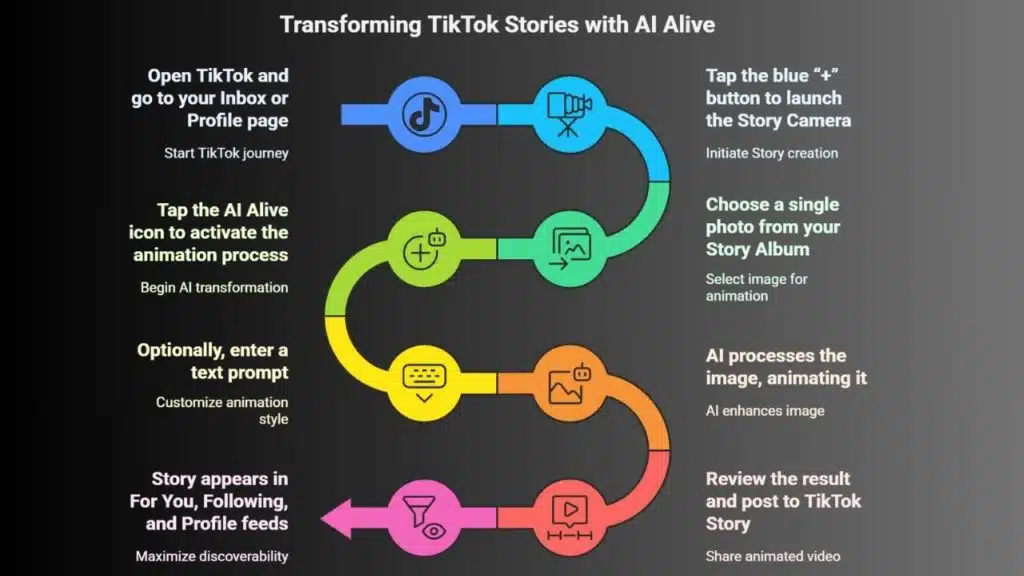
Using AI Alive is a straightforward process for TikTok users:
- Open TikTok and go to your Inbox or Profile page.
- Tap the blue “+” button at the top to launch the Story Camera.
- Choose a single photo from your Story Album.
- Once the image is loaded, look for the AI Alive icon on the editing toolbar.
- Tap the icon to activate the AI animation process.
- Optionally, you may be prompted to enter a text prompt (describing the mood or style you want).
- The AI then processes your image, animating it with effects like gentle movements, light shifts, or surreal enhancements.
- After reviewing the result, you can post the animated video directly to your TikTok Story.
Once posted, the AI-generated Story will appear in three main areas:
- For You feed
- Following feed
- Your profile page
This helps maximize discoverability and audience interaction.
Content Results May Vary: A Mixed Bag of Magic and Mishaps
While the promise of automated animation sounds impressive, the real-world outcomes can vary significantly. In some cases, the results are striking—turning portraits into cinematic story snippets or breathing motion into nature photos with waves and fluttering leaves. In others, the AI interpretation can become unexpectedly surreal or even unsettling. For instance:
- Faces may distort in unnatural ways
- Limbs or backgrounds may be duplicated or warped
- Expressions can appear exaggerated or frozen, leading to what users jokingly call “AI horror moments”
This unpredictability isn’t unique to TikTok. AI-based animation tools on platforms like Instagram and Snap face similar quirks. However, TikTok seems confident in its algorithm’s ability to generate “good enough” results for mass sharing.
Why TikTok Might Be Rushing Ahead of Instagram
Industry insiders speculate that TikTok is strategically launching AI Alive ahead of potential competition from Instagram’s upcoming app “Edits”—a CapCut clone expected to offer similar AI animation capabilities. Meta previewed Edits as a video editing suite designed for creators, equipped with AI-generated effects, image cutouts, and stylized animations.
By rolling out AI Alive now, TikTok may be aiming to retain its creative edge and protect its dominance in short-form content, particularly as rival platforms increasingly mimic its features.
TikTok’s Safety and Transparency Commitments
To address the challenges around AI-generated content, TikTok has embedded several safety and transparency features into AI Alive:
- AI Labeling: All content produced using AI Alive is clearly labeled as AI-generated, so viewers understand that the animation was not captured traditionally.
- C2PA Metadata: Videos include C2PA metadata—a standard developed by the Coalition for Content Provenance and Authenticity. This digital fingerprint helps verify the authenticity and origin of AI-generated content, even when it’s shared outside of TikTok.
- Moderation & Prompt Review: TikTok uses content moderation tools to vet the original image, user-generated prompts, and the final output for compliance with community guidelines. This is crucial in minimizing harmful or misleading use of AI animations.
These measures align with growing concerns about AI misinformation and deepfake content, reinforcing TikTok’s ongoing commitment to responsible use of emerging technologies.
The Bigger Picture: AI and the Evolution of Digital Storytelling
TikTok’s AI Alive is part of a larger trend in which generative AI tools are reshaping how content is created and consumed on social media. From text-to-image generation (like DALL·E) to video-to-avatar platforms (like Synthesia), AI is no longer just a backend utility—it’s a core creative force for digital users.
Features like AI Alive serve both casual users and serious content creators by:
- Reducing the skill barrier for animation
- Accelerating content creation workflows
- Boosting engagement through novelty and innovation
The addition of this tool also reflects how Gen Z and millennial users prefer dynamic, interactive content over static visuals—pushing platforms like TikTok to continuously innovate.
A Creative Leap, with a Caution Label
TikTok’s AI Alive is not just another flashy filter—it’s a tool that democratizes animation and opens up new creative horizons. However, it comes with the usual caveats: while results can be impressive, users should remain mindful of the ethical and creative limitations of AI content.
For content creators looking to stay ahead of the curve, experimenting with AI Alive could offer a fresh, fun way to connect with followers—especially in Stories, where engagement thrives on immediacy and creativity.
























