
A SaaS login system usually feels manageable until the product starts selling to larger teams. Then the questions change. Can admins require SSO? Can access be removed automatically when an employee leaves? Can users sign in with passkeys? Can a security team see who created an API key, changed a role, or disabled MFA?
Those questions are no longer limited to large enterprise software. Even mid-market customers now expect cloud apps to handle identity with care. Authentication is not just the email-and-password screen. It is the control layer that decides who gets into the product, what tenant they belong to, what they can do, how long their session should last, and when the product should ask for stronger proof.
That is why SaaS authentication best practices in 2026 should be treated as product architecture, not a late security checklist. The right choices reduce account takeover risk, make enterprise sales easier, and prevent painful rewrites when the user model becomes more complex.
1. Build the Identity Model Before the Login Page Grows Around It
A basic user table can carry a prototype. It should not define the long-term identity architecture.
The cleaner model separates the user from the customer account, workspace, or tenant. One person may belong to several tenants. One tenant may have many users. A membership connects the person to the tenant and defines what that person can do there.
This sounds obvious, but many SaaS teams discover the problem late. An agency employee may need access to five client workspaces. Removing them from one workspace should not delete their whole account. A finance user may need billing access but not production data. A contractor may need project access for three weeks, not permanent admin rights.
A practical SaaS identity model should usually account for:
- Users, such as human account holders
- Tenants or workspaces, such as companies, teams, or client accounts
- Memberships that connect users to tenants
- Roles and permissions that define allowed actions
- Sessions that represent current authenticated access
- Authenticators such as passwords, passkeys, security keys, or MFA apps
- Service accounts for non-human access
This structure makes future features easier: SSO, SCIM, audit logs, tenant-level security settings, group mapping, and safe offboarding. Without it, every new identity feature becomes a patch.
2. Move High-Risk Accounts Toward Phishing-Resistant MFA
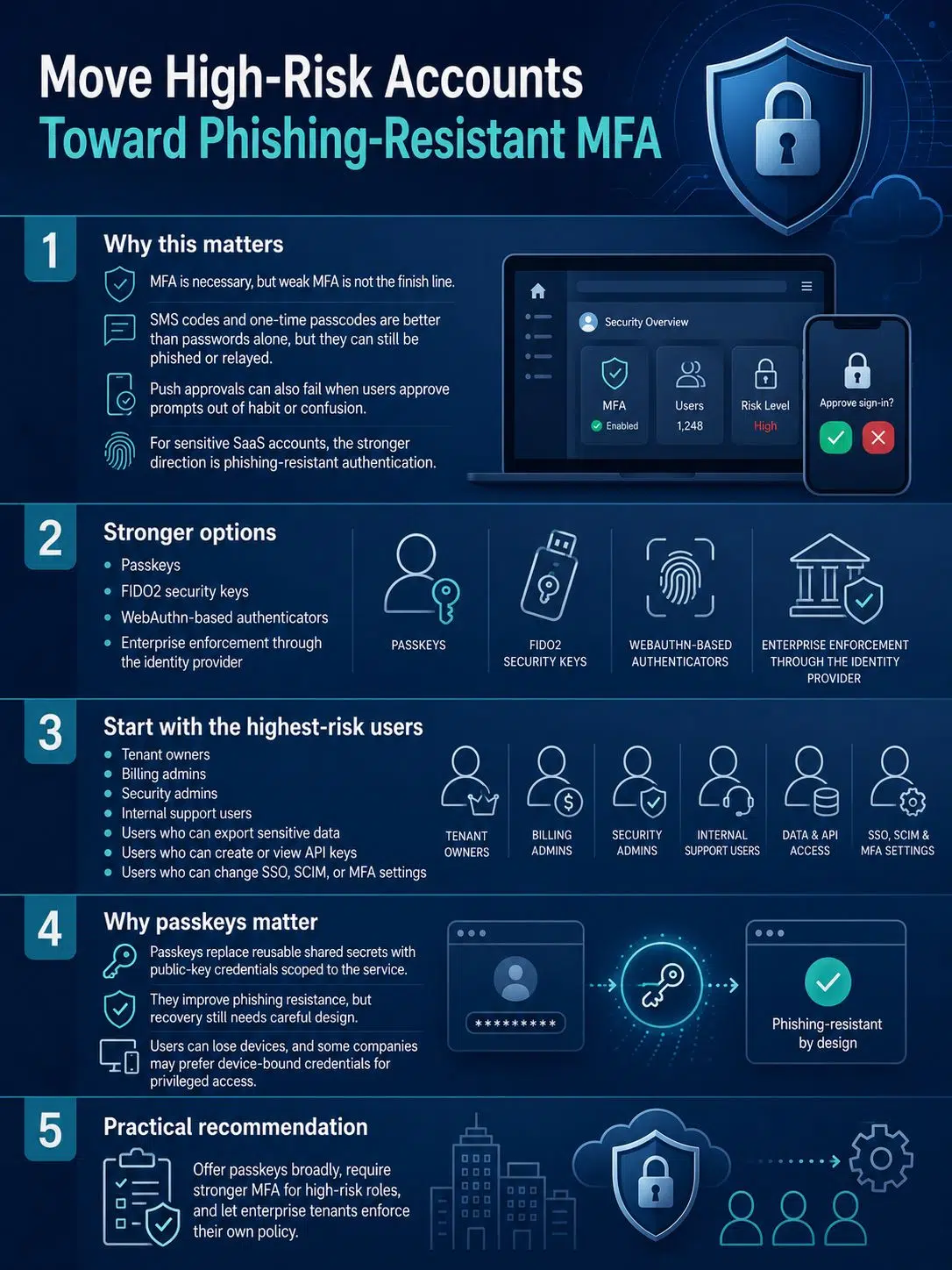
MFA is still necessary, but weak MFA is not the finish line.
SMS codes and one-time passcodes are better than passwords alone, but they can still be phished, intercepted, or relayed. Push-based MFA can also fail when users approve prompts out of habit or confusion. For sensitive SaaS accounts, the stronger direction is phishing-resistant authentication.
That usually means passkeys, FIDO2 security keys, or WebAuthn-based authenticators. Enterprise customers may also enforce strong authentication through their own identity provider.
The rollout does not need to be dramatic. Start with the users who can cause the most damage:
- Tenant owners
- Billing admins
- Security admins
- Internal support users
- Users who can export sensitive data
- Users who can create or view API keys
- Users who can change SSO, SCIM, or MFA settings
Passkeys are especially worth planning for because they replace reusable shared secrets with public-key credentials scoped to the service. They are not a complete answer to every identity problem. Users lose devices. Some companies prefer device-bound credentials for privileged access. Recovery still needs careful design.
The practical recommendation is simple: offer passkeys broadly, require stronger MFA for high-risk roles, and give enterprise tenants a way to enforce their own policy.
3. Stop Using Outdated Password Rules
Passwords will remain part of many SaaS products for a while. The mistake is using old rules that make users work harder without making accounts much safer.
A good password policy now favors length, password-manager support, blocklists, rate limiting, and secure storage. It should avoid arbitrary composition rules that push users toward predictable patterns such as “CompanyName2026!” Routine forced password rotation is also poor default behavior unless compromise is suspected or a specific policy requires it.
For SaaS teams, the practical baseline should be:
- Allow long passwords and passphrases.
- Do not block paste or password managers.
- Screen against common, expected, and compromised passwords.
- Avoid password hints and security questions.
- Rate-limit repeated failures.
- Store passwords with a modern password-hashing approach.
- Force resets when risk evidence exists, not just because a calendar date arrived.
Current NIST guidance is more specific than many older product defaults. Passwords used as the only authentication factor require a longer minimum than passwords used as part of MFA. If a SaaS product targets regulated or security-sensitive customers, the password policy should be reviewed against the latest official guidance rather than copied from a legacy template.
One small product decision matters here: do not make the password field hostile to password managers. Users who rely on generated passwords are usually trying to do the right thing.
4. Be Careful With OAuth and OpenID Connect Shortcuts
“Sign in with Google” or “Sign in with Microsoft” can look like a simple feature. Under the surface, OAuth and OpenID Connect mistakes can become account takeover bugs.
OAuth is mainly about delegated authorization. OpenID Connect adds an identity layer on top of OAuth 2.0. SaaS teams should keep that distinction clear. An access token is not a user profile. An ID token is not a general-purpose API key.
For modern SaaS applications, the authorization code flow with PKCE should be the normal pattern for browser and mobile clients. Token validation needs to be strict: issuer, audience, expiry, signature, and nonce where the flow requires it. Redirect URIs should be exact and reviewed, not loosely wildcarded.
Avoid the implicit grant for new applications. Avoid the resource owner password credentials grant. Asking users to type another service’s password into your own app is unsafe and does not fit modern MFA or passkey-based login.
Most OAuth failures are not caused by the protocol being mysterious. They come from small shortcuts: weak redirect rules, unsafe account linking, missing audience checks, or token handling spread across too many places in the codebase.
Keep this logic centralized and reviewed.
5. Treat Account Recovery as a High-Risk Flow
Attackers often look for the softer path. If login requires MFA but recovery only requires a support ticket and an email link, recovery becomes the real authentication system.
Password reset links should be short-lived and single-use. MFA reset should not be treated like changing a display name. Adding a new authenticator, changing a primary email, disabling MFA, or transferring tenant ownership should trigger alerts and audit logs.
Support tooling needs limits as well. Internal features such as “log in as user,” “reset MFA,” or “transfer owner” can be useful, but they are dangerous if they are too easy. They should require elevated permissions, reason capture, and detailed logging. For sensitive tenants, a second approval step may be justified.
Enterprise recovery needs special thought. What happens if the only tenant owner leaves the company? Is there a monitored break-glass account? Can another verified owner approve access recovery? Is the process written down, or does support improvise?
A secure login screen cannot compensate for a weak recovery process.
6. Design Sessions Around Risk, Not Just Expiry Time
A session is the product’s current trust decision. If session handling is weak, strong login controls lose much of their value.
For browser-based SaaS apps, secure, HttpOnly cookies with appropriate SameSite settings are often safer than putting sensitive tokens in localStorage, where cross-site scripting can expose them. Session identifiers should be random, rotated after login and privilege changes, and revoked on logout. Refresh tokens need expiry, rotation, reuse detection, and revocation.
Session rules should also match the action. Reading a dashboard does not carry the same risk as exporting a customer database or creating a production API key.
Use step-up authentication before actions such as:
- Creating, viewing, or rotating API keys
- Exporting large datasets
- Changing SSO or SCIM settings
- Removing MFA
- Changing owner roles
- Updating billing details
- Inviting privileged users
Do not ask users to reauthenticate constantly for ordinary work. That creates frustration and encourages shortcuts. Challenge them when the action, session age, device, or risk signal justifies it.
7. Add SSO and SCIM Before They Become Sales Blockers
Many SaaS companies delay enterprise identity support until a large customer asks for it. By then, the account model may already be hard to fix.
SSO lets customers enforce login through providers such as Microsoft Entra ID, Okta, Google Workspace, JumpCloud, or another identity provider. SCIM helps automate user and group provisioning, updates, and deprovisioning.
For business buyers, this is not just convenience. It is how access gets removed when employees leave or change roles. Manual offboarding does not scale well, and it is easy to miss someone.
The details matter:
- SSO should be tenant-specific.
- Domain verification should be explicit.
- Account linking should avoid unsafe merges and duplicate users.
- SCIM groups should map to clear roles or permission sets.
- Customers should know whether access is just-in-time, SCIM-controlled, or both.
- Break-glass access should be limited, protected, and monitored.
SAML remains common in enterprise SaaS. OIDC is also widely used. Support the protocol your customers actually need, but keep your internal identity model consistent.
The mistake to avoid is treating SSO as a login button only. Enterprise identity includes lifecycle management, admin controls, logs, and failure handling.
8. Keep Human Users Separate From API and Service Access
A common SaaS risk is the old API key nobody owns anymore.
A developer creates a key from a personal admin account. A workflow, integration, or customer script starts using it. Months later, the developer leaves, but the key still works. Logs point to a person who no longer controls the automation.
Human users, service accounts, API clients, and automation jobs should be separate identity types. A service account should have an owner, scope, expiry policy, and last-used information. API keys should be revocable from the admin UI. Secrets should not be shown again after creation.
Scopes matter more than teams often admit. A token used for reporting should not be able to delete users. A CI/CD token should not manage billing. A webhook integration should not be able to export all customer records.
For higher-risk APIs, teams may need short-lived tokens, OAuth client credentials, signed requests, mTLS for selected enterprise integrations, or workload identity patterns in cloud environments. Not every SaaS product needs all of that immediately. Every SaaS product with APIs needs ownership, scoping, rotation, and revocation.
A never-expiring admin token is not an integration strategy.
9. Protect Login, Signup, Reset, and Invitation Flows From Abuse
Authentication abuse does not only happen on the login page.
Attackers target signup, password reset, magic links, OTP verification, invitation acceptance, token refresh, and trial activation. SaaS products with free credits, AI usage, storage, messaging, or developer APIs may attract abuse earlier than expected.
Rate limiting should not be a single global counter. Attackers distribute traffic. Real users mistype passwords, travel, switch networks, and use VPNs. Better controls combine multiple signals: account, tenant, IP address, device, endpoint behavior, email reputation, ASN, and previous risk history.
Credential stuffing defenses should include breached-password screening, failed-login monitoring, MFA enforcement, and alerts for unusual patterns. Signup abuse may require email reputation checks, disposable email controls, delayed access to expensive features, or stricter tenant verification.
CAPTCHA can help in selected flows, but it should not be the whole defense. It can create accessibility and UX problems, and determined attackers often route around it.
The stronger approach is layered: slow the attack, limit expensive actions, protect high-risk endpoints, and keep normal users moving.
10. Log Identity Events So Incidents Can Be Understood
If a customer asks what happened during a suspected account takeover, vague logs are not enough.
“User updated settings” does not tell a security team whether someone changed MFA, invited a new admin, created an API key, or exported data. Identity logs should be specific enough to reconstruct the event.
A SaaS product should log meaningful authentication and access events, including:
- Successful and failed login
- MFA challenge and enrollment
- Passkey or security key enrollment
- Password reset requested and completed
- Primary email changed
- User invited, removed, or reactivated
- Role changed
- SSO configuration changed
- SCIM sync activity
- API key created, used, rotated, or revoked
- Support impersonation or privileged internal access
- Suspicious login blocked
Logs should include time, actor, tenant, target, event type, IP address, user agent, identity provider, and outcome where appropriate. They should not store passwords, OTPs, recovery codes, full tokens, or secrets.
Internal teams need logs for detection. Customers need logs for trust. Mature SaaS products should also support export and retention controls, especially for enterprise plans.
Small Authentication Mistakes That Create Large Risk
Some of the most damaging authentication problems start as ordinary product shortcuts.
Invitations are one example. If an invite can be accepted by the wrong logged-in user, or if the invited email can be changed during acceptance without verification, the flow may become an account takeover path.
Magic links need similar caution. They can improve usability, but they move trust into the user’s email account. Links should expire quickly, work once, and avoid creating long-lived sessions for sensitive accounts without additional checks.
Role design is another quiet problem. “Admin” is not a permission model. Billing admin, workspace admin, security admin, integration admin, and owner are different jobs. Giving all of them the same power may be fast at first, but it becomes risky as customers grow.
The final mistake is treating authentication changes as routine UI work. Login, SSO, session, recovery, invitation, role, and API access changes should receive security review. A small shortcut can affect every tenant.
What to Prioritize First
A small SaaS team does not need to build every enterprise identity feature immediately. The priority is to avoid decisions that will be expensive or unsafe to undo.
Start with the identity model. Make tenants, memberships, roles, sessions, authenticators, and service accounts distinct. Then protect the highest-risk users and actions. Add strong MFA or passkeys for owners, admins, billing users, internal support, and API key access. Make recovery and session revocation reliable before adding more login options.
For products moving into mid-market or enterprise sales, SSO and SCIM should come earlier than many teams expect. They are often buyer requirements, not premium extras. Audit logs belong in the same category.
Good authentication is easier to build in layers when the foundation is clean. It becomes painful when every new customer requirement fights the original account model.
Final Thoughts
The most useful SaaS authentication best practices for 2026 are practical ones. They help teams handle real product conditions: multiple tenants, enterprise SSO, automatic deprovisioning, API integrations, support access, account recovery, session risk, and incident review.
Do not start by adding every security feature at once. Start by designing identity properly, protecting privileged access, using OAuth and OIDC carefully, moving toward phishing-resistant MFA, and making every sensitive action auditable and reversible.
A login screen lets users in. A good authentication system helps customers trust the product after they are already inside.