
When measuring SaaS growth, a common trap is staring at a dashboard full of website traffic while wondering why user churn is skyrocketing. You simply cannot fix a leaky software product by measuring how many people look at your landing page. Understanding the true difference between product analytics vs web analytics is essential if you want to stop flying blind.
To build a SaaS application that actually retains users, you have to draw a clear line between getting people in the door and tracking what they do once they are inside. That is where the distinction between web analytics and product analytics becomes your biggest operational advantage.
Web Analytics: The Digital Storefront
Think of web analytics as the foot traffic outside your digital storefront. I use it strictly to measure the “top of the funnel”, everything that happens before a visitor hands over their email address and creates an account.
Web analytics is built for anonymous, session-based tracking. Its entire job is to tell you if your marketing, content, and SEO efforts are actually working.
What you should look for here:
- Acquisition: Which specific channels (organic search, LinkedIn campaigns, referrals) drive the highest volume of qualified traffic?
- Content Performance: Are visitors actually reading your editorial content, or bouncing back to the search results after three seconds?
- Conversion Rates: Where are visitors dropping off on your pricing or signup pages?
Traditional heavyweights like Google Analytics 4 dominate this space, but I’ve recently seen a massive shift toward lightweight, privacy-first tools like Plausible or Umami. They give you the traffic insights you need without bogging down your site with complex, conversion-killing cookie banners.
Product Analytics: The Engine Room
The moment a user hits “Sign Up” and logs into your app, web analytics hits a technical wall. This is exactly where I switch entirely to product analytics.
SaaS applications are complex ecosystems. You aren’t just tracking page loads anymore; you need to track behavior. Product analytics is event-centric. It ties specific, granular actions (like “Created a Workspace” or “Invited a Teammate”) to a specific, logged-in user or company account over time.
What you should look for here:
- Activation & Onboarding: Where exactly do users get stuck or frustrated during their first five minutes in the app?
- Feature Adoption: Are your most expensive, high-value features actually being used, and more importantly, by which accounts?
- Retention Cohorts: Do the users who signed up during your January promotion stick around longer than the ones who signed up in March?
When I need to answer these questions, I rely on purpose-built product analytics platforms like Mixpanel or Amplitude. They are designed to map out complex behavioral funnels and show you exactly where users fail to see the value in your software.
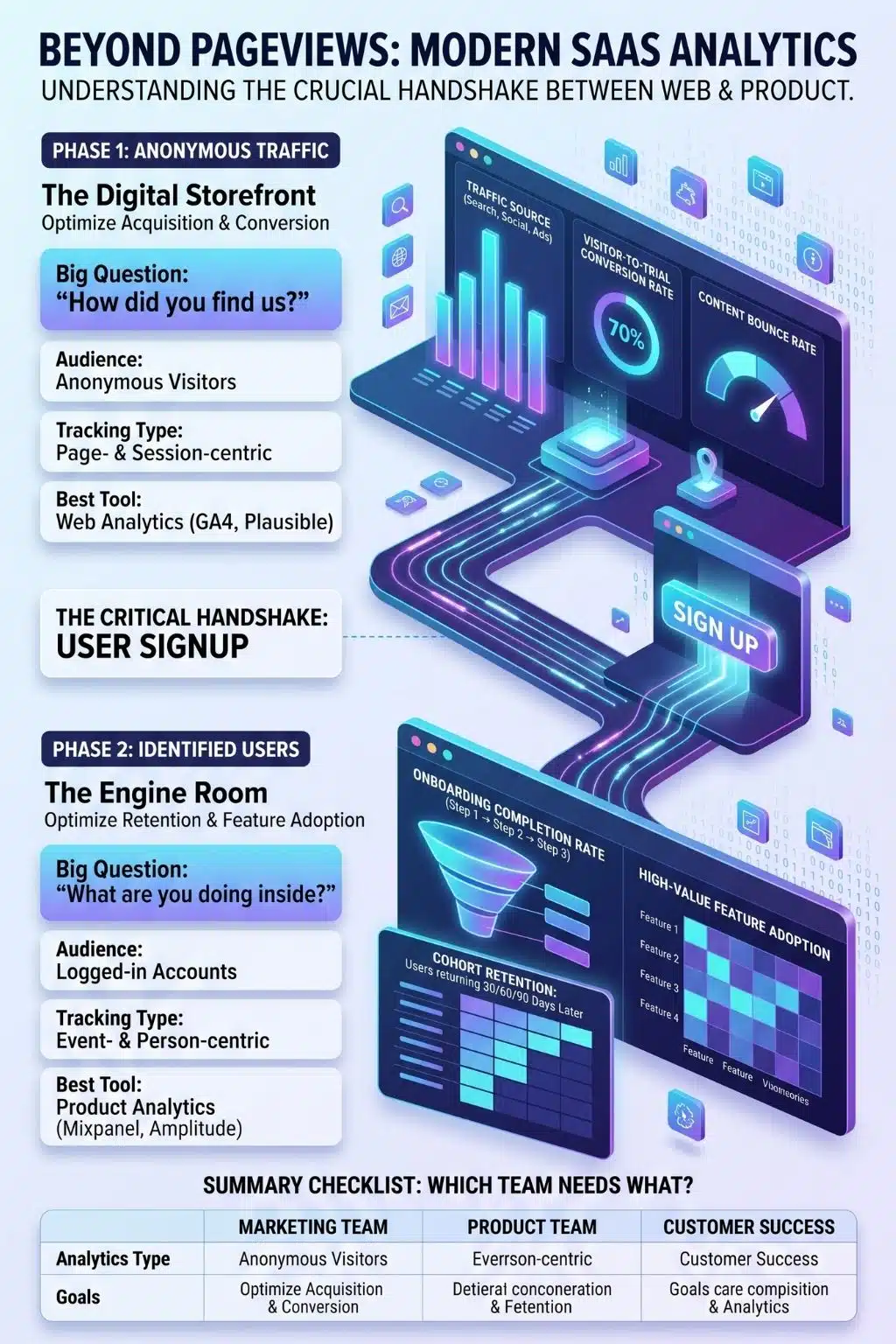
Product Analytics vs Web Analytics: The Side-by-Side Breakdown
If you are ever confused about which tool to check for a specific metric, here is the cheat sheet I use with my own teams:
| Focus Area | Web Analytics | Product Analytics |
| The Core Question | “How did you find us?” | “What are you doing now that you’re here?” |
| Target Audience | Marketing, SEO, & Content Teams | Product Management, UX, & Customer Success |
| Data Model | Anonymous sessions and pageviews | Logged-in users, accounts, and tracked events |
| Primary Goal | Traffic growth, acquisition, and signups | User activation, feature adoption, and retention |
The Modern Stack: Why You Must Run Both
The biggest mistake I see isn’t choosing the wrong tool; it’s assuming these two systems are competitors. They aren’t. They are a handshake.
I use web analytics to optimize my marketing spend and bring in qualified leads. I then use product analytics to ensure those leads actually stick around, find value, and upgrade to paid tiers. Relying on just one means you either don’t know where your best customers come from, or you don’t know why they leave.
Interestingly, the rigid boundary between the two is starting to blur. Platforms like PostHog are gaining incredible traction right now because they combine lightweight web analytics with deep, event-based product tracking in a single platform. It’s an elegant solution if you are tired of duct-taping multiple data silos together just to see the full customer journey.
The Bottom Line
Data is only as good as the questions you ask it. Stop asking your marketing site why your software is churning, and stop asking your product dashboard how your latest blog post performed. Arm your marketing team with web analytics, empower your product team with behavioral data, and watch how quickly your growth blind spots disappear.
Frequently Asked Questions (FAQs) on Product Analytics vs Web Analytics
1. Can I just hack Google Analytics to do both?
You can force GA4 to track custom product events, but I strongly advise against it. It’s fundamentally built for marketing attribution, not behavioral cohorting. Tracking complex SaaS user journeys in GA4 usually requires jumping through technical hoops that dedicated product analytics tools handle effortlessly out-of-the-box.
2. When should an early-stage SaaS invest in product analytics?
The moment you launch your MVP and have real users logging in. Even if it’s just 50 beta testers, you need to know what they click on and where they get confused. If you wait until you have thousands of users to implement product tracking, you have already missed your most crucial early feedback loop.
3. Are product analytics tools harder to set up?
Yes, they require significantly more strategic planning. Dropping a web analytics tracking script on a site takes five minutes. Product analytics requires you to map out a “tracking plan”, deciding exactly which in-app events matter most to your business before your engineers write a single line of code to track them.
4. What is the single most important product metric to track first?
Time-to-Value (TTV). You need to measure exactly how long it takes a new user to experience the “Aha!” moment of your software. If your data shows that users take three days to find your core feature, you know exactly where to focus your UX and product roadmap.
5. Will running both tools slow down my application?
It shouldn’t, provided they are implemented correctly. Keep web analytics strictly on your public-facing marketing pages, and keep product analytics behind the login wall. Many teams use a customer data platform (CDP) to collect user data once and seamlessly route it to both systems without impacting app performance.