Preventing digital burnout starts with setting a workload you can sustain, deciding when you are available, and making room for time away from publishing. For creators, that can be difficult: the same phone holds your camera, client messages, audience, and performance dashboard. Even after you finish a post, the work can feel unfinished.
Content creator burnout can develop when those demands keep exceeding the time and energy available to meet them. Another productivity app may organize the pressure without reducing it. A useful prevention plan needs to change what you expect from yourself and what other people can expect from you.
You do not have to change everything at once. Start with the part of your routine that repeatedly pushes work into meals, sleep, relationships, or days off.
Recognize When the Workload Is Becoming Too Much
People use the term content creator burnout to describe persistent exhaustion, detachment, and difficulty keeping up with creative work. It deserves more attention than an occasional afternoon when ideas do not come easily.
The World Health Organization describes burnout as an occupational phenomenon associated with unmanaged chronic workplace stress. Its definition includes exhaustion, greater distance or cynicism toward work, and reduced professional effectiveness. It is not classified as a medical condition.
For creators, warning signs may include dreading a familiar recording session, becoming unusually irritated with audience requests, or struggling with routine tasks. These experiences do not establish a diagnosis. The mental health organization Take This also cautions that there is no universally agreed sequence of burnout stages.
10 Practical Ways to Prevent Digital Burnout
The following changes address different sources of pressure, from production demands to constant availability. Choose the ones that match your situation. The example schedules are starting points to adjust, not medical prescriptions or platform requirements.
1. Set a Publishing Schedule That Fits an Ordinary Week
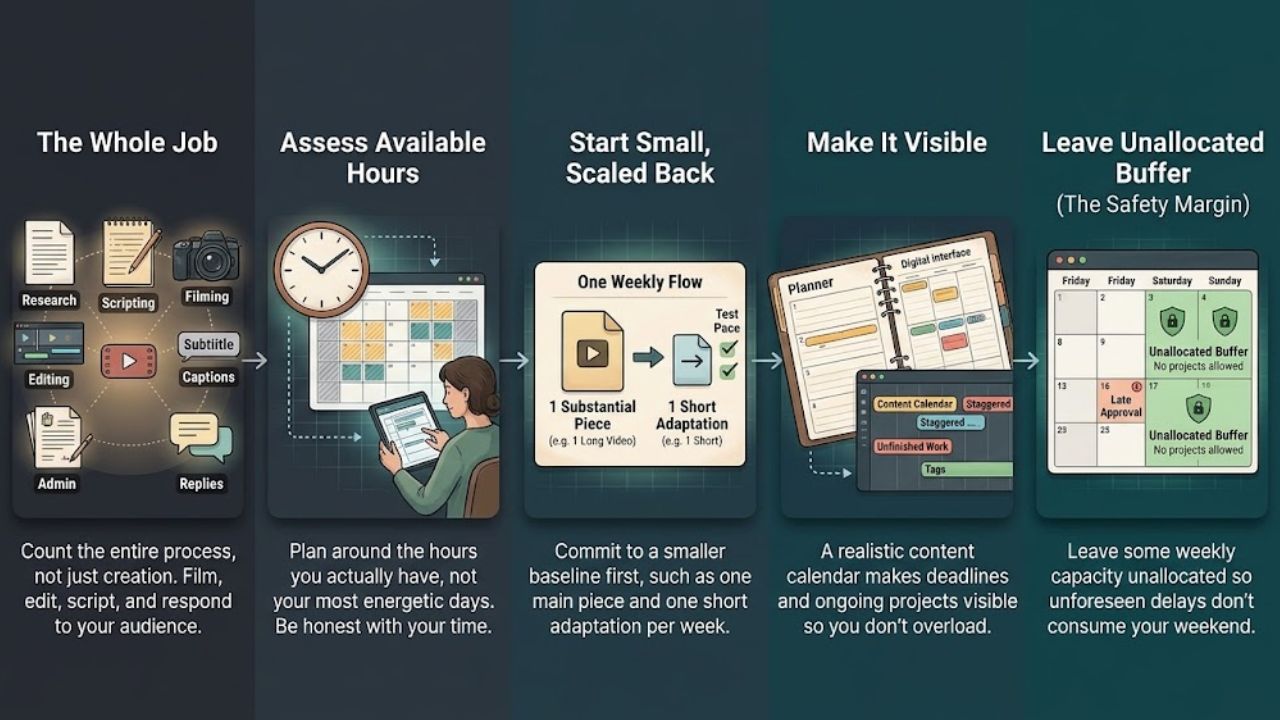
A schedule built around your most energetic week leaves little room for illness, family responsibilities, or difficult assignments. Count the whole job before promising a publishing frequency: research, scripting, filming, editing, captions, administration, and audience replies.
One practical step toward preventing digital burnout is to plan around the hours you actually have. If your evenings offer six workable hours, allocate them before committing to daily videos.
For example, you might produce one substantial piece and one short adaptation each week, then review whether that pace fits. A realistic content calendar can help make deadlines and unfinished work visible. Leave some capacity unallocated so a late approval does not automatically consume your weekend.
2. Give the Workday a Clear Stopping Point
“I will stop when everything is finished” offers little protection when new comments and messages keep arriving. Decide when your workday ends and what genuinely warrants an exception.
To reduce the pressure behind content creator burnout, make availability explicit. Tell clients your response hours and explain when revisions will be handled. For an international audience, a scheduled post does not have to mean you are available when it goes live.
Try a short shutdown routine: save your work, note the next task, close the dashboard, and put work equipment away where possible. YouTube’s creator guidance recommends boundaries around workspaces and comment replies, along with communicating planned breaks to viewers.
3. Batch Similar Tasks Without Creating Marathon Sessions
Grouping related work can simplify a production day. Write several outlines together, record two short segments while the equipment is ready, or prepare captions in one sitting.
However, batching is useful for managing digital burnout only if it creates breathing room. An exhausting all-day filming session followed by late-night editing defeats the purpose.
Choose a finish line before you begin: two scripts, one recording block, or a fixed editing window. Include time for breaks and equipment problems. If the batch repeatedly overruns, reduce its size. Keep some open space for timely ideas rather than trying to script every future post in advance.
4. Limit Analytics Checks to Useful Decisions
Before opening a dashboard, ask what you need to decide. Are viewers leaving before the explanation begins? Did a newsletter generate replies? Is a sponsor’s reporting deadline approaching?
Repeated checking can become another demand associated with content creator burnout, especially when every small fluctuation feels like a verdict on your ability.
For evergreen work, try one planned weekly review. A live campaign may need closer monitoring, but define that window and its purpose. Record one observation and one next action, then close the report. Avoid changing your entire direction in response to a single weak post. Your dashboard should help you make decisions without occupying every gap in the day.
5. Reuse Strong Ideas Without Multiplying Your Obligations
A useful article can supply a newsletter explanation or a short video answering one reader question. You have already done some of the research and thinking.
Thoughtful reuse may ease the production demands behind content creator burnout. Start with an existing piece that remains accurate, then choose one additional format your audience will use. These content repurposing strategies offer options for adapting the strongest part of a published article.
Set a limit before you start. One article does not need to become twelve assets across six platforms. Check permissions, update old information, and adapt the explanation to its new format. If repurposing creates more deadlines than it removes, scale it back.
6. Separate Publishing Tasks From Endless Browsing
Opening an app to upload a clip can turn into an hour of competitor research, trend watching, and comparison. Give each visit a specific purpose and an exit point.
To reduce digital burnout, separate creation, distribution, and recreational browsing in your schedule. Draft offline when practical. Keep an idea list so that noticing something interesting does not require an immediate research session.
You can also mute nonessential alerts and move distracting apps off your home screen. Keep important client, family, and security notifications available. These digital minimalism habits provide ways to make phone use more deliberate without abandoning tools you need for work.
7. Set Boundaries Around Comments and Revisions
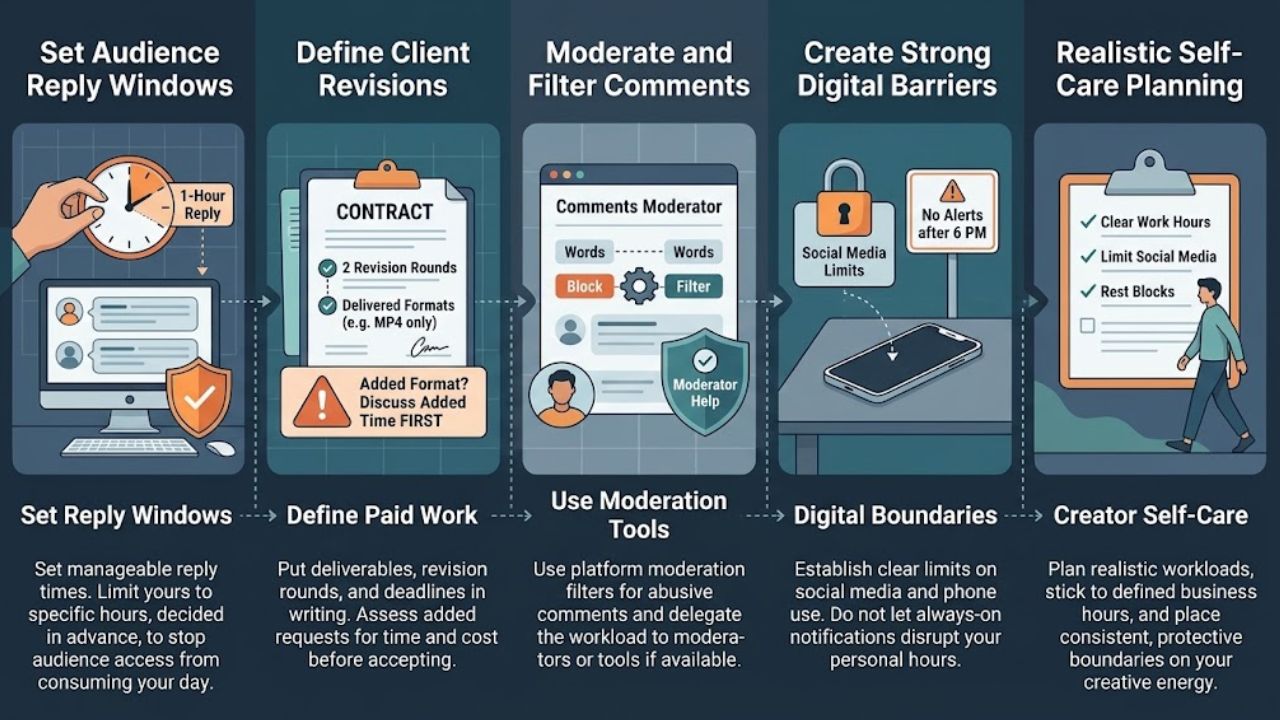
Audience relationships require attention, but access to your content does not have to include unlimited access to you. Choose a manageable reply window and decide which requests you can reasonably answer.
For paid work, put deliverables, revision rounds, deadlines, and approval responsibilities in writing. If a client requests another format, discuss the added time before accepting it.
These boundaries address one source of content creator burnout: work that expands after the original commitment. Use moderation settings for abusive comments and delegate moderation if suitable help is available. Patreon recommends clear work hours, limits on social media, and realistic workload planning in its creator self-care guidance.
8. Protect Sleep and Take Breaks Away From Production
Check whether publishing regularly delays bedtime, interrupts meals, or keeps you at the desk long after you intended to stop. Address the recurring scheduling conflict rather than relying on occasional catch-up days.
Managing digital burnout should include opportunities to leave work behind. Between production blocks, stand up, get water, or take a short walk if that suits your circumstances. During longer breaks, choose something that does not involve monitoring your channel.
For evenings, try finishing performance checks before your wind-down period and keeping work messages away from bed. These sleep hygiene fundamentals offer practical routine ideas. Better habits do not guarantee good sleep; persistent sleep difficulties deserve professional attention.
9. Keep Part of Your Life Outside the Content Pipeline
A meal, walk, conversation, or hobby can become another assignment when you feel obliged to photograph it, record it, and turn it into a post.
Choose an activity that stays private. Cook without filming the process. Meet a friend without collecting a story. Make something you have no intention of publishing.
Put that time in your calendar if work usually takes its place. These work-life balance tips include ways to protect personal time and communicate limits. You do not need to prove that every hour away improves your next piece of content. Personal enjoyment is a sufficient reason to make room for it.
10. Make a Plan for Overloaded Weeks and Ask for Support
Decide in advance what you will change when commitments exceed capacity. You might postpone an optional post, pause a secondary channel, renegotiate a deadline, or hire help for a defined task if your budget allows.
A content creator burnout plan should address the workload you return to after a break. If the same deadlines and availability demands remain, discuss which commitments can change. Where income limits your options, start with the lowest-value unpaid task rather than assuming you can stop working entirely.
If exhaustion, low mood, anxiety, or sleep problems persist or interfere with daily life, speak with a qualified health professional. A trusted friend or creator peer can offer support, but they cannot replace appropriate care.
Frequently Asked Questions
What Is Digital Burnout?
The term informally describes feeling persistently depleted by digital demands and constant connectivity. It is not a separate diagnosis in the WHO definition of occupational burnout.
How Can I Prevent Digital Burnout Without Quitting Social Media?
Keep necessary work access, mute nonessential alerts, schedule audience replies, and set a stopping time. Reduce optional channels or publishing commitments that repeatedly exceed your capacity.
What Are the Signs of Content Creator Burnout?
Signs may include ongoing exhaustion, detachment from your work or audience, and difficulty completing familiar tasks. These signs can overlap with other problems and do not establish a diagnosis.
How Long Does Recovery Take?
There is no universal recovery timeline for content creator burnout. It depends on your circumstances and whether the pressures change. Seek professional support when symptoms persist, worsen, or affect daily functioning.
How Many Hours of Screen Time Are Too Much for Creators?
No single daily number establishes whether a creator’s workload is healthy. Consider what screen use involves and whether it repeatedly displaces sleep, movement, relationships, or other needs.
Final Thoughts
Preventing digital burnout requires a routine with room for the person doing the work. Start with one concrete change: reduce a publishing commitment, set a reply window, or protect an evening from analytics.
Addressing content creator burnout also means examining expectations with clients, collaborators, and audiences. Keep the boundaries that make your week more manageable, adjust what does not fit, and ask for support when the pressure remains too much.