SEO tools used to feel like optional helpers. In 2026, they are closer to survival gear. Search is more competitive, AI answers are changing click behavior, technical problems are harder to ignore, and ranking reports alone no longer tell the full story.
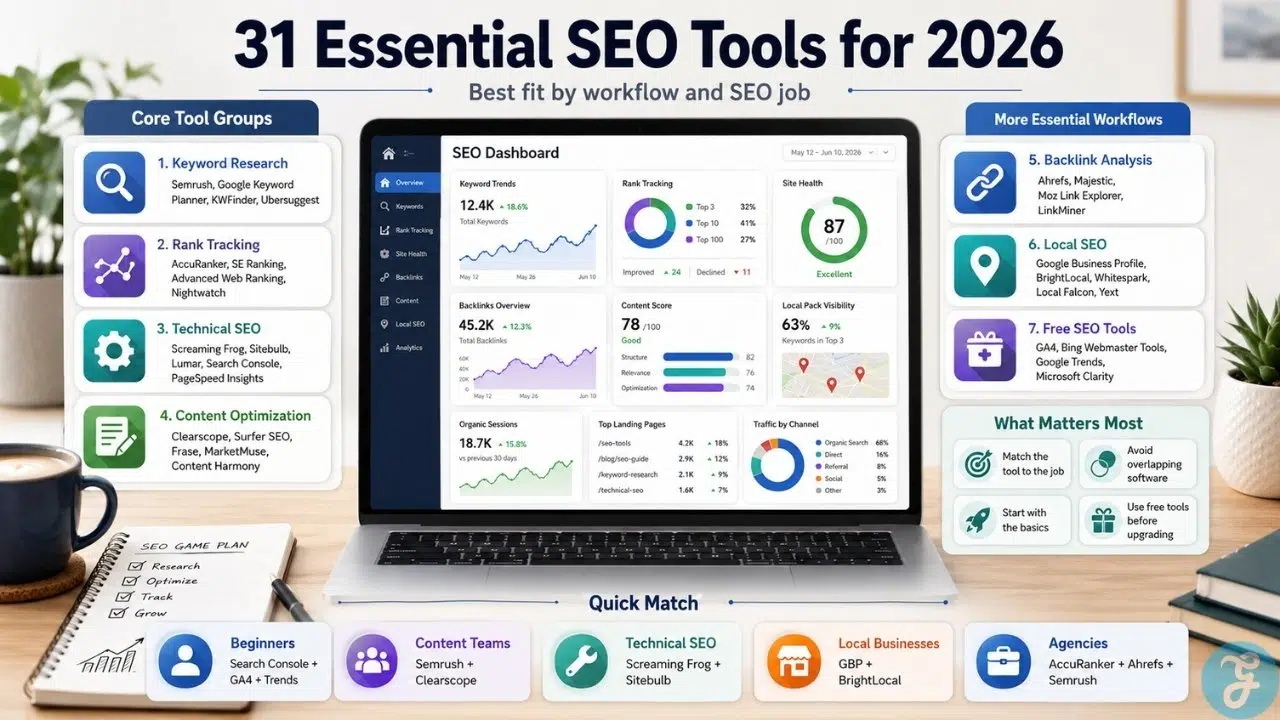
The best SEO tools 2026 should help with the work SEO teams repeat every week: research, tracking, audits, content, backlinks, local visibility, and performance checks. Instead of listing random software names, this guide groups 31 essential SEO tools by the SEO job they help you handle.
Our Selection Criteria
Before building this SEO tool list, we looked at tools through a practical lens. A good tool should help users make better SEO decisions, not just create more dashboards.
We judged each tool using practical criteria that matter in real SEO work:
- Workflow fit: Does the tool solve a clear SEO job?
- Data usefulness: Does it provide information users can act on?
- Depth vs simplicity: Is it suitable for its target user?
- Reporting quality: Can teams explain findings clearly?
- Long-term value: Will the tool still matter as SEO changes in 2026?
A useful SEO tool list should not feel like a software directory. It should feel like a guided SEO stack for different users, budgets, and workflows.
This guide is for SEO beginners, bloggers, agencies, SaaS teams, ecommerce brands, local businesses, affiliate publishers, and in-house marketers trying to build a smarter SEO workflow.
Some readers will need one or two no-cost SEO tools. Others will need a full stack of top SEO software for keyword research, technical audits, content optimization, backlink analysis, and local visibility. The goal is to help them choose by need, not hype.
A Quick Map of the 31 Essential SEO Tools
Before going into the categories, give readers a fast overview of how the full stack is organized.
| SEO Workflow | Tools Covered | Best For |
|---|---|---|
| Keyword Research | 4 tools | Finding topics, demand, and keyword opportunities |
| Rank Tracking | 4 tools | Monitoring rankings, SERP movement, and visibility |
| Technical SEO Audits | 5 tools | Finding crawl, indexability, speed, and site health issues |
| Content Optimization | 5 tools | Improving briefs, structure, intent, and topical coverage |
| Backlink Analysis | 4 tools | Studying authority, competitor links, and link quality |
| Local SEO | 5 tools | Managing maps, listings, reviews, and local visibility |
| Free SEO Tools | 4 tools | Building a no-cost foundation for SEO decisions |
Best Keyword Research Tools for Finding SEO Opportunities
Keyword research is still the starting point of most SEO campaigns, but the job has changed. The best keyword research tools now need to help with intent, competition, topic clusters, and realistic ranking opportunities, not just search volume.
1. Semrush
Semrush is the strongest all-around pick for keyword research, competitive analysis, and campaign planning. It belongs here because it helps users move from keyword ideas to competitor gaps, SERP analysis, and campaign planning.
2. Google Keyword Planner
Use Google Keyword Planner as the free keyword demand and PPC-intent tool. It is especially useful for commercial keyword validation and early-stage research.
3. KWFinder
Use KWFinder for beginners, bloggers, and niche sites that need simple long-tail keyword discovery without heavy dashboards.
4. Ubersuggest
Use Ubersuggest as the budget-friendly keyword research option for small businesses and beginners who want basic keyword and competitor data.
Best Rank Tracking Tools for Monitoring SEO Visibility
Rank tracking is no longer just about checking whether a page moved up or down. In 2026, ranking tools need to show SERP features, mobile differences, local variation, competitor movement, and visibility trends.
5. AccuRanker
Use AccuRanker as the dedicated rank tracking pick for agencies and serious SEO teams that need fast, focused tracking.
6. SE Ranking
Use SE Ranking as the value-focused rank tracking and SEO suite option for freelancers and small agencies.
7. Advanced Web Ranking
Use Advanced Web Ranking for reporting-heavy teams and agencies that need polished visibility reports.
8. Nightwatch
Use Nightwatch for local and segmented rank tracking, especially when location-level visibility matters.
Technical SEO Audit Tools for Site Health and Crawl Control
Technical SEO tools help reveal problems users cannot see on the front end. Crawl errors, broken canonicals, redirect chains, slow templates, orphan pages, and indexability problems can quietly weaken an entire SEO strategy.
9. Screaming Frog SEO Spider
Use Screaming Frog as the best hands-on technical crawler for SEOs who need deep crawl control.
10. Sitebulb
Use Sitebulb for visual technical audits, prioritized hints, and clearer client-friendly reports.
11. Lumar
Use Lumar for enterprise-scale website health, large-site auditing, governance, and monitoring.
12. Google Search Console
Use Google Search Console as the essential Google-side indexing and search performance tool.
13. Google PageSpeed Insights
Use PageSpeed Insights for page speed, Core Web Vitals, and template-level performance checks.
Best Content Optimization Tools for Stronger SEO Pages
Content optimization tools should not turn articles into keyword-stuffed templates. The best ones help writers understand intent, topical coverage, structure, readability, and where a draft is too thin to compete.
14. Clearscope
Use Clearscope as the premium editorial optimization tool for teams that care about quality and consistency.
15. Surfer SEO
Use Surfer SEO for scalable content optimization and real-time writing guidance.
16. Frase
Use Frase for research, briefs, AI-assisted drafting, and SERP-informed content workflows.
17. MarketMuse
Use MarketMuse for topical authority, content inventory, and strategic content planning.
18. Content Harmony
Use Content Harmony for better content briefs, search intent analysis, and writer-ready outlines.
Best Backlink Analysis Tools for Authority and Competitor Research
Backlink analysis is not about chasing the biggest link count. The better question is whether a site has relevant referring domains, clean anchors, useful linkable assets, and competitor gaps worth pursuing.
19. Ahrefs
Use Ahrefs as the strongest backlink research tool for competitor analysis and link profile depth.
20. Majestic
Use Majestic for dedicated link intelligence, Trust Flow, Citation Flow, and backlink-first research.
21. Moz Link Explorer
Use Moz Link Explorer for beginner-friendly backlink checks, Domain Authority, Page Authority, and Spam Score.
22. Mangools LinkMiner
Use LinkMiner for simple competitor backlink prospecting and beginner-friendly link analysis.
Best Local SEO Tools for Maps, Listings, and Reviews
Local SEO is its own world. Businesses need tools for Google Business Profile health, map rankings, reviews, listings, citations, and location-level reporting.
23. Google Business Profile
Use Google Business Profile as the essential free foundation for local visibility on Google Search and Maps.
24. BrightLocal
Use BrightLocal as the best all-around local SEO software for agencies and local businesses.
25. Whitespark
Use Whitespark for local rank tracking, citation discovery, and local search research.
26. Local Falcon
Use Local Falcon for map-grid tracking and location-based ranking visibility.
27. Yext
Use Yext for enterprise listings, multi-location control, and centralized business data management.
Best Free SEO Tools for a No-Cost SEO Foundation
Free tools will not replace a full SEO platform, but they can take a website surprisingly far. They are especially useful for beginners, small businesses, and lean teams that need search data before paying for premium software.
28. Google Analytics 4
Use GA4 for understanding organic traffic behavior, engagement, and conversions.
29. Bing Webmaster Tools
Use Bing Webmaster Tools for additional search performance, indexing, and SEO checks beyond Google.
30. Google Trends
Use Google Trends for seasonality, regional interest, topic timing, and search demand direction.
31. Microsoft Clarity
Use Microsoft Clarity for heatmaps, session recordings, and user behavior insight that can support SEO and UX improvements.
A Quick Overview
The SEO tools market is crowded, but the real decision is not about choosing the most famous platform. It is about matching the tool to the job. A business that needs keyword ideas does not need the same software as an agency managing rank tracking, backlink audits, technical crawls, and local visibility reports.
Overview Comparison
| Tool Type | Best Starter Pick | Best Advanced Pick | Best For |
| Keyword Research | Google Keyword Planner | Semrush | Finding topics and search demand |
| Rank Tracking | SE Ranking | AccuRanker | Monitoring keyword movement |
| Technical SEO | Google Search Console | Screaming Frog | Fixing crawl and indexation issues |
| Content Optimization | Frase | Clearscope | Improving briefs and page quality |
| Backlink Analysis | Moz Link Explorer | Ahrefs | Understanding authority and link gaps |
| Local SEO | Google Business Profile | BrightLocal | Improving local visibility |
| Free SEO Stack | Google Trends | Microsoft Clarity | Supporting lean SEO workflows |
How to Choose the Right SEO Tools in 2026
The best SEO tools 2026 will depend on your workflow, budget, site size, and maturity. A beginner does not need seven paid platforms. An agency cannot run serious campaigns with free tools alone.
The Selection Framework
- Start with your weakest workflow: keyword research, rankings, audits, content, backlinks, local SEO, or analytics.
- Avoid overlapping tools too early: do not pay for three platforms that solve the same problem.
- Choose by decision quality: the tool should help you decide what to fix, write, update, monitor, or report.
- Build gradually: start with free tools, add specialists when the work becomes too complex or time-consuming.
The Final Checklist
Before choosing from this essential SEO tools list, ask:
- Does this tool solve a specific SEO problem?
- Will I use it weekly, or just admire the dashboard?
- Does it overlap too much with something I already have?
- Can it help me make faster or better decisions?
- Does the cost match the revenue, traffic, or client value it supports?
The SEO Stack That Actually Makes Sense in 2026
The uncomfortable truth is that most teams do not need more SEO tools. They need a cleaner SEO workflow. A bloated stack creates scattered data, duplicated reports, and confused priorities.
The smarter approach is to build around the seven core jobs: research the opportunity, track visibility, audit the site, improve content, analyze authority, manage local presence, and use free tools to validate the basics. A smarter SEO stack starts with the jobs that actually matter: finding opportunities, tracking visibility, fixing site health, improving content, analyzing backlinks, managing local search, and using free tools where they still do the job.
The best SEO tools 2026 will not be the tools with the loudest marketing. They will be the ones that help teams make better decisions, fix real problems, and build search visibility that survives algorithm changes, AI results, and tougher competition.
Frequently Asked Questions (FAQs) About Best SEO Tools 2026
What are the best SEO tools 2026 for beginners?
Beginners should start with Google Search Console, Google Analytics 4, Google Trends, Google Keyword Planner, and PageSpeed Insights. These tools cover search visibility, traffic behavior, keyword demand, and performance without requiring paid subscriptions.
Which top SEO software is best for agencies?
Semrush, Ahrefs, Screaming Frog, Sitebulb, AccuRanker, BrightLocal, and Clearscope are strong agency-friendly options. The best mix depends on whether the agency focuses on content, technical SEO, local SEO, backlinks, or full-service SEO.
Do I need paid SEO tools in 2026?
Not always. Free tools are enough for basic visibility checks, analytics, local presence, and small-site audits. Paid tools become useful when you need competitor research, large-scale reporting, rank tracking, content optimization, backlink analysis, or agency workflows.
What should an SEO tool list include?
A strong SEO tool list should cover keyword research, rank tracking, technical audits, content optimization, backlink analysis, local SEO, analytics, and free foundational tools. These categories support the main decisions SEO teams make every week.
How many essential SEO tools does a business really need?
Most small businesses can start with 4 to 6 essential SEO tools. Agencies, publishers, ecommerce teams, and SaaS brands may need a larger stack, but only if each tool solves a clear workflow problem.