

Are you struggling to stay focused while working from home? Remote work is still a big part of life in Home Office 2025, shaping how we set up our spaces. This post will show you seven must-haves to boost comfort and style in your workspace.
Stick around, let’s fix that!
Key Takeaways
- Get an ergonomic desk chair with lumbar support for comfort during long work hours in 2025.
- Use an adjustable standing desk to switch between sitting and standing for less fatigue.
- Add a monitor arm to position screens right and avoid neck strain while working from home.
- Pick adjustable LED task lighting to cut eye strain during remote work.
- Bring in biophilic elements like snake plants for better air quality and a calm vibe.
- Keep a clutter-free desk with a cable management system for better focus.
- Go for minimalist design with neutral colors for a clean and sharp home office look.
Ergonomic Desk Chair for Support and Comfort
Hey there, let’s chat about finding the perfect ergonomic chair for your home office. You’re working remotely, and sitting for hours can be a real pain, literally. A solid desk chair with lumbar support keeps your back happy and prevents those annoying aches.
Look for one with adjustable height to match your desk setup. It’s like finding the sweet spot on a cozy couch, but for work!
Now, think about breathable materials in that chair. They stop you from feeling like you’re in a sauna during long Zoom calls. Customizable height options let you tweak it just right, so your feet sit flat and comfy.
Pair this with your work-from-home vibe, and you’ve got a productivity boost. Trust me, a good ergonomic chair is your back’s best buddy.
Adjustable Standing Desk for Flexibility
Let’s talk about a game-changer for your home office, folks. An adjustable standing desk brings flexibility to your work-from-home setup. Switch between sitting and standing with ease, thanks to height-adjustable designs.
This prevents fatigue, keeping you fresh during long hours. Plus, it boosts energy, so you don’t slump by midday.
Now, imagine pairing this with your hybrid work routine. A standing desk fits right into smart technology integration, often with controls at your fingertips. You stay comfy, whether you’re on a call or deep in a project.
It’s like having a desk that works as hard as you do, adapting to your every need.
Monitor Arm for Proper Screen Positioning
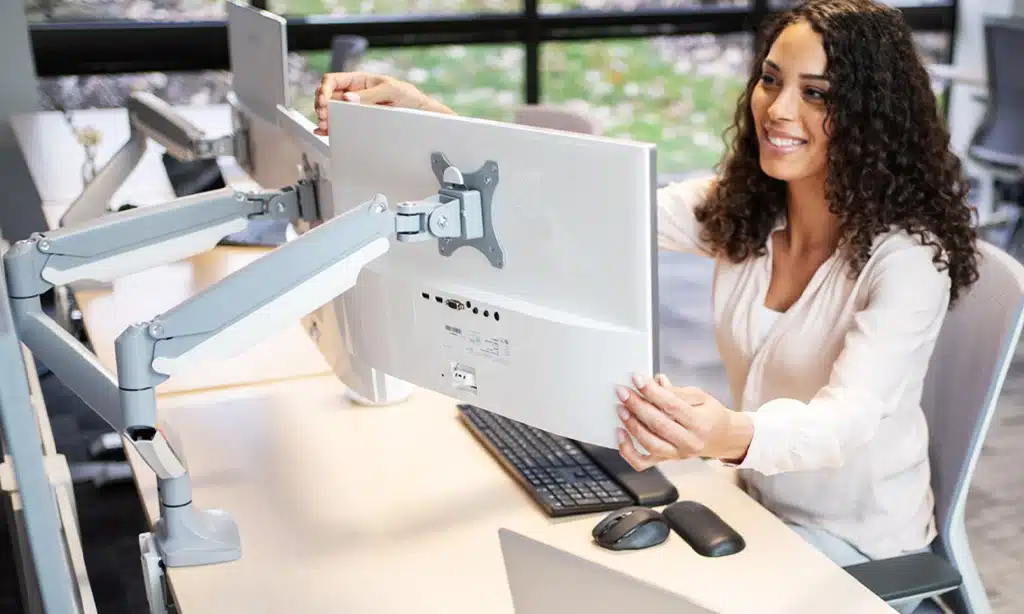
Hey there, wanna save your neck from constant strain while you work from home? A monitor arm is your new best friend for proper screen positioning. It lets you adjust the height and angle of your external monitor, so you’re not hunching over like a turtle.
Plus, with a high-quality monitor to reduce eye strain, you’ll feel fresher even after long hours of remote work.
Got dual monitors for that extra productivity boost? Great idea! A sturdy monitor arm can hold them in place, and paired with monitor stands, you’ll get top-notch comfort. Tilt that screen just right to dodge glare, and keep your eyes happy.
Trust me, your body will thank you for this small tweak to your hybrid work setup.
Task Lighting to Reduce Eye Strain
Good lighting can save your eyes from getting tired. If you work long hours at your desk, harsh glare or dim shadows can cause eye strain. Adjustable LED desk lamps are a game changer, folks.
They let you tweak the brightness and color temperature to match your needs. Plus, they mimic natural light, which is always the best pick for your vision.
Want to kick it up a notch? Place your desk lamp to avoid reflections on your screen, and try time-based lighting. This means adjusting the glow as the day goes on, keeping your eyes comfy.
Natural light beats everything, so set up near a window if you can. Trust me, your peepers will thank you for this simple fix.
Cable Management System for a Clutter-Free Space
Hey there, let’s tackle that messy desk situation with a solid cable management system. Those tangled cords under your workspace? They’re not just an eyesore, they mess with your focus too.
Grab some simple tools like cable clips or sleeves to bundle wires for your laptop stand and external monitor. Keep them neat and out of sight. This small fix can turn chaos into calm, giving you uncluttered surfaces to work on.
Isn’t it nice to see a clean space? With a clever setup, you can hide cords behind your desk or route them through trays for that minimalist vibe. No more tripping over wires or hunting for the right USB-C plug.
A clutter-free zone boosts your mood and productivity, letting you zero in on tasks. Stick to minimal decor for focus and clarity, and watch how a tidy area transforms your remote work game.
Biophilic Elements for Natural Inspiration
Adding natural vibes to your home office can lift your mood, folks. Think about tossing in some easy-care plants like snake plants or pothos. They don’t need much fuss, and they clean up the air around you.
Place them near your desk for a splash of green while you grind through those digital files on Google Drive. It’s like having a tiny forest right by your side, calming your mind during a hectic hybrid work day.
Sunlight also plays a big role in this setup, so yank those curtains open. Let that natural light flood in to cut down on eye strain from staring at an external monitor. Mix in wooden or stone accents for extra earthy charm.
A small wooden shelf or a stone paperweight can tie it all together. These touches spark inspiration, making your remote work space feel less like a cage and more like a cozy nook.
Minimalist Design for a Clean Aesthetic

Hey there, let’s chat about keeping your home office sleek with a minimalist design. Stick to neutral color palettes, like soft grays or warm beiges, to create a calm vibe. Clear off those uncluttered surfaces, and watch how your focus sharpens without all the extra stuff crowding your space.
Toss out the clutter, and go for minimal decor to keep things crisp. A tidy desk isn’t just pretty, it’s a game-changer for productivity. Pair this clean look with simple tools, think a basic laptop stand or a no-fuss external monitor, and you’ve got a space that screams clarity.
Sustainable Materials for Eco-Friendly Choices
Going green in your home office feels like a breath of fresh air, doesn’t it? I’m thrilled to chat with you about sustainable materials that boost eco-friendly vibes. Think about desks made from reclaimed wood, giving old timber a snazzy new life.
These pieces cut down on waste and look amazing, adding earthy charm to your space.
Now, let’s talk seating with a conscience. Opt for chairs upholstered in organic fabrics, soft yet kind to the planet. This choice supports a healthier environment while keeping your comfort on point during long remote work hours.
Plus, eco-friendly furniture often lasts longer, saving you cash in the long haul. How cool is that for your hybrid work setup?
Personalized Decor for a Touch of Individuality
Hey there, let’s make your home office scream “you” with personalized decor! Toss in some artwork that sparks joy, or prop up family photos that warm your heart. These little touches turn a bland space into your cozy nook, boosting your vibe while you tackle remote work.
Travel souvenirs, like that quirky trinket from your last trip, can sit on your desk for a quick smile. Mix in a vision board to keep your dreams in sight, and watch how these bits of your story lift your spirit.
Your workspace deserves this personal flair, so go for it!
Acoustic Panels for Noise Reduction
Let’s talk noise reduction, folks. If your home office echoes like a cavern or you hear every car horn outside, acoustic panels can save the day. These sound-absorbing wall panels soak up unwanted racket, making your space a quiet haven for focus.
Add in soundproof curtains, and you’ve got a powerful combo against distractions. It’s like wrapping your room in a cozy blanket of silence.
Ever tried working with a noisy neighbor blasting tunes? Pair those panels with noise-canceling technology, like top-notch noise-canceling headphones, and watch the chaos fade. Your hybrid work setup deserves this peace, no doubt.
Imagine you’re on a call with crystal-clear sound, no background buzz to mess things up. Let’s transform your office into a calm zone for max productivity.
High-Quality Desk Mat for Enhanced Comfort
Hey there, folks, let’s chat about something super simple yet game-changing for your home office. A high-quality desk mat can truly boost your comfort while you tackle remote work.
It’s like giving your wrists a soft pillow to rest on, cutting down on strain during those long hours of typing with an ergonomic keyboard or clicking with an ergonomic mouse. Plus, it protects your desk from scratches and spills, keeping your workspace neat.
Think of a desk mat as your desk’s best buddy, adding a smooth surface for your mice and keyboards to glide over. It also feels nice under your hands, making every task a bit cozier.
Pick one with a cushioned base for extra support, and watch how it transforms your setup. Trust me, this small addition packs a big punch for productivity and ease!
Ergonomic Keyboard and Mouse for Proper Hand Positioning
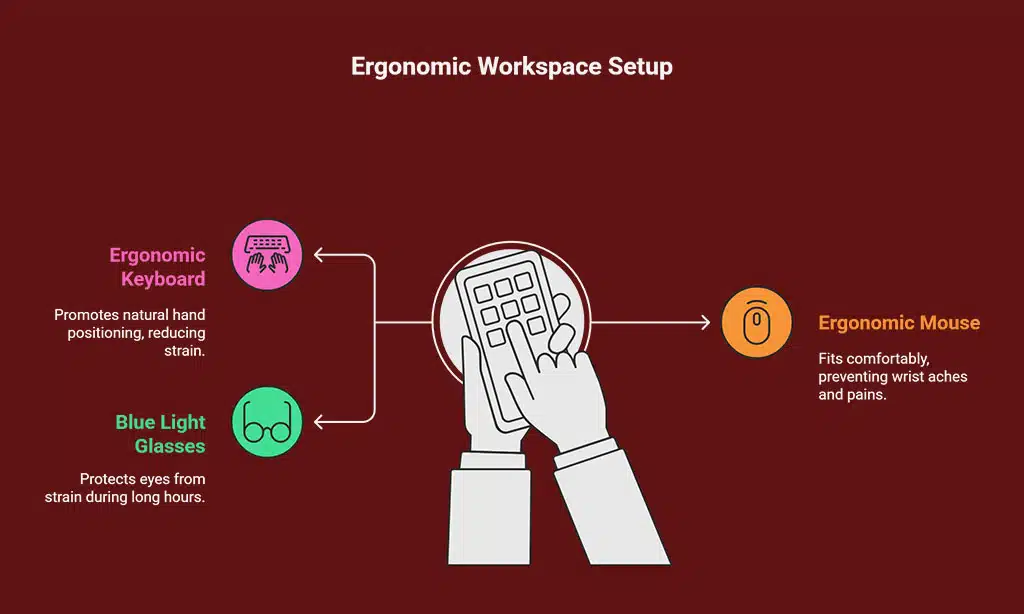
Let me tell you, setting up your workspace with an ergonomic keyboard and mouse can be a game changer. These tools help with proper hand positioning, cutting down on strain during long hours of remote work or hybrid work setups.
Your wrists will thank you for dodging that pesky ache, trust me on this!
Now, picture your hands floating naturally over the keys, no twisting or bending. An ergonomic mouse fits your grip like a glove, while the keyboard keeps your arms comfy. Toss in blue light-blocking glasses for extra care against eye strain, and you’ve got a setup that boosts productivity.
Let’s keep those hands happy, shall we?
Plants and Greenery for Improved Air Quality
Adding plants to your home office goes beyond just appearance, everyone. They improve air quality, making your workspace feel revitalized and energetic. Low-maintenance plants, like snake plants or pothos, require minimal care yet offer significant benefits in purifying the air.
Plus, when paired with wooden or stone accents, they introduce a touch of the outdoors inside. Envision breathing more freely as these green companions cleanse the air of toxins while you handle remote tasks.
Dealing with a stale room? Place a humidifier or air purifier next to your plants for the best results. Plants and natural light work together to reduce stress and elevate your mood, supporting you through hybrid workdays.
Imagine a mini forest on your desk, complemented by a stylish desk lamp, transforming your area into a peaceful haven. This arrangement truly inspires happiness and keeps your lungs content.
Smart Technology Integration for Efficiency
Hey there, let’s chat about making your home office smarter in 2025. Smart technology can boost your efficiency like a well-oiled machine. Think height-adjustable desks with built-in tech that move up or down with a tap.
These gems adapt to your needs, whether you’re sitting or standing with a standing desk setup. Plus, they often pair with apps to track your habits. How cool is that?
Now, imagine voice-controlled devices running your space. Just say a word, and your lights shift with time-based lighting to match the day’s mood. Your hybrid work setup gets a lift with tools like docking stations and webcams syncing seamlessly.
Toss in some productivity tools on your laptop, and you’re set to crush remote work tasks. Isn’t it neat how tech turns chaos into a breeze?
Takeaways
Ready to revamp your workspace? Building a home office for 2025 means blending comfort with style, and it’s easier than you think. Picture your desk setup as a cozy cockpit, primed for productivity.
With tools like Krisp for noise cancellation and a sharp focus on ergonomic gear, you’re set to soar. So, jump in, tweak that space, and make it yours!
FAQs on Must-Have Ergonomic Home Office Items
1. What’s the big deal about an ergonomic chair for my home office in 2025?
Hey, let’s talk comfort, alright? An ergonomic chair with lumbar support isn’t just a fancy seat, it’s your back’s best buddy during those long remote work hours, saving you from aches and pains.
2. Why should I bother with a standing desk in a hybrid work setup?
Listen up, switching between sitting and standing with a standing desk keeps your blood flowing. It’s like giving your body a mini workout without leaving your inbox unattended. Plus, it pairs nicely with an external monitor for better focus.
3. How do noise-canceling headphones fit into my home office vibe?
Picture this, you’re on a call, and the neighbor’s dog is barking like it’s auditioning for a movie. Noise-canceling technology in headphones or headsets blocks that racket, letting you zoom into productivity tools without a hitch. It’s your secret weapon for peace with top-notch noise cancellation.
4. Can a laptop stand and ergonomic mouse really change my workday?
Absolutely, a laptop stand lifts your screen to eye level, cutting down on eye strain like a charm. Add an ergonomic mouse and keyboard, and you’ve got a setup that feels like a breeze to use.
5. How do I jazz up my space with personalized decor and still keep it functional?
Think of your home office as a canvas, my friend. Use a vision board and personalized decor to spark joy, mix in natural light with a desk lamp for the right color temperature, and toss in soundproofing materials to hush distractions. Keep it simple with a “less is more” mindset, maybe even play with a bokeh effect in your background for video calls.



























