

You flip three switches in a row. You hunt for your phone to light a room. It feels like a daily quest. This can waste time and power. Did you know a smart bulb, or LED lamp, can cut energy use by 80 percent?
This guide shows how to link a smart thermostat, or climate control unit, to one hub. It also covers lights and security cameras, or safety sensors. You will learn to use voice control with Google Assistant and smart speakers.
We cover energy efficiency, home automation, and remote control. Read on.
Key Takeaways
- Smart LED bulbs can cut energy use by 80%. Energy Star smart bulbs can slash lighting energy by 50%. They fit standard sockets and pair with Alexa or Google for voice control.
- Amazon Echo, Google Home, and Apple HomePod link lights, locks, cameras, and thermostats. Use a Zigbee, Z-Wave, or Wi-Fi hub (and IFTTT if needed) for full device compatibility.
- To install a Nest or Ecobee thermostat, turn off power, mount the new base, and attach labeled wires. Join your Wi-Fi in the app. The thermostat learns your habits, tracks energy use, and takes voice commands.
- Ring video doorbells stream 1080p and send motion alerts. Link them with smart locks, sensors, and alarms in one hub. Store footage in the cloud or on a DVR.
- Hide routers and hubs behind art or in cabinets. Flush-mount speakers and TV frames. Tuck light strips in molding to hide wires and keep a clean look.
Choosing a Smart Home Ecosystem
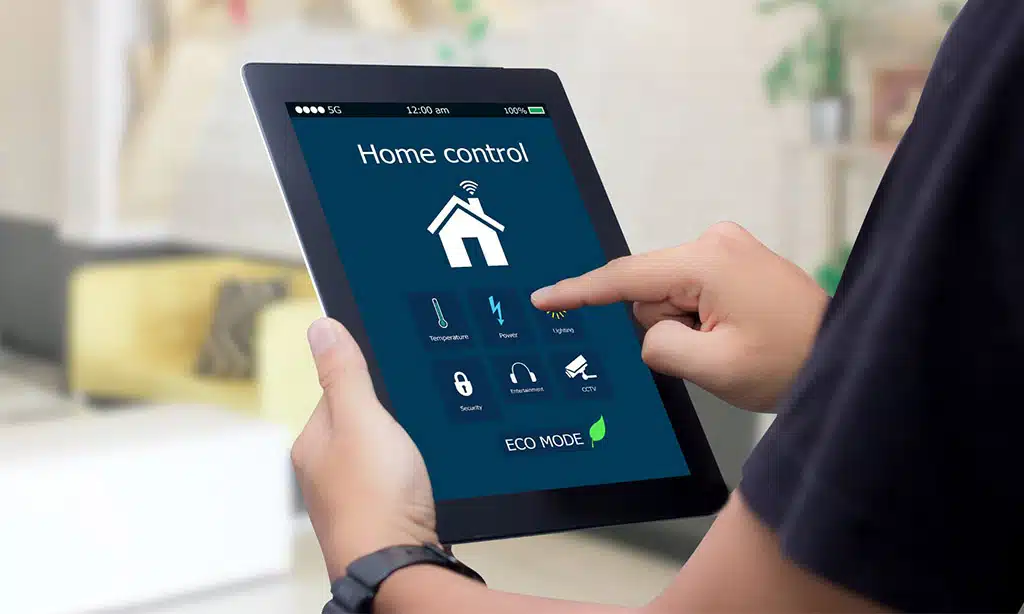
Start by choosing a digital helper that feels like a trusty sidekick. Link your smart devices on a sturdy, fast Wi-Fi network so your Internet of Things gear chats like old pals.
Selecting the right digital assistant
Amazon Echo links to smart lights, locks, and speakers with a simple voice prompt. Google Home teams with Android phones and smart thermostats for quick climate control. Apple HomePod pairs with Apple HomeKit so Siri answers calls, plays tunes, and dims bulbs.
It feels like magic when bulbs spring to life with a single word.
These voice assistants sync with smart home tech like smart meters and bulbs to boost energy efficiency. You tuck a speaker on a bookshelf or behind a plant for a sleek look. A cover can dress it up so it blends into your style.
Ensuring compatibility between devices
Pair each new device to a hub that supports Zigbee, Z-Wave, or Wi-Fi. Once I saw a hub juggle a dozen devices like a circus clown. Check your assistant’s list of compatible products.
Google Assistant and Apple HomeKit link with smart bulbs and smart locks. ClareOne unites blinds, climate control, and security in one app. IFTTT recipes glue gadgets that speak different protocols.
This method cuts energy consumption and speeds setup.
Install smart thermostats that sync to your hub. Motion sensors power energy management by dimming lights when rooms sit empty. Smart cameras and doorbells send alerts to smart speakers.
Philips Hue syncs lighting with your security systems. ClareOne also controls blinds, lights, and locks from one interface.
Smart Lighting Solutions
You shape mood and function with layered lighting setups, from Hue Lightstrips under shelves to a warm desk lamp beam. These energy-saving bulbs link to Amazon Alexa or Google Assistant and wake your living room with a simple voice cue.
Layered lighting for functionality and ambiance
Layered lighting adds function and atmosphere. It mixes ribbon lights, spotlights, and smart bulbs.
- Use ribbon lights under kitchen cabinets for bright task zones, they light worktops, hide within cabinets, and pair with Lutron digital controls for smooth dimming.
- Aim spotlight fixtures at artwork to add accent, they frame paintings, boost texture, and link to Philips Hue bulbs for vivid color shifts.
- Pick smart LED bulbs with high Kelvin for soft ambient glow, they cut energy use and carbon footprint, and they work with motion detection to adjust levels.
- Set scene controls by zone, you group fixtures by area, then dim hall lights at night or boost kitchen glow by day, all via Amazon Alexa or Google Assistant.
Using energy-efficient smart bulbs
You can slash up to 50% of lighting energy with Energy Star smart bulbs. They fit into standard sockets with no extra wiring. Philips Hue bulbs sync with Alexa or Google Assistant, so you voice-control colors or dim lamps with a tap.
That simple swap adds personalized ambiance and trims your power bill.
Smart bulbs link to your home automation system through IoT, so they chat with your thermostat or security camera. Smart switches or motion sensors kill lights in empty rooms. That feature slashes waste, boosts energy efficiency, and keeps your rooms bright on cold nights.
Climate Control and Energy Management
Your smart thermostat runs your home like a silent butler, cutting bills and saving energy. It joins your IoT network and lets you adjust the heat and A/C with a smart app or voice assistant.
Installing smart thermostats
Installing smart thermostats starts by cutting power at the circuit breaker. Unhook the old thermostat, mark each wire, and add labels. Attach the new base for a Nest Thermostat or Ecobee model.
Slip each labeled wire into its matching terminal. Secure the faceplate. Flip the breaker back on.
The smart thermostat boots and asks for a Wi-Fi network. Open the Nest or Ecobee app on your phone. Join your IoT network with one tap. Pick a schedule or let learning mode adapt to your routine with climate control presets.
The app tracks your usage and sends energy management alerts. Boost energy efficiency by lowering heat when you head out. Ask Google Assistant or Alexa to tweak temps with a voice command.
The slim design blends with any modern wall panel.
Integrating energy-saving solutions
Smart home automation can slash your utility bills. You gain control over energy use.
- Use smart thermostats that learn your habits, let you adjust settings remotely, and cut energy waste.
- Link motorized blinds with your IoT hub to block glare and drop cooling loads.
- Program your central control app to spot power leaks, track data, and boost comfort.
- Switch to smart LEDs with built-in timers to dim lights in empty rooms.
- Connect solar panels and battery storage to your network for green power on demand.
Smart Home Security
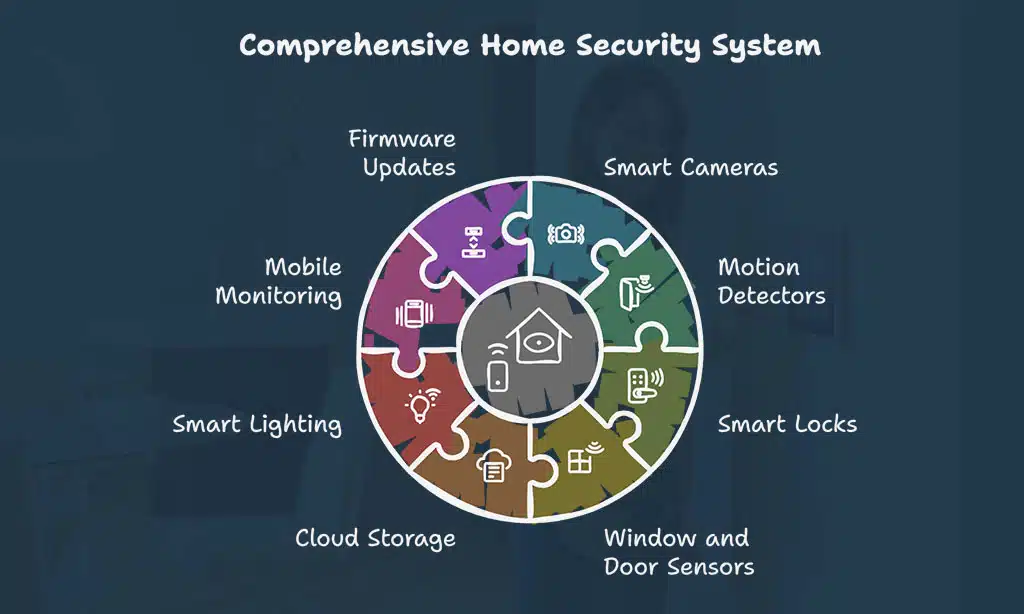
Smart cameras and entry sensors plug into your Wi-Fi and the IoT to send live clips and alerts to your phone, so you spot every visitor in real time. A voice assistant arms smart locks with a tap, keeping your home safe from package thieves and late-night intruders.
Incorporating cameras and sensors
Cameras and detectors guard your home night and day. They spot motion, log clips, and boost your home security.
- Select high-res eye-cams like Ring video doorbells. They stream at 1080p and record in low light. These devices push alerts to Amazon Alexa, Google Assistant, or Apple HomeKit hubs.
- Place motion detectors near exits, hallways, and garages. They trigger alarms and start video clips. You cut false alerts by tweaking sensitivity in the app.
- Link locks, cams, and alarms in one hub. SimpliSafe gear, August smart locks, and other smart devices mesh via your Wi-Fi. This setup makes a stronger security system.
- Add window and door trip detectors. Use sensors that alert on glass break or lock twist. You get a text if someone hits a pane or tries a handle.
- Tap cloud storage or a network video recorder. A cloud plan keeps weeks of footage safe. A DVR on your LAN cuts risk of service hiccups.
- Sync Philips Hue bulbs, sirens, and speakers. Bright lights and chimes go off with each motion event. You scare off prowlers and wake up your block, almost like a hornet swarm.
- Check live feeds on your phone, tablet, or smart TV. Fire TV, Roku, and iOS apps let you jump in fast. You scan every corner, from kitchen to attic, in seconds.
- Keep firmware current on all gear. Regular updates stop cyber threats. A trimmed energy use also cuts your carbon footprint.
Centralizing control for security systems
A central hub cuts down on app switching. It keeps your security systems, like cameras and sensors, in one place. The ClareOne system links climate control, blinds and alarm via a single app.
You tap one icon to check your front door camera, change the thermostat or lower shades with ease.
A single interface speeds tasks in hybrid work setups. You skip juggling smart locks or voice assistants. The hub lets you set schedules, view alerts or arm the alarm with one tap.
It makes home security and energy management fit one screen.
Blending Technology with Aesthetics
Your home wears tech like a secret cloak, hidden but strong. See how a few tweaks sync smart switches, living walls, and motorized shades for a sleek, green look.
Concealing devices within the design
Smart tech can hide in plain sight. Design hacks help gear blend with style.
- Hide your TV like a Samsung Frame TV that doubles as art on a gallery wall. Use a flush mount bracket and cover wires with sleek cord concealers or a stylish box that matches paint or wood trim.
- Fit speakers inside acoustic grills or behind a false wall. You get surround sound for home theater without bulky smart speakers or clutter.
- Tuck routers and hubs behind a framed canvas or inside a vented cabinet. This keeps your network strong and your Amazon Alexa or Google Assistant mic hidden.
- Stash smart lock hardware inside door trim or behind decorative molding. The keypad sits on a hidden panel, so you keep keyless entry and Wi-Fi access with no hardware showing.
- Integrate motorized blinds into ceiling slots above windows. Control them via Apple HomeKit or voice commands and keep wiring in the jamb.
- Conceal smart lighting panels like Philips Hue strips under cabinets or inside crown molding. You maintain natural light and mood hues without exposed wires or tiny bulbs.
- Camouflage sensors and cameras in plant pots or living walls. You blend green living with smart home security and hide your IoT gear in plain sight.
Choosing sleek and modern smart devices
Matte black smart refrigerators blend in with modern kitchen cabinets. A Wi-Fi enabled model keeps track of groceries and boosts energy efficiency. They fit like a glove in any decor style and highlight smart home technology.
Joule Sous Vide devices slip under cabinets without taking up countertop space. They sync with mobile apps for cooking precision.
Slim soundbars hide behind screens or slide into shelves. Sonos Play smart speakers tuck into corners, filling rooms with clear audio. In-wall or ceiling speakers vanish into plaster while pumping crisp sound.
Voice assistants like Echo Dot or Google Nest Mini handle commands hands-free. Each gadget plugs into your home automation setup in seconds.
Takeaways
Pair Philips Hue bulbs with a Nest Thermostat and watch your house come alive. Add a Ring doorbell and Arlo camera to guard your entry. Use Google Assistant or Alexa to call the shots with your voice.
Let Apple HomeKit link every gadget in one app. You gain comfort, boost energy efficiency and rest easy each night.
FAQs on How to Integrate Smart Technology into Modern Home Design
1. How do I weave smart home technology into my interior design?
Sketch your room layout for strong interior design. Pick smart devices that match your decor and boost home automation. Hide wires inside walls or cabinets for clean lines. Link all devices with a central smart hub.
2. Do smart thermostats really save energy?
Yes, smart thermostats learn your schedule and adjust the heat. They cut energy wastage by fine-tuning climate control. You see fast energy savings on your bills.
3. How can I mix smart lighting with style?
Use smart lighting systems with dimmers to set the mood. Go for color-changing bulbs or simple LED lights for flair. Pair them with smart switches to control lights from your phone. Add motorized shades for natural light play.
4. Are smart locks and security cameras good for home security?
Yes, smart locks secure doors with codes or your phone. Security cameras and simple alarm systems keep watch day and night. You get alerts on your devices, so you stay in the loop.
5. Which smart appliances make life easier?
Choose smart refrigerators that track groceries and suggest recipes. Pick a robot vacuum that cleans while you relax. Add a smart TV for easy streaming and voice control. Those devices save time and trim energy use, too.























