
A correction in the source article can take five minutes. Tracking that correction across several language editions can take much longer, especially when one version has a local example, another has a different graphic, and a third has not been updated at all. A multilingual article change register gives the edit a traceable record from the source decision to the final check on each live page.
The register is more than a list of translated URLs. It should answer three questions without a search through messages and draft files: What changed in the source? Which editions need a decision? What was actually published and checked? The eight field groups below cover those questions. A spreadsheet can hold them, although a larger team may use a CMS or project board with linked records.
Define the Unit of Work Before Adding Fields
Create one parent record for a source change and one linked action row for each affected locale. A parent record describes the shared editorial issue; the locale rows describe what each edition will do about it. That distinction matters when a correction applies everywhere, but the wording, image, or timing differs by market.
Do not create a new entry for every comma. Group small edits made for one reason, but separate changes that need different evidence, approval, or reader-facing correction decisions. A factual correction and a routine headline improvement should not share a single “done” status. The same discipline behind research notes that preserve source and version context helps another editor reconstruct why an article changed.
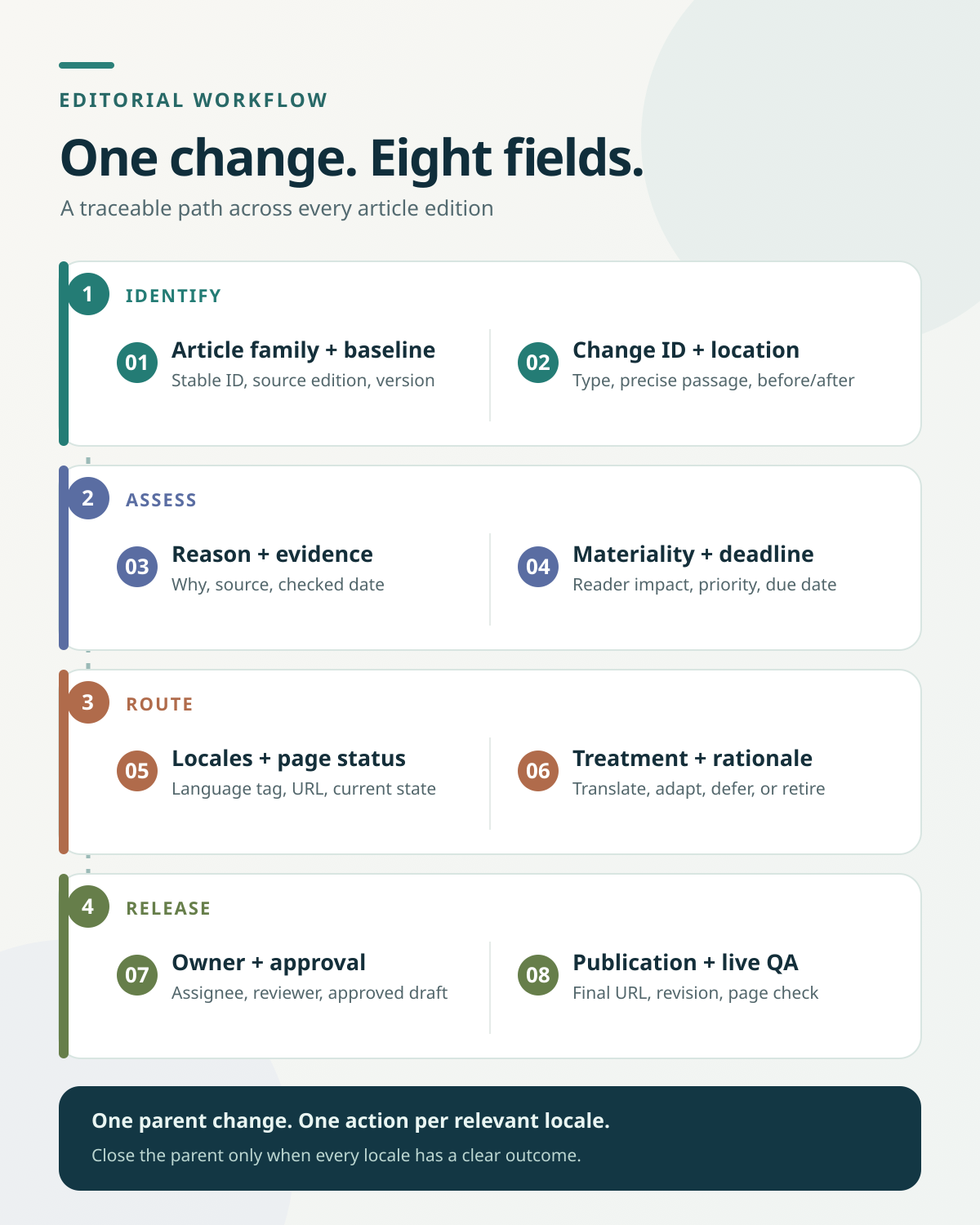
Think of the eight fields as four handoffs: identify the change, assess its importance, route it to the right editions, and verify the release. The infographic summarizes those handoffs; the sections below explain what each field must contain.
1. Article Family ID and Source Baseline
Assign a stable ID to the article family and identify its source edition, canonical working document or CMS record, source URL when live, and the exact revision being changed. Record the source editor and the time the change entered the register. A title is a poor identifier: titles and slugs can change while the article remains the same.
The baseline should be a version ID, revision link, or saved comparison that lets a reviewer see the text before the change. If there is no reliable revision history, preserve the affected passage and its location in the restricted editorial record. The source language is a workflow choice, not a claim that every locale must copy its wording. Some editions may contain independent reporting or a market-specific section that requires its own verification.
2. Change ID, Type, and Exact Location
Give each change a unique ID under the article family. Record whether it is a factual correction, substantive update, clarification, translation fix, image or caption change, metadata edit, link change, or technical change. Point to the affected heading, paragraph, table cell, chart label, alt text, or metadata field; include a before-and-after excerpt or a revision diff.
“Updated statistics” is too vague to act on. “Table 2, row ‘2024 revenue’: changed the currency label from USD to EUR” tells an editor what to inspect and whether an image containing the old label must be replaced. A single change can touch several components; list them under the same change ID when they depend on the same correction. Mark genuinely independent changes separately so a locale can close one without concealing an unfinished second task.
3. Reason, Evidence, and Editorial Decision
Record why the change is being made and the evidence that supports it. The trigger might be a source correction, an updated official document, a reader report, a broken link, or a planned refresh. Attach the exact source location and check date, plus the editor’s decision when the evidence is incomplete or disputed. Keep sensitive correspondence and licensed materials in restricted storage; the register can point to them by ID.
This field distinguishes “the source article changed” from “the source article was wrong.” It also prevents a translated edition from repeating a newly corrected number while retaining the old explanation around it. Editorialge’s fact-checking policy calls for verifiable sourcing and clearly marked corrections; a register should preserve the proof and the correction decision for the relevant edition.
4. Materiality, Priority, and Deadline
Describe the reader impact before choosing a due date. A typo in a nonessential phrase, an expired product price, and a wrong safety instruction should not wait in the same queue. Use a small set of priority values with a written rule: for example, immediate escalation for consequential misinformation, a defined deadline for material but nonurgent updates, and the next maintenance cycle for minor polish. Record who set the priority and when it should be reassessed.
The record should also say whether the source page needs a visible correction note and whether linked social posts, newsletters, or downloadable versions require action. For a factual error, follow the site’s corrections policy for verification, timing, and a reader-facing note. The decision is editorial, not an automatic consequence of a changed timestamp. If an error remains live in one language while another is fixed, keep that locale open and escalate it according to the actual risk. Do not hide the gap by marking the article family complete.
5. Locale Inventory and Page Status
List each applicable language and region precisely, such as es-ES, pt-BR, or bn-BD, with its article URL or CMS ID and present state. Useful states include published, draft, not created, retired, under review, and confirmed unaffected. A generic “Spanish” column may conceal two editions with different examples or terminology.
Confirm the pages are actual counterparts before placing them in one family. Some localized articles are adaptations with different sections, and some apparently similar URLs cover different reader tasks. Record the last known revision for each page so the assignee can tell whether the source correction is already present. When a locale has no page, “not created” is a valid decision; it is not a failed translation task. For large operations, keep the family inventory in one place and link the per-change rows to it instead of copying URLs into every spreadsheet cell.
6. Locale-Specific Treatment and Rationale
For every affected edition, choose an action: translate the change, adapt it with local evidence, replace an example, leave it unchanged with a reason, defer it with an owner, or retire the affected passage. Save the proposed wording or a link to the locale draft. This is the point where a change register becomes an editorial tool rather than a broadcast message.
A revised tax threshold in one country, for example, should not be translated into an article about another country’s rules merely because the pages share a source outline. Conversely, a corrected name in a global event may need to reach every edition, including captions and graphics. The W3C’s translation workflow sends translators information about source updates and calls attention to hidden text such as meta descriptions and alt text. Its procedure is for W3C material, but the broader lesson is useful: define the changed components and the translation decision, rather than assuming the body copy is the whole page.
7. Assignee, Reviewers, and Approval State
Name the person responsible for each locale action, the reviewer who checks the language and facts, and the person who approves publication. Save the version each person reviewed and any conditions attached to approval. An assigned translator is not necessarily authorized to approve a revised legal claim or a correction note; route those decisions to the appropriate editor or specialist.
Keep statuses separate: assigned, drafting, fact review, language review, approved, blocked, and published are distinct events. “Approved” should mean an identified person approved a specific version, not that a comment thread has gone quiet. An approval workflow with clear roles helps prevent a translation from reaching the CMS while its factual review is still open. Record blockers with a named next action so the row does not become a permanent “waiting” label.
8. Release, Live QA, and Closure
Record the publication time, final URL, and revision ID for each edition. Then inspect the live page: the corrected passage, title and description where affected, links, image text, caption, alt text, mobile layout, and any visible correction note. Log who checked it, when, and what they found. A successful CMS save is not evidence that the correct text reached readers.
If a URL, locale mapping, or alternate set changed, add a technical check for the language links. Google’s localized-page guidance explains that hreflang alternates need valid language or region codes and return links between pages. A routine wording edit does not automatically require rebuilding those annotations, but a moved or retired locale page may.
Close the locale row only after the live check and any follow-up distribution are complete. Close the parent change only when every locale has an explicit outcome: published and verified, confirmed unaffected, not applicable, retired, or an approved deferred action with an owner and review date. Do not let “deferred” silently become “finished.”
A Compact Register Example
The following is a fictional example of one source correction. The article family and source change are shared; each locale has its own action and release check.
| Record | What the editor enters |
|---|---|
| Article and baseline | ART-042; source en-US; revision v12, checked November 19, 2026 |
| Change and location | CHG-042-03; factual correction; chart caption and body paragraph 6; “2025 fieldwork” → “2024 fieldwork” |
| Evidence and priority | Original survey methods show 2024; source checked November 19; material correction; review all live versions promptly |
es-ES action |
Published page identified; caption and paragraph corrected; local editor approved version v8; live text and correction note verified |
de-DE action |
Draft wording prepared; chart still contains 2025; image replacement assigned; status blocked until visual and fact review |
bn-BD action |
No corresponding article exists; marked not applicable, with the inventory checked rather than assumed |
This example makes the remaining work visible: the German edition cannot be closed just because its paragraph is ready, and the Bengali edition need not be invented to complete the register. A simple spreadsheet can work if each change and locale action has its own ID, controlled status, and link to the evidence. Larger teams can store the same relationships in a CMS or task system.
Complete the Multilingual Article Change Register With Live Checks
A multilingual article change register is useful when it connects an internal decision to the live version in every relevant language. Start with these eight field groups, give each locale an explicit outcome, and close the work only after someone checks the page readers can actually open. The next editor should be able to see which change was made, why it was made, and what still needs attention without rebuilding the story from scattered messages.