

Mobile gaming has evolved far beyond casual swipes and taps. Today’s shooters deliver console-quality graphics, intense gameplay, and immersive experiences—all from the palm of your hand. But let’s face it: touchscreen controls can sometimes hold you back. That’s where controller support comes in.
If you’re craving smoother aim, better movement, and more responsive gameplay, choosing mobile shooters with controller support is the way to go. Whether you’re a die-hard FPS fan or just want to upgrade your on-the-go gaming experience, these titles are made for you.
In this article, we’ll explore the 10 best mobile shooters with controller support—perfect for both iOS and Android gamers looking to dominate the battlefield with precision and style.
Call of Duty Mobile
Call of Duty Mobile mixes fluid first-person shooter action, full controller support via Bluetooth, remote play on Xbox Cloud Gaming, and a last-man-standing mode—keep reading to see why it leads the pack.
Features & Gameplay
Players aim across detailed maps in multiplayer and battle royale modes in this mobile gaming hit. The title runs on Unity engine to deliver high-quality graphics and smooth gameplay on Android devices and iOS.
It lets you team up or go solo in quick matches. You can use controller support over Bluetooth or join through Xbox Cloud Gaming for a console feel.
Regular updates bring new maps and weapons each month. The interface runs smoothly on most smartphones, and you can grab the title on Google Play Store or via PS Remote Play. Fans get fresh content through product news and feature drops.
Why It Stands Out
Call of Duty Mobile uses Unreal Engine for slick graphics. Gamers enjoy full controller support on phones and tablets. This shooter ranks at the top of mobile gaming charts. The franchise brings battle royale and deathmatch to your pocket.
Developers roll out fresh updates each week. They add new maps, modes, and skins monthly. Global esports tournaments draw pro teams and big crowds. Feature drops keep fans hooked all year.
PUBG Mobile
PUBG Mobile packs a punch for mobile gaming fans. It brings battle royale fights to your phone. Fans join huge lobbies and plan tactics to outsmart rivals. Controller support boosts aim and moves with surgeon-like precision.
You duck, dodge, and dive for cover in tense matches.
Players can get PUBG Mobile from the app marketplace and Google Play. Its large player base means you find matches in seconds. Many hook up a Bluetooth pad for smooth control on mobile platforms.
You even link Xbox Cloud Gaming or PS Remote Play to swap screens.
Shadowgun Legends
Shadowgun Legends shines on phones. It offers online team raids and co-op missions for up to four players. It blends shooter core with role play growth. The game runs on major mobile platforms.
It sits on Google Play Store and App Store under mobile games. Its controller support stands out via Bluetooth and wired pads. You can swap touch controls for gamepads. You level up gear, earn credits, and tune weapons.
The visuals run crisp at 60 FPS on many devices.
Players explore PvP arenas and loot hunts in sci-fi zones. Gamers choose from three classes and pack skills for their hero. They chat with allies in safe hub zones. It feels like a console shooter in your hand.
Mobile gaming meets arcade style meets RPG flair. Fans of FPS games get a taste of team duty, action RPG, and story arcs. It mixes story missions with live events and feature drops.
You jump in for quick battles or long hauls. Now move on to Modern Combat 5 for more online depth.
Modern Combat 5
Modern Combat 5 drops you into high stakes warzones on mobile. It runs on iOS shop and Android market. You play single missions or squad skirmishes. The title stands high among first-person shooters.
A deep weapon skill tree adds strategy. It shines in mobile gaming. You can also use a wireless pad for top controller support.
Maps brim with cover and tight lanes. Each match flows fast and fierce. Your shots ring out in crisp HD. Developers issue regular feature drops and bug fixes. Leaderboards track your ranked play.
Wireless pads link in seconds. Next up, Standoff 2 turns up the heat.
Standoff 2
Standoff 2 blends squad tactics and quick maps in one app. It runs on Android handset and iPad through the App Store or Google Play. PUBG Mobile fans grab a controller and storm each target with a team.
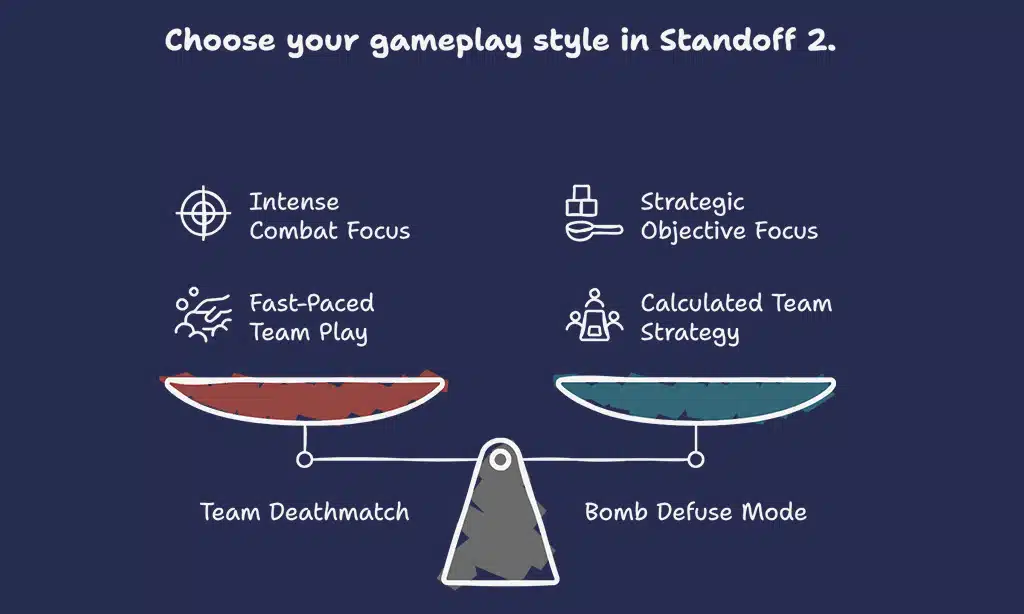
Mobile gaming perks surge with built in controller support and Bluetooth pairing. You choose team deathmatch or bomb defuse modes, each packed with tense fights. Voice chat cracks with jokes as squads move like clockwork.
Into the Dead 2
Players grab a gun and dash through a zombie horde. It sits in the App Store and Google Play Store, and ranks high among android games and iOS titles. Bluetooth pairing adds real buttons, you ditch touch controls for triggers, and you link to Xbox Cloud Gaming or PS Remote Play.
Mobile gaming fans praise its rush and raw thrills.
Story-driven campaigns hook players with short cutscenes and tense set pieces. You choose rescue runs, timed missions, or endless survival. Each mode tests your reflexes and keeps your heart racing.
Pairing a controller makes on-screen taps feel clumsy by comparison, it turns your phone into a true shooting rig.
Combat Master Mobile
Combat Master Mobile packs a punch on a small screen. It runs on App Store, Google Play Store. Competitors grab a wired or a Bluetooth controller; they get slick controls. Controller support enhances every skirmish.
Gunfights erupt in seconds on compact maps. Teams clash in deathmatch, team battle and flag modes. Every match moves fast. Casual and ranked contests suit new players and vets. Voice chat and ping features speed up team calls.
On Android devices, lag stays low. Mobile gaming fans love its crisp aim and quick respawns.
Takeaways
Time to fire up your favorite shooter with controller support. Pair your controller via Bluetooth, then hit the field. This list covers titles on the App Store, Google Play, Xbox Cloud Gaming, and PS Remote Play.
You can sort by genre or hardware preferences in a snap. Now grab your device, lock on, and let the action begin.
FAQs
1. What is controller support in mobile gaming?
Controller support means you can plug in a game pad to play mobile games, not just tap on the screen. It helps you aim better in shooter games and lets you move with more precision.
2. How do I pair my controller to my mobile phone?
Open settings, turn on Bluetooth, then press the sync button on your pad. A name pops up under available devices, tap it and you’re set.
3. Which top shooter titles let me plug in a controller?
Battle royale hits like pubg mobile and call of duty mobile both back up controller play. You can also grab a looter shooter like diablo immortal and fire away with a pad.
4. Can I stream these mobile games on other game platforms?
Yes, you can use xbox cloud gaming or ps remote play to beam your favorite shooter games to a phone or tablet. That way, you play lag-free, wherever you roam.
5. Does a pad really change the feel of a battle royale?
Oh yes, it shifts the game from a touch-only trial to a full throttle race. You get crisper turns, faster reloads, and a steadier aim, right at your fingertips.
6. Are there other genres with controller support on mobile?
Sure, beyond shooting games you can find racing games, looter shooter titles, and adventure games that work with a pad. They turn your mobile phone into a mini console.

























