

Have you ever felt like getting the right answer from an AI is like wrestling with a stubborn jar lid? You twist and pull, but the results just miss the mark. Many of us struggle simply because we are not sure how to phrase our instructions. I found that making tiny adjustments to how you ask a question completely changes the quality of the answer.
If you want to know how to write prompts for Gemini Advanced, I am going to walk you through the exact steps I use. Grab a cup of coffee, and let’s get your prompts working perfectly for you!
Exploring Gemini Advanced
Gemini Advanced is like having a brilliant assistant who reads at lightning speed. As of early 2026, this system is powered by the incredibly smart Gemini 3.1 Pro model. People love this AI for its natural chat style and its massive memory capacity.
Did you know it has a two-million token context window? That means you can upload massive documents directly into the chat.
- Analyze massive files: It can easily process a 1,500-page PDF in seconds.
- Review code: You can feed it an entire GitHub repository to find a single bug.
- Watch videos: It can even scan hours of uploaded video to find specific timestamps.
Teachers use it to build lesson plans, and business professionals use it to summarize massive reports. You do not have to read every single page yourself anymore.
Importance of Effective Prompts in Gemini Advanced
Giving clear instructions steers the AI exactly where you want it to go. A vague request like “Water tips” leaves the machine guessing. If you ask for a specific list, you get a highly targeted answer.
This is not just a theory. A 2026 report from ProfileTree revealed that using structured prompts reduces AI output errors by an incredible 76 percent.
“Companies that train their teams on prompt engineering see a 67 percent boost in daily productivity.”
When you write well, the AI understands your user intent instantly. You can even trigger its special Deep Think mode for complex logic problems.
This feature forces the model to spend more time reasoning through the math or coding issue before it types a single word. Short, direct words truly work magic with these systems!
Essential Elements for Perfect Prompts
Crafting a great prompt is like building the perfect sandwich. You just need to layer the right details in the right order.
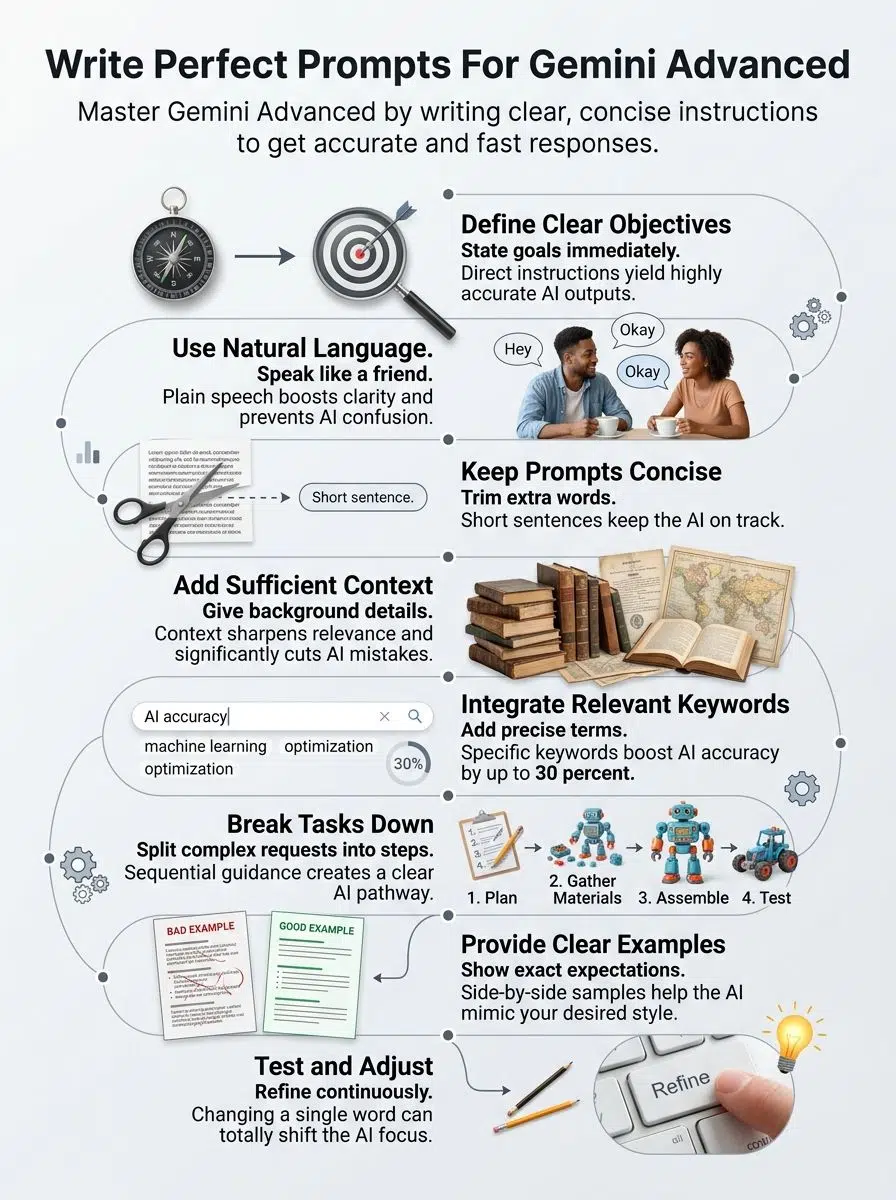
Employ natural language
Talk to the AI exactly like you would speak to a helpful neighbor. Gemini relies heavily on Natural Language Processing to decode your requests.
Instead of typing “Elucidate the process of photosynthesis,” just ask it to explain how plants make food from the sun. Here is a fun trick from power users on the r/PromptEngineering subreddit. Start your request by assigning a persona.
- The Persona Trick: Tell the AI to “Act as a friendly middle school science teacher.”
- The Benefit: This instantly adjusts the vocabulary and tone of the response without needing complex instructions.
Simple prompts help AI models deliver crystal clear answers.
Aim for clarity and conciseness
Short, punchy sentences keep the machine focused. If you write a massive wall of text, the AI might lose track of your main question.
Every word you type consumes a “token,” which is how the AI measures data. Trimming the fluff saves processing power and gets you a faster response.
Try to keep your core instructions between 10 and 15 words. Pick strong action verbs like “summarize,” “list,” or “compare.”
Skip the filler phrases. Clarity in communication saves you from having to ask the same question twice.
Ensure adequate context
Context is the background information the AI needs to succeed. If you just say “Summarize this,” the output could be anything from a haiku to a five-page essay.
A popular strategy among professionals is the R-T-F framework. This stands for Role, Task, and Format. You give the AI a job, tell it exactly what to do, and define how the answer should look.
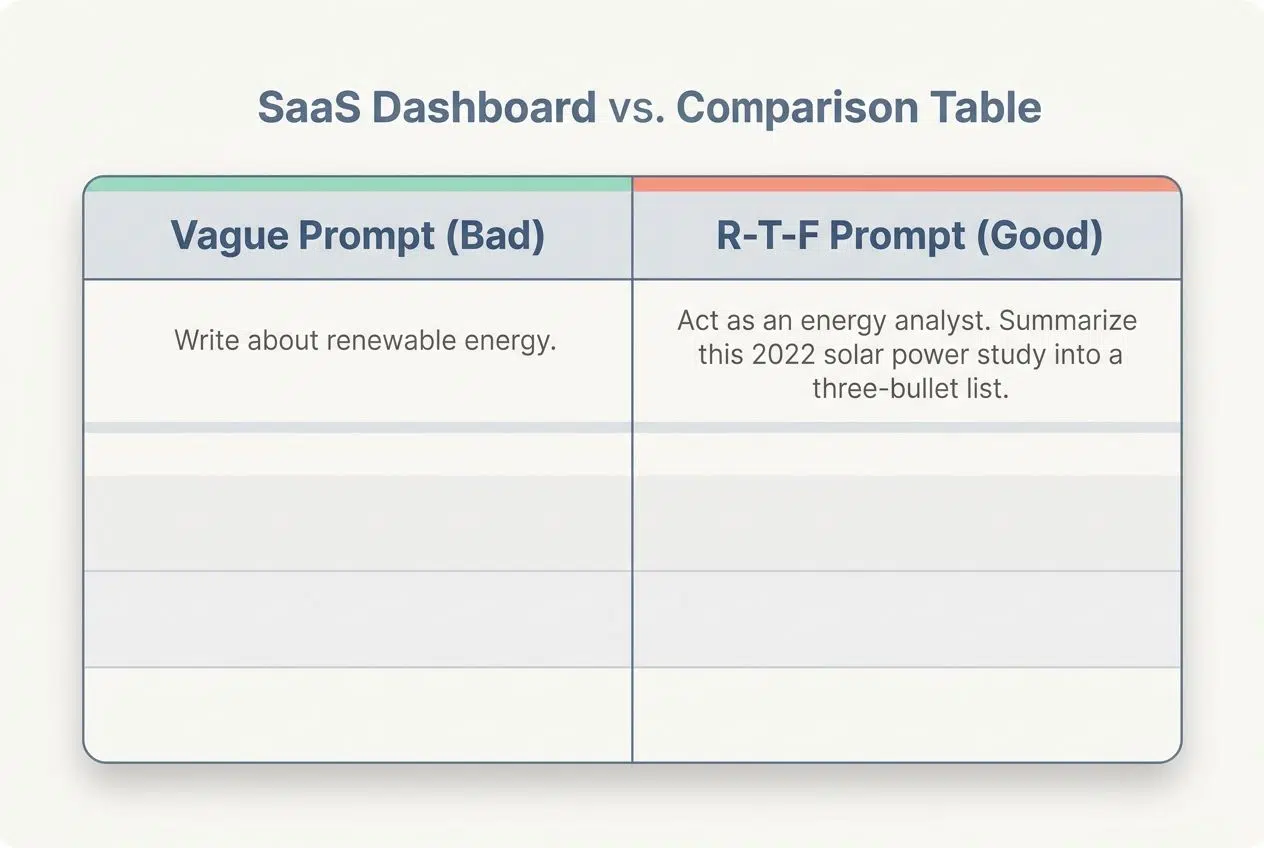
| Vague Prompt (Bad) | R-T-F Prompt (Good) |
|---|---|
| Write about renewable energy. | Act as an energy analyst. Summarize this 2022 solar power study into a three-bullet list. |
Adding that simple structure sharpens both relevance and accuracy. The model thrives when it knows exactly who the audience is.
Integrate specific and relevant keywords
Once you have your context set, you need to sprinkle in the exact words that matter most. These keywords act like a compass. If your goal is Content Creation, use those exact words in your instructions. AI models weigh these terms heavily to figure out the user intent.
For example, if you are doing a data project, explicitly include words like “growth rate,” “analysis,” and “Q4 revenue.” Using a flashlight to find your keys is better than lighting up the whole neighborhood. Your chosen words fine-tune the answers perfectly.
Simplify complex topics
Break big ideas down into bite-sized pieces. If you need the AI to explain advanced physics, avoid the dense jargon.
- Use the Feynman Technique: Ask the AI to explain a highly complex subject using simple analogies.
- Set a reading level: Ask it to “write this at a 6th-grade reading level.” This forces the system to drop the confusing corporate speak.
Explain concepts using familiar stories. Think of coding as snapping together colorful building blocks.
Gemini Advanced Performance in Various Tasks
Gemini Advanced is incredibly versatile. Let’s look at how this AI handles specific jobs.

Logical reasoning and analysis
These models use heavy logical reasoning to solve problems. In fact, the 2026 Gemini 3 Pro model scored a massive 95 percent on the AIME high school math benchmark.
You can ask it to break down complex financial data or solve tricky algebra. The best way to get accurate math is to add the phrase, “Show your work step by step.”
When you ask it to analyze a sequence of numbers, giving it a direct job reduces confusion. The model will point out its thought process so you can check its logic.
Creation of stories and creative content
Creative writing tasks are incredibly fun with the right instructions. Short, clear sentences guide the tool to craft amazing tales. Did you know this platform also handles visuals? It integrates with Google’s Imagen 4 model for stunning pictures and Veo 3.1 for generating short video clips.
You can ask for a funny story about a lost dog, and then request an image of that exact dog. For marketing campaigns, focus on clarity. Try asking it to write three catchy headlines for a spring sale.
Support in education and tutoring
Students frequently use this AI as a personal tutor. It can explain tough historical events or difficult science terms in plain English. Teachers on educational forums highly recommend using the “Socratic method” in your prompts.
- The Command: Ask the AI, “Do not give me the answer. Ask me guiding questions so I can figure it out myself.”
- The Result: This turns the chat into an active learning session instead of a cheat sheet.
Teachers also use it to build multiple-choice quizzes in seconds. It makes education feel like a collaborative walk up a hill.
Development and troubleshooting of code
Coding with this platform is like having a senior developer sitting next to you. It handles everything from Python scripts to React web components. While tools like Claude Opus are famous for coding, Gemini is right at the top of the 2026 SWE-bench software engineering tests with a score of nearly 76 percent.
Because of its massive memory, you can paste entire error logs directly into the chat box. Use keywords like “syntax,” “debug,” and “optimize.” Tweak your requests until the script runs perfectly.
Analysis of charts and data
Data analysis is incredibly fast here. You can ask it to spot trends in a bar graph or find the outliers in a massive spreadsheet. If you use Google Workspace, you can pull data directly from Google Sheets into the AI interface.
A pro tip is to upload your raw CSV files and explicitly state your goal. You could say, “Summarize the Q3 sales trends and create a bulleted list of the top three performing products.” By naming precise tasks, you make spreadsheet analysis genuinely enjoyable.
Generation of interleaved images and text
Mixing images and text keeps your audience engaged. Gemini is natively multimodal, meaning it understands pictures, audio, and text all at the same time.
Here are a few ways to mix media formats:
- Recipe Guides: Ask for a step-by-step recipe and request that it generate a photo for every single step.
- Study Sheets: Have it explain a biology concept and draw a diagram next to the text.
- Quick Exports: Once you have a great mix of text and graphics, click the export button to send the whole layout directly to Google Docs.
Use words like “side-by-side” or “visual guide” to get the best formatting.
Crafting Effective Prompts for Gemini Advanced
A strong instruction steers the system like a GPS. Testing different phrases is half the fun.
Define a clear objective
You need to know your goal before you start typing. If you want a bedtime story for kids, state that immediately.
Clear objectives lead to better AI Model Optimization. Use specific words like “write a funny script featuring talking cats.” Professionals call this defining your output format. If you want a table, ask for a table. If you want a Python script, specify the language. Being clear cuts out the guesswork.
Build prompts with step-by-step guidance
Giving the AI a clear pathway is crucial for complex projects.
- Use Chain of Thought: Add the phrase “think step-by-step” to your prompt. This simple trick drastically reduces math and logic errors.
- Break it down: Ask for a summary first, and then ask for an analysis in a second prompt.
- Add context early: Share details about your target audience right away.
- Use ordered markers: Start your sentences with “First,” “Second,” and “Third.”
- Test and adjust: Iterative Refinement is how you find the perfect instruction.
Enhance prompts with examples
Showing the AI what you want is always better than just telling it. In the tech industry, this is known as Few-Shot Prompting.
- Providing two or three examples of your previous work helps the system copy your exact tone and style.
- Clear examples focus on one task at a time, making the task breakdown much easier.
- Including specific fictional names or data points in your sample prevents the AI from giving a generic, boring answer.
- Negative examples are helpful too. You can explicitly say, “Do not use corporate jargon like ‘synergy.”
Continuously test and adjust prompts
Testing and changing your words is the secret to mastering AI. This keeps your results sharp and highly relevant.
- Check the drafts: Gemini generates multiple versions of every answer. Click the “Show Drafts” button at the top right to see different approaches.
- Start small: Use a short instruction first, and add more rules if the answer is too vague.
- Swap keywords: Changing a single verb from “explain” to “analyze” completely changes the output.
- Keep a log: Save your best prompts in a simple text file so you can reuse them later.
Innovative Uses of Gemini Advanced
You can spark fresh ideas and solve daily problems with a few clever strategies.
Generating academic research and summaries
Academic research is a breeze with this platform. You can ask it to summarize dense medical studies or long historical texts.
In late 2025 and 2026, Google introduced the Deep Research feature. This tool actively browses the web, reads multiple long-form reports, and synthesizes the data into a single, cohesive document. It even includes clickable citations so you can verify the original sources.
Add phrases like “machine learning” or “AI interaction” to keep the summary focused tightly on your specific topic.
Creating outlines for literature reviews
Start your literature review with a simple list of main topics. You can ask the AI to organize your thoughts using the MECE framework. This business consulting trick ensures your outline covers every possible angle without any overlapping sections. Give the system context, like your target audience and the length of the paper.
You can even ask it to format the outline as a text-based mind map for easier reading. Review and tweak the structure until it fits perfectly.
Automating business processes
This system is an amazing partner for saving time at work. It handles repetitive tasks like sorting data or drafting emails.
If you use the platform within your company, you can type “@Gmail” directly into the prompt box. You can then say, “Summarize the emails from my boss from the last two days.”

“A 2026 workplace survey found that using AI for administrative inbox management saves the average worker up to four hours a week.”
Clear and specific instructions make this automation completely painless.
Producing creative marketing content
Crafting eye-catching marketing materials is incredibly fast with AI. You can generate catchy ads or social media posts in seconds.
A great tip is to ask the model for twenty different variations of a single headline. You can then pick the best two and run an A/B test on your website.
Always specify your format and constraints. For example, ask for a Twitter post “under 280 characters with two relevant hashtags.” Getting your content formatted quickly gives you more time to focus on your actual business strategy.
Pitfalls to Avoid in Prompt Design
If you starve the AI of details, it will just spin its wheels.
Avoiding vagueness or complexity
Keep your requests direct. Instead of saying, “Write something about dogs,” ask for a list of three family-friendly dog breeds.
When you are vague, you risk “zero-shot hallucination.” This is a technical term for when the AI just makes up fake facts because it did not have enough guidance.
You fix this by grounding the model. Paste in your own article or data, and tell the AI to “only use the provided text” to answer the question. Stick to one core idea per prompt so the machine does not get overwhelmed.
Failing to provide sufficient context
Leaving out the background story leads to highly confusing answers. The AI will just make random guesses to fill in the blanks.
A 2026 workflow study showed that over 82 percent of AI tasks could be done by a human, but we use AI for speed. If you have to ask the same question five times because your first prompt lacked context, you ruin that speed advantage.
Here is how to fix vague context:
- Instead of: “Give me safety tips.”
- Use this: “List five online safety tips for middle schoolers in 2026.”
Context acts like a roadmap, guiding the system right to the perfect answer.
Resources for Enhancing Prompt Writing Skills
If you want to level up your skills, there are fantastic free resources available online.
- DeepLearning.AI: You can take the highly-rated “Prompt Engineering for Developers” course on Coursera. It is completely free and takes just a few hours.
- Google Cloud Skills Boost: Google offers hands-on training through this platform, which lets you practice in a live environment.
- Reddit Communities: Discussion groups, like the r/PromptEngineering subreddit, are perfect for finding tested templates and new tricks.
Try mixing these video guides with your own daily practice.
Final Words
Writing perfect instructions boils down to using clear words and sharing enough details. These simple steps work incredibly fast and help the system give you exactly what you need. Small changes in how you ask can spark massive improvements in your daily workflow.
Try out the persona trick or the R-T-F framework the next time you log in. Go ahead and put these strategies to use today. You will be amazed at the creative answers you get!

























