


Many of us try to save an image gallery by right-clicking each photo. We juggle pages and lose track. It feels like a puzzle. We get stuck in loops and redirects.
Here you learn how to download galleries on imagefap with a free gallery downloader called ImageFap-DL on GitHub. It uses Node.js and npm to fetch full albums in bulk. You run a simple command in your web browser or terminal.
You can use Chrome or any chromium based browser. You can set up a proxy or add an antivirus program to guard against malicious software. You will grab dozens of files by name and keep them in neat folders.
Keep reading.
Key Takeaways
- You install Node.js LTS from nodejs.org and run npm i -g imagefap-dl to get ImageFap-DL v2.1.0 by patrickkfkan on GitHub.
- You open a Chromium browser, copy a gallery URL (for example https://www.imagefap.com/profile/johndoe/galleries or https://www.imagefap.com/gallery/1234567), and run imagefap-dl in your terminal.
- You use -o to set C:\Downloads, -n to add sequence numbers, and -f for full file names; ImageFap-DL v2.1.0 also adds proxy support.
- You list each gallery URL on its own line in urls.txt, skip lines that start with #, and run imagefap-dl urls.txt to bulk download.
- You can also run Python 3.6+ scripts by veluzifer from SourceForge or use the Windows Bulk Image Downloader tool for alternative methods.
Tools Needed to Download Galleries on ImageFap
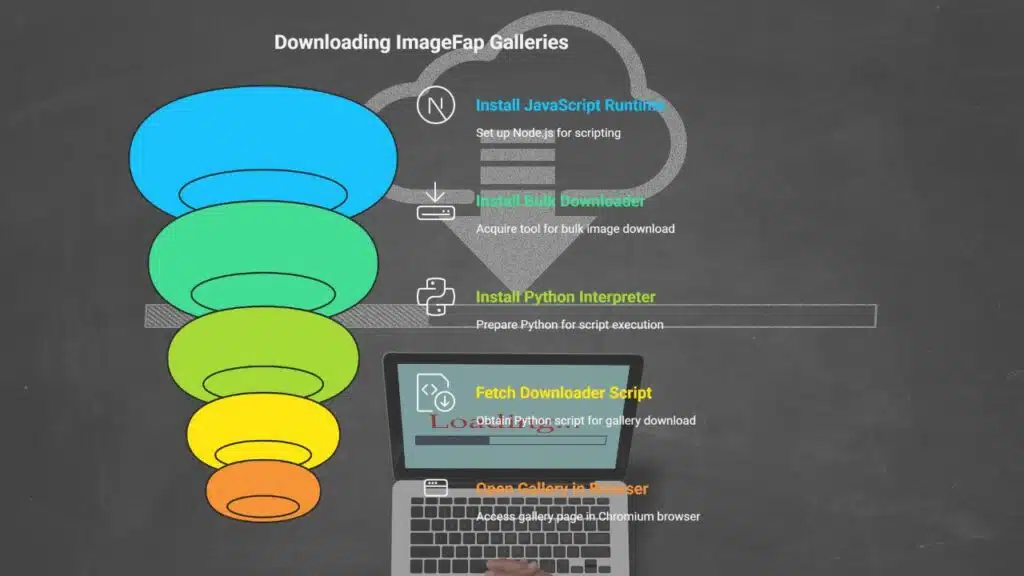
You need a few tools to grab a gallery from ImageFap. Each app or script runs on Windows or macOS.
- JavaScript runtime (Node.js): install the LTS build from nodejs.org. Then run npm i -g imagefap-dl to load the downloader by patrickkfkan on GitHub. It pulls images in bulk fast.
- Bulk image downloader tool: grab the Windows installer of Bulk Image Downloader for bulk download. It works on image hosting sites and handles redirecting links or flv and wmv streams.
- Scripting language interpreter (Python): download Python 3.6 or higher. It runs the ImageFap Gallery Downloader script by veluzifer from SourceForge.
- Web gallery downloader script: fetch the Python code from SourceForge under veluzifer’s name. It uses a fusker pattern to list file names and pull pics in bulk.
- Chromium based browser: open a gallery page in any fork like Chrome. Copy the URL to your clipboard and paste it into each tool to start your mass download.
Step-by-Step Guide to Downloading Galleries on ImageFap
This guide shows each command in plain steps. It works on any web site or image hosting sites gallery page.
- Open your google chrome or chromium based browsers to ImageFap and find a gallery or profile page. Copy the URL, for example https://www.imagefap.com/profile/johndoe/galleries or add ?folderid=42 for a subfolder.
- Launch a terminal or command prompt on Windows or Linux. This lets you run the web gallery downloader from your local inbox.
- For all galleries from a user, type
imagefap-dl ‘https://www.imagefap.com/profile/johndoe/galleries’
and press enter for a bulk download. - Use
imagefap-dl -o ‘C:\Downloads’ ‘https://www.imagefap.com/gallery/1234567’
to grab one gallery into C:\Downloads. - List each gallery URL on its own line in urls.txt, skip lines that start with #, and save the file. Then run
imagefap-dl urls.txt
for a bulk image downloader run. - Check your download folder when the process ends and find all images without using a torrent or hitting a web forum.
Tips for a Smooth Downloading Experience
Update your gallery downloader often. ImageFap-DL v2.1.0 adds proxy support and handles many URLs at once. Use -o to pick your output folder. Try -n to add sequence numbers to file names.
Flip on -f for full names. Run Node.js v18 or above.
Check user reviews in web forums about image hosting sites before setup. Save bookmarks for top bulk image downloader threads. Track software updates to dodge glitches. Pick the default uvfg layout to organize user, favorites, folder, gallery.
Share your tips for error fixes in community threads.
Takeaways
Now you can grab galleries with ImageFap-DL at the terminal in no time. You install Node.js, type npm i -g imagefap-dl, then hit enter. This tool and other bulk image downloader apps like JDownloader2 run on any PC.
Flags let you sort folders and overwrite images with ease. You feed a urls.txt list and watch bulk download flow like clockwork.
For more tips on navigating and maximizing your experience on ImageFap, check out our comprehensive guide here.
FAQs
1. How do I use the gallery downloader on ImageFap?
First, copy your gallery link. Next, open the gallery downloader, paste the link, and click download. It then grabs all your images in a jiffy, so you can kick back and relax.
2. What is a web gallery downloader?
It is a tool that runs in your browser, it pulls images from a site. You drop in a URL, hit go, and in seconds it fetches your pics. Think of it as a picture tool that does the heavy lifting for you.
3. Can I bulk download galleries on ImageFap?
Yes, you can bulk download many images at once. Just tick the bulk download box, pick a folder, and start. It is a piece of cake, no sweat, and you get every file in one swoop.
4. Where can I find user reviews and software updates?
Go to the tool’s page on ImageFap. Scroll down to read user reviews, they show what works and what needs a tweak. Then scroll up to grab the latest software updates, so you stay fresh with new fixes and features.






















