


How to Clear Reddit History and Keep Your Browsing Private [With Images]

How to Clear Reddit History

Listen to the Podcast:

Reddit is one of the most used platforms or forums worldwide. Millions of publications or questions are asked daily, as well as comments and answers. This means many users can search for certain doubts, interests, or problems to participate in the available threads.

However, these searches made on Reddit will be stored in your profile, creating what is known as search history. Fortunately, if you want to get rid of Reddit’s search history, you can do it.

You can search for anything in the Reddit app or the browser version. The platform will show the search results closest to the term used. But also, the search carried out will be stored in your Reddit user account. All search terms used in Reddit will be stored in the Search History of the platform.

Unfortunately, this Reddit search history is not to the users’ liking when interpreting that this could be a privacy failure if someone accesses their Reddit profile. Unfortunately, Reddit’s search history cannot be disabled. However, you can empty or delete Reddit search history.

Reddit allows users to delete specific searches from Reddit search history or clear history completely.

Be that as it may, in this tutorial, we will show you how to clear Reddit history from the mobile app for Android, iPhone, or the Web version.

Related reading: How to Delete Reddit Account Permanently?

How to clear Reddit history on Android or iPhone?

  1. Open the Reddit app

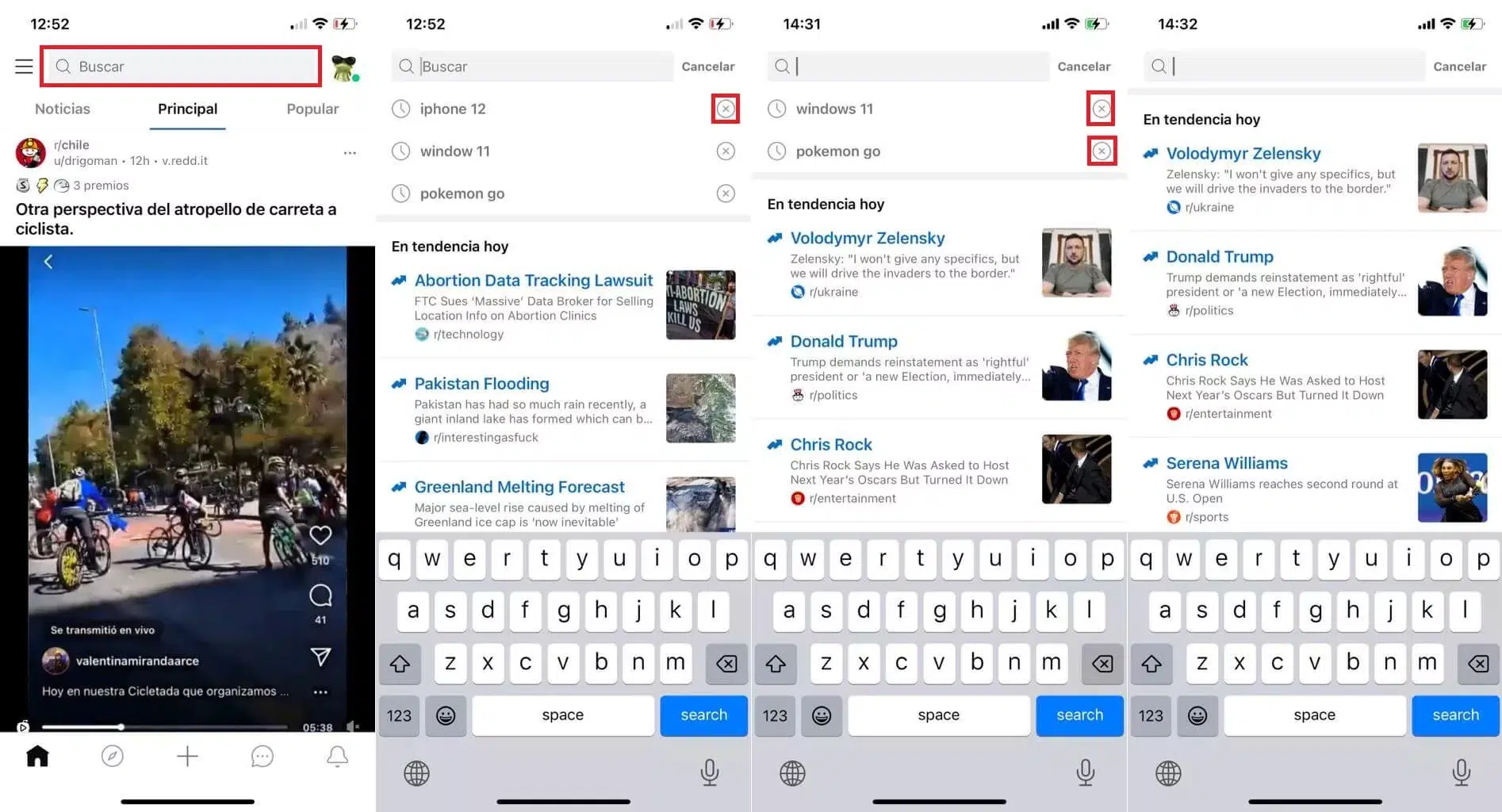
2. Click on the search field.

3. This will display several of the search terms used.

4. Select the X with each of the terms to be deleted so that they are deleted.
how-to-clear-reddit-history
Clearing Reddit search history

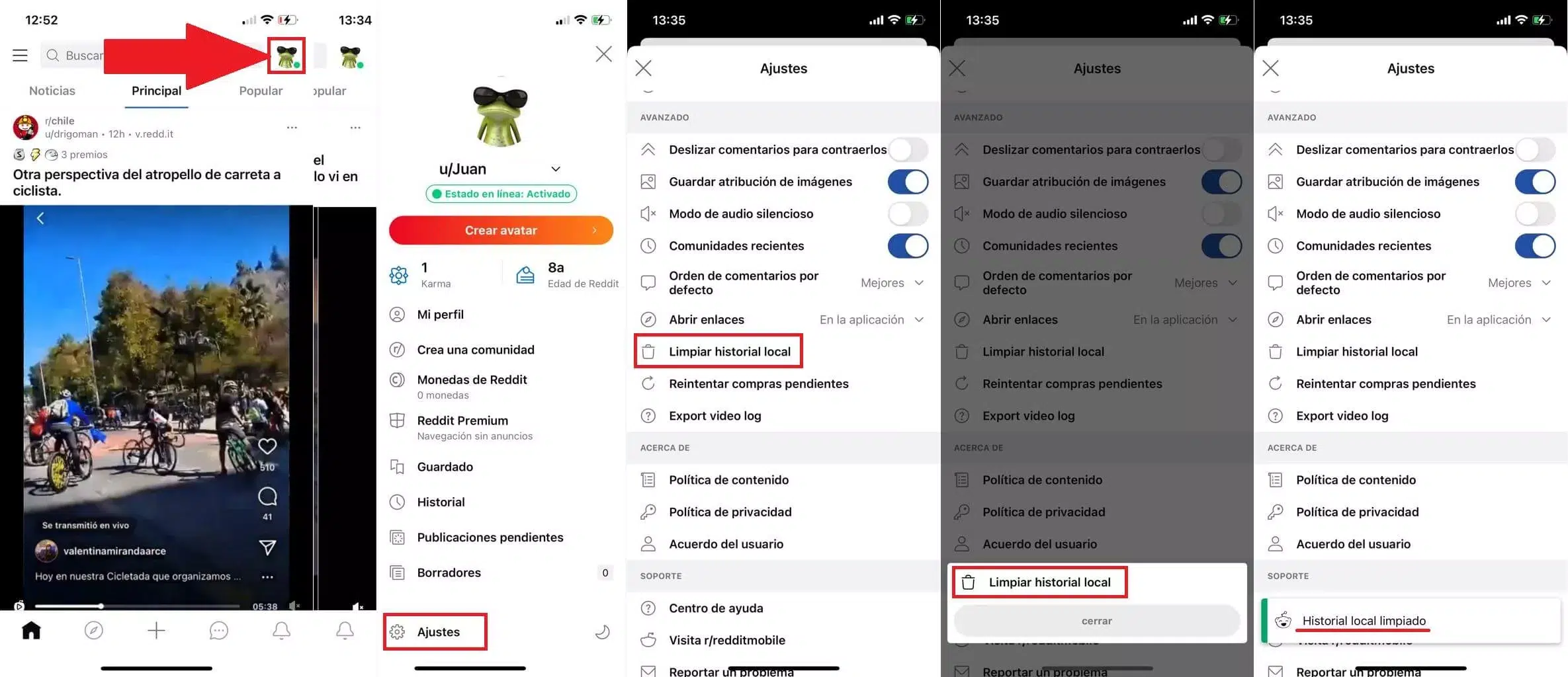
5. To delete all the history, click on the profile photo.

6. When the menu is displayed, select: Adjustments

7. This will show an adjustment list between which we must search and select: Clear local history

8. A small window will be displayed where we must confirm the deletion of the search history by clicking on Clear local history again.

9. Done; Reddit’s history will be removed entirely and with all search terms used.
how-to-clear-reddit-history
Reddit search history clearing method

How to clear Reddit history from the Web version?

  1. Open the Reddit website in your browser and log in to your account.

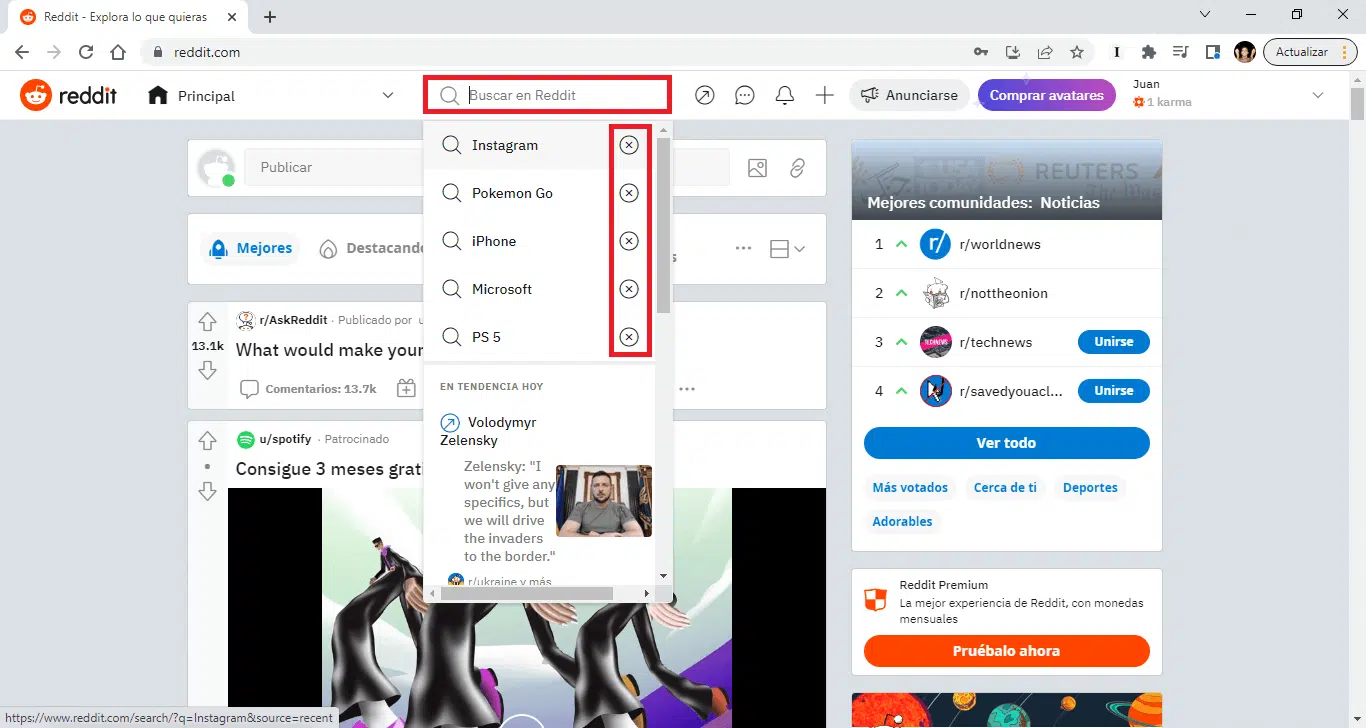
2. Here, do click in the search field.

3. At the top of the list will appear the last search terms used.

4. Next to them, you will see the icon: X

5. Click on the X icon next to the term you want to remove from the Reddit history.

6. This will delete the search terms from the Reddit history you want.
how-to-clear-reddit-history
Clearing Reddit search history from the web

Subscribe to Our Newsletter

Related Articles

Top Trending

Time to Value: How SaaS Teams Can Reach Results Faster
missing children in Bangladesh
When a Child Goes Missing, Where Does the State’s Responsibility End?
How to Onboard New Team Members With a Self-Serve Wiki
Jobs Taking Over By AI
12 Jobs AI is Changing Fastest And How Workers Are Adapting
When Should Kids Start Tracing Letters
When Should Kids Start Tracing Letters?

Technology & AI

Time to Value: How SaaS Teams Can Reach Results Faster
Best Productivity Gadgets for a Smarter Desk
10 Best Productivity Gadgets for Your Desk
SaaS status page tools
8 Best SaaS Status Page Tools for Reliable Updates
How to Build AI Literacy Without Writing Code
10 Ways to Build AI Literacy Without Writing Code
How to Measure Brand Visibility in AI Answers

GAMING

Intentional Screen Time
How to Spend Your Screen Time More Intentionally
Complete Guide on Game Programgeeks
Game Programgeeks: A Complete Guide on PC, Game Dev, and Tech
Online Color Game Philippines
Online Color Game Philippines: What Every Beginner Should Know Before Playing
Ways to Reduce Game Development Costs
12 Ways Studios Cut Game Development Costs
NFT game development cost
How Much Does NFT Game Development Cost? A Realistic Budget Breakdown

Business & Marketing

Time to Value: How SaaS Teams Can Reach Results Faster
How to Onboard New Team Members With a Self-Serve Wiki
How to Document Team Processes for Better Teamwork
How to Manage Scope Creep Before It Manages You
How to Manage Scope Creep Without Blocking Good Ideas
Made in America work boots
Made in America Still Matters When You’re Buying Serious Work Boots

EdTech & E-Learning

Mistakes Parents Made When Teaching Alphabet
8 Mistakes Parents Make When Teaching the Alphabet
best digital whiteboards for classrooms
12 Best Digital Whiteboards for Classrooms That Make Lessons More Interactive
Preschool Learning Games on Google Play
10 Best Preschool Learning Games on Google Play
Uppercase or Lowercase First for Children
Uppercase or Lowercase First? What the Research Says
EdTech Podcasts and Newsletters for Educators
10 Best EdTech Podcasts and Newsletters for Educators

Software & Apps

Time to Value: How SaaS Teams Can Reach Results Faster
SaaS status page tools
8 Best SaaS Status Page Tools for Reliable Updates
Best Project Management Tools for Agencies
8 Agency Project Management Tools Worth Considering
best flashcard apps for spaced repetition
10 Best Flashcard Apps for Spaced Repetition That Actually Help You Remember
best tools for async video updates
8 Best Tools for Async Video Updates That Keep Work Moving
























