
I don’t write production code. Even so, I supervised how AI coding tools built the audit tool, rank tracker, API integrations, and dashboard for RankPilot AI, the unified SEO platform we are building. It is still in development. That work taught me how to build AI literacy without writing code, and I learned most of it by getting things wrong first.
The problem is simple. AI tools can write code for you, but they can’t tell you when they are wrong. If you don’t understand how they work, you can’t guide them, check them, or stop them. Below are the 10 things I had to learn to do that job.
Short answer: To build AI literacy without writing code, start with three things. Learn how AI models produce answers, how much they can hold in memory, and where they make things up. Then practice on a real project with a clear spec, saved checkpoints, and a habit of reading errors instead of ignoring them.
1. How to Build AI Literacy Without Writing Code: Learn How the Model Answers
A language model predicts text. It picks the next likely word based on patterns from training and whatever you put in front of it. It does not look up facts unless it has a tool for that.
That one idea explained most of the strange behavior I saw later. A model can write a clean function that calls an API endpoint that doesn’t exist because the pattern looked right.
Image tools work differently. If your team also uses image generators, it helps to understand how diffusion models work. You don’t need the math. You need the right mental picture.
2. Understand the Context Window
This was the first concept I had to learn on the job. The context window is the model’s working memory for one session. In Claude Code, it holds your conversation, the files Claude reads, command outputs, project instructions, and system instructions. When it gets full, Claude Code summarizes older parts, and detailed instructions from early in the session can get lost.
That explained why the tool sometimes “forgot” a rule we had set an hour earlier. Here is what I do now:
- Put permanent project rules in a CLAUDE.md file, not in the chat. That file is reloaded after every compaction, while rules given only in conversation can disappear.
- Use /compact to summarize a long session when you still need to continue a feature, and /clear to start fresh.
- Keep one task per session when you can.
Cursor and Replit have the same limit under different names.
3. Treat Confident Answers as Drafts
AI does not sound unsure when it is wrong. It makes things up in the same calm tone it uses for facts. In code, this shows up as invented functions, wrong settings, or packages that don’t exist.
This is not rare. A study presented at USENIX Security 2025 tested 16 popular code models and found hallucinated package rates of at least 5.2% for commercial models and 21.7% for open-source ones. The risk is real, because attackers can upload malicious packages under those fake names.
My checks don’t need any code:
- Ask, “Is this package real? Give me its official page.” Then open the page yourself.
- Ask the model to list its assumptions before it builds anything.
- Ask a second model to review the first model’s plan.
4. Write the Spec Before the Prompt
Most of my job was writing instructions, not code. A vague request gets a guess. A clear spec gets something close to what you wanted.
Compare these two:
Weak: “Add a dashboard.”
Better: “Add a dashboard page that shows rank changes for one project over the last 30 days. Show a friendly message when there’s no data. Do not change the database structure.”
A good spec answers five questions. What should it do? What data comes in? What should the user see? What must never happen? How will we know it works?
5. Learn to Read Errors and Logs
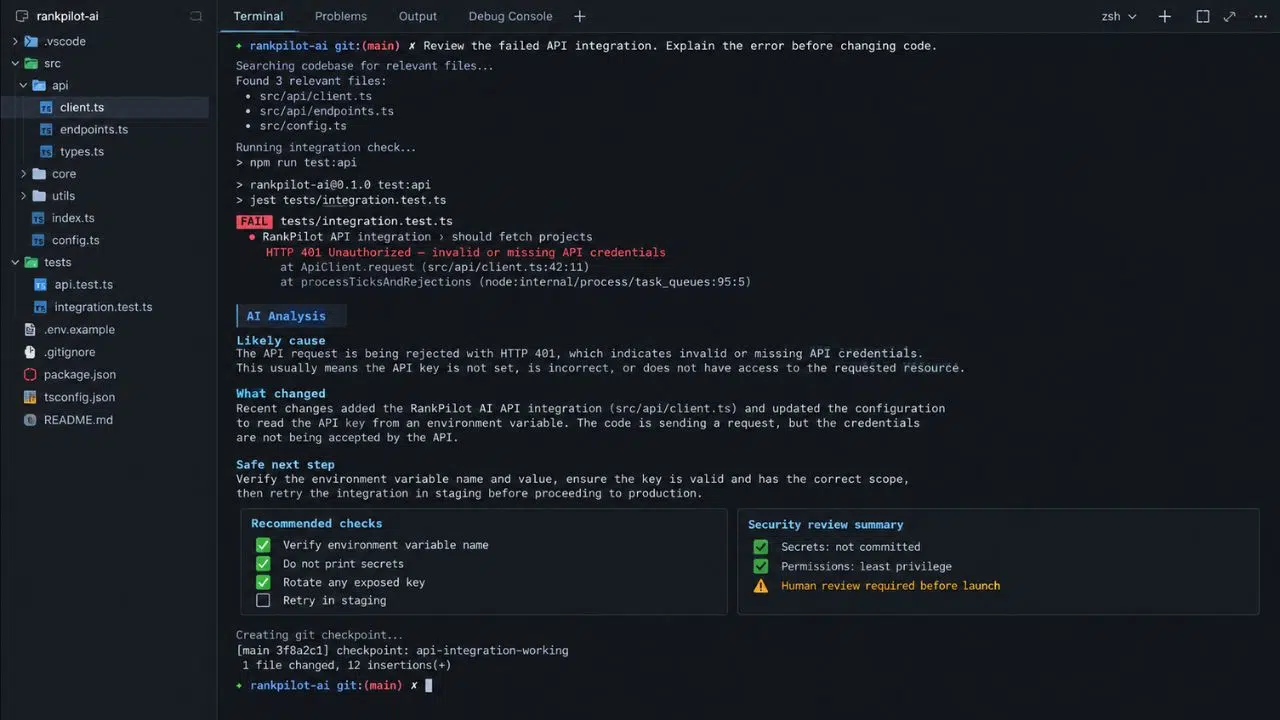
Our deployment broke when we integrated an API. The fix didn’t start with code. It started with reading.
You can read an error message without being able to write code. A few basics go a long way. A 401 or 403 status code usually means a key or permission problem. A 404 means the address is wrong. A 429 means too many requests. A 500 means something failed on the server side.
Learn where your hosting tool keeps its logs. When something breaks, paste the full error to the AI, not your summary of it. Then ask, “What changed since the last working version?” before you ask it to “fix it.”
6. Know the Danger Zones
Security and user data are where Claude Code struggled most for us. The security layer and the user database took more rounds of fixes than any other part of the build.
The research explains why. Veracode’s 2026 report found that about 44% of AI code generation tasks introduced a risky security flaw. The average security pass rate was 56%, almost the same as the 55% in its first report. In the same period, the models got very good at writing code that runs, but not code that is safe.
My rule is simple. Anything that touches passwords, payments, API keys, or personal data gets reviewed by a human expert before launch. Ask the AI to explain in plain words where secrets are stored and who can access each part of the database. If you can’t follow the answer, bring in help. Knowing where your own knowledge stops is part of AI literacy.
7. Save Your Work Often

AI tools can change ten files in one go. If one of those changes breaks something, you need a way back.
Learn the basics of commits and rollbacks, even if you never type a Git command yourself. This guide to version control for non-code projects is a good start. Save a working version before every big change. Don’t skip it.
8. Know When to Reset
Some bugs Claude Code simply could not fix. It would try, fail, try again, and make things worse. Each failed attempt filled the context window with bad ideas.
Anthropic’s own guidance matches what we learned. After two failed corrections, clear the session and write a better first prompt that uses what you learned.
When a reset doesn’t work either, try these next:
- Break the problem into a smaller piece.
- Explain the problem from scratch, as if to a new person.
- Try a different tool.
- Hand it to a human developer.
Knowing when to stop saves more money than any prompt trick.
9. Match the Tool to the Job
We used Claude Code for most of the work and Replit and Cursor only in a limited way. Each type of tool fits a different job:
| Tool type | Good for | Watch out for |
|---|---|---|
| Agentic coding tools (Claude Code) | Multi-file features, APIs, back-end work | Needs clear specs and careful review |
| AI code editors (Cursor) | Small edits you want to see line by line | You still judge every change. |
| Browser builders (Replit) | Quick prototypes with hosting in one place | Harder to manage as projects grow |
| No-code platforms | MVPs and internal tools | Less control over the details |
If your idea is still at the test stage, a no-code tool may be enough. See these no-code tools for a SaaS MVP and this list of no-code SaaS platforms for non-developers.
10. Take One Structured Course
Learning on a live project is fast but messy. One short course fills the gaps.
Anthropic’s AI Fluency: Framework and Foundations is a good choice. It is free, beginner level, and takes about three hours. It teaches four skills: delegation, description, discernment, and diligence. Those are the same skills this list has covered: choosing what to hand off, explaining it clearly, checking the output, and using AI responsibly.
If your company operates in the EU, this also has a legal side. The AI literacy duty in Article 4 of the EU AI Act has applied since 2 February 2025. The Digital Omnibus, in force since 27 July 2026, changed it from a duty to ensure a sufficient level of AI literacy into a duty to take measures that support it.
Final Thoughts on How to Build AI Literacy Without Writing Code
You don’t need to become a developer. You need to be the person who can tell when the AI is wrong. That is how to build AI literacy without writing code. Start with context windows and hallucinations, because they explain most failures. Then learn to read errors, protect your data, and save your work.
For our team, this knowledge cut development costs and saved time on RankPilot AI. A good first step is to pick one small feature this week. Write a one-page spec, give it to an AI coding tool, and review every change before you accept it.