
The best homework help apps for kids help them understand the assignment while leaving the answer in their hands. A child might need a clearer explanation, practice with a related skill, help reading a passage, or a way to check their reasoning. The right app gives them that support, then lets them return to the schoolwork on their own.
I have seen why that distinction matters with my nephew. He began learning letters with guidance, grew more independent, and later recognized those letters in books away from the screen. That is what I look for in a learning app: can the child use the skill when the app is closed?
The ten options below address different problems. Choose the one that fits the point where your child is stuck.
| App | Best for | What parents should know |
| Khan Academy | Understanding a difficult concept | Free lessons and practice; use a similar problem before the assigned one. |
| Khan Academy Kids | Early reading and math | Free; designed for ages 2–8. |
| IXL | Practising a specific weak skill | Free access is limited; subjects and features vary by country edition. |
| Prodigy Math | Making math practice engaging | Educational math content is free; optional membership adds features. |
| Brilliant | Reasoning through math and coding | Free access has daily limits; full tutor access is paid. |
| GeoGebra Graphing Calculator | Exploring and checking graphs | Can draw a finished graph, so use it after an attempt when permitted. |
| Read Along by Google | Reading aloud | Free Android app with English and Bangla among its languages. |
| Duolingo | Extra language practice | Free lessons; explanations vary by course. |
| Anki | Reviewing facts over time | AnkiDroid is free; the official AnkiMobile iOS app is paid. |
| Merriam-Webster Dictionary | Understanding unfamiliar English words | Definitions are useful; the child still needs to explain the word in context. |
1. Khan Academy: For the lesson behind the question
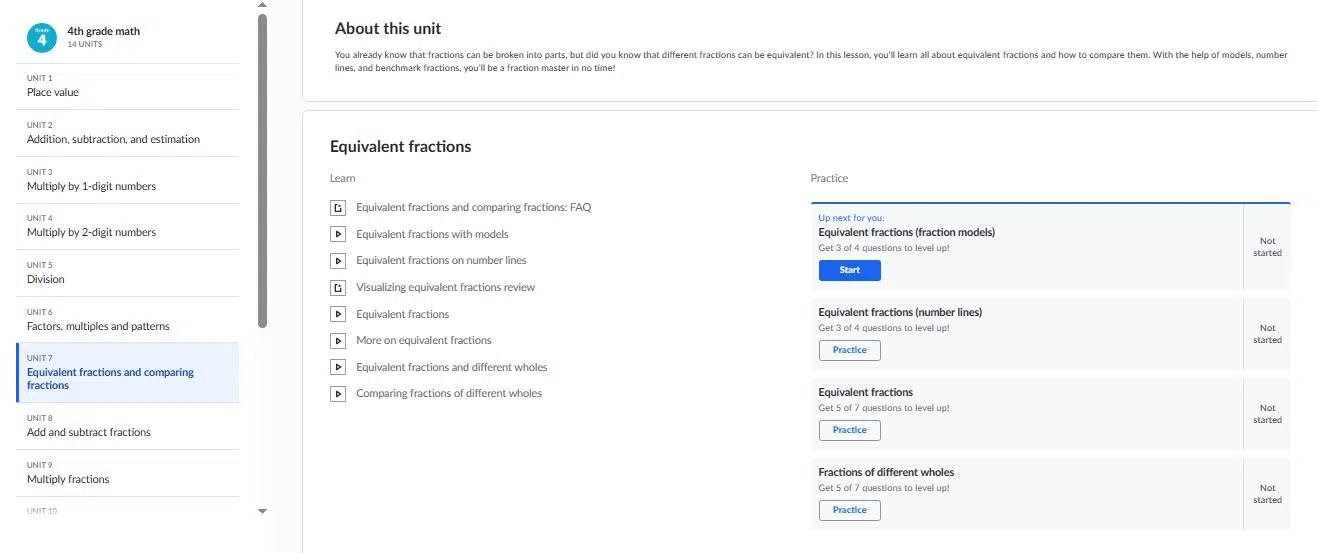
A child may be stuck on one math problem because an earlier idea never became clear. Khan Academy gives them a way to revisit that idea through lessons, videos, articles, and practice exercises. They can receive feedback and open hints when they need help.
Suppose the homework asks them to add fractions with different denominators. They can review how the method works, solve a separate practice problem, and then return to the question their teacher assigned.
The order matters. If a child opens every hint before trying, they may follow the steps without knowing why they work. Ask them to attempt a similar problem first, then explain the method aloud. Khan Academy’s regular lessons and practice are free. Its separate AI tutor, Khanmigo, has different access rules and should not be assumed to be part of the standard app experience.
2. Khan Academy Kids: For early reading and math foundations
For a younger child, the obstacle may be smaller than the worksheet makes it appear. A reading task can be difficult because letter sounds are still uncertain. An addition problem can be difficult because the child needs more practice recognizing numbers and quantities.
Khan Academy Kids offers books, games, and activities covering early reading, writing, language, and math. It is designed for ages 2 to 8 and is free for families. For homework purposes, it is most useful when an early elementary child needs practice with the skill behind an assignment.
Choose an activity connected to the difficulty you noticed. Afterwards, return to the book or worksheet and see what the child can do without the app. Khan Academy Kids builds foundations; it does not need to reproduce the teacher’s exact question to be helpful.
3. IXL: For the skill a child keeps missing
If the same mistake appears throughout a homework page, more guessing will rarely clear it up. IXL lets a learner work on a specific skill and gives feedback on their answers.
A child who repeatedly misses equivalent fractions, for instance, can practise that topic before returning to the assignment. This makes IXL useful when the parent or child can name the problem: It is this skill we need to work on.
Keep the session focused. A tired child does not necessarily benefit from a long stretch of extra questions. IXL offers limited free access, with broader access through a subscription. Its subjects and some features also vary across country editions, so check that the practice matches your child’s curriculum.
4. Prodigy Math: For children who resist extra practice
Prodigy Math places adaptive questions inside a game. Its educational math content covers grades 1 through 8 and is free, while an optional membership adds other features.
The game can make another round of practice more appealing to a child who has had enough of worksheets. If multiplication facts are slowing down the homework, for example, a short Prodigy session can give them more opportunities to answer those questions.
Set the goal before play begins. Otherwise, collecting rewards may become the main activity. When the child is done, offer a math question away from the game. Their answer will tell you more than their progress through its virtual world.
5. Brilliant: For working out why a method works
Brilliant teaches math and coding through interactive problems and visual explanations. Learners make choices and receive feedback as they work. Its tutor, Koji, is designed to guide their reasoning when they get stuck in supported activities.
It is a better fit once a child is comfortable with basic arithmetic and ready to work through ideas such as fractions and early algebra. Readiness matters more than a fixed age.
Brilliant can help a student understand a topic that appears in homework, though its courses will not necessarily follow the school’s sequence. Free access has daily limits, and full tutor access requires a paid plan. Let the child work through the related concept, then return to the assignment without carrying over a ready-made response.
6. GeoGebra Graphing Calculator: For checking math visually
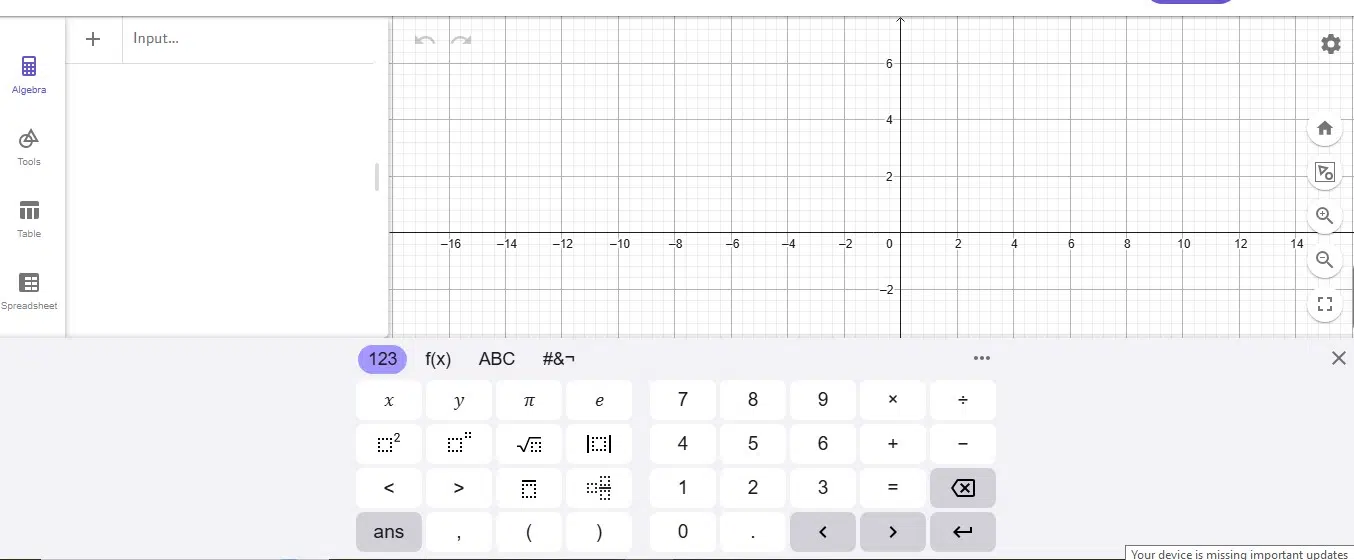
When a student is learning functions, seeing a graph change can make an equation easier to understand. GeoGebra Graphing Calculator lets them explore graphs and observe what happens when they change a value.
A useful exercise is to predict the graph first. What will happen if the slope increases? Where should the line cross the axis? The student can then use GeoGebra to test the prediction and explain any difference.
GeoGebra can also produce the finished graph. If drawing that graph is the assignment, the student should make their own attempt first. Use the app to check the work only when the teacher permits a graphing calculator.
7. Read Along by Google: For getting through the reading
Reading homework becomes frustrating when a child gets stuck on word after word. Read Along by Google listens as a child reads aloud and offers help when needed. Its free Android app includes English and Bangla, among other languages, and can work offline after the initial download. A browser version is also available.
It is best suited to children who already know some letters and are beginning to read. The child still does the reading; the app helps them move past difficult words.
Once the passage is finished, put the device aside and talk about it. Ask what happened or which part of the text supports an answer. Reading the words and understanding the passage are related skills, but the child needs to practise both.
8. Duolingo: For practising a school language
A child may need more repetition with vocabulary or grammar than a homework sheet provides. Duolingo offers short language lessons that can give them that extra practice. In supported courses, “Explain My Answer” also provides feedback on a response.
The child can practise a language pattern in the app, then write the sentences required for school in their own words. Saying a new phrase aloud or using it in a different sentence can help you see whether they understand it.
Duolingo will not necessarily cover topics in the order the teacher does. Its explanation feature also varies by course. Use it to strengthen language skills around the assignment rather than search for a matching answer.
9. Anki: For remembering what they have learned
Some assignments require a child to recall terms, formulas, dates, or definitions. Anki uses flashcards and spaced review so learners return to information over time.
The most useful cards come from the student’s own lessons and notes. They read a question, try to recall the answer, and turn the card over after making an attempt. A parent can help a younger learner make a small set; an older student may prefer to manage their own.
Anki helps with recall, but memorizing a definition is not the same as applying it. Mix fact cards with questions such as “How would you use this?” or “Why does this rule apply here?” AnkiDroid is free on Android, while the official AnkiMobile app for iOS is paid.
10. Merriam-Webster Dictionary: For understanding the word that blocks the question
One unfamiliar word can make a reading passage or instruction seem much harder than it is. The Merriam-Webster Dictionary & Thesaurus app gives students definitions and related words they can consult while reading and writing.
Looking up the word is only the first step. Ask the child which meaning fits the sentence, then have them explain the idea in their own words. If they use the thesaurus while writing, they should choose a word they understand and would naturally use.
Merriam-Webster is an American English reference, so spelling conventions may differ from those used at school. Its dedicated Kids dictionary is an additional in-app purchase. Younger children may need help choosing the right meaning when an entry lists several.
Why some familiar apps are absent
Photomath can scan a math problem and display a solution. Brainly provides answers to homework questions. Quizlet has useful flashcards, but it also offers textbook solutions. Grammarly can give writing feedback, while some features can rewrite a student’s text.
Those tools can have appropriate uses under a teacher’s rules. Their answer and rewriting features make them harder to recommend for a list centred on children doing their own work. If a student uses one to check an attempt, they should still be able to explain and revise the answer independently.
How to tell whether an app is helping
First, find the precise point where the child is stuck. “I don’t get it” might mean they cannot read the question, have forgotten a definition, or missed an earlier lesson. Each problem calls for a different kind of help.
Then give the app one job:
- Let the child attempt the assignment: Even an incomplete attempt shows what they understand.
- Practise the missing skill: Pick a lesson, reading exercise, graph, or set of recall cards related to that difficulty.
- Return to the schoolwork: Close the app and let the child try the assigned question again.
- Ask for an explanation: “How did you work that out?” reveals more than “Did you finish?”
Keep the teacher’s instructions in view, especially for calculators and AI tools. Before making an account for a younger child, check the app’s age rules and privacy settings as well.
The Work Should Still Be Theirs
I would judge a homework app by what a child can do after putting the device down. Can they explain the step they missed? Can they solve a similar question with different details? Can they notice when an answer does not make sense?
Choose the app for one specific obstacle, let it help with that skill, and then give the assignment back to the child. The work may take longer tonight. The understanding they carry into the next lesson is theirs.
Frequently Asked Questions on the best Homework Help Apps for Kids
Are homework help apps cheating?
Practising a related skill or reviewing a lesson is different from submitting an answer produced by an app. What is permitted depends on the assignment and the teacher’s rules. When those rules are unclear, ask before using a tool that can calculate, generate, or rewrite the response.
Which apps can I try without paying?
Khan Academy, Khan Academy Kids, GeoGebra Graphing Calculator, and Read Along by Google offer free access to the uses described here. Prodigy Math’s educational math content is free, and Duolingo has free lessons. IXL and Brilliant limit free use. AnkiDroid is free on Android, while AnkiMobile on iOS is paid. Check current terms before purchasing, as plans and features can change.
What if my child still cannot complete the homework?
Tell the teacher where the child gets stuck and what they have already tried. That gives the teacher something more useful than an unfinished page alone. The child may need an explanation of an earlier skill, a different way of approaching the question, or direct support at school.