A health app may need your workout route to map a run. It may not need your location all day. That distinction is easy to miss when setup screens ask for several permissions at once. The health app privacy risks worth checking include unclear data sharing, third-party tracking, sensitive location histories, weak account security, and uncertainty about what happens to information after you delete an account.
These risks vary by app. The examples below do not mean every health app shares or misuses data. They show why it is worth checking what an app collects, who may receive it, and what controls you actually have. A polished interface or a health-related purpose does not answer those questions by itself.
1. Privacy policies that leave key details unclear
A privacy policy can be easy to find and still be hard to understand. Look for concrete answers: what information the app collects, why it needs it, how long it keeps it, and what types of companies may receive it.
Phrases such as “improve our services” or “work with trusted partners” leave important details unstated. Does “partners” mean a cloud provider, an analytics company, an advertiser, or several kinds of recipients? Does the policy explain whether information is linked to your account or device?
Read the sections on sharing, advertising, and retention—not just the summary at the top. If those sections do not explain what happens to sensitive information in plain terms, think twice before entering details you would not want used for another purpose.
2. Health details passed to advertising and analytics tools
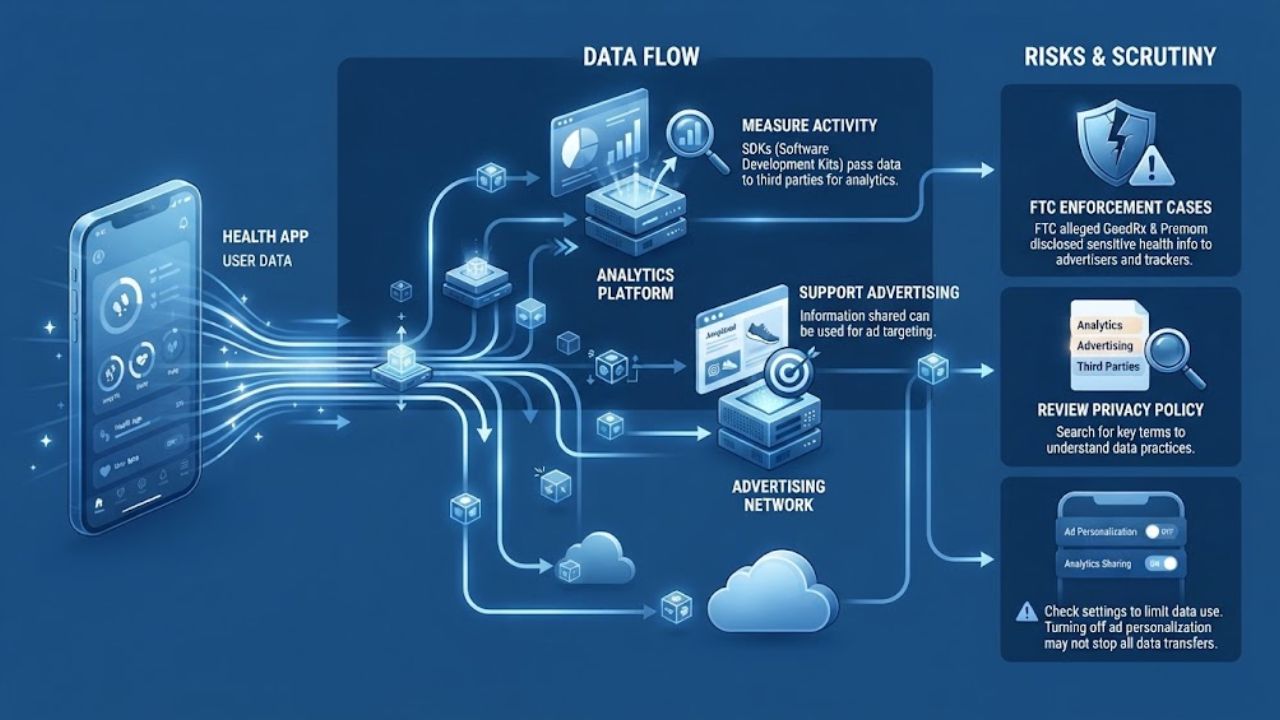
Apps may include software development kits (SDKs) to measure activity or support analytics and advertising. An SDK can send information to the company that made it. What it receives depends on the app’s setup, so the presence of an SDK alone does not prove that sensitive data is being disclosed.
The FTC’s cases involving GoodRx and Premom show why this deserves attention. The FTC alleged that GoodRx disclosed personal health information to advertising companies. In the Premom case, the FTC alleged that third-party tracking tools shared sensitive health and device information. These were specific enforcement cases, not evidence that every health app uses tracking the same way.
Search the privacy policy for terms such as “analytics,” “advertising,” and “third parties.” If the app offers a setting to limit data use, see whether it covers analytics as well as personalized ads. Turning off ad personalization on your phone may not stop all app-to-company data transfers.
3. A profile assembled from separate details
A sleep schedule, age range, activity pattern, and general location may each seem unremarkable. Together, they can reveal a routine or suggest health interests. Connected services can add still more context.
That does not mean an app has made a reliable medical assessment. It means a collection of ordinary details may become more revealing when combined. HHS warns that information collected by apps and devices may be viewed by other entities, used for targeted ads, or sold to data brokers.
This risk is easy to overlook when each screen asks for one small piece of information. Before linking another service, ask whether the connection adds a feature you will actually use. If not, leave it disconnected.
4. “Anonymous” data that may still be identifying
“Anonymous,” “aggregated,” and “de-identified” can describe steps taken to reduce privacy risks. They are not a promise that information could never be connected to a person. A distinctive location pattern or device identifier, combined with other records, may make someone easier to recognize.
The FTC’s developer guidance discusses re-identification risks, including with location data. That does not mean every de-identified dataset can be traced to an individual. It does mean the label alone is not enough to assess the risk.
Look for an explanation of what the app means by de-identified, whether data is shared, and whether it remains linked to your account or device. If the policy offers no detail, treat the claim cautiously.
5. Location history that exposes sensitive visits
Location access can help an app map a run or record a cycling route. Continuous access may reveal much more: where you spend time, which services you visit, and how often you return.
In a case involving data broker X-Mode and its successor Outlogic, the FTC said precise location data could be used to track visits to sensitive places, including medical and reproductive health clinics. The FTC finalized an order in that case. It involved a data broker’s practices; it does not show that every health app sells location data.
If an app only needs location for a route, continuous background access may be more than you need. Check whether your phone offers a “while using” option or lets you deny location access entirely. Some features may stop working without it, so decide whether that trade-off is worthwhile.
6. Permissions that do not fit the feature
A fitness app may need motion access to count steps. A different feature might request contacts, photos, a microphone, or location. Some requests may support a feature you do not use; others may be difficult to justify from the app’s main purpose.
Device permissions and privacy policies answer different questions. A permission setting tells you what the app can access on your phone. It does not explain everything the app does with information you enter or send to its own servers.
Review permissions in your phone’s settings after setup, when you have had time to consider them. Remove access that is not needed for a feature you use. If the app stops working, you can decide whether that feature is worth restoring the permission for.
7. Data that travels through connected apps and devices
A health app linked to a smartwatch, food diary, or another health platform can save manual entry. It can also send information between services, each with its own privacy policy and account settings.
Before connecting services, check what categories of information will sync and whether you can limit the transfer. Do not assume a link sends only the one data point you had in mind. When you stop using an integration, disconnect it in the settings of both services if possible.
Deleting information from one app may not delete a copy stored by another. That is a practical reason to connect only the services you need.
8. A data breach or an exposed account
Health information can be exposed in a security incident or through someone accessing an account or unlocked phone. No privacy setting can eliminate that risk, but basic account protections reduce avoidable exposure.
Use a unique password for each health app, enable multifactor authentication if available, and protect your phone with a screen lock. Avoid staying signed in on a shared device. These steps matter most when an app holds information you would not want another person to see.
In the United States, the FTC Health Breach Notification Rule applies to certain businesses outside HIPAA and sets requirements for qualifying breaches. It does not cover every health app. The FTC rescinded its separate 2021 policy statement about the Rule in September 2026; the statement and the Rule are distinct.
9. Information left behind after account deletion
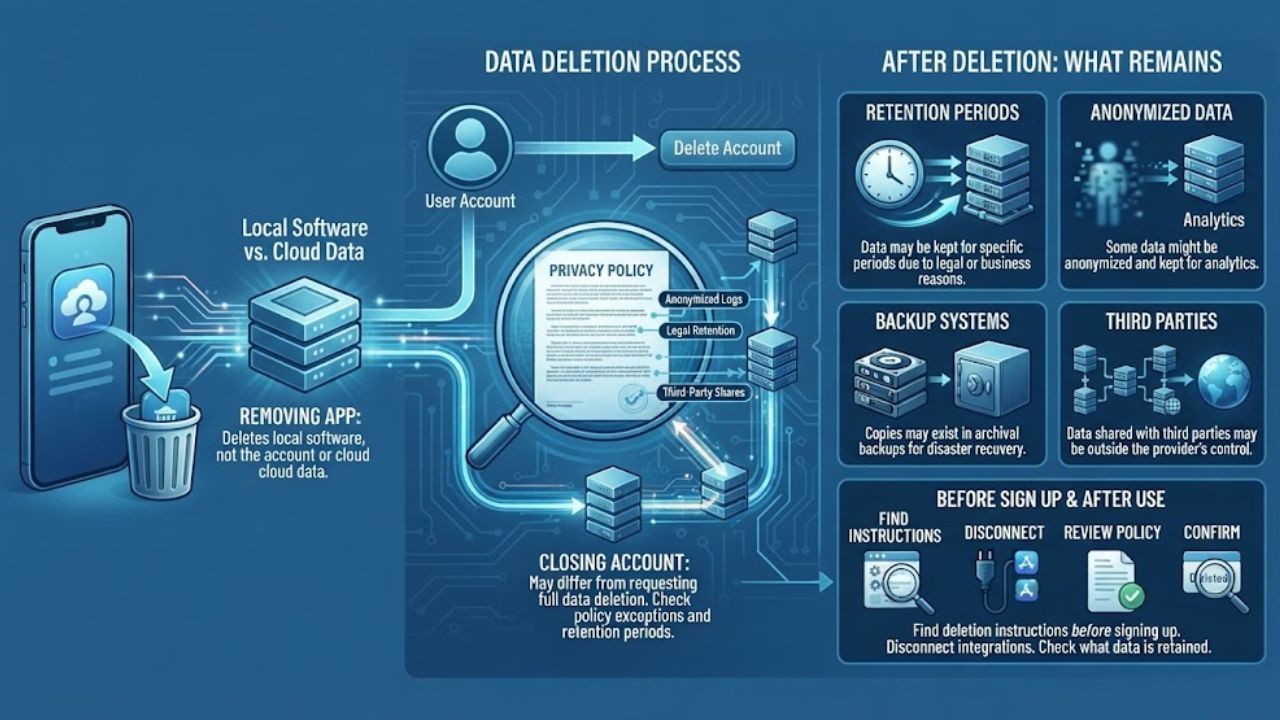
Removing an app from your phone usually removes the local software, not necessarily the account or data held by the provider. Closing an account may also differ from requesting deletion of stored information.
Before signing up, find the account deletion instructions. If you stop using the service, follow those instructions, disconnect integrations, and check whether the provider explains what information it may retain. A company’s policy may describe exceptions or retention periods; do not assume that tapping “delete account” removes every copy immediately.
10. Assuming a health privacy law covers every app
A health-related purpose does not automatically bring a consumer app under HIPAA. In the United States, HIPAA applies to covered entities and their business associates. HHS says that personal-use app data is generally not protected by HIPAA unless the app is provided by a covered entity or business associate. Other rules may still apply.
Protections differ across countries. In the European Union, the GDPR classifies health data as a special category of personal data and sets specific conditions for processing it. That is meaningful protection, but it does not make every app’s practices identical or remove the need to check the app’s policy.
Find out which company provides the app and what privacy notice applies to your account. Treat a legal label or healthcare connection as one piece of information, not a substitute for checking what the app collects and shares.
Final Thoughts
You do not have to avoid health apps to protect your privacy. Start with the app you use most: check its sharing and location settings, remove permissions you do not need, and secure the account. If you cannot find a clear explanation of how sensitive information is handled, consider whether the app’s benefit is worth the uncertainty.
The health app privacy risks that matter most depend on the information you share and the services you connect. A few minutes reviewing settings before entering more data can help you make a deliberate choice.
Frequently Asked Questions (FAQs) About Health App Privacy Risks
Does HIPAA protect information I enter into any health app?
No. HHS says HIPAA generally does not protect information in a personal-use app unless it is provided by a covered entity or its business associate. Other laws may apply depending on the service and location.
If I turn off ad tracking, does that stop all data sharing?
Not necessarily. Phone-level tracking controls may limit certain forms of advertising tracking, but they may not govern every analytics tool, account-linked transfer, or disclosure described in an app’s policy. Review the app’s own privacy settings too.
Is deleting the app enough when I stop using it?
Usually, deleting the app removes it from your phone; it does not necessarily close your account or delete information held by the provider. Use the account deletion process and review connected services separately.