

Want to change the voice for your marketing videos with AI voice filters to capture audience attention? This article is here to offer you a complete and detailed guide to tailor interactive and engaging videos with diverse AI voice options. Whether you want to make appealing marketing videos with cartoon voices for children or adjust your current promotional video voice to a deeper tone to resonate with your branding message, everything is covered in this article. Explore the magic below!
Guide for AI voice video with CapCut Pippit AI
You can open Table of Contents
show
Before starting to make AI voice videos, you need to pick a free AI video generator that can help you tailor visually appealing and high-quality videos. CapCut Pippit AI is a recommended option for you in this case. Enjoy various style-diverse AI voice filters to match your purposes and target audiences. No professional editing skills or experiences are needed. Everything is simple for even non-professional editors or business starters who can transform their content and grow their channels. What you need to do is go to the main interface of CapCut Pippit AI and sign up for your account by clicking on the button “Start for free.” After all, follow the simple and intuitive guide below:
Step 1: Go to the video generator
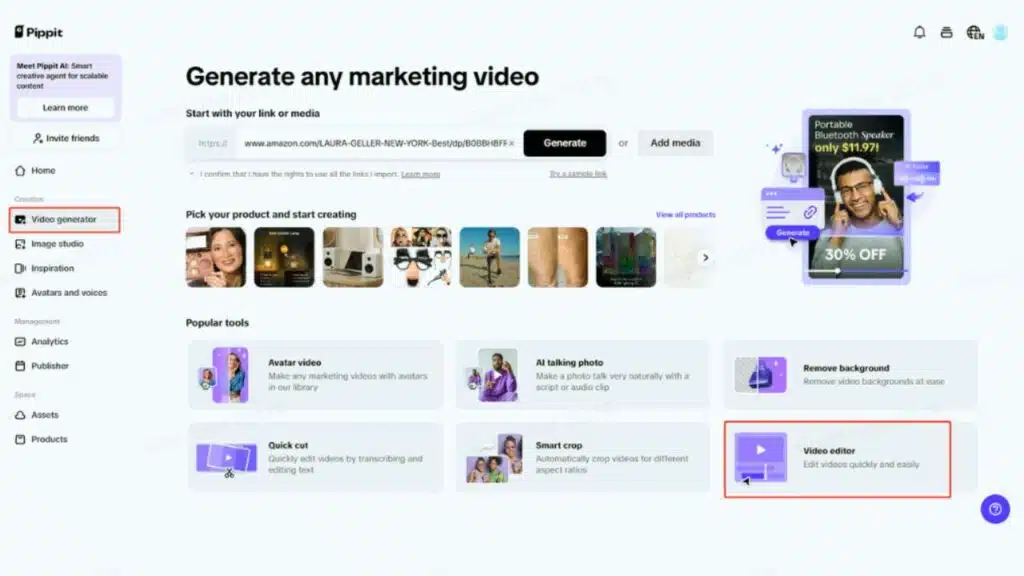
At the main interface, locate the button “Video generator” and then click on the button “Video editor” to be directed to the main online editing interface to customize your video with AI voice.
Step 2: Create your video with AI voice
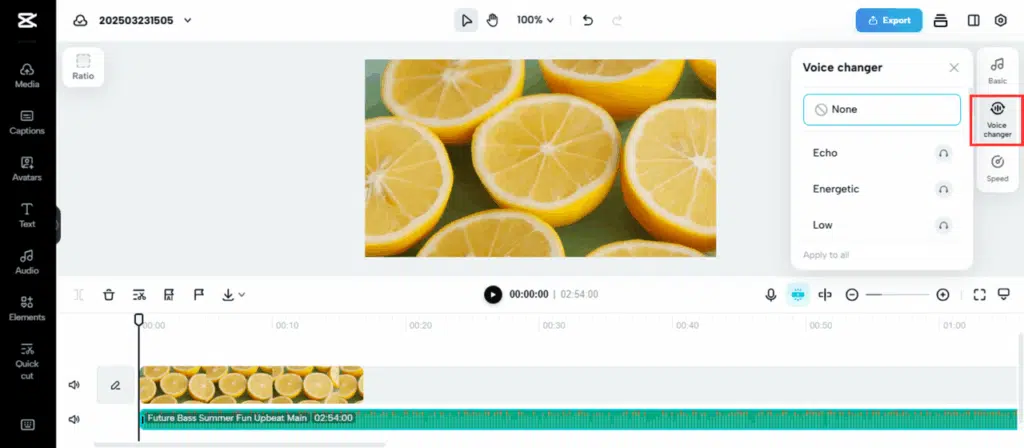
Click on the “Media” button and choose “Upload” to upload your media files to make videos with AI powers. You can also choose to upload files from your phone, start a new video recording, or even edit with reference from a computer or related link. After uploading your videos and audio, choose the “Voice changer” button and pick your preferred voice option. After all, you can also tailor your voice settings with other options to adjust for voice speed and volume or reduce noise with the “Basic” and “Speed” buttons. Feel free to level up your video further with other interesting AI-powered elements, such as AI caption from an AI caption generator, or insert special animations to ensure a smooth transition between each scene in your video.
Step 3: Export your video
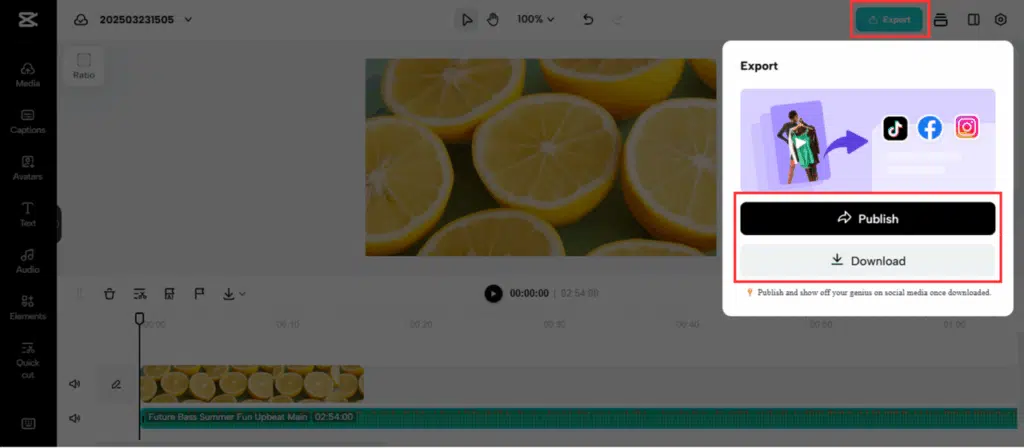
When you are feeling happy with your video, click on the button “Export.” Here, you can choose the “Download” button to save your video with customized settings. If you want to schedule video publishing on social channels with CapCut Pippit AI’s publishing feature, click on the “Publish” button, choose your sharing platform, and add a captivating video description.
Bonus tips for engaging and natural shoppable content with AI voice
To make captivating and engaging shoppable videos with AI voices, here are some tips that you can use to maximize the impact. Here is your magic:
1. Choose the right AI voice filter
First, what you need to consider most is to pick an appropriate and right AI voice filter that matches your shoppable content in seconds. You can ask yourself some questions, such as who your target audiences are and what their preferences or interests are, to tailor the perfect voice option that meets their needs. Moreover, you should also pick an AI-powered voice filter that can easily resonate with your video content for sparking customers’ interest. For example, if your shoppable content is touching, choose a deep AI voice to lend you a hand.
2. Adjust voice settings
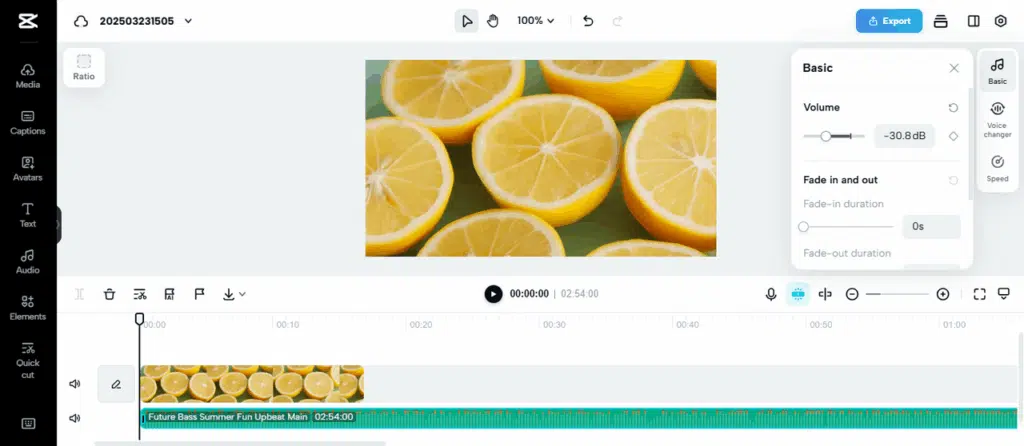
Another powerful and effective tip that you can do to boost your shoppable content with AI voice to the next level is to adjust voice settings. Change your voice volume and speed or reduce noise aspects that can affect your audio quality. With CapCut Pippit AI, you can freely edit all these voice aspects and settings for harmonious and perfect audio with ease.
3. Double-check the quality
The final thought is to spend your time double-checking your audio and video quality. This action will allow you to fix any problem in your audio or video perfectly. Ensure high-quality video output is ready for sharing or use. Avoid any quality-related or future problems in your videos.
Conclusion
To make interactive videos with AI voice, you can come to CapCut Pippit AI’s free AI video generator, which offers you a one-click solution for harmonious and captivating audio with ease. Free your worries about lack of experience or professional skills for video editing with AI voice. CapCut Pippit AI provides you with a three-step solution to make your dream come true. What you need to do is to go to the video generator, create your video with AI voice, and export your video. Feel free to shine up and level up your shoppable video further with AI-powered magic, such as creative graphics for attention-grabbing video visuals or background music stocks for harmonious and lovely video effects. Everything is ready to cover all your needs. You can also optimize this magical space to make your video with AI voice more natural and engaging at CapCut Pippit AI by optimizing massive collections of voice filters, adjusting voice settings with diverse options, or even double-checking the video quality. Explore CapCut Pippit AI to drive more engagement to your shoppable content with AI voice options!
























