Google’s New School Time Feature Enhances Focus on Android Smartphones

Googles School Time Feature Android Smartphones

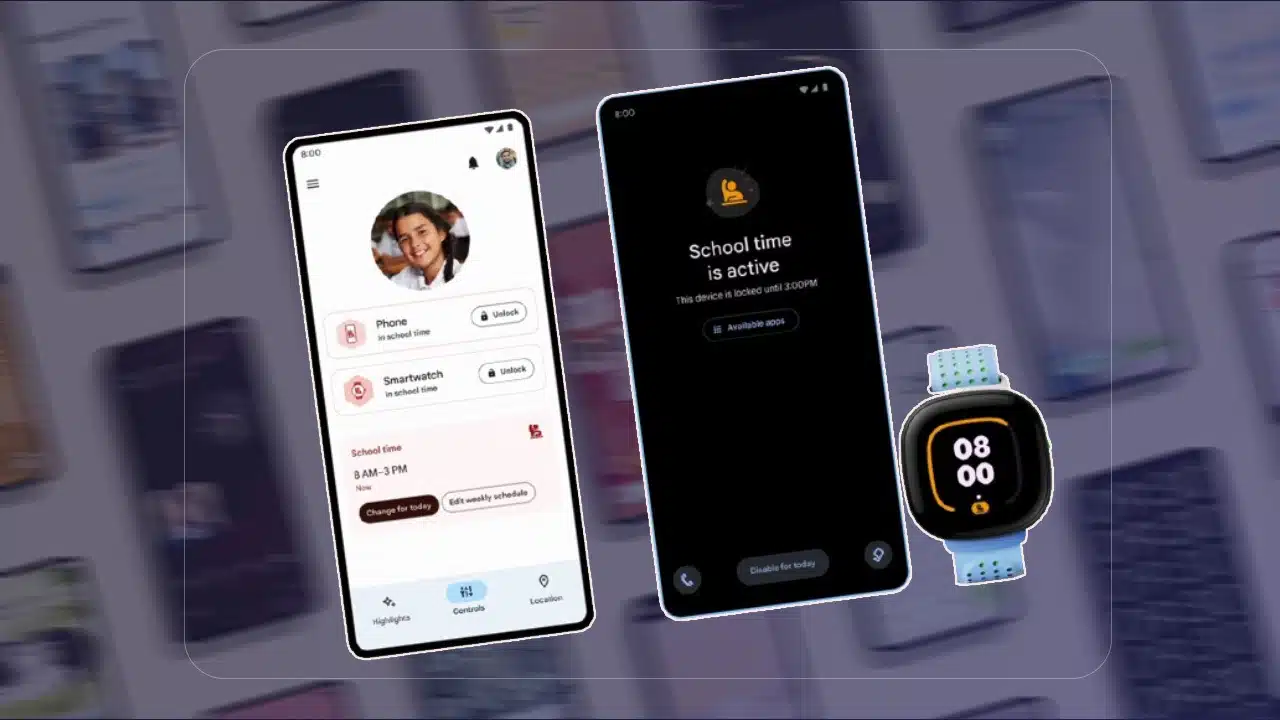
Google is rolling out a new feature called “School Time” for Android smartphones, designed to help students and parents manage device usage during school hours. This feature aims to enhance focus and minimize distractions, making it easier for students to concentrate on their studies.

What is the School Time Feature?

The School Time feature is a tool within Google’s Family Link app, that allows parents to set digital ground rules for their children. It enables parents to restrict access to certain apps and notifications during designated school hours. Parents can prevent their kids from becoming distracted by their phones while studying by customizing the schedule.

Key Features of School Time

  1. Customizable Schedules: Parents can set specific time blocks when the School Time feature is active. During these periods, access to distracting apps and notifications is limited.
  2. App Restrictions: Parents can choose which apps are accessible during school hours. Parents can restrict games and social media while maintaining access to essential apps like educational tools or emergency contacts.
  3. Notifications Silence: Notifications are paused during school time to prevent distractions. This allows students to concentrate on their tasks without being interrupted by alerts or messages.
  4. Usage Reports: Parents receive detailed reports on how their children use their devices. Parents can adjust restrictions based on screen time and the most used apps.

Why is School Time Important?

With the increasing reliance on digital devices for learning, it is crucial to balance educational use with potential distractions. The School Time feature addresses this by creating a structured environment that encourages productivity and minimizes the temptation to engage with non-educational content.

How to Use School Time

Parents must have the Family Link app installed on their and their children’s devices in order to use the School Time feature. The setup process involves the following steps:

  1. Install Family Link: Download and install the Family Link app from the Google Play Store.
  2. Create a Family Group: Set up a family group and add your child’s account to it.
  3. Configure School Time: Navigate to the School Time settings within the Family Link app. Set the desired schedule and select which apps to restrict during these periods.
  4. Monitor and Adjust: Regularly check usage reports and adjust the School Time settings as necessary to ensure it meet your child’s needs.

Benefits for Students and Parents

The School Time feature offers several benefits:

  • Enhanced Focus: By limiting access to distracting apps and notifications, students can maintain better focus during study hours.
  • Parental Control: Parents can feel more at ease knowing they control their children’s device usage.
  • Healthy Digital Habits:  Encouraging structured device use helps students develop healthy digital habits that balance education and recreation.

Google’s School Time feature is a valuable addition to the Family Link app, providing a practical solution for managing device usage during school hours. By allowing parents to customize restrictions and monitor usage, it helps create a focused and distraction-free learning environment for students. As digital learning becomes more prevalent, tools like School Time play a crucial role in ensuring students can maximize their educational opportunities while maintaining healthy digital habits.



Subscribe to Our Newsletter

Related Articles

Top Trending

best gaming chairs for posture
The 6 Best Gaming Chairs for Posture Support in 2026
On This Day February 13
On This Day February 13: History, Famous Birthdays, Deaths & Global Events
Benefits of Slow Living in 2026
Why "Slow Living" Is The Antidote To 2026 Burnout: Revive Yourself!
Best countertop composters
The 4 Best Countertop Composters Reviewed: Go Green!
The Fallen Banyan- A Shadow That Still Shelters Our Souls
The Fallen Banyan: A Shadow That Still Shelters Our Souls

Fintech & Finance

7 Best Neobanks for Cashback Rewards in 2026
7 Neobanks Offering the Best Cashback Rewards in 2026
10 Influential Crypto Voices to Follow in 2026
10 Most Influential Crypto Voices to Follow in 2026: The Ultimate Watchlist
10 Best No-Foreign-Transaction-Fee Cards for Travelers
10 Best No-Foreign Transaction-Fee Credit Cards for Travelers
Best Business Credit Cards for Ecommerce
Top 5 Business Credit Cards for E-commerce Owners
budget apps that sync with your bank
10 Best Budgeting Apps That Sync With Your Bank [2026 Edition]

Sustainability & Living

top renewable energy cities 2026
10 Cities Leading the Renewable Energy Transition
Editorialge Eco Valentine T-shirts
Wear Your Heart Green: Editorialge Eco Valentine T-Shirts & Hoodies Review
Top 5 Portable Solar Generators for Camping in 2026
Top 5 Portable Solar Generators for Camping in 2026: Field-Tested Reviews
Water-Saving Habits
Water-Saving Habits That Actually Make a Difference: Transform Your Life!
clean tech breakthroughs
The Top 6 Clean Tech Breakthroughs from Late 2025 You Probably Missed!

GAMING

best gaming chairs for posture
The 6 Best Gaming Chairs for Posture Support in 2026
15 Cozy Games to Start Your New Year Relaxed
15 Cozy Games to Start the New Year Relaxed and Happy
console quality mobile games
5 Mobile Games That Actually Feel Like Console Experiences of 2026
best monitors for RTX 5000 series
Top 10 Gaming Monitors for the New Graphics Cards of 2026
Narrative Design hero's journey
Narrative Design in 2026: Moving Beyond the "Hero's Journey"! A Revolution Awaits!

Business & Marketing

Best Business Credit Cards for Ecommerce
Top 5 Business Credit Cards for E-commerce Owners
Top 6 Marketing Automation Tools With Best AI Integration
Corporate Social Responsibility
Corporate Social Responsibility: Why Employees Demand Action, Not Words
8 SaaS Trends Watching Out for in Q1 2026
8 Defining SaaS Trends to Watch in Q1 2026
How To Win Chargebacks
Mastering Dispute Resolution: How to Win Chargebacks in 2026 [Insider Tips]

Technology & AI

Best water filtration systems
The 4 Best Water Filtration Systems for You and Your Family
Best dedicated server providers for high-traffic sites
The 5 Best Dedicated Server Providers for High-Traffic Sites in 2026
Best crypto tax software
The 5 Best Crypto Tax Software Tools for the 2025 Tax Year. No More Mistakes
How to Install Mozillod5.2f5
Step-by-Step Guide: How to Install Mozillod5.2f5 and Firefox Successfully
best monitors for RTX 5000 series
Top 10 Gaming Monitors for the New Graphics Cards of 2026

Fitness & Wellness

Benefits of Slow Living in 2026
Why "Slow Living" Is The Antidote To 2026 Burnout: Revive Yourself!
JOMO outperforming FOMO
The Joy of Missing Out: Why JOMO is Outperforming FOMO in 2026
Dopamine Detox
Dopamine Detox 2.0: Reclaiming Attention in an Algorithm-Heavy World
The 7 Best Employee Wellness Apps for 2026
The 7 Best Employee Wellness Apps for 2026: A Complete Guide for HR Leaders
Sukanta Kundu Spinal Surgery Recovery
The Weight of the World: From a Broken Spine to a Miraculous Resurrection