College life throws curveballs at students every day. You juggle assignments, research papers, group projects, and online classes while trying to stay organized. Your Windows computer sits there, loaded with basic programs that barely scratch the surface of what you need.
Most students struggle with scattered notes, missed deadlines, and clunky file management that makes simple tasks feel like climbing Mount Everest.
Microsoft Office dominates campus life, but smart students know that free Windows apps can transform their academic game completely. These digital tools turn your computer into a productivity powerhouse that handles everything from PDF editing to distraction blocking.
This guide reveals twelve game-changing applications that will streamline your workflow, boost your grades, and save precious time for the things that actually matter. Your study sessions are about to get a serious upgrade.
Key Takeaways
- Microsoft OneNote offers free cross-device note syncing with audio recording and handwriting support for complete academic organization.
- Google Drive provides 15 GB free storage with real-time collaboration tools for seamless group projects and document sharing.
- Grammarly catches grammar mistakes and offers plagiarism detection to improve academic writing quality across all platforms instantly.
- Trello uses visual boards and team collaboration features to transform chaotic assignments into organized, manageable project workflows.
- These twelve free Windows apps boost student productivity by handling note-taking, file storage, writing, and project management efficiently.
Microsoft OneNote: Essential Note-Taking App
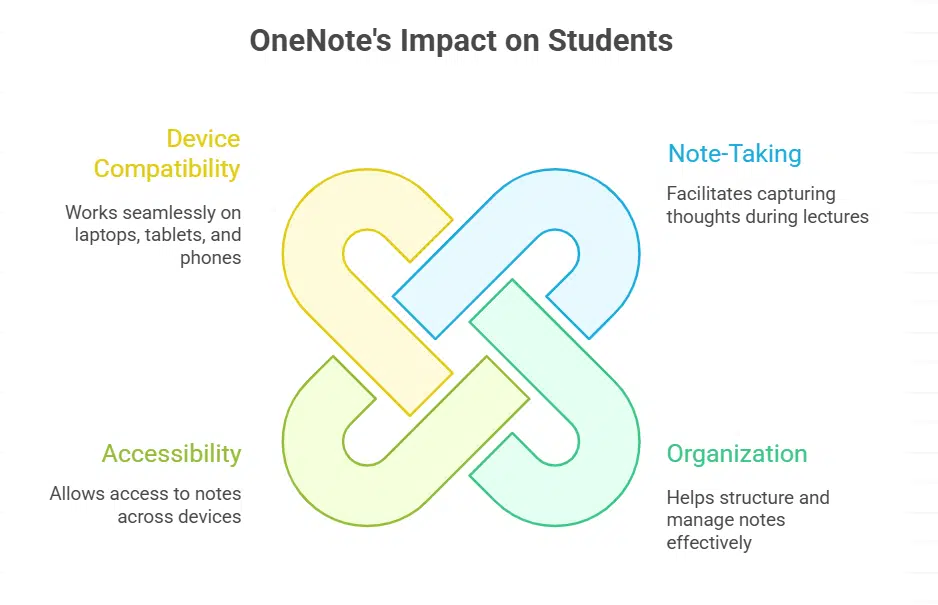
Microsoft OneNote transforms how students capture and organize their thoughts during lectures, study sessions, and group projects. This powerful note-taking app syncs across all your devices, so you can access your notes from your laptop, tablet, or phone anytime, anywhere.
Key Features & Advantages (Microsoft OneNote)
OneNote transforms how students organize their digital notes and study materials. This free app from Chris Nash’s recommendations works like a digital notebook that connects with other Microsoft Office apps.
- Cross-device sync keeps notes accessible everywhere – Your notes appear on tablets, phones, and computers instantly, so you never lose important class information.
- Digital notebook organization beats paper folders – Create separate notebooks for each class, with sections and pages that mirror your physical binders but take up zero space.
- Integration with Microsoft Office suite saves time – Copy content directly from Microsoft Word, Excel, and PowerPoint into your notes without switching between apps.
- Collaboration features help group projects succeed – Share notebooks with classmates to work together on assignments, study guides, and research projects in real-time.
- Search function finds information fast – Type keywords to locate specific notes, even handwritten text gets recognized and becomes searchable.
- Audio recording captures lectures while taking notes – Record your professor’s voice while typing, then play back sections to clarify confusing concepts later.
- Web clipper saves online research directly – Grab articles, images, and web pages straight into your notebooks without copying and pasting.
- Handwriting support works great on tablets – Draw diagrams, write equations, and sketch ideas naturally with a stylus or finger on touch screens.
- Version control tracks changes automatically – See who edited what and when in shared notebooks, plus restore previous versions if mistakes happen.
Google Drive: Top Cloud Storage Solution
Google Drive stands as the go-to cloud storage solution that keeps your files safe, accessible, and ready to share with classmates at any moment – discover why millions of students can’t imagine their academic life without it.
Core Features & Benefits (Google Drive)
Google Drive serves as a powerful cloud storage solution that transforms how students manage their academic files. This platform offers free storage with any Google account and supports multiple file types for complete document management.
- 15 GB Free Storage Space – Students receive generous free storage that accommodates thousands of documents, presentations, and research materials without paying monthly fees.
- Real-Time Document Collaboration – Multiple users can edit Google Docs, Google Sheets, and presentations simultaneously, making group projects flow smoothly and efficiently.
- Offline Access Capability – Files remain accessible even without internet connection, allowing students to work on assignments during commutes or in areas with poor connectivity.
- Automatic File Synchronization – Changes save instantly across all devices, preventing data loss and keeping the most current version available everywhere.
- Cross-Platform Compatibility – Works seamlessly on Windows 11, Android devices, iPads, and iPhones, giving students flexibility to switch between different devices.
- Built-in PDF Management – Students can view, edit, and share PDF documents directly within the platform without needing separate PDF editing software.
- Version History Tracking – Previous versions of documents remain accessible, allowing students to recover earlier drafts or track changes over time.
- Integrated Office Suite – Google Docs, Google Sheets, and Google Slides provide full word processing, spreadsheet, and presentation capabilities without additional software costs.
- Secure File Sharing Controls – Students can set specific permissions for shared folders, controlling who can view, comment, or edit their academic work.
Grammarly: Improve Your Writing Accuracy
Grammarly acts like a personal writing coach that catches mistakes your eyes might miss. This powerful tool checks grammar, spelling, and sentence structure while you type in Microsoft Word, Google Docs, or any web browser.
Main Features & Advantages (Grammarly)
This writing tool catches mistakes that basic word processors miss. Students can improve their academic writing and emails with both free and premium versions available.
- Real-time grammar and spell check – Spots errors as you type in any application, from Google Docs to Microsoft Word, making corrections instant and easy.
- Style improvement suggestions – Provides tips to make your writing clearer and more engaging, helping students craft better essays and reports.
- Works across all platforms – Functions seamlessly in web browsers like Google Chrome, Microsoft Edge, and Mozilla Firefox for consistent writing support.
- Academic writing support – Offers specialized feedback for research papers, helping students meet formal writing standards required in coursework.
- Sentence structure analysis – Identifies complex sentences and suggests simpler alternatives, making your writing more readable and professional.
- Plagiarism detection – Premium version scans your work against billions of web pages to help maintain academic integrity.
- Vocabulary enhancement – Suggests stronger word choices and helps expand your writing vocabulary for more impactful communication.
- Multiple writing goals – Adapts suggestions based on your audience, formality level, and writing purpose for targeted improvement.
- Performance insights – Tracks your writing progress over time, showing improvement areas and celebrating your growth as a writer.
Trello: Streamline Project Management
Trello turns chaos into order with its simple card-based system that makes group projects feel like a breeze. Students can create boards for each class, add team members, and track assignments from start to finish without breaking a sweat.
Essential Features & Benefits (Trello)
Students need powerful project management tools to handle their academic workload effectively. This platform transforms chaotic assignments into organized workflows that boost productivity and reduce stress.
- Visual Board System: Create boards for each class or project with customizable columns like “To Do,” “In Progress,” and “Completed.” Drag and drop cards between lists to track assignment progress instantly.
- Team Collaboration: Share boards with classmates for group projects and study sessions. Team members can comment, attach files, and assign tasks to specific people in real-time.
- Due Date Tracking: Set deadlines for each card and receive notifications before assignments are due. Calendar view shows all upcoming tasks across different boards in one place.
- File Attachments: Upload documents, images, and PDFs directly to cards for easy access. Google Drive integration lets you attach files from cloud storage without switching apps.
- Mobile Access: Sync your boards across all devices so you can check tasks anywhere. The mobile app works offline, letting you add cards even without internet connection.
- Checklist Creation: Break down complex assignments into smaller, manageable steps using built-in checklists. Check off completed items to track progress and stay motivated.
- Label Organization: Color-code cards by subject, priority level, or assignment type for quick visual identification. Labels help you spot urgent tasks at a glance.
- Activity Tracking: Monitor who made changes to shared boards and when updates occurred. This feature helps teams stay accountable and prevents duplicate work.
Zoom: Reliable Video Conferencing
Zoom stands as the go-to video conferencing platform that keeps students connected to their classes, study groups, and professors with crystal-clear audio and video quality that makes online learning feel almost like being there in person.
Primary Features & Benefits (Zoom)
Video conferencing has become vital for online learning and distance learning. This platform offers students powerful tools for hybrid learning environments.
- High-quality video and audio calls keep students connected during virtual classes, group projects, and study sessions with crystal-clear communication.
- Screen sharing and recording features allow students to capture lectures, share presentations, and review important content later for better retention.
- Supports large groups and webinars, making it perfect for university lectures, study groups, and collaborative projects with multiple participants.
- Integration with calendar apps helps students manage their schedule, set reminders for classes, and organize their learning environment efficiently.
- Breakout rooms enable small group discussions and team projects, creating interactive learning experiences that mirror traditional classroom settings.
- Chat functionality allows students to ask questions, share resources, and communicate with classmates without interrupting the main presentation.
- Mobile app compatibility lets students join classes from anywhere, providing flexibility for busy schedules and different learning preferences.
- Waiting room feature gives instructors control over class entry, creating a secure learning environment free from disruptions.
Canva: Creative Graphic Design Tool

Canva transforms students into design wizards, even if they can’t draw a stick figure. This user-friendly app creates stunning slideshows, lesson plans, and creative projects that make professors sit up and take notice.
Fundamental Features & Benefits (Canva)
Students need powerful design tools that won’t break the bank or require years of training. This user-friendly platform transforms anyone into a graphic designer with its drag-and-drop features and ready-made templates.
- Drag-and-drop interface makes design simple for beginners. Students can create professional slideshows, lesson plans, and presentations without any design experience.
- Templates for various design projects save time and spark creativity. Choose from thousands of options for posters, social media posts, and homework assignments.
- Collaboration options for team projects let multiple students work together. Share designs instantly and get feedback from classmates or educators in real-time.
- Integration with social media platforms helps students share their work easily. Post directly to Instagram, Facebook, or Twitter without downloading files first.
- Free version offers plenty of features for student budgets. Access basic tools, fonts, and images without paying monthly fees or subscriptions.
- Mobile app works on any device for design on the go. Create graphics from your phone, tablet, or computer with the same powerful tools.
- Brand kit feature keeps all your colors and fonts organized. Maintain consistent looks across all your school projects and presentations.
- Animation tools bring static designs to life with movement. Add motion to text and graphics for engaging presentations that capture attention.
Zotero: Manage Research with Ease
Zotero acts like a digital filing cabinet for all your research materials. This powerful tool helps students collect, organize, and cite sources from websites, pdf files, and academic databases with just one click.
Key Features & Benefits (Zotero)
Research management becomes simple with this powerful tool. Students can organize sources, create citations, and build bibliographies in minutes.
- Automatic Citation Generation: Creates perfect citations in over 9,000 styles including APA, MLA, and Chicago. Students save hours of manual formatting work.
- Web Browser Integration: Captures sources directly from websites, academic databases, and online articles with one click. No more copying and pasting citation details.
- PDF Annotation Tools: Highlights text, adds notes, and extracts quotes from PDF files seamlessly. All annotations sync across devices automatically.
- Group Collaboration: Shares research libraries with classmates and study groups. Team members can add sources and notes together in real-time.
- Cloud Storage Sync: Stores all research materials online and syncs across computers, tablets, and phones. Access your sources anywhere, anytime.
- Microsoft Word Integration: Inserts citations and builds bibliographies directly in Word documents. The plugin works with Microsoft Office 365 and older versions.
- Smart Organization: Creates folders, adds tags, and sorts sources by topic or project. Finding specific research becomes quick and easy.
- Duplicate Detection: Identifies and removes duplicate sources automatically. Keeps research libraries clean and organized without extra effort.
Cold Turkey: Effective Distraction Blocker
Cold Turkey blocks distracting websites and apps, helping students focus on their studies without the temptation of social media or games pulling them away from important work.
Core Features & Advantages (Cold Turkey)
Students need powerful tools to stay focused during study sessions. This distraction blocker delivers customizable features that boost productivity and improve time management skills.
- Website and App Blocking: Block specific websites and applications during study sessions to minimize interruptions and maintain focus on academic work.
- Scheduled Blocking Sessions: Set up automatic blocking periods that align with your study schedule, creating disciplined study habits without manual intervention.
- Customizable Block Lists: Create personalized lists of distracting sites and programs that match your specific study needs and weaknesses.
- Progress Tracking: Monitor your productivity improvements over time with detailed reports showing blocked attempts and focus duration.
- Study Mode Options: Choose from different blocking intensities, from gentle reminders to complete system lockdowns during exam preparation.
- Timer-Based Controls: Use built-in timers to create focused work sessions with automatic breaks, similar to popular study techniques.
- Password Protection: Prevent yourself from disabling the blocker during weak moments by setting up password barriers for settings changes.
- Whitelist Management: Allow access to essential study tools and educational websites while blocking everything else during focused work periods.
Icecream PDF Editor: Simplify PDF Management
Students deal with countless PDF files during their academic journey, from research papers to assignment submissions. Icecream PDF Editor transforms the headache of PDF management into a breeze, offering simple tools to edit, merge, and organize your documents without breaking the bank.
Main Features & Benefits (Icecream PDF Editor)
Icecream PDF Editor stands out as a versatile tool for efficient PDF document management. This software simplifies reading and organizing PDF documents for academic tasks while maintaining accessibility for all technical skill levels.
- Edit PDF Content Directly – Modify text, images, and formatting within PDF files without converting to other formats. This feature saves time when making quick corrections to assignments or research papers.
- Annotate Documents for Study Sessions – Add highlights, comments, and sticky notes to mark important sections. Students can create visual study guides and prepare for exams more effectively.
- Fill Out PDF Forms Quickly – Complete application forms, worksheets, and digital assignments with ease. The tool handles various form types commonly used in educational settings.
- Collaborate Through Comments – Share feedback and notes with classmates or instructors using the commenting system. This feature supports group projects and peer review processes.
- Sign Documents Digitally – Add electronic signatures to assignment submissions and official documents. Digital signing eliminates the need for printing and scanning paperwork.
- Merge Multiple PDFs – Combine separate PDF files into single documents for better organization. Students can create comprehensive study packets from various class materials.
- Split Large Documents – Break down lengthy PDFs into smaller, manageable sections. This function helps organize textbook chapters or research materials by topic.
- User-Friendly Interface – Navigate the software easily regardless of technical experience level. The intuitive design reduces learning time and increases productivity for busy students.
Audacity: Powerful Audio Editing
Audacity transforms your Windows computer into a professional recording studio. This free audio editing software lets students create podcasts, edit interviews, and clean up voice recordings with ease.
Essential Features & Advantages (Audacity)
Students need powerful audio editing software for projects, presentations, and creative work. This free program delivers professional-grade features that rival expensive alternatives.
- Multi-track editing and recording capabilities – Work with multiple audio files at once, layer sounds, and create complex audio projects without spending money on premium software.
- Supports a wide range of audio formats – Import and export files in MP3, WAV, FLAC, and dozens of other formats, making it compatible with any device or platform.
- Provides various effects and plug-ins – Add reverb, noise reduction, amplification, and countless other audio effects to polish your recordings like a pro.
- Free and open-source accessibility – Download and use all features without paying subscription fees or dealing with trial periods that expire.
- Simple interface for beginners – Start recording immediately with intuitive controls that don’t require extensive training or technical knowledge.
- Cross-platform compatibility – Run the same program on Windows, Mac, or Linux systems without losing functionality or familiar features.
- Real-time preview functionality – Listen to changes instantly while editing, saving time and preventing mistakes in your final audio output.
- Batch processing tools – Apply the same effects to multiple files simultaneously, perfect for processing lecture recordings or podcast episodes efficiently.
Todoist: Organize Tasks Efficiently
Todoist transforms your scattered thoughts into organized action plans, making task management feel less like herding cats and more like conducting a symphony.
Primary Features & Benefits (Todoist)
This productivity app transforms how students organize their daily tasks and academic responsibilities. Students can create to-do lists and track task progress, making it an essential tool for better task management.
- Task Organization System: Students organize assignments, projects, and personal tasks in one central workspace, eliminating the chaos of scattered notes and forgotten deadlines.
- Progress Tracking Tools: The app tracks completed tasks and shows productivity patterns, helping students see their accomplishments and identify areas for improvement.
- Project Management Features: Students can break large assignments into smaller, manageable steps, making overwhelming projects feel less stressful and more achievable.
- Due Date Reminders: Built-in notifications alert students about upcoming deadlines, preventing last-minute panic and missed assignments that hurt grades.
- Cross-Platform Sync: Tasks sync across all devices, so students can add homework on their phone and check it later on their computer or tablet.
- Collaboration Options: Students can share project lists with classmates, making group work smoother and keeping everyone on the same page.
- Priority Levels: The app lets students mark urgent tasks, helping them focus on what matters most when time gets tight before exams.
- Productivity Analytics: Students view detailed reports showing their task completion rates and productivity trends over time, boosting motivation and accountability.
MyFitnessPal: Track Nutrition & Fitness
MyFitnessPal helps students track their eating habits and fitness goals. The app counts calories, logs workouts, and keeps you healthy during busy school days.
Fundamental Features & Advantages (MyFitnessPal)
Students need to stay healthy while managing their studies. MyFitnessPal makes tracking nutrition and fitness simple for busy college life.
- Calorie Counter Database: Access over 14 million foods in the database. Scan barcodes to log meals quickly. Track your daily calorie intake with precision.
- Exercise Tracking Integration: Log workouts and sync with fitness devices. Connect with popular apps to monitor activity levels. Calculate calories burned during study breaks.
- Macro Nutrient Breakdown: View protein, carbs, and fat percentages daily. Set custom goals based on your fitness needs. Monitor nutrient balance for better brain function.
- Weight Progress Charts: Track weight changes over time with visual graphs. Set realistic goals for healthy weight management. Monitor trends during stressful exam periods.
- Recipe Importer Tool: Import recipes from websites automatically. Calculate nutrition facts for homemade meals. Share healthy recipes with roommates and friends.
- Water Intake Reminder: Set daily hydration goals and track progress. Receive notifications to drink more water. Stay hydrated during long study sessions.
- Social Community Support: Connect with friends for motivation and accountability. Join groups focused on student health goals. Share progress and celebrate achievements together.
- Meal Planning Calendar: Plan weekly meals in advance. Create shopping lists based on planned meals. Save time and money with organized meal prep.
Takeaway
These twelve windows apps transform your student life from chaos to organized success. Microsoft OneNote keeps your notes neat, while Google Drive stores everything safely in the cloud.
Grammarly catches writing mistakes before your professor does, and Trello helps you manage projects like a pro. Zoom connects you to classrooms anywhere, and Canva makes your presentations shine bright.
Download these study tools today and watch your grades climb higher than ever before.
FAQs on Essential Windows Apps For Students
1. What are the most important Windows apps for students?
Students need Microsoft Word for writing papers, Microsoft Excel for data work, and Microsoft PowerPoint for presentations. Google Drive gives you cloud storage to keep files safe. Antivirus software like AVG Antivirus protects your computer from viruses and malware protection keeps you secure.
2. Which study tools work best on Windows?
Microsoft OneNote helps you take notes and organize them well. Spaced repetition apps boost your memory using active recall methods. Mendeley manages your research papers and citations, making homework easier.
3. How do I protect my Windows computer from malicious software?
Install antivirus programs to block viruses and malware. Registry cleaner tools keep your system running smooth. Some antivirus software includes parental controls if you share the computer with family.
4. Can I use Google apps on Windows?
Yes, Google Docs, Google Sheets, and Google Classroom work great in your web browser. You can also download some apps from Google Play if your Windows device supports it.
5. What apps help with math and science classes?
A graphing calculator app solves complex geometry problems. Microsoft Excel handles data analysis and creates charts. Some learning management systems connect to your school’s courses and assignments.
6. Do I need special apps for online learning?
Microsoft Teams connects you to virtual classes and group projects. Google Drive stores all your files in cloud storage so you can access them anywhere. These apps work on Windows 7 and newer systems, plus they sync with iOS devices too.