Before buying a team knowledge base, ask the vendor to demonstrate how employees find a current answer, how owners keep it accurate, and what happens when access, costs, or suppliers change. Turn those answers into written requirements and a small trial with your own representative content.
This checklist focuses on internal team knowledge: onboarding instructions, operating procedures, project decisions, and reusable answers. It is a research-based buying guide, not a hands-on product ranking. The proposed tests are tasks for your evaluation; they are not reported test results.
If you are still building a shortlist, Editorialge’s comparison of knowledge base tools for different team needs provides a starting point. Use the questions below to evaluate the candidates against the same requirements.
1. Which recurring questions must the knowledge base answer?
Start with a small set of questions employees already ask: how to request access, where to find an approved proposal, who handles an escalation, or which onboarding steps apply to a particular role. Give each question an intended reader and an authoritative answer.
Separate an internal team knowledge base from a public customer help center. A private operating procedure and a customer troubleshooting article may need different permissions, publishing controls, and owners. If both audiences matter, include both in the evaluation.
Demo task: bring ten representative questions and the documents that answer them. Ask the vendor to show how an ordinary employee would find the right answer. Decide which failures would prevent a purchase before the demonstration begins.
2. Can employees find answers without knowing the document title?
Test the language employees actually use. A document called “Annual Leave Policy” should be evaluated against searches such as “book time off” and the abbreviations your team uses. Include a question with no documented answer so you can inspect the failure experience.
Record whether the answer appears, whether it is current, and whether the employee can open its source. Separate conventional search results from AI-generated answers; success in one does not establish success in the other.
Ask which content types the search covers, how quickly changes become searchable, and what happens to deleted or archived material. A polished search box is less useful if the documents your team depends on are outside its coverage.
3. How are article owners, reviews, and overdue updates managed?
Ask who receives a review reminder, who can confirm accuracy, and what happens when the owner leaves. Require a visible owner and a workable review process for important procedures. “Last edited” is not the same as “checked and still correct.”
For a documented example, Atlassian describes transferring ownership in Confluence so another person becomes the point of contact. Its documentation also lists exceptions, including blog posts and space overview pages. Check your actual content types rather than assuming that one ownership control covers everything.
Demo task: assign an owner, transfer responsibility, and identify an overdue page. Establish who will maintain the content after launch; buying a review feature does not assign that work.
4. Can you control access at the level your team needs?
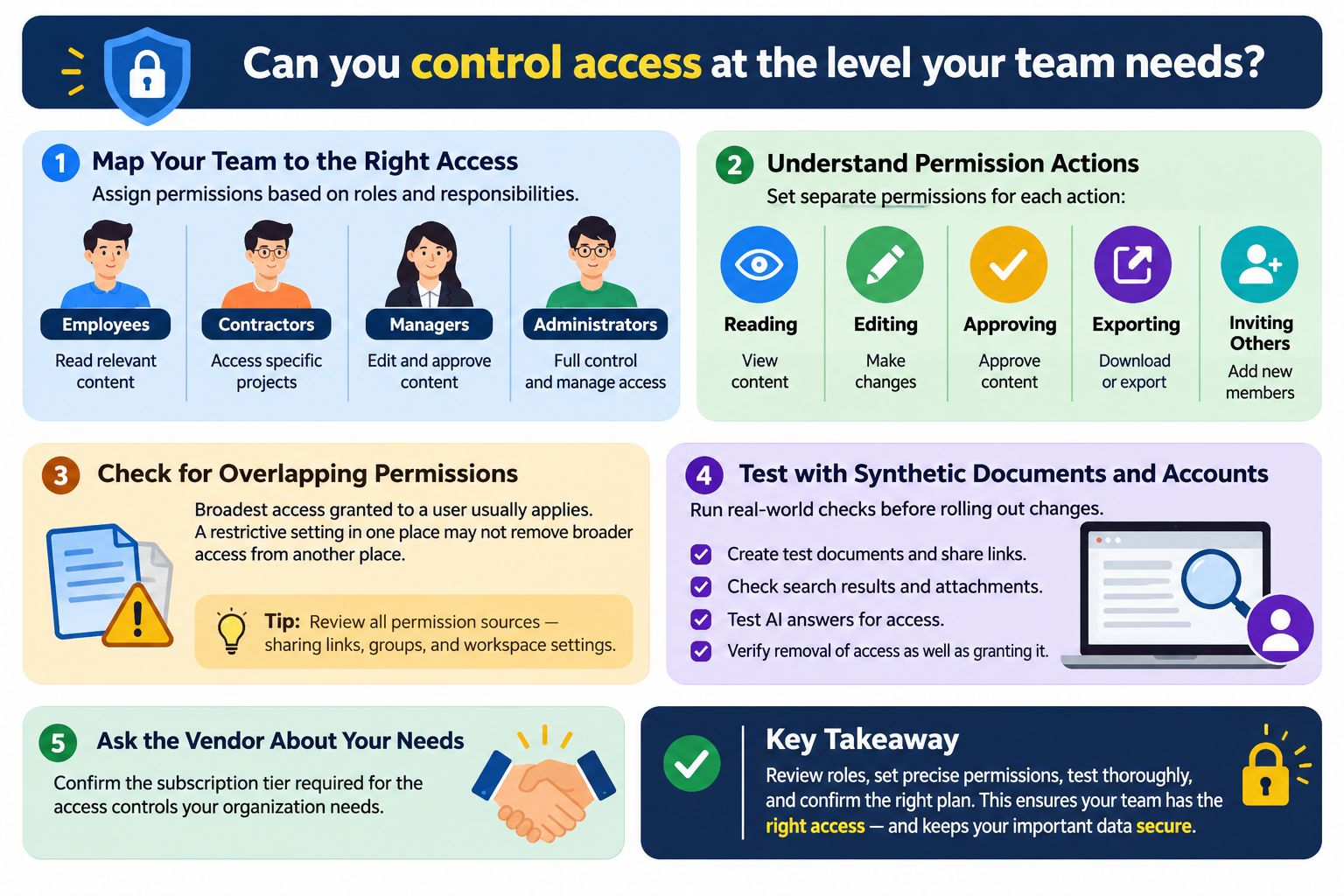
Map employees, contractors, managers, and administrators to the pages they should see and the actions they should perform. Reading, editing, approving, exporting, and inviting others are separate requirements.
Check overlapping permissions. Notion’s permissions documentation, for example, explains that the broadest access granted to a user applies. A restrictive setting in one place may not remove broader access granted elsewhere.
Use synthetic documents and separate test accounts to inspect page links, search results, attachments, and any AI answers. Test removal of access as well as granting it. Ask the vendor to identify the subscription tier required for the controls your organization needs.
5. Can AI answers be checked against accessible, current sources?
If AI answering is part of the purchase, ask for a demonstration with an outdated instruction, a conflicting document, and a question the knowledge base cannot answer. Check whether the answer links to supporting passages and whether those passages support the actual conclusion.
Repeat the question from an account without access to the underlying document. Ask how permissions are enforced across connected sources, how updates and deletions propagate, and what the service does when evidence is insufficient.
Request written answers about retention, model providers, and whether your content is used for model training. Treat these as procurement questions requiring the vendor’s current terms and technical documentation. A useful-looking citation alone does not establish accuracy or appropriate data handling.
6. Will people contribute and correct content during normal work?
Ask an employee who is not leading the purchase to create a short procedure, add an image, link a related article, and suggest a correction. Observe where they need help. Repeat the important tasks on the devices and assistive technologies your colleagues actually use.
Check templates, revision history, approval options, and recovery from an accidental edit. Keep drafting and approval roles proportionate to the content: a routine team note may need less control than an instruction used across the business.
The buying question is whether the workflow is manageable for your contributors. Record the steps they struggle with and the training or administration those steps would require.
7. Do integrations preserve the right source and permissions?
List the places where knowledge currently lives, such as shared drives, project tools, and support systems. For each proposed connection, ask whether it copies content, indexes it, embeds it, or simply links to it. Those behaviors create different maintenance jobs.
Choose one connected document and change its text, owner, and access settings. Ask how each change reaches the knowledge base and how an administrator notices a failed sync. Include deletion and reconnection in the trial plan.
Agree which system holds the authoritative version. If employees can edit two copies independently, define how conflicts will be resolved before connecting the full archive.
8. What survives migration from your existing documents?
A successful import should be assessed beyond the number of pages transferred. Build a representative sample containing nested pages, tables, images, attachments, internal links, and any structured records that matter to your workflow.
Ask which elements retain their structure and which require manual rebuilding. Inspect permissions separately; readable imported text does not establish that access settings carried over. Identify what happens to old links that employees have bookmarked.
Demo task: migrate a small, sanitized sample and record each repair. Estimate the effort for the rest of the archive from those observed problems. Confirm whether the vendor, a partner, or your own team is responsible for that work.
9. What is the total cost for your actual mix of users?
Request a quote that distinguishes readers, editors, administrators, guests, and any other billable roles. Specify required security controls, storage, integrations, support, and AI usage. Ask how costs change if the team grows or usage exceeds an allowance.
Build separate first-year and renewal budgets. The first year may include migration and training; ongoing costs should include administration and content maintenance. Record taxes and currency separately where relevant.
Illustrative calculation, not a vendor quote: 40 paid seats at $8 per month cost $3,840 for a year. Add $600 for migration and $1,200 of internal setup time, and the first-year estimate becomes $5,640 before taxes or other charges. Replace every assumption with your actual quote and labor estimate.
For the wider purchasing discussion, use Editorialge’s guide to negotiating SaaS contracts and renewals alongside the knowledge-base trial results.
10. How will you identify missing answers and measure usefulness?
Ask what administrators can learn from unsuccessful searches, feedback, outdated pages, and unanswered questions. Confirm whether useful reports are available on the proposed plan and whether you can export the underlying information.
Select a small set of outcomes before the pilot: for example, employees completing a defined task without asking a colleague, finding the current answer, or flagging a missing instruction. Page views alone do not show that someone solved a problem.
Record the same tasks before and during the pilot. Keep the sample and measurement method consistent, and note when training or newly written content could explain an improvement. Use the findings to guide the purchase without turning a small trial into a company-wide productivity claim.
Identify the procedures employees might need during an outage of the knowledge base itself. Ask about service commitments, support hours, escalation routes, recovery options, and the limits of revision history or deleted-content recovery.
Distinguish a supplier’s service recovery from your ability to retrieve one accidentally deleted article. Ask who can request each type of recovery, how long it may take, and what the contract actually commits to.
For essential instructions, agree on an appropriately controlled alternative access method and an owner who keeps it current. Have the people responsible for IT and security assess whether the vendor’s documented arrangements meet your operational needs.
12. Can you leave with usable content and a clear exit process?
Request an export during the trial. Open the files outside the product and inspect article text, images, attachments, links, and any metadata you need. Record what is absent, including permissions or version history where relevant.
An export is not automatically a working replacement or a complete restore. Notion’s export guidance explicitly notes that reuploading an exported workspace does not instantly recreate it. Use that distinction when evaluating any vendor’s promise of portability.
Confirm the cancellation deadline, access after cancellation, export availability, deletion process, and any assistance fees in the applicable agreement. Name the person who would handle a move and estimate the rebuilding work before committing to a long term.
Turn the Answers Into a Purchase Decision
Use one evaluation sheet for every candidate. Record the proposed plan, requirement, evidence, result, owner, and unresolved issue. Mark each result Pass, Fail, or Not demonstrated. A sales assurance or a feature on a roadmap should remain Not demonstrated until you have evidence appropriate to the requirement.
| Decision area | Evidence to collect | Suggested treatment |
|---|---|---|
| Access boundaries | Results from separate synthetic test accounts | Required control: resolve any failure before purchase |
| Answer retrieval and accuracy | The same representative questions run on each candidate | Compare against acceptance criteria agreed before the trial |
| Ownership and upkeep | A completed review and ownership-transfer workflow | Confirm that the named team can maintain it |
| Migration and exit | Inspected sample import and usable exported files | Document missing elements and rebuilding effort |
| Total cost | Written quote plus internal work estimates | Compare first-year and renewal budgets separately |
These are suggested decision rules, not an industry certification. Decide which requirements are mandatory for your team and which are preferences. A favorable overall impression should not cancel a failed mandatory requirement.
A practical pilot could use ten recurring questions, a small set of sanitized documents, and employees from more than one role. Assign someone to record the evidence and someone to own follow-up questions. End with a decision, a list of unresolved conditions, and a named owner for the first collection of articles.