

Modern professionals in 2026 are increasingly working from non-traditional locations such as cafes and co-working hubs. Maintaining proper ergonomics for hybrid workers is critical to preventing long term physical strain when your office is constantly on the move.
The transition between a structured corporate environment and a flexible remote setup often leads to improvised workstations that lack support. This guide explores the most effective tools and strategies to ensure your health remains a priority regardless of your physical location.
How We Chose Our Top 7 List?
Our evaluation process is rigorous and relies on public data from the current year. We prioritize the long-term safety of users above any short-term convenience. This ensures that the strategies we recommend are stable for the foreseeable future.
We applied the following weightings to our research and comparison efforts.
| Criteria | Weighting | Focus Area |
| Portability | 40% | Weight and folded dimensions |
| Ergonomic Impact | 30% | Proven posture improvement |
| Build Quality | 30% | Durability for daily travel |
7 Essential Ways To Improve Ergonomics For Hybrid Workers
Improving your mobile setup requires a mix of physical tools and behavioral changes. We have evaluated these strategies based on their effectiveness for workers who move between locations frequently throughout the week.
1. Portable Laptop Stands
The single most effective way to prevent neck pain is to raise your screen to eye level. A foldable stand allows you to transform a standard cafe table into a professional grade workstation in seconds.
The following features and considerations define the use of laptop stands for mobile professionals.
Special Features:
-
Multiple height adjustment levels
-
Heat dissipation through open design
-
One second setup and breakdown
Things to Consider:
-
Requires an external keyboard and mouse
-
Stability can vary on uneven surfaces
-
May take up space in smaller bags
Best for: Professionals who spend more than two hours at a temporary desk.
2. Compact Vertical Mice
Using a laptop trackpad for extended periods forces your wrist into an unnatural position. A portable vertical mouse keeps your hand in a neutral handshake posture to reduce the risk of repetitive strain injuries.
Modern vertical mice are designed to be travel friendly without sacrificing the ergonomic benefits of larger models.
Special Features:
-
Multi device Bluetooth connectivity
-
Long lasting rechargeable batteries
-
Lightweight and ergonomic contouring
Things to Consider:
-
There is a small learning curve for new users
-
Vertical height may make it slightly bulky for flat pockets
-
High precision tracking may require a mouse pad
Best for: Users who suffer from wrist fatigue or carpal tunnel symptoms.
3. Inflatable Lumbar Support
Standard chairs in cafes and trains often lack the necessary curve to support your lower spine. An inflatable or foldable lumbar roll fits easily in a backpack and provides immediate relief for your back.
This simple tool can make a significant difference during long commutes or flights.
Special Features:
-
Adjustable firmness through air pressure
-
Secure straps to prevent slipping
-
Washable and durable fabric covers
Things to Consider:
-
Requires manual inflation for most portable models
-
Can feel intrusive in very narrow seating
-
Needs to be positioned correctly at the belt line
Best for: Commuters who rely on public transportation or non ergonomic cafe seating.
4. Foldable Footrests
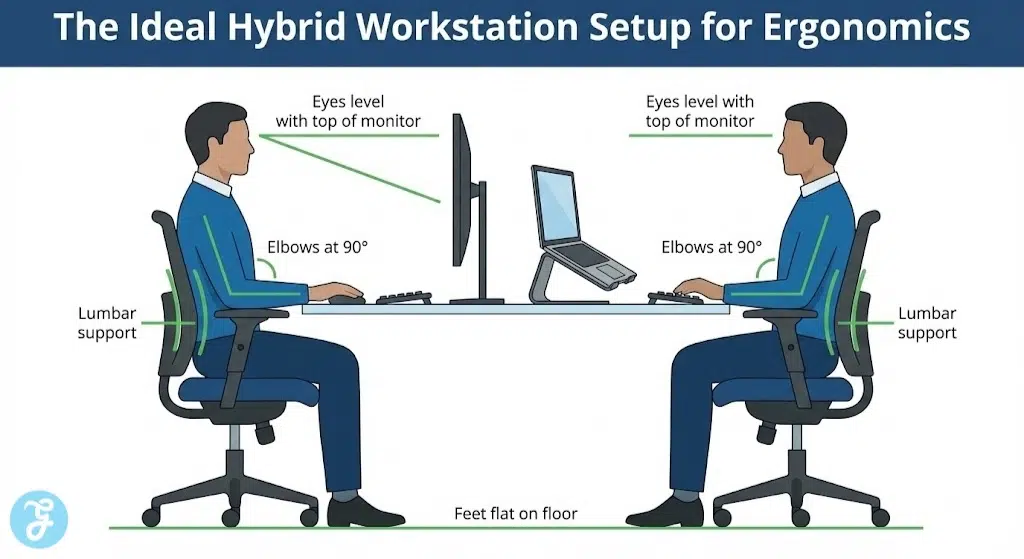
Ergonomics for hybrid workers starts with a solid foundation at the feet. If your chair is too high and your feet are dangling, it places excessive pressure on your thighs and lower back.
A portable footrest ensures that your knees remain at a ninety degree angle regardless of the table height.
Special Features:
-
Height and tilt adjustment options
-
Non slip surface for stability
-
Packs flat for easy transport
Things to Consider:
-
Adds extra weight to your carry on bag
-
Might be awkward to set up in crowded spaces
-
Requires a clear floor area under the table
Best for: Shorter individuals or those working at high bistro tables.
5. Noise-Canceling Gear For Cognitive Ergonomics
Ergonomics is not just about physical comfort but also cognitive focus. Active noise-cancelling headphones allow you to create a quiet environment in noisy shared spaces which reduces mental fatigue.
Managing sound levels helps you maintain a productive flow state and lowers your overall stress.
Special Features:
-
Multiple levels of noise cancellation
-
Integrated microphones for clear calls
-
Ambient sound modes for situational awareness
Things to Consider:
-
High quality models can be quite expensive
-
Battery life must be managed for full work days
-
Prolonged use can cause slight ear pressure
Best for: Workers in busy co-working hubs or public cafes.
6. AI Posture Sensors
Small wearable sensors can now track your posture in real time and provide haptic feedback when you slouch. These devices are particularly useful for hybrid workers who lack a consistent office setup to remind them of their alignment.
These tech solutions provide data driven insights into your daily habits and areas for improvement.
Special Features:
-
Discrete design that clips to clothing
-
Integration with mobile health apps
-
Personalized training programs for core strength
Things to Consider:
-
Requires frequent charging and app syncing
-
Can be distracting if the vibration is too strong
-
Feedback only works when the device is worn correctly
Best for: Individuals who find themselves slouching as the work day progresses.
7. Modular Ergonomic Backpacks
The way you carry your gear is just as important as the gear itself. A modular backpack with specialized compartments ensures that weight is distributed evenly across your shoulders and hips.
Investing in a high quality bag prevents shoulder strain before you even reach your destination.
Special Features:
-
Padded laptop sleeves and cable management
-
Ergonomic shoulder straps and sternum clips
-
Weatherproof materials for all season commuting
Things to Consider:
-
Larger sizes can become heavy if overpacked
-
Professional designs often carry a premium price
-
May require reorganization when switching modes
Best for: Hybrid workers who commute by foot or bike daily.
The rise of the nomadic professional has created a new set of physical challenges. Unlike a fixed office desk, hybrid environments vary in height, lighting, and seating quality. This section provides a high-level look at the tools currently dominating the market in 2026.
Quick overview:
| Tool Type | Portability Rating | Primary Benefit | Average Weight |
| Foldable Laptop Stand | High | Eye Level Alignment | 150g – 300g |
| Compact Vertical Mouse | High | Wrist Pressure Relief | 120g – 140g |
| Inflatable Lumbar Roll | Very High | Lower Back Support | 50g – 100g |
How Should You Choose The Best Option For You
Choosing the right ergonomic setup requires an honest assessment of your daily habits and physical needs. You should prioritize the tools that address your most frequent areas of discomfort first.
The following table identifies which tools perform best in different categories of service.
| Category | Top Pick | Primary Reason |
| Portability | Nexstand K2 | Weighs less than a pound and fits anywhere |
| Versatility | MX Anywhere 3S | Small footprint with professional performance |
| Back Health | Inflatable Lumbar Roll | Essential for non-adjustable public seating |
| Mental Focus | Sony WH-1000XM5 | Industry-leading noise cancellation for cafes |
Wrap-Up
Successfully navigating ergonomics for hybrid workers is an ongoing process of adjustment and discovery. By investing in a few key portable tools you can protect your health and maintain high productivity levels. Always remember that the best posture is your next posture.
Movement remains the most critical component of any ergonomic strategy. Even with the best gear, you must take regular breaks to stretch and reset your body. Start by picking one or two tools from this list and build your ideal mobile office over time.


























