The app says “Great job!” Another level opens. Your child is occupied, and you have ten minutes to finish dinner or answer a work call. Then it is time to put the tablet away. That small scene captures two questions parents often have about learning apps. Do learning apps help kids learn? And if a child finds it hard to stop, is the app still worth using?
The honest answer depends on the child, the activity, and what happens beyond the screen. Some apps can help children practise early skills. Others are better at holding attention than building understanding. A parent can use an app for a much-needed break without pretending every minute of play is a lesson.
What Can a Learning App Teach?
Research has found benefits from some educational apps, particularly for focused early literacy and math skills. Children can practise identifying letters, connecting letters with sounds, recognizing numbers, and counting.
Those are worthwhile goals. They are also narrower than many app descriptions suggest. Recognizing a letter in a game is not the same as reading a story. Tapping the number three is not the same as counting three objects at home.
In one study, preschool children using specially developed literacy and math apps improved in the skills those apps targeted compared with children in control groups. A broader review of studies also found an average benefit for early math and literacy. The results varied, and gains were clearer for specific skills than for wider abilities such as comprehension and problem-solving.
So, learning apps can help kids learn. The evidence does not tell us that every app labeled “educational” works, or that spending longer on one will produce better results.
Learn about parental control apps to manage screen time.
Do Learning Apps Help Kids Learn? Look for Learning After the App Closes
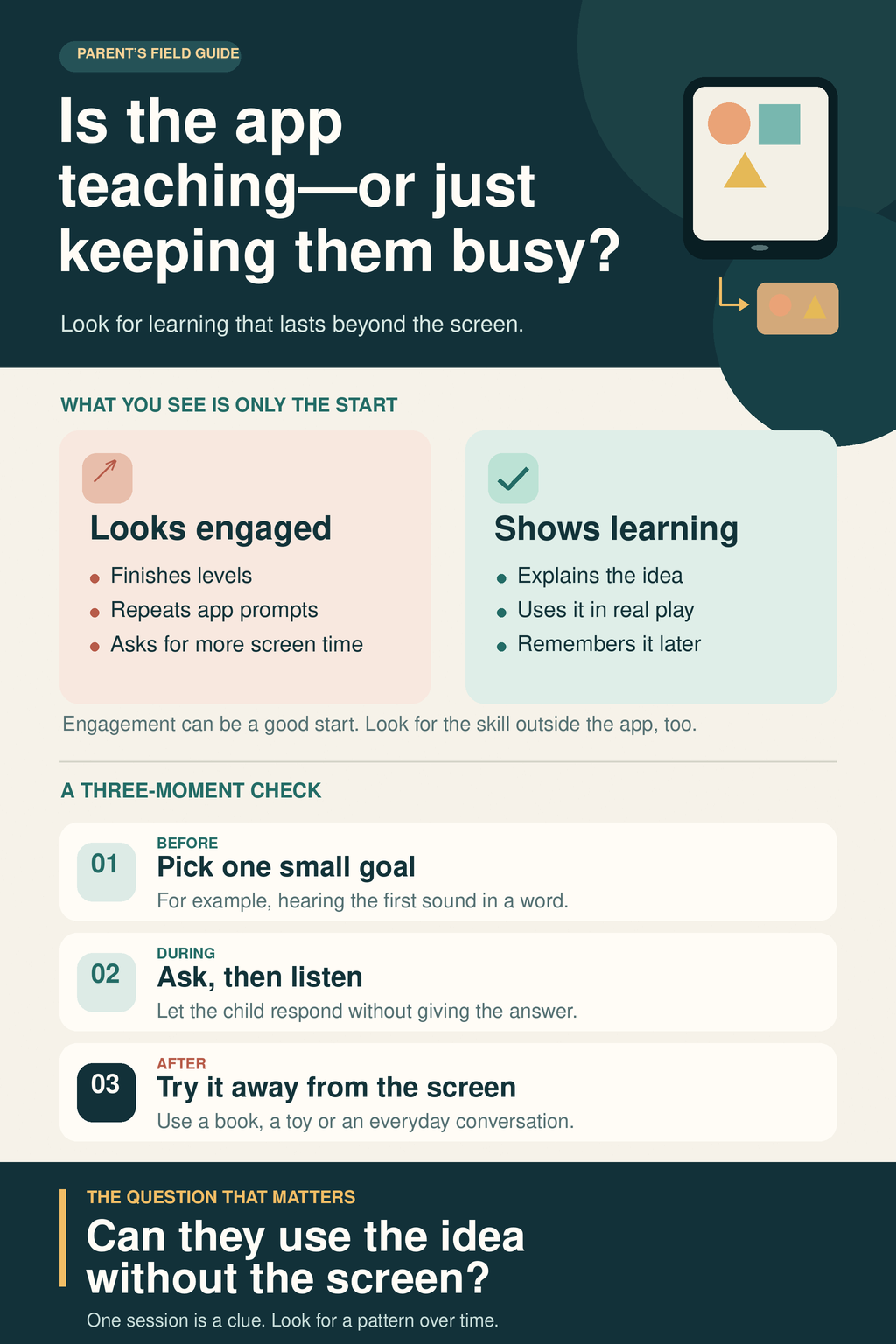
Most apps can show you progress inside the game. A child completes a level, collects a reward, or makes fewer mistakes. That may show growing familiarity with the task. It does not tell you, by itself, whether the child understands the idea outside that task.
I pay more attention to what happens later.
| What the child does in an app | What you might notice away from it |
| Matches a letter to its sound | Notices that letter or sound in an unfamiliar book |
| Counts pictures on a screen | Counts a few toys or household objects with suitable help |
| Completes a story activity | Talks about a character or event in their own words |
These are observations, not tests a child must pass. A child may be tired, distracted, or unwilling to answer. Look for small changes across ordinary moments rather than asking them to perform immediately after every session.
Our team developed Alphabet Magic Trace, and I have watched my nephew Fariz use it since he was about three. Over roughly a year and a half, I saw him grow more comfortable with lowercase letters and letter sounds, then notice letters in books. That is a personal observation, not proof the app caused the change. He was also learning through books, preschool, adult help, and everyday play.
That experience is one reason I keep the distinction clear: getting better at an app and learning something useful beyond it can happen together, but they are not the same claim.
Age Matters More Than the “Educational” Label
A baby can tap a screen and remain fascinated by an animation. That does not mean the baby has learned the concept behind it. Very young children often have difficulty connecting what they see on a screen with objects and events in real life. They learn through interaction with people, movement, and hands-on exploration.
The World Health Organization does not recommend sedentary screen time for children under two. For children aged two to four, it recommends no more than one hour a day, with less being better.
The American Academy of Pediatrics recognizes that some families choose brief, high-quality media for very young children and that a video call with a responsive person differs from leaving a child alone with an app. Its guidance is somewhat more flexible for children aged 18 to 23 months: if media is introduced, keep it limited, choose it carefully, and use it together when possible. For toddlers older than 18 months, it suggests no more than one hour a day.
The two organizations differ on that narrow age range, but neither suggests filling an infant’s or toddler’s day with app time. And for preschoolers, one hour is a limit, not a target. There is no learning advantage in using all of it simply because an app is available.
What Is the App Asking Your Child to Do?
Before handing over a new app, use it yourself for a few minutes. Its store description may promise creativity, confidence, and school readiness. The activities will tell you more.
Look for a clear goal. Is the child comparing quantities, listening to a letter sound, or working through a story? Can you explain the activity without repeating the app’s marketing language?
Then make a wrong choice. Does the app give a useful response and let the child try again? Or does it supply the answer so quickly that the child can keep tapping without thinking? An enjoyable game can still give a child room to work something out.
Notice what surrounds the task, too. A reward after an activity is not necessarily a problem. But frequent interruptions, unrelated animations, purchase prompts and a constant invitation to play another level can make it harder to see where the lesson ends and the attention-grabbing design begins. Check privacy and purchase settings before a child uses the app.
A good learning app does not need to look like schoolwork. It should make the skill it is practising more important than its streaks and prizes.
What If the App Is the Only Thing That Calms Them?
Sometimes a parent needs a child to be occupied for a few minutes. There is no value in pretending that every family can provide uninterrupted, one-to-one play throughout the day.
Still, it is worth noticing if a device becomes the automatic answer whenever a child is bored, upset, or asked to wait. Young children need opportunities to practise handling those moments with support. A screen can quiet the immediate situation without helping them learn another way through it.
Research following preschool children has found an association between more tablet use and later parent-reported anger and frustration. Greater anger and frustration were then associated with more tablet use later on. The study relied on parents’ reports, took place during the pandemic, and did not establish what children were doing on their tablets. It cannot show that a particular learning app caused a tantrum.
A child who protests when tablet time ends is not automatically “addicted” to the device. Leaving an enjoyable activity can be difficult, especially when a child is tired, hungry, or stressed. Some apps also make stopping harder by moving straight into the next activity.
Watch the pattern rather than treating one bad transition as a diagnosis. Does your child now expect a screen whenever they are upset? Are limits becoming harder to hold? Is app time pushing aside sleep, meals, physical play, or conversation? Those are more useful questions than whether the app has an educational category label.
Give Screen Time a Purpose and a Stopping Point
You do not need a complicated family system to make app use more intentional. Start by choosing the activity before the device is opened. “Let’s do this counting game” gives the session a purpose. “You can have the tablet for a while” leaves the choice, and often the ending, to the app.
Set a stopping point the child can understand. It might be the end of one activity or a familiar timer. Turn off autoplay where possible. If your child responds well to a warning before time is up, give one; if warnings make the transition more tense, try ending at a natural break instead.
Join in for part of the activity when you can. Ask what they are trying to solve or listen to them explain a choice. Later, connect the idea to something nearby: count cups while setting the table or look for a familiar letter in a book. You do not have to quiz the child after every session. The aim is to give learning another place to appear.
And leave room for screen time to be described honestly. An app may occasionally provide a short break for a caregiver. That use does not have to be called education to be understandable. What matters is that it does not quietly become the only way a child plays, waits, or calms down.
If your child becomes upset when it is time to stop, stay calm and keep the limit clear. A long lecture in the middle of a meltdown is unlikely to help. Once the moment has passed, you can think about whether the activity, timing, or stopping point needs to change.
When to Seek More Support
Talk with your child’s pediatrician if intense meltdowns happen nearly every time screen use ends despite a consistent routine. The same applies if screen use seems connected to changes in sleep, eating, or social activity, or if your child can no longer manage ordinary waiting or boredom without a device.
You do not have to determine the cause from an app history or handle a persistent problem alone. Children differ in what they find difficult, and a useful plan should fit the child in front of you.
The Question to Ask When the Screen Goes Dark
A child may enjoy an app, become skilled at using it, and learn from it. Those are three different things. Keeping them separate makes it easier to judge the app fairly.
When I consider whether a learning app deserves a place in a child’s routine, I look at the skill it practises, whether that skill begins to show up elsewhere, and what the app may be replacing. I also look at how easily the child can return to books, toys, people and ordinary play when the session ends.
Do learning apps help kids learn? Sometimes. A good one can support practice. Its real value becomes clearer in the life a child returns to after putting the device down.
Frequently Asked Questions on Do Learning Apps Help Kids Learn
Do learning apps help kids learn, or do they just keep them busy?
Some do both. A well-designed app can help a child practise a focused skill, such as recognizing letters or counting. But staying engaged, earning stars or finishing levels does not prove the child understands the lesson. Look for the skill beginning to appear in books, conversation, or everyday play.
Can babies learn from educational apps?
A baby may enjoy the sounds and pictures, but tapping a screen is not reliable evidence of learning. Very young children can struggle to connect what they see on a device with the world around them. Talking, singing, handling objects and playing with a responsive adult offer them richer ways to learn.
How can I tell if my child is learning from an app?
Choose one skill the app practises, then notice whether your child uses it in another setting. After a letter game, do they spot that letter in a book? After a counting game, can they count a few toys with help? Look for small changes over time. One correct answer, or one difficult day, will not settle the question.
How much time should a toddler spend on a learning app?
An educational label does not make screen time unlimited. The WHO recommends no sedentary screen time for children under two and no more than one hour a day for ages two to four, with less being better. AAP guidance allows families to introduce limited, high-quality media after 18 months, preferably together with an adult. Treat an hour as a ceiling, not a goal.
Does a tantrum when app time ends mean my child is addicted?
No. A young child may simply find it hard to stop an enjoyable activity, especially when tired or hungry. Set a predictable ending and respond calmly when it arrives. Pay closer attention if meltdowns happen nearly every time or screen use begins affecting sleep, play, meals, or family life; a pediatrician can help you assess that pattern.