
Digital Evidence in Injury Claims can include photos, videos, messages, medical records, location history, and relevant income documents. These records may help explain an accident, document injuries, and connect treatment, missed work, or expenses to what happened.
Their value depends on accuracy, context, and proper preservation. This guide covers ten common types, what each can show, and mistakes to avoid. US laws and court rules vary, so seek advice about your situation while putting medical care and immediate safety first.
What Makes Digital Evidence Useful?
A useful record connects to the incident, injuries, treatment, or losses. Its source and context matter.
Federal Rule of Evidence 901 generally requires evidence that an item is what it is claimed to be. Rule 902 allows certain electronic evidence to be authenticated through qualified certifications and required notice. Authentication does not settle every admissibility issue, and state courts follow their applicable rules.
For digital evidence in injury claims, retain each record’s source and context.
10 Types of Digital Evidence in Injury Claims
Digital Evidence in Injury Claims can help document what happened, the injuries reported, and the losses that followed. These ten categories explain which records may be relevant, what each can show, and how to preserve them. Start with available originals and information at risk of deletion while keeping context intact.
1. Smartphone Photos and Videos
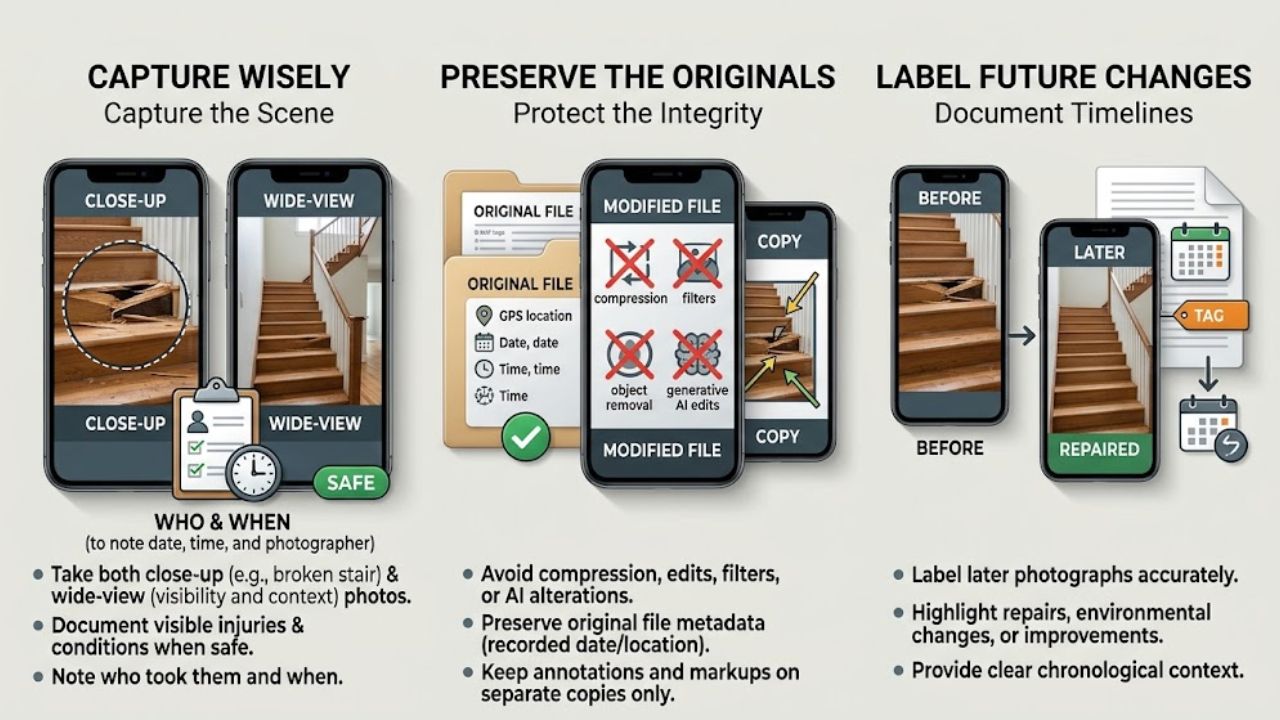
A close-up of a broken stair shows damage. A wider photograph adds location and visibility. Take both when safe, along with images of visible injuries and other relevant conditions. Note who took them and when.
Original files matter when using digital evidence in injury claims. Compression or editing can affect detail and metadata, including recorded dates or locations. Keep annotations on separate copies and avoid filters, object removal, or generative AI alterations.
Label later photographs accurately, especially if repairs or other changes have occurred.
2. Surveillance, Doorbell, and Dashcam Footage
Give footage early attention because recording systems may overwrite older files. Retention varies by system and service.
Identify nearby cameras and contact their owners or operators about preserving the relevant period. Provide the location, date, and approximate time. An attorney can help when access is uncertain; a preservation request does not guarantee release.
Check supplied footage:
- Does the file open, or does it require a separate player?
- Does it cover the incident and enough surrounding time for context?
- Is the camera clock different from the actual time?
Seek the original system export. A phone recording of a playback screen can be a fallback, but keep pursuing the original if available. Document clock discrepancies without altering the recording.
3. Messages, Emails, and App Conversations
An exchange about missed shifts or a message reporting a hazard may help establish a timeline. Context is especially important when conversations become digital evidence in injury claims: one cropped reply can conceal what the sender was answering.
Keep surrounding messages, participant details, dates, attachments, and original emails with available headers. Preserve the conversation on the device or account after taking screenshots. A contact nickname alone may leave uncertainty about identity.
Put explanations in separate notes. Do not rewrite messages or ask others to change their accounts of events.
4. GPS, Location History, and Trip Records
First check whether location records exist. Google Maps Timeline is off by default and requires opting in. Current documentation describes device-based records accessed through the mobile app, with backup available when enabled.
Available location history and rideshare records may help establish travel times or place a device near the scene. Preserve the device, account, and date details without correcting routes or filling gaps. A recorded device location does not, by itself, establish who held it or what happened there.
5. Fitness Tracker and Smartwatch Records
Before-and-after activity can help describe changes in routine. Wearable records contribute digital evidence in injury claims when considered alongside medical findings and other information.
A lower step count needs explanation. It could reflect reduced movement or time when the device was not worn. Preserve relevant earlier records, the device model, dates, and known gaps; a chart alone cannot establish medical causation.
Apple’s Health app offers “Export All Health Data.” Store full exports securely; they may contain unrelated sensitive information. Discuss disclosure scope with counsel.
6. Social Media Posts and Account Activity
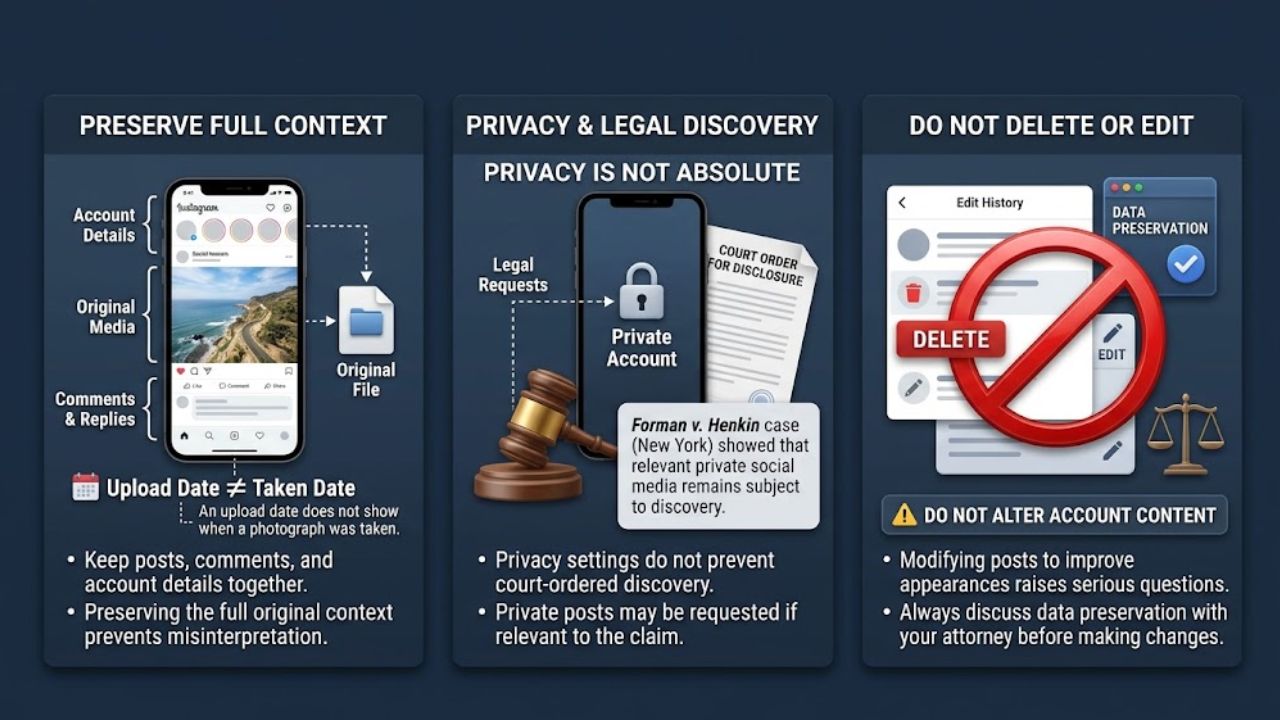
An upload date does not necessarily show when a photograph was taken. Keep posts, relevant comments, account details, and available original media together so their context remains visible.
Privacy settings do not automatically prevent discovery. In Forman v. Henkin, New York’s highest court allowed disclosure of certain private Facebook material through requests tailored to the case. That decision applies New York law.
Posts may support or raise questions about claimed limitations. Do not delete or edit potentially relevant content to improve appearances; discuss preservation before changing account content.
7. Medical Records and Patient Portal Messages
Medical records help document symptoms, examinations, treatment, and work restrictions. When gathering digital evidence in injury claims, include relevant portal messages as well as visit summaries and test reports.
A portal download may be incomplete. Ask the provider about missing records. HIPAA generally gives patients access to medical and billing records held by covered providers and health plans, with exceptions. Electronic-copy requirements depend partly on how records are maintained and which formats are readily producible.
If a record is wrong, request a correction through the provider. Keep the original download. Treatment records do not automatically establish another party’s liability.
8. Digital Bills, Receipts, and Payment Records
Pair expenses with their purpose. A rideshare receipt to a clinic is easier to assess alongside the appointment date than as an unexplained transaction.
Keep itemized bills and payment records for potentially relevant treatment, medication, travel, equipment, or recovery assistance. Log dates, providers, amounts, and purposes. Separate unpaid bills, estimates, payments, refunds, and reimbursements to avoid double counting.
Whether a particular expense is recoverable depends on the claim and applicable law.
9. Employment and Income Records
Income-related digital evidence in injury claims should explain work changes. Save schedules, time entries, pay statements, leave records, employer correspondence, and medical work restrictions.
Hourly workers may need scheduled and actual hours. Salaried employees should distinguish unpaid absence from paid leave used. Freelancers can retain canceled contracts, invoices, and earlier income records, keeping revenue, expenses, and profit separate.
An earnings decline alone does not explain its cause. Account for other circumstances, and use lawful channels to request employer-held information.
10. Vehicle Event Data and Connected Car Records
This category usually needs specialist help. An event data recorder may capture crash-related speed, braking, and restraint information, depending on the vehicle and system. It captures technical data for a brief period and differs from a dashcam. Connected car services may hold separate records.
The Driver Privacy Act of 2015 assigns covered event data to the owner or lessee and restricts access by others, subject to specified exceptions, including consent or judicial authorization.
Raise preservation before repairs, sale, or scrapping. Avoid dismantling modules yourself. Retrieval and interpretation require care; technical data does not automatically determine fault.
When Records Disagree
Preserve conflicting records and investigate. Do not correct timestamps or routes to make a timeline appear consistent.
Federal Civil Rule 37(e) addresses electronic information that should have been preserved for anticipated or ongoing litigation but was lost through a failure to take reasonable steps and cannot be restored or replaced. Court measures require additional findings; the harshest sanctions require intent to deprive another party of its use.
How to Preserve Records
Organizing digital evidence in injury claims starts with material at risk of disappearing.
- Keep originals and separate working copies.
- Log each file’s source, receipt date, and relevant device or account.
- Make a secure backup and check that files open.
- Address automatic deletion promptly with appropriate advice.
- Use lawful access and secure sharing methods.
- Seek advice before resetting or trading in an important device.
Final Thoughts
First, identify records that could disappear, then secure the files already available. Keep a short source log and note any gaps. Reliable digital evidence in injury claims is easier to assess when each record has a clear purpose. Bring that organized collection, including contradictions, to an attorney who can evaluate what matters and what needs further support.
Frequently Asked Questions (FAQs) About Digital Evidence in Injury Claims
Does Metadata Prove a File Is Genuine?
No. It offers clues about origin, but can be changed or lost. A timestamp should be assessed alongside the file’s source and other supporting evidence.
Must Every Claim Include All Ten Types?
No. Prioritize records that answer relevant questions. A treatment record and receipt may explain an expense more directly than unrelated location history. Collecting additional data simply because it exists can make review harder.
Does Preserving a File Mean Sharing Everything?
Preservation keeps information available. Disclosure is a separate question involving relevance, lawful requests, and privacy concerns. Discuss the scope with an attorney rather than distributing entire accounts or health archives without review.