The right developer infrastructure SaaS companies for a US startup depend on what the team needs to operate: a web application, an always-running worker, a database or a complete backend. Start with that workload, then compare US deployment choices, commercial-plan eligibility, the bill at realistic usage and the work required to leave.
This guide compares 15 suppliers across those layers. They are alternatives within a layer, not 15 subscriptions you should buy. Vercel and Netlify are natural starting candidates for web delivery; Render, Railway, Fly.io and DigitalOcean address application hosting; the data and backend options solve a different part of the stack.
“Developer infrastructure SaaS” is used here as a buying category for managed developer services. Technically, several entries are platform-as-a-service or managed database services. The NIST cloud-computing definition distinguishes cloud service models; the practical question is which responsibilities remain with your team.
What We Checked: Three First-Hand Observations
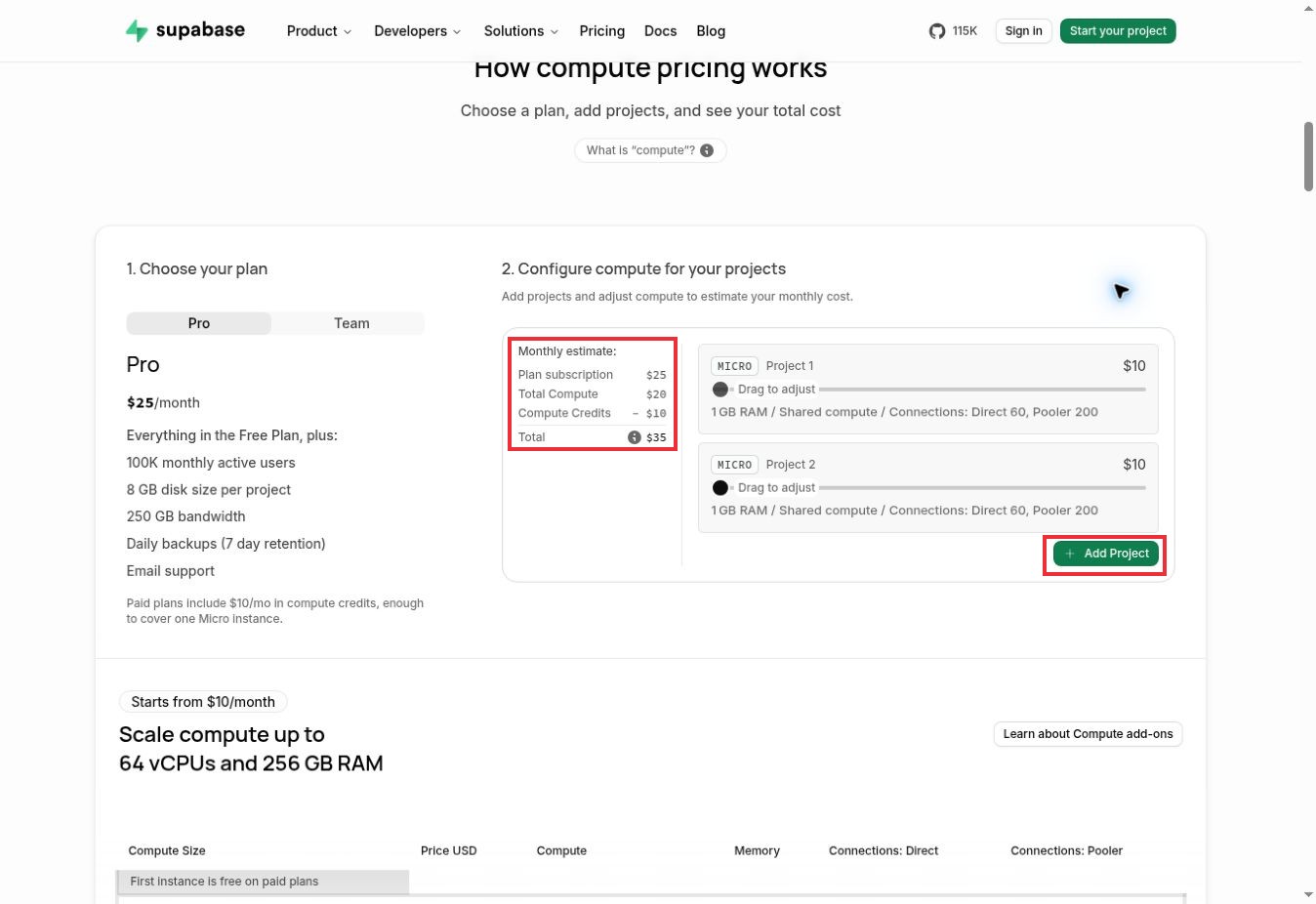
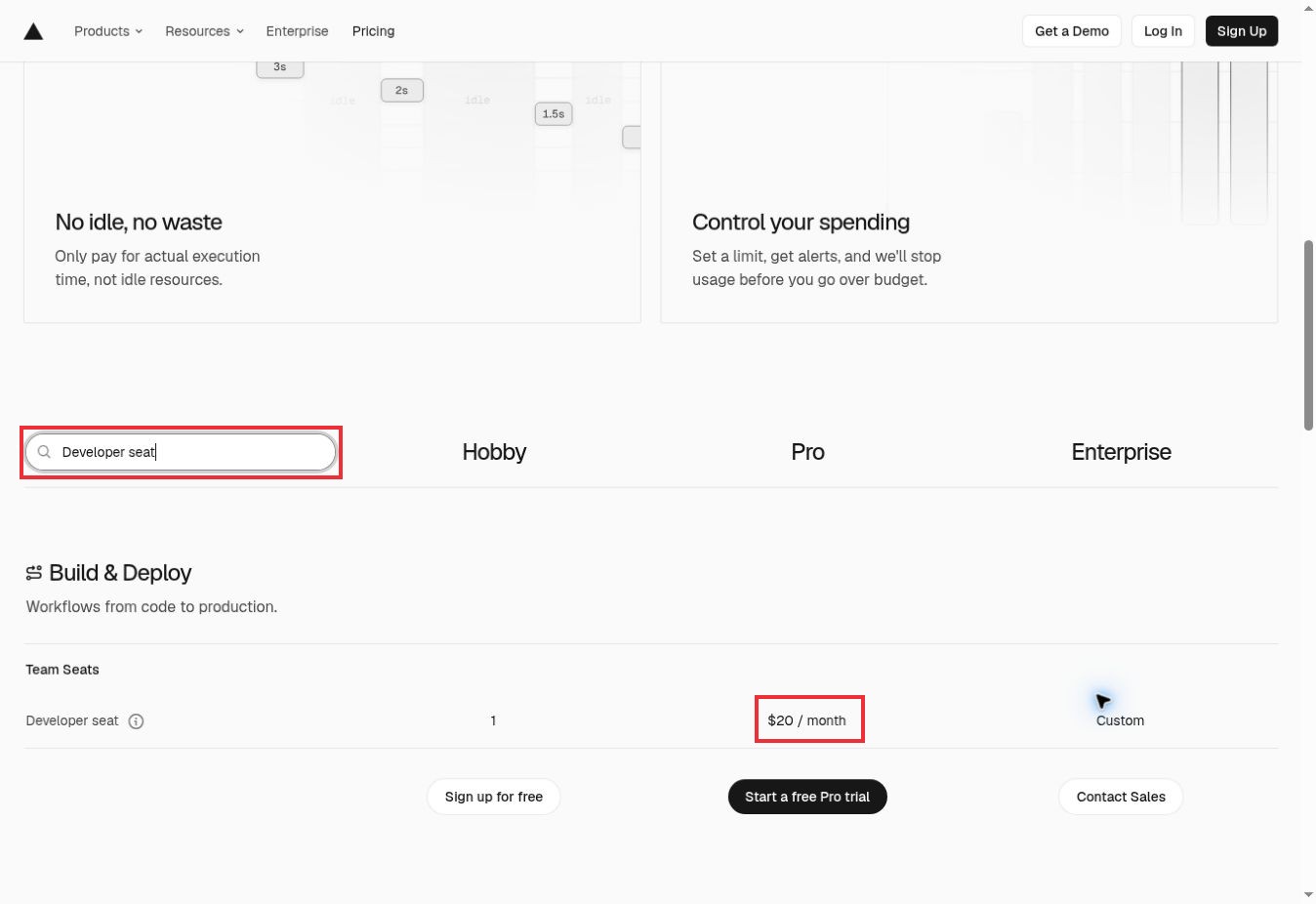
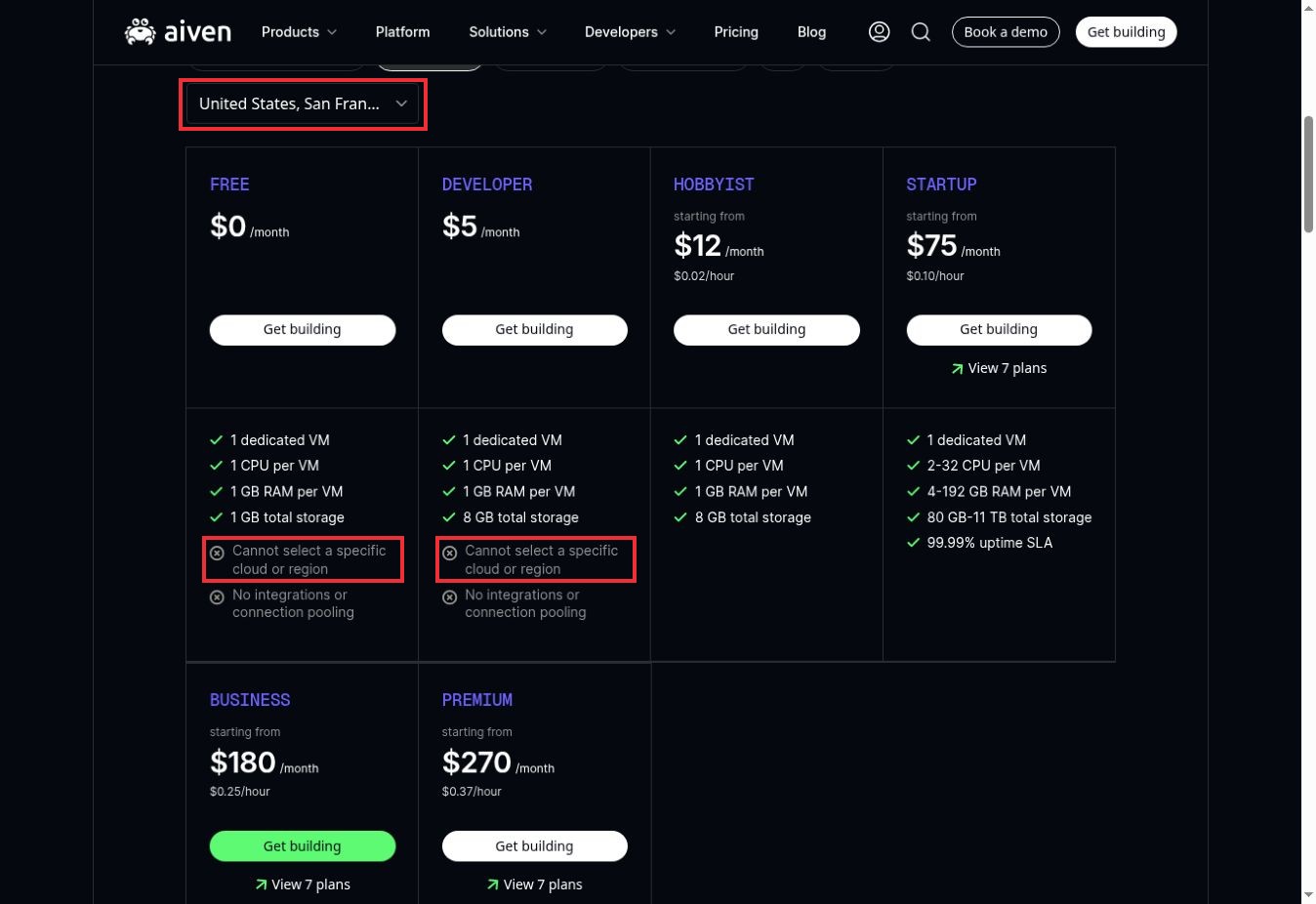
On November 17, 2026, we worked through three public pricing interfaces to check details that can change a startup’s shortlist. We added a second Micro project in Supabase’s calculator, filtered Vercel’s comparison to developer-seat pricing and selected a US region in Aiven’s PostgreSQL comparison.
Three details stood out: Supabase’s displayed Pro estimate rose from $25 to $35 per month; Vercel’s filtered row showed a $20 monthly Pro developer-seat charge; and Aiven’s Free and Developer cards still excluded region selection after San Francisco was selected. The marked screenshots below show the controls and results behind those observations.
These checks cover public calculators and plan-selection controls. We did not provision infrastructure or purchase a plan or measure application performance. The remaining comparisons draw on official documentation.
How These Developer Infrastructure SaaS Companies Were Selected
Official pricing, product and region documentation was reviewed on November 17, 2026. Inclusion requires an actively managed service, a relevant development workflow and documented US deployment or service-location support. The comparison combines documentation research with the three public-interface checks described above; it is not a performance benchmark. The order groups useful options rather than ranking speed, reliability or market share.
The country relationship is service availability for ordinary commercial workloads, not US headquarters. Documented regions do not guarantee acceptance of every customer, access to startup credits, US-only handling of all metadata or eligibility for government procurement. The matrix calls out the plan restrictions that materially change the choice.
US Fit and Billing at a Glance
These are pricing bases, not equivalent quotes. Dollar amounts are published US-dollar list prices where quoted; taxes, additional resources and negotiated terms can change the payable total. English documentation was available for all 15 entries. Spanish-language support and console localization were not verified, so neither is promised.
Deployment and delivery
| Supplier / role | Documented US fit | Billing basis and eligibility limit |
|---|---|---|
| Vercel Web deployment and request-driven compute |
Documented US compute regions; global delivery network | Pro listed at $20/month plus applicable usage and team charges |
| Render Application services, workers and managed data |
Oregon, Ohio and Virginia service/datastore regions | Workspace plan plus resource usage; production compute is separate |
| Railway Service deployment with resource metering |
California and Virginia deployment regions | Pro: $20 minimum monthly usage, with $20 usage credit |
| Fly.io Regional application Machines |
US locations include Ashburn, Dallas, Chicago and Los Angeles | Machine runtime, volumes, transfer and optional services |
| DigitalOcean Managed App Platform deployment |
App Platform availability includes NYC and SFO | From $5/month per smallest container; extra components add cost |
| Cloudflare Workers and related application services |
US-scoped Durable Objects; global Workers architecture | Workers Paid subscription plus request/CPU and service-specific meters |
| Netlify Web delivery, previews and functions |
Functions default to Ohio; other US choices documented | Pro from $20/month with usage credits; credit consumption varies |
Data and integrated backends
| Supplier / role | Documented US fit | Billing basis and eligibility limit |
|---|---|---|
| Supabase Postgres-based backend |
N. Virginia, Ohio, Oregon and N. California project regions | Pro from $25/month; compute and overages matter |
| Databricks / Neon Managed Postgres and database branching |
AWS N. Virginia, Ohio and Oregon; product coverage differs | Database compute in CU-hours, storage and other usage |
| PlanetScale Managed relational databases |
AWS US regions; GCP US regions; engine-specific Azure support | Resource-based; single-node Postgres starts at $5/month |
| MongoDB Atlas managed document database |
US AWS regions; Free/Flex availability is narrower than dedicated | Free, Flex and Dedicated tiers with different resource bases |
| Upstash Managed Redis-compatible data services |
US primary/read regions including N. Virginia and Oregon | Redis pay-as-you-go: $0.20 per 100,000 commands; storage and replication matter |
| Appwrite Integrated application backend |
New York and San Francisco regions documented as available | Subscription, resource quotas and optional dedicated database compute |
| Convex Application database and backend functions |
US East (N. Virginia) at the standard regional rate | Professional: $25 per developer/month plus applicable usage |
| Aiven Managed open-source data services |
Multiple documented US cloud regions on eligible plans | Plan/resource pricing; Free and $5 Developer lack region selection |
1. Supabase: Postgres-based backend
Supabase is a practical starting point when the same small team needs a database, authentication, file storage and APIs. Postgres sits at the center, so database design remains a recognizable part of the architecture rather than disappearing behind a proprietary collection model.
The US region choice is explicit. Choose it alongside the application host, not after launch. Pro starts at $25 per month, but that is an entry price: additional projects and resource consumption can change the bill. The free plan pauses inactive projects after a week.
For an exit rehearsal, separate the database from the rest of the backend. Supabase documents CLI backup and restore, but a database copy alone is not proof that authentication, stored files and application configuration have moved successfully. If you want only managed Postgres, compare Neon or Aiven before adopting the wider platform.
First-Hand Observation: A Second Project Changes the Estimate
We selected Pro and used Add Project to include a second micro project. The calculator showed a $25 subscription, $20 in total compute and a $10 compute credit, producing a $35 monthly estimate. For a startup separating production from another environment, the useful budgeting unit is the project and its compute—not just the subscription price. Other usage and taxes were outside this calculation.
2. Vercel: Web deployment and request-driven compute
Vercel suits a team whose daily work revolves around shipping a web application from a repository. Its deployment and delivery services reduce the number of separate systems needed to put changes in front of users. Keep the function region close to the database; a global CDN does not make a distant database local.
The first budget decision is eligibility. Hobby is for personal, non-commercial use. A startup selling a product should evaluate Pro or Enterprise rather than treat Hobby as its production budget. The listed Pro starting price is $20 per month, with included usage credit and additional charges beyond the plan allowances.
The exit question is how much of the application depends on Vercel-specific services. Keep the repository and build instructions under company control, and inventory each platform dependency before estimating a move. A successful Git clone does not reproduce hosting configuration, secrets or service integrations.
First-Hand Observation: Check the Developer-Seat Row
We entered “Developer seat” in the pricing table’s search field. The filtered comparison showed one seat under Hobby, $20 per month under Pro and custom pricing under Enterprise. That makes team size a concrete budget input: check paid developer seats alongside workload consumption before treating the headline plan price as the total company bill.
3. Render: Application services, workers and managed data
Render is worth examining when your application includes a web service, background jobs and a database. Those components have different operating needs; treating every task as a short HTTP function can make a simple product harder to maintain.
The workspace plan and the resources are separate decisions. Render documents with no monthly fee. Hobby workspace with one team member, while Pro and higher add collaboration and operational features. Free compute instances have substantial limits, and Render explicitly advises against using them for production applications.
US deployment options include Oregon, Ohio and Virginia. Pick carefully: an existing service or database cannot simply have its region changed. You create a replacement and migrate configuration and data. Keep services that need private networking in the same region; render documents separate private networks for each region.
4. Railway: Service deployment with resource metering
Railway makes sense for developers who want to deploy several related services and see resource consumption together. Its pricing is based on resources used, so the useful comparison is the workload you intend to run, not a nominal server size from a different provider.
The Pro plan is positioned for teams shipping production applications. It has a $20 minimum usage commitment and includes $20 in monthly usage credit; additional consumption is charged beyond that amount. CPU, memory, storage and egress are distinct cost drivers. A trial credit should not be mistaken for a recurring production allowance.
The region documentation lists California and Virginia. For migration planning, record the application start command, environment variables, persistent data and connections between services. Then reproduce those dependencies outside Railway before treating a move as straightforward. A team that needs an invariant monthly total should model peak usage and spending controls first.
5. Fly.io: Regional application Machines
Fly.io is a closer fit when application placement is part of the engineering decision. Its documented regions include several US cities, allowing the team to think about where compute runs rather than treating hosting as one invisible destination.
That control comes with more things to own. Machines, volumes, data transfer and managed databases are separate resources. The pricing page quotes USD and identifies Ashburn and Secaucus as the basis for its lowest-priced Machine examples. Those examples are not complete production-stack prices, and other regions can differ.
Keep an inventory of volumes, backup requirements and regional dependencies. The regions table also distinguishes locations that support Managed Postgres from those that do not. Skip Fly.io if the team wants location and persistent-data decisions handled entirely by an integrated backend service. For an exit, rehearse application deployment and data restoration separately.
6. DigitalOcean: Managed App Platform deployment
DigitalOcean App Platform deploys applications from Git repositories or container images. That makes it a useful middle ground for a startup that wants managed deployment while keeping a conventional application structure.
The pricing documentation lists the smallest shared container at $5 per month. It does not support manual scaling or autoscaling. Larger configurations have different capabilities, and dedicated-CPU plans support autoscaling. A worker and a database do not disappear into the price of the web component.
New York and San Francisco are among the documented App Platform locations. Check the availability of the component you need, since a provider-wide region list is not the same as a product availability table. An exit plan should preserve the repository or container image, app specification and data. Rebuild the deployment on the destination rather than assuming a platform configuration is portable unchanged.
Cloudflare is useful when request handling and the delivery layer belong close together. Workers billing distinguishes requests from CPU time, while associated data services have their own meters. The paid Workers examples use a $5 monthly subscription before applicable usage.
For a US-specific requirement, the important detail is the scope of each setting. Cloudflare documents a US jurisdiction for Durable Objects that confines that object’s execution and persistent data. It also says Workers elsewhere may still access the object. That is not an application-wide promise that every request, log and dependency remains in the United States.
Before adopting several bindings, list what each one stores and how the application reads it. Your exit work will depend on those service-specific interfaces. Skip this approach if a conventional server environment is essential or if the team cannot validate the runtime and data-location behavior of its chosen components.
8. Netlify: Web delivery, previews and functions
Netlify is an option for teams that want web delivery, preview deployments and functions in one workflow. The current credit-based pricing needs a different budget sheet from older bandwidth-only comparisons: production deploys, compute, bandwidth and web requests all consume credits.
Pro is listed from $20 per month with unlimited members. The included credit tier and any additional credits still matter. A team releasing repeatedly during a launch can consume its allowance differently from a quiet site with the same visitor count.
The function configuration documentation gives Ohio as the default region and lists other US options. It also states that old deploys retain their earlier region configuration. For an exit, preserve the source and build pipeline, then replace platform-specific functions, redirects and data services deliberately. Do not assume a redeployment moved historical versions or every associated service.
9. Databricks / Neon: Managed Postgres and database branching
Neon, now part of Databricks, is a candidate when Postgres and disposable development environments are central to your workflow. Its database compute is metered in compute-unit hours rather than one fixed server price. The published Launch rate is $0.106 per CU-hour, with storage and other applicable usage counted separately.
There is a consequential region detail for US startups: the current documentation lists AWS regions in Northern Virginia, Ohio and Oregon, while Azure regions are deprecated for new projects. Product coverage also differs between regions. Do not infer that an available Postgres region supports every newer backend feature.
Neon documents backups with pg_dump, giving the database an identifiable export route. Still, restore the dump and check extensions, roles and application connections before calling the database portable. A project’s region cannot be changed in place; moving means creating another project and migrating the data.
10. PlanetScale: Managed relational databases
PlanetScale should be evaluated by database engine and topology. Its current offering includes Postgres and MySQL-compatible Vitess, with different deployment choices. A generic description of it as only one kind of database would miss an important purchasing decision.
The published single-node Postgres starting price is $5 per month. High availability is a different arrangement, described as a primary and two replicas across three availability zones. Shards, replicas, storage, backups and network usage can all change the cost. Choose the topology you need before comparing the headline price.
The region documentation lists several US options and explains that Azure support applies to Postgres and Neki, not Vitess. It also documents a dump-based region migration procedure. Preserve the schema and test compatibility on the destination; a familiar SQL interface does not make every engine-specific behavior interchangeable.
11. MongoDB: Atlas managed document database
MongoDB Atlas belongs on the shortlist when the application is designed around a document database. It is not simply an alternative place to upload a Postgres schema. Make that data-model decision first, then compare hosting and operations.
Atlas provides Free, Flex and Dedicated options. The pricing page positions Free for learning and exploration and Flex for development and testing. Dedicated pricing depends on the selected resources. Avoid using the cheapest prototype tier as evidence of what a production deployment will cost.
The AWS availability documentation distinguishes dedicated-cluster coverage from Free and Flex coverage. It also separates ordinary Atlas from Atlas for Government. For a normal commercial startup, use the service and region appropriate to its actual account; a US region alone does not establish public-sector eligibility. Plan an exit around a verified data export, indexes and application behavior, including any Atlas-specific features you adopt.
12. Upstash: Managed Redis-compatible data services
Upstash is a targeted addition when an application needs a Redis-compatible service rather than another complete backend. The pay-as-you-go Redis price is $0.20 per 100,000 commands, but command volume is not necessarily the same as application request volume.
Global replication makes that distinction visible. Upstash documents that replicated writes are counted as commands, so adding read regions can change the bill. Its supported locations include US primary and read regions; choose them around the actual read and write paths.
The export documentation offers RDB files and calls out a specific limitation: Redis Functions data is not included. That is useful evidence for a migration checklist. Identify which structures and features the application uses, export representative data and restore it before relying on a future move. A low command price also should not be read as including every production-support feature.
13. Appwrite: Integrated application backend
Appwrite groups authentication, databases, storage, functions and other application services into a shared platform. It suits a team that values a coordinated backend more than assembling each component separately.
The current region page lists New York and San Francisco as available. The pricing documentation also separates serverless database consumption from dedicated database tiers. Dedicated compute starts at $10 per month per database; that is a component price, not a claim that an entire production application costs $10.
Free-plan limits are operationally important: Appwrite says the project freezes and the console becomes read-only when a resource limit is reached. Pro can continue with additional charges, subject to configured controls. Before choosing the platform, map how users, files, data and functions would be transferred or rebuilt. An integrated backend can simplify launch while expanding the scope of a later migration.
14. Convex: Application database and backend functions
Convex is worth investigating when the team wants database operations and backend functions to follow one application-development model. Its plans include capabilities such as search, scheduled work and preview deployments, while frontend hosting remains a separate choice.
Professional is listed at $25 per developer per month. That seat basis matters for a growing engineering team even before workload charges are considered. The region documentation lists Northern Virginia at the standard rate and higher usage pricing in its non-US regions.
Convex documents data export, but exporting records is only one part of leaving. Application functions and integrations must also work on the destination. Treat that distinction as a design choice rather than an unpleasant surprise. If your team already depends heavily on SQL tools and wants minimal backend rewrites during migration, a managed relational service may be a closer fit.
15. Aiven: Managed open-source data services
Aiven is a candidate for teams that want a managed data service with a choice of underlying cloud and location. The platform covers several open-source data technologies; for this comparison, PostgreSQL is the clearest starting point.
The low-price caveat is unusually important. Aiven lists both Free and $5-per-month Developer PostgreSQL plans, but neither lets you select a specific cloud or region. A US-only placement requirement therefore changes which plan you should evaluate. The general region directory includes US locations, yet availability can differ by project, service and plan.
Compare the selected production configuration rather than carrying the Developer price into a region-controlled design. For an exit rehearsal, test the database’s standard backup and restore path and record any extensions or managed-service integrations that need replacement. Skip Aiven’s entry plans when location selection is non-negotiable; investigate the eligible production plans instead.
First-Hand Observation: A Region Filter Is Not a Plan Entitlement
We selected United States, San Francisco in the PostgreSQL pricing comparison with DigitalOcean selected as the cloud. The Free and Developer cards continued to state that a specific cloud or region could not be selected. A visible US location in the comparison therefore does not establish that the entry plan gives you location control. Confirm that the chosen plan supports the placement your workload needs.
Build an Exit Plan Before the First Production Deploy
Keep three separate inventories: application code and configuration, persistent data, and provider-specific services. A repository export addresses only the first. A database dump addresses part of the second. Neither automatically reproduces authentication, scheduled jobs, stored objects, secrets or network rules.
Use a small, synthetic version of your application for a migration rehearsal. Deploy it, create representative records and files, export what you can, then restore it into a second environment. Record missing features and manual steps. This is a proposed exercise; no migration test results are claimed here.
| Supplier | Consider another option when… |
|---|---|
| Supabase | You need only a database and do not want the surrounding backend services. |
| Vercel | You intend to run a commercial product on Hobby. |
| Render | You require an in-place region change. |
| Railway | You need a fixed bill regardless of consumption. |
| Fly.io | Nobody on the team can own regional topology and persistent data. |
| DigitalOcean | You expect autoscaling on the smallest shared container. |
| Cloudflare | You assume one US setting confines the entire application. |
| Netlify | You budget only traffic and ignore production deploys. |
| Databricks / Neon | You require a new Neon deployment on Azure. |
| PlanetScale | You equate a single-node starting price with high availability. |
| MongoDB | Your product fundamentally depends on relational SQL behavior. |
| Upstash | You require an export that includes Redis Functions data. |
| Appwrite | You expect service to continue unchanged after Free limits. |
| Convex | A low-effort move to a conventional SQL backend is essential. |
| Aiven | You need a specific US region on the cheapest plan. |
The US Procurement Checks That Change the Decision
For an ordinary startup, separate buying infrastructure from accepting payments from customers. These hosting and database accounts do not establish merchant-account eligibility. If the product charges customers, evaluate its payment processor separately.
Record your billing entity and address, the selected service region, where backups and logs are handled, and the plan’s commercial-use terms. Compare invoices on the same assumptions. A seat-based plan, an hourly container and a database compute unit describe different things.
State agencies, school districts and businesses handling restricted data may have additional contract requirements. This comparison does not evaluate public-sector procurement or child-data suitability. If either applies, obtain the relevant agreement and complete that review before uploading real data.
Accessibility also needs its own check. The presence of a developer console does not establish that every operator can use it. Request the supplier’s accessibility documentation and try essential tasks with the team’s required assistive technology. No vendor accessibility conformance rating is claimed here.
Compare a Workload, Not Fifteen Starting Prices
For an illustrative planning exercise, give every shortlisted supplier the same specification: one production web app, one background worker, a database, a staging environment, three developers and a defined monthly data-transfer estimate. Specify whether the worker runs continuously and whether the database may pause. Those details can change which architecture fits.
Then build the estimate from its parts: platform or seat fee, compute, data storage, backups, transfer, builds and support. Mark credits separately, with an expiry date. Run a baseline and a higher-usage scenario instead of assuming the first month represents the business indefinitely.
Our guide to choosing a cloud provider for a SaaS product discusses the broader architecture decision. For a narrower compute comparison, see the serverless-platform guide. This shortlist adds the supplier-level US region, billing and exit questions to that discussion.
Choose by Your Startup’s Next Constraint
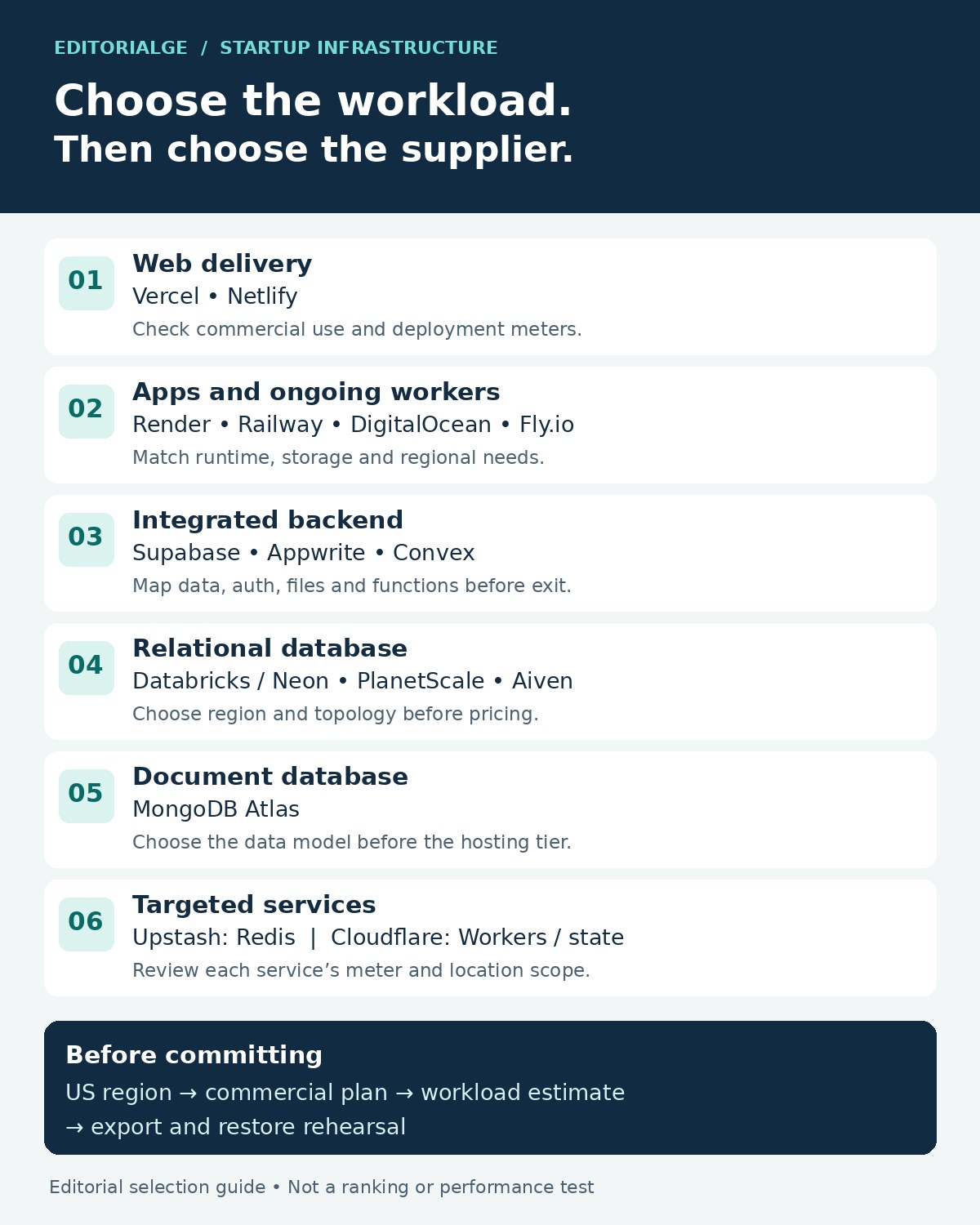
- For a web product with a separate database, start by comparing Vercel and Netlify. Check commercial eligibility and model the deployment and traffic meters.
- For an API plus ongoing workers, investigate Render, Railway and DigitalOcean. Add Fly.io when regional application placement warrants more operational control.
- For an integrated backend, compare Supabase, Appwrite and Convex around the data model and migration work your developers can maintain.
- For a separate relational database, compare Neon, PlanetScale and Aiven using the required topology and US region. Choose MongoDB Atlas when the application calls for a document model.
- For a targeted cache or Redis-compatible service, examine Upstash. For request processing and edge-connected state, investigate Cloudflare’s individual services and their location controls.
A useful shortlist of Developer Infrastructure SaaS Companies should leave you with two or three plausible choices for one layer of the stack. Select the required region and commercial plan, estimate the same workload, and rehearse the exit before production data makes the decision harder to reverse.
Frequently Asked Questions (FAQs)
Does a US hosting region mean all data stays in the US?
Not automatically. The selected region may describe a database or a compute service, while logs, support access, backups and other components have different arrangements. Assess the complete data path and contract.
Are startup credits included in the comparison?
No credit award is assumed. Programs can have eligibility requirements, spending restrictions and expiry dates. Build a sustainable estimate without credits, then treat a confirmed award as temporary relief.
Can one supplier replace the rest of the stack?
Sometimes an integrated backend can cover several needs, but the scope still matters. A database provider does not automatically host your frontend, and an application host may charge separately for persistent data. Map the components before consolidating vendors.