Windows 11 and Windows 10 come packed with built-in apps that promise to handle your daily tasks. Yet many users find these default programs fall short of their needs. Windows Media Player struggles with certain video formats, while Microsoft Edge lacks the chrome extensions that make browsing smooth.
The snipping tool feels basic compared to what power users want for screenshots.
Microsoft’s built-in apps cover the basics, but third-party alternatives often deliver superior performance and features. These replacement programs can transform your productivity and make your computer work better for you.
This guide reveals 12 outstanding programs that outshine Windows’ default offerings, from media players to file managers.
Each recommendation comes with clear explanations of why these tools beat the competition. You’ll discover free alternatives that save money while boosting your workflow. Ready to supercharge your Windows experience?
Key Takeaways
- VLC Media Player plays virtually any video or audio file format, unlike Windows Media Player which struggles with many common formats.
- Google Chrome loads pages faster than Microsoft Edge and offers thousands of extensions for enhanced productivity and customization.
- LibreOffice provides a complete office suite for free, handling documents, spreadsheets, and presentations without Microsoft Office’s hefty price tag.
- ShareX captures scrolling screenshots and uploads to over 80 services, far exceeding the basic Windows snipping tool capabilities.
- Everything searches millions of files instantly across your entire hard drive, making Windows Search look painfully slow by comparison.
VLC Media Player: A Better Alternative to Windows Media Player
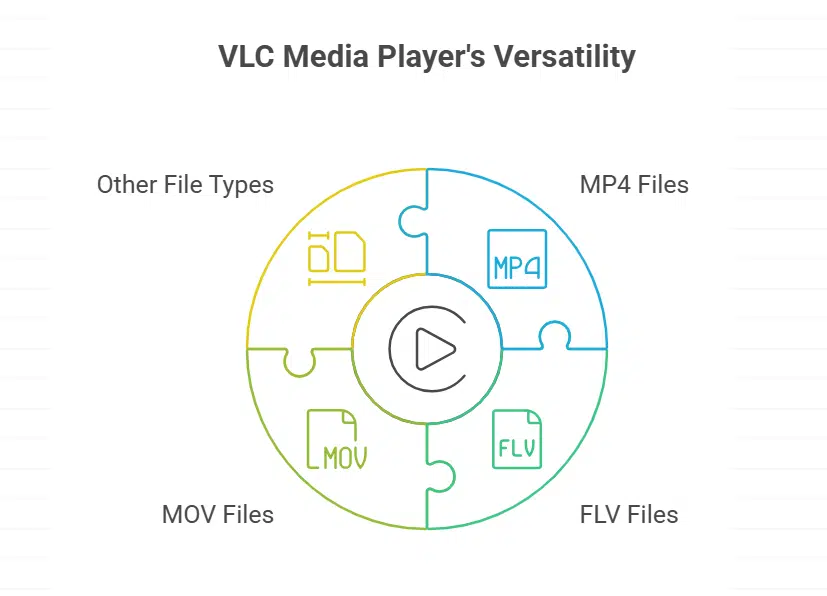
Windows Media Player feels like driving a car with square wheels when you need to play different video formats. VLC Media Player swoops in like a superhero, playing almost every file type you throw at it, from MP4 to FLV to MOV files without breaking a sweat.
Features & Description (VLC Media Player)
VLC media player crushes Windows Media Player in almost every way. This free powerhouse plays virtually any video or audio file you throw at it. FLV files, MOV formats, WMA tracks, and dozens of other file types work perfectly.
The built-in Windows media player often fails with these formats, leaving you frustrated.
VLC comes packed with features that make it a must-have app for any Windows setup. You can adjust playback speed, add subtitles, convert files between formats, and even stream content over networks.
The interface stays clean and simple, but power users can dive deep into advanced settings. Unlike Windows Media Player, VLC receives regular updates and supports the latest codecs without requiring additional downloads.
Google Chrome: A Faster and More Versatile Browser
Google Chrome beats Internet Explorer and Microsoft Edge in speed, tabs management, and extension support, making it the go-to internet browser for millions of users worldwide – keep reading to discover why this browser dominates the market.
Features & Description (Google Chrome)
Chrome dominates the browser market for good reasons. This internet browser loads pages faster than Microsoft Edge and offers superior tab management. Chrome syncs bookmarks, passwords, and browsing history across all your devices seamlessly.
The browser supports thousands of extensions that boost productivity and customize your experience.
Chrome’s developer tools outshine Edge’s basic options. Web developers love Chrome’s debugging features and console access. The browser handles multiple tabs without slowing down your computer.
Chrome connects with Google Drive, Google Docs, and other Google services automatically. Security updates arrive frequently, keeping your browsing safe from threats.
LibreOffice: A Free Alternative to Microsoft Office
LibreOffice gives you a complete office suite without spending a dime on Microsoft Office. This free software handles documents, spreadsheets, presentations, and databases just like the expensive alternatives, making it perfect for students, small businesses, and anyone who wants professional tools without the hefty price tag.
Features & Description (LibreOffice)
This free office suite packs a serious punch against Microsoft Office. Writer handles documents like a pro, while Calc crunches numbers better than Excel in many cases. Impress creates stunning presentations that rival PowerPoint.
Draw lets you sketch diagrams and illustrations with ease. Base manages databases without breaking a sweat. Math tackles complex equations that would make your head spin.
LibreOffice saves files in multiple formats, including Microsoft Office types. You can open Word docs, Excel sheets, and PowerPoint files without missing a beat. The interface feels familiar but offers more customization options than Microsoft’s version.
Best part? It costs zero dollars and works on Windows, Mac, and Linux systems. Students love this alternative because it delivers professional results without the hefty price tag of Microsoft Office.
Paint. NET: Advanced Image Editing Over MS Paint
Paint.NET brings professional image editing features to your desktop without the hefty price tag of adobe photoshop. This free software transforms basic photo editing into a creative playground, offering layers, special effects, and advanced tools that make ms paint look like a toy from windows 95.
Features & Description (Paint.NET)
Paint.NET transforms basic image editing into a powerful creative experience. This free software replaces MS Paint with professional-grade tools that rival expensive programs like Adobe Photoshop.
Users get layers, special effects, and advanced brushes without spending a dime. The program handles everything from simple photo fixes to complex digital art projects.
Built-in plugins expand Paint.NET’s capabilities far beyond what microsoft store apps offer. Artists can apply blur effects, adjust colors, and create stunning graphics with ease. The interface stays clean and simple, making it perfect for beginners who want more than basic drawing tools.
Power users love the extensive plugin library that adds new features regularly. Paint.NET proves that free software can compete with premium alternatives while keeping things straightforward and user-friendly.
Malwarebytes Anti-Malware: Superior Security Over Windows Defender
Malwarebytes Anti-Malware catches threats that slip past Windows Defender, giving your computer the protection it deserves against malware, ransomware, and other digital nasties that could wreck your day.
Features & Description (Malwarebytes Anti-Malware)
Malwarebytes Anti-Malware beats Windows Defender hands down. This anti-malware software catches threats that slip past Microsoft’s built-in protection. Real-time scanning blocks malware before it damages your system.
The program removes stubborn infections that other tools miss. Premium versions offer web protection and ransomware shields. Free users get excellent malware removal after infections occur.
This security tool runs alongside Windows Defender without conflicts. Quick scans finish in minutes, while deep scans check every file. The interface stays simple, making it perfect for beginners.
Updates happen automatically to catch new threats. Malwarebytes catches zero-day exploits and advanced persistent threats. Your operating system stays clean with this powerful security layer.
ShareX transforms how you capture and share your screen. This free tool beats the basic snipping tool by offering advanced features like scrolling screenshots, automatic uploads, and built-in editing options.
ShareX crushes the basic snipping tool with its massive feature set. This free screenshot utility captures full screens, specific windows, or custom regions with lightning speed. Users can record screen videos, create GIFs, and even capture scrolling web pages in one smooth motion.
The app goes way beyond simple screenshots. ShareX uploads images instantly to over 80 different services, including Google Drive, Dropbox, and imgur. Built-in editors let you add arrows, text, and highlights before sharing.
The program also includes a color picker, ruler tool, and hash checker. Power users love the customizable hotkeys and automated workflows that save hours of repetitive work.
7-Zip: Better File Compression and Extraction Than Windows Explorer
Windows Explorer handles basic file compression, but it falls short when you need real power. 7-Zip crushes the competition with superior compression ratios, faster processing speeds, and support for dozens of archive formats that leave Windows’ built-in tools in the dust.
Features & Description (7-Zip)
7-Zip crushes file compression tasks better than Windows Explorer’s built-in tools. This free software handles more file types than you can shake a stick at. ZIP, RAR, TAR, and dozens of other formats open without breaking a sweat.
The compression rates blow Windows’ default tools out of the water. Files shrink down to much smaller sizes, saving precious disk space on your computer.
Command line support makes 7-Zip a power user’s dream. Right-click any file or folder to compress it instantly. The interface stays clean and simple, no bells and whistles to confuse you.
Password protection keeps your sensitive files locked up tight. Extract archives faster than Windows Explorer ever could. This package manager alternative gives you complete control over your compressed files without the headaches.
MusicBee: A Robust Music Player Compared to Groove Music
MusicBee transforms your music streaming experience with features that make Groove Music look like a toy, offering customizable interfaces, advanced audio controls, and support for virtually every audio format you can throw at it.
Features & Description (MusicBee)
MusicBee transforms your music collection into a personalized listening experience. This free media player supports almost every audio format you can imagine, from MP3 to FLAC. The software organizes your tracks automatically using smart playlists and tags.
You can customize the interface with different skins and layouts to match your style. The built-in equalizer gives you precise control over sound quality, while the crossfade feature creates smooth transitions between songs.
Advanced users love MusicBee’s powerful library management tools. The program syncs perfectly with portable devices and smartphones. You can stream music from google drive or other cloud services directly through the app.
Unlike basic music streaming services, MusicBee lets you control every aspect of your audio experience. The software even converts between different file formats on the fly, making it superior to simple music streaming apps like Spotify Premium.
Everything: A Faster File Search Tool Than Windows Search
Windows Search makes you wait forever to find your files. Everything changes the game by showing instant results as you type, making file searches lightning-fast across your entire system.
Features & Description (Everything)
Everything turns file searching into a lightning-fast experience. This small program indexes your entire hard drive in seconds, not minutes like the built-in Windows search. You type a few letters, and Everything shows results instantly.
No more waiting for Windows to crawl through folders while you tap your fingers on the desk.
Everything searches through millions of files faster than you can blink. The program uses barely any memory or CPU power, unlike the resource-hungry Windows search that slows down your computer.
You can search by file name, extension, or even partial matches. Everything also lets you search specific folders, network drives, and external storage devices with the same blazing speed.
QuickLook: Preview Files Instantly Without Opening Them
Windows users often struggle with the slow preview system that forces them to open every file. QuickLook changes this game completely by letting you peek at documents, images, and videos with just a spacebar tap, making file management lightning-fast.
Features & Description (QuickLook)
QuickLook brings macOS-style file previews to Windows systems. Press the spacebar while selecting any file, and QuickLook displays its contents instantly. You can preview documents, images, videos, and code files without launching separate applications.
This tool works with PDF files, Microsoft Word documents, and hundreds of other formats. File explorer becomes more efficient when you can peek inside files quickly.
The app supports plugins for specialized file types. Developers can preview code with syntax highlighting. Photographers can examine metadata from their images. QuickLook handles everything from text files to complex spreadsheets.
The preview window shows file details, dimensions, and creation dates. This productivity tool saves time by eliminating the need to open full applications just to check file contents.
EarTrumpet: Advanced Audio Control Beyond the Default Mixer
EarTrumpet transforms your audio control experience by giving you precise volume management for each app running on your system, something Windows’ basic audio mixer simply can’t match.
Features & Description (EarTrumpet)
Windows comes with a basic audio mixer that barely scratches the surface. EarTrumpet transforms your sound control into something special. This free app gives you individual volume controls for every program running on your computer.
You can adjust Chrome’s volume while keeping your music player loud. Games can stay quiet while video calls remain clear.
EarTrumpet works like a charm with multiple audio devices too. Switch between headphones and speakers with just one click. The app shows which programs use which audio devices. You can even move specific apps to different speakers or headphones.
This beats the default Windows audio mixer by miles. Power users love how EarTrumpet makes complex audio setups simple to manage.
PowerToys: A Suite of Utilities to Supercharge Windows Functionality
Microsoft PowerToys transforms your Windows experience with a collection of advanced utilities that put built-in tools to shame. This free toolkit from Microsoft includes features like FancyZones for window management, PowerRename for batch file renaming, and a powerful launcher called PowerToys Run that makes the Start menu look outdated.
Features & Description (PowerToys)
Microsoft PowerToys brings a collection of advanced utilities to Windows. This free toolkit adds features that should have been built into the operating system from day one. PowerToys includes over a dozen tools that boost productivity and make daily tasks easier.
The suite offers a window manager that lets you snap windows into custom layouts with ease. The file renamer handles bulk operations in seconds, while the color picker grabs exact hex codes from anywhere on screen.
A powerful search tool called PowerToys Run launches apps and files faster than the start menu. The always-on-top feature keeps important windows visible while you work in other programs.
These tools transform how you interact with Windows, making complex tasks simple and saving time throughout your day.
Takeaway
These twelve productivity tools transform your Windows experience from ordinary to extraordinary. VLC media player, Google Chrome, LibreOffice, and Paint.NET replace clunky built-in apps with lightning-fast alternatives.
ShareX beats the snipping tool hands down, while 7-Zip makes file compression a breeze. Power users know that switching from Windows defaults saves hours every week, boosting efficiency like rocket fuel.
Download these programs today and watch your computer work smarter, not harder.
FAQs on Best Windows Programs Better Than Built-in Apps
1. Why should I replace Windows built-in apps with third-party programs?
Built-in Windows apps often lack advanced features that productivity tools from other developers provide. Programs like VLC media player, Google Chrome, and VS Code offer much better performance than their Microsoft counterparts.
2. What makes VLC media player better than Windows Media Player?
VLC media player handles almost every video format without needing extra codecs. It’s free, lightweight, and works smoothly with large files that might crash the default media player.
3. Should I use Microsoft Office or Google Docs for work?
MS Office gives you more advanced features for complex documents and spreadsheets. Google Docs works great for simple tasks and team collaboration, plus it syncs with Google Drive automatically.
4. Is Visual Studio Code really better than Windows Notepad for programming?
Absolutely! VS Code is a powerful integrated development environment that supports debugging, version control with git repositories, and code completions. Notepad can’t handle breakpoints or connect to Azure services like this programming tool can.
5. Why do people prefer Google Chrome over Microsoft Edge?
Google Chrome connects seamlessly with Google’s ecosystem, including Google Photos and YouTube Music. Many users find Chrome’s extensions and sync features more reliable than what browsers from the Microsoft Store offer.
6. What Windows productivity tools should every user download?
Microsoft PowerToys adds useful features like a better snipping tool and enhanced file compression options. Windows Terminal beats the old command prompt, and apps like Fork make managing git repositories much easier than using the basic tools.