

Managing multiple online accounts—email, banking, shopping—often leads to forgotten passwords and risky habits like reusing weak ones. This not only causes frustration but also increases the risk of hacking and data breaches.
Password security shouldn’t feel overwhelming. Yet, poor practices can result in stolen information or locked accounts, turning a small inconvenience into a major problem.
Expert reviews have tested dozens of free and paid Password Managers to identify the best options for 2026. Top picks include Bitwarden for its free features, 1Password for its all-around performance, and Proton Pass for privacy-focused users. These tools also support essentials like two-factor authentication, strong password generation, and dark web monitoring.
Choosing the right Password Manager simplifies security, protects sensitive data, and makes managing digital life effortless. Ready to upgrade online safety?
Why is Password Security Important?
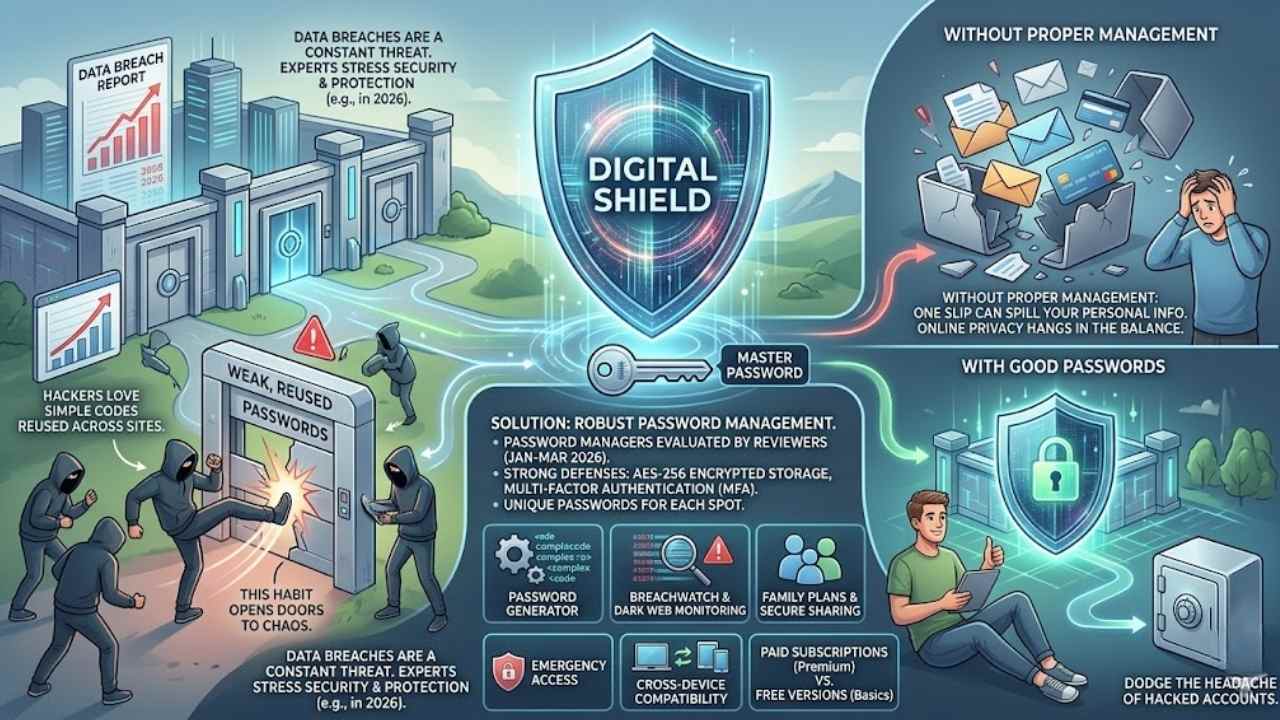
Picture your online accounts as a fortress, and weak passwords act like flimsy gates that crooks can kick down with ease. Hackers love simple codes, you know, the ones folks reuse across sites.
That habit opens doors to chaos. Data breaches hit hard, as the Verizon Data Breach Investigation Report shows year after year. In 2026, experts stress security and information protection as top priorities for staying safe online.
Dozens of password managers got tested by reviewers from January to March that year. They picked winners based on strong defenses like AES-256 encrypted storage and multi-factor authentication.
You need unique passwords for each spot, plus a solid master password to lock it all up. Think of it as your digital shield against sneaky threats.
Folks often skip these steps, but one slip can spill your personal info everywhere. Online privacy hangs in the balance without proper password management. Reviewers evaluated tons of options, both paid and free, to guide you.
They highlight tools with password generators that create tough codes on the fly. Add in features like breachwatch for dark web monitoring, and you stay ahead of trouble. Family plans help share access securely, while emergency access saves the day in a pinch.
Cross-device compatibility keeps everything in sync, no matter your gadget. Subscription models offer premium features, but free versions work for basics. Stick with these, and you dodge the headache of hacked accounts.
How Do Password Managers Work?
Password managers act like a secure vault for your online keys. They store all your passwords in one encrypted spot. You create a master password to access everything. This master key unlocks the vault, and the tool fills in login details for you.
Tools like 1Password and Bitwarden use strong encryption to keep data safe. Reviewers evaluated dozens of paid and free options in 2026, focusing on security features and ease of use.
Publications like PCMag and Wirecutter published these reviews between January and March 2026. Bitwarden started in 2016 and still leads as a top free choice. Dashlane offers browser extensions that make logins quick.
You install the app or extension, then add your accounts. The manager generates strong passwords for new sites. It checks password strength and suggests improvements. Features like password health reports help you spot weak spots.
Security experts like Kim Key and Alan Henry praise these tools for their user interface. NordPass shines with competitive pricing and premium plans. Proton Pass focuses on privacy with zero-trust security frameworks.
Password managers are essential for online safety in 2026, as they protect your information with top encryption, says a reviewer from Zapier.
These apps sync across devices for multi-device compatibility. Keeper excels at secure sharing, letting you send passwords safely. Aura and RoboForm include extras like dark web monitoring.
You enable auto-fill on your phone or computer. Passwordless login options, like passkeys, skip traditional passwords altogether. Subscription pricing varies, but many offer free tiers.
Travel mode in some apps hides sensitive data on the go. Email aliasing in premium plans adds privacy layers. Customer support teams guide you through setup. Tools like Apple Passwords app integrate with your devices.
Total Password provides emergency access for trusted contacts. Reviewers emphasize information protection as a key criterion. Bitwarden remains a favorite for its open-source approach.
Dashlane stands out with comprehensive security features. You log in once, and the manager handles the rest. This setup beats memorizing dozens of codes.
Key Features to Look for in a Password Manager
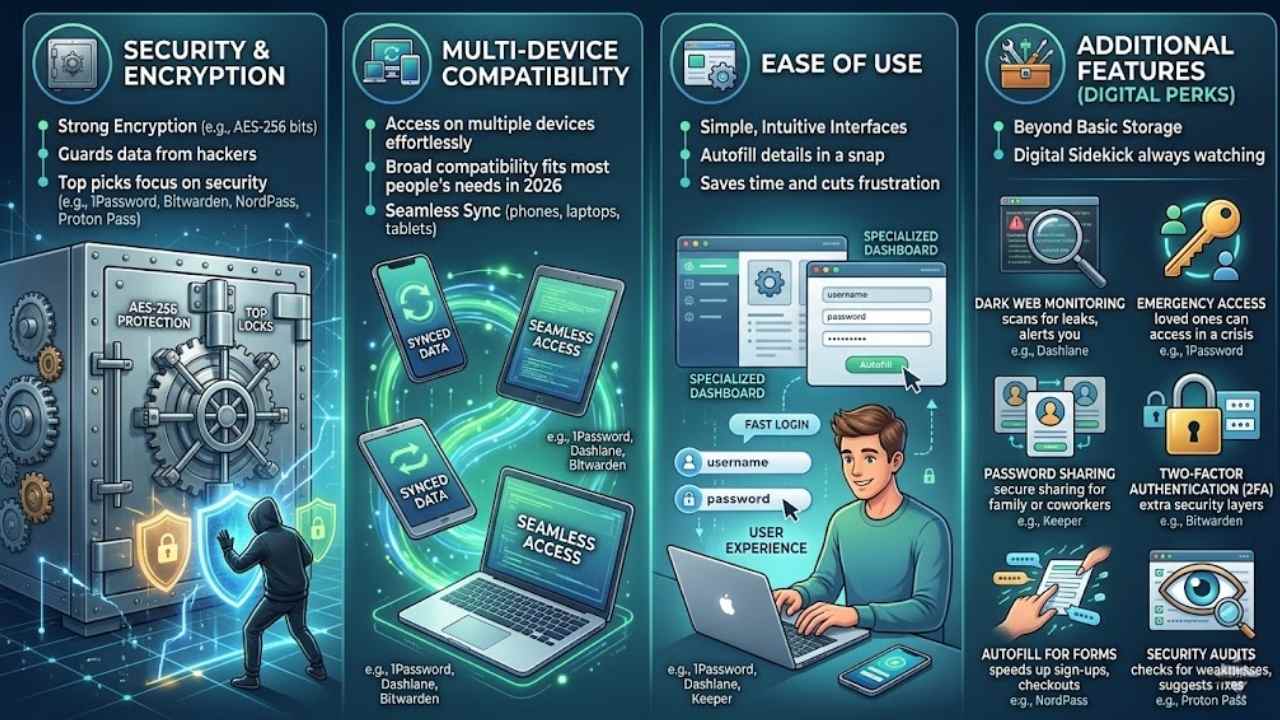
4. Key Features to Look for in a Password Manager: Hey, picking the right password manager feels like finding a trusty sidekick in a spy movie, one that guards your secrets with top-notch locks, syncs across your phone and laptop without a hitch, keeps things simple so you don’t pull your hair out, and throws in bonuses like alerts if your info pops up on shady sites—stick around, we’ll break it down next.
Security and Encryption (Key Features)
Password managers guard your data with strong encryption, like AES-256 bits, to keep hackers at bay. Reviewers stress security as a top factor in picks for 2026, after testing dozens of paid and free options from January to March.
You get peace of mind, knowing your info stays safe during password sharing. Imagine your passwords locked in a vault that only you can open, no peeking from outsiders. Sources name 1Password as the best in general due to its solid combo of features and protection, while Bitwarden shines as the top free choice since 2016.
NordPass wins Editors’ Choice for its premium security in business plans, and Proton Pass suits those wanting full privacy suites.
Users love how these tools boost user experience with easy, secure access across phones and laptops. Keeper excels at safe password sharing for teams, cutting risks in daily logins.
Security pros evaluated managers on info protection, making sure you pick one that fits your needs. Think of it as your digital bodyguard, always on duty. Individual plans from 1Password stand out for most folks, blending top encryption with simple use.
Multi-Device Compatibility (Key Features)
You need a password manager that works across all your gadgets, right? Top picks like 1Password shine here with seamless sync on phones, laptops, and tablets. This tool offers the best mix of features, including broad compatibility that fits most people’s needs in 2026.
Bitwarden, the top free choice since 2016, lets you access passwords on multiple devices without extra costs. Proton Pass stands out for privacy fans, blending password tools with a full security suite that spans devices effortlessly.
Reviewers tested dozens of options, both paid and free, between January and March 2026 to spotlight these.
Imagine juggling work on your computer and quick checks on your phone; that’s where multi-device support saves the day. Dashlane provides comprehensive security that syncs across platforms, making life easier.
Keeper excels in secure sharing while keeping everything in sync on various devices. NordPass earns Editors’ Choice for its premium features that include strong multi-device access.
With an Individual Annual Membership from 1Password, you get top security and compatibility that protects your info no matter the device. These managers prioritize protection, evaluated rigorously for online safety this year.
Ease of Use (Key Features)
Ease of use makes password managers a breeze for everyday folks like you and me. Imagine you’re juggling work emails, online shopping, and social media logins all day long. A good password manager jumps in with simple interfaces that autofill your details in a snap.
It saves time, cuts frustration, and keeps things flowing without a hitch. Reviewers tested dozens of paid and free options between January and March 2026, and they praised tools like 1Password for their straightforward setups.
Bitwarden shines here too, offering easy navigation since its start in 2016. You get quick access on phones or computers, no steep learning curve involved.
Folks often worry about tech feeling like a puzzle, but top picks flip that script. Dashlane and Proton Pass deliver clean designs that guide you step by step, almost like a helpful buddy chatting you through it.
Keeper steps up with intuitive sharing options that feel natural, not clunky. These features tie into strong security, as noted in 2026 evaluations, making protection effortless. Imagine ditching sticky notes for passwords; it’s that simple shift to smoother days.
NordPass even grabs Editors’ Choice for its premium ease in business settings.
Additional Features (e.g., Dark Web Monitoring, Emergency Access) (Key Features)
Password managers pack extra perks that go beyond basic storage, making your online life safer and smoother. Think of them as your digital sidekick, always watching your back with tools like these.
- Dark web monitoring scans the shady corners of the internet for your leaked data, alerting you if someone sells your info; reviewers in 2026 praised options like Dashlane for this, as dozens of paid and free managers got evaluated across January to March publications, stressing security as a top criterion.
- Emergency access lets trusted contacts grab your passwords in a crisis, like if you forget them during travel; 1Password shines here with its individual annual membership plan, hailed by multiple sources as the top-rated for features, including this one that adds peace of mind without hassle.
- Password sharing secures ways to send logins to family or coworkers, keeping everything encrypted; Keeper stands out for this, as evaluations in 2026 noted its edge in safe sharing, part of why reviewers tested dozens to recommend top picks for online safety.
- Two-factor authentication setup guides you to add extra login layers, cutting hack risks; Bitwarden, the best free choice since 2016, includes this in its core, with 2026 reviews confirming it as a standout amid many evaluated options.
- Autofill for forms speeds up sign-ups and checkouts, saving you time on multiple devices; NordPass earned Editors’ Choice in 2026 for premium features like this, blending it with business tools that multiple sources highlighted for comprehensive protection.
- Security audits check your passwords for weaknesses, suggesting fixes on the spot; Proton Pass leads for privacy fans with this, plus a full internet security suite, as 2026 recommendations from various dates emphasized info protection in their evaluations.
- Breach alerts notify you of company data leaks that might affect your accounts, prompting quick changes; 1Password combines this with top encryption, earning its spot as the top-rated in 2026 reviews that covered compatibility and extra perks for most users.
1Password: Best Overall Password Manager
Picture your passwords locked in a vault that no thief can crack, and that’s what 1Password delivers with its AES-256 encryption and zero-knowledge design. It syncs across phones, laptops, and browsers, plus it autofills logins so fast, you’ll wonder how you lived without it—stick around to see why it tops our list.
Features & Description (1Password)
1Password stands out with its top mix of tools for keeping your logins safe. It uses strong codes to lock your data, and it works on phones, computers, and more. You get auto-fill for quick sign-ins, plus extras like sharing passwords with family.
Folks love how it spots weak spots in your accounts. Experts picked it as the best all-around choice for most users in 2026, after checking dozens of options.
The app offers an Individual Annual Membership plan that shines for everyday needs. Reviews from January to March 2026 highlight its edge in safety and ease. It fits right into your daily routine, like a trusty sidekick guarding your online world.
Multiple sources agree it’s number one for that perfect balance of power and simplicity.
Pros & Cons (1Password)
Let’s discuss the pros and cons of 1Password, the top pick for most folks in 2026.
| Pros | Cons |
|---|---|
| Offers the best mix of features, compatibility, and security in 2026 evaluations. | Costs more than free options like Bitwarden for basic needs. |
| Multiple sources name it the best all-around choice for most people this year. | Lacks some full suite perks that Proton Pass provides for privacy fans. |
| Individual Annual Membership plan stands out as a strong value for secure access. | May feel overwhelming for users who want simple, no-frills tools. |
| Focuses on key criteria like encryption and info protection for online safety. | Premium features require payment, unlike Bitwarden’s free tier since 2016. |
| Reviewed among dozens of paid and free managers in early 2026 reports. | Does not match NordPass in business-focused Editors’ Choice awards. |
Bitwarden: Best Free Password Manager
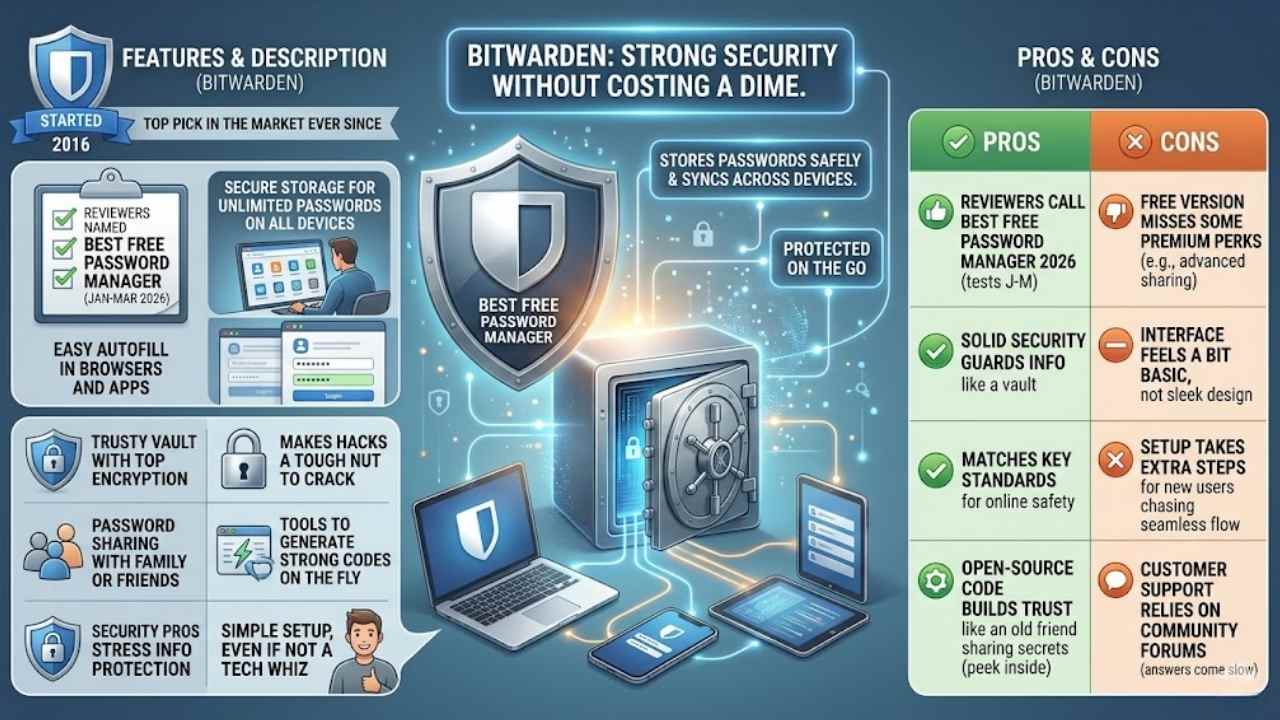
Bitwarden gives you strong security without costing a dime, like a trusty lock on your digital door. It stores your passwords safely and syncs them across devices, so you stay protected on the go.
Features & Description (Bitwarden)
People love Bitwarden for its strong free plan that keeps your passwords safe without costing a dime. This tool started in 2016 and has stayed a top pick in the market ever since. Reviewers checked dozens of paid and free options between January and March 2026, and they named it the best free password manager for that year.
You get secure storage for unlimited passwords on all your devices, plus easy autofill in browsers and apps. Think of it as a trusty vault that locks away your info with top encryption, making hacks a tough nut to crack.
Extra perks include password sharing with family or friends, and tools to generate strong codes on the fly. Security pros stress how it focuses on info protection, a big deal in reviews for online safety.
Imagine juggling logins like a pro without the stress, that’s what Bitwarden brings to the table. Users rave about its simple setup, even if you’re not a tech whiz.
Pros & Cons (Bitwarden)
Bitwarden stands out as a top pick, especially if you want a free option that packs real punch since its start in 2016.
| Pros | Cons |
|---|---|
| Reviewers call it the best free password manager for 2026, based on tests of dozens of tools from January to March that year. | Free version misses some premium perks, like advanced sharing, that paid rivals offer. |
| It holds strong in the market as a top choice, with solid security that guards your info like a vault. | Interface feels a bit basic compared to flashier apps, which might bug folks who crave sleek designs. |
| Focus on protection shines through, matching key standards for online safety that experts stress in reviews. | Sync across devices works well, but setup takes extra steps for new users chasing that seamless flow. |
| Open-source code lets tech-savvy folks peek inside, building trust like an old friend sharing secrets. | Customer support relies on community forums more than direct help, so answers come slow sometimes. |
Dashlane: Best for Comprehensive Security Features
Dashlane packs a punch with tools like automatic password changes and VPN access for extra online safety. Imagine, it spots weak spots in your logins before hackers do, so you stay one step ahead.
Features & Description (Dashlane)
You get strong security with Dashlane, folks. It packs top encryption to guard your passwords. Think of it as a vault that locks out thieves. Users love the auto-fill for quick logins.
Plus, it scans the dark web for leaks. That keeps you one step ahead of trouble. Dashlane works on phones, computers, and tablets. Sync your data across devices without a hitch. Imagine sharing passwords safely with family.
It handles that too. Reviewers praise its premium tools for business needs.
Critics call Dashlane a champ for full protection in 2026. It offers VPN for safe browsing. Add two-factor authentication for extra shields. You can generate strong passwords on the fly.
Feel secure with emergency access options. Many sources evaluated dozens of managers. They highlight Dashlane’s focus on info safety. Paid plans shine with advanced features. Free versions give basics, but upgrades unlock more.
People pick it for privacy in a risky online world.
Pros & Cons (Dashlane)
Dashlane packs a punch with its security tools, so let’s break down what shines and what might not fit everyone.
| Pros | Cons |
|---|---|
|
|
Proton Pass: Best for Privacy-Focused Users
Proton Pass guards your secrets with zero-knowledge encryption, so no one peeks inside, not even the company. Imagine a digital fortress that auto-fills logins across devices while scanning for data leaks—curious yet?
Features & Description (Proton Pass)
Users love Proton Pass for its strong focus on privacy and security. This tool combines password management with a full internet security suite. Reviewers in 2026 praise it as the top pick for those who want more than basic protection.
They evaluated dozens of options, both paid and free. Sources published these recommendations between January and March 2026. Imagine your online life as a fortress; Proton Pass builds the walls high with end-to-end encryption.
It stores passwords, notes, and even hides your email from trackers. You get alias emails to keep your real address safe, like a secret identity in a spy novel. Security experts highlight its zero-knowledge architecture.
No one, not even the company, can access your data.
Proton Pass shines for privacy fans who need robust tools. It offers autofill on all devices, from phones to computers. You sync everything without worry, thanks to secure servers in Switzerland.
Folks say it’s like having a Swiss bank for your logins, safe and neutral. Reviews from multiple sources in 2026 confirm its edge in combining features. Users appreciate the built-in VPN for extra shielding.
This setup protects against leaks on public Wi-Fi. Think of it as your digital bodyguard, always on duty. Experts tested it against rivals and found it excels in user trust.
Pros & Cons (Proton Pass)
Proton Pass shines as a top pick for folks who crave a full internet security suite packed with password tools. It bundles strong privacy features, like end-to-end encryption, that keep your data safe from prying eyes. Think of it as a digital fortress, guarding your logins while scanning for threats. Reviews from January to March 2026 praise its focus on security and information protection, making it ideal for privacy hounds. Plus, it syncs across devices without a hitch, and offers extras like secure notes.
On the flip side, Proton Pass might feel pricey for basic users who skip the premium bells and whistles. Some folks gripe about its learning curve, especially if you’re new to all-in-one suites. Free versions limit features, so you could miss out on full protection without paying up. Still, for those chasing top-notch online safety in 2026, it delivers solid value despite the costs.
Keeper Password Manager: Best for Secure Password Sharing
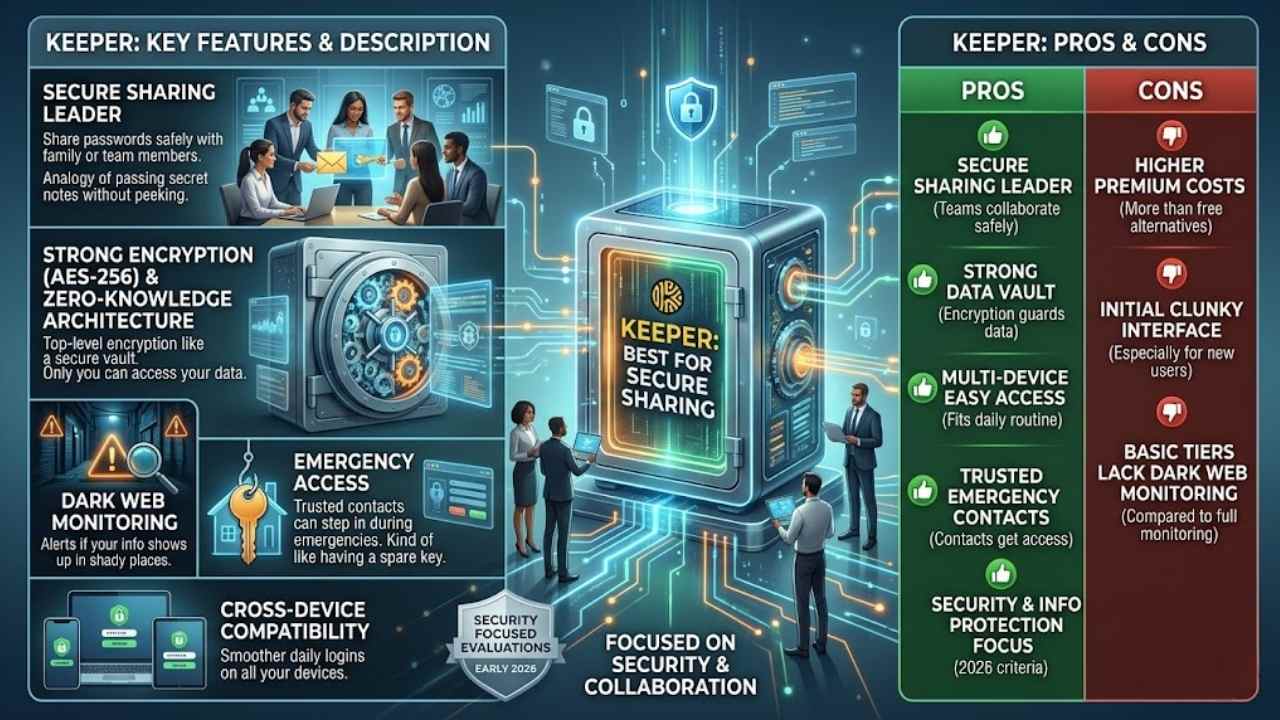
Imagine sharing passwords with your team, like passing a secret note in class, but without the risk of it falling into the wrong hands. Keeper locks down those shares with AES-256 encryption and zero-knowledge architecture, making it a breeze for families or businesses to collaborate safely on logins.
Features & Description (Keeper)
Keeper Password Manager stands out for its strong focus on secure sharing. It lets you share passwords safely with family or team members, like passing a secret note without anyone peeking.
The app uses top-level encryption to guard your data, much like a vault that only you can open. Plus, it offers dark web monitoring to alert you if your info shows up in shady places.
Reviewers tested dozens of options, both paid and free, across early 2026 to pick the best for online safety.
You get emergency access features too, so trusted contacts can step in if needed, kind of like having a spare key hidden for emergencies. Keeper works on all your devices, from phones to computers, keeping things smooth.
Security pros praise its info protection, a big deal in 2026 evaluations. Think of it as your digital bodyguard, always watching your back with easy tools that fit right into daily life.
Pros & Cons (Keeper)
Keeper shines in secure password sharing, making it a top pick for teams who need to swap credentials safely. You get strong encryption that guards your data like a vault, and it fits right into your daily routine with easy access on multiple devices. Folks love how it handles emergency access too, letting trusted contacts step in if needed. Reviewers evaluated dozens of options in 2026, and Keeper stands out for its focus on security and information protection, key criteria for online safety.
On the flip side, Keeper’s premium plans can pinch your wallet more than free alternatives like Bitwarden. Some users find its interface a bit clunky at first, especially if you’re new to password managers. It lacks built-in dark web monitoring in basic tiers, which means you might miss out on extra alerts compared to tools like Dashlane.
Final Thoughts
We’ve covered top picks like 1Password for all-around excellence, Bitwarden as the free champ, Dashlane for strong safeguards, Proton Pass for privacy fans, and Keeper for safe sharing.
These tools make password handling simple and quick, so you can set them up in minutes without hassle. Strong passwords shield your online life from threats, cutting risks and boosting peace of mind in a digital world full of pitfalls.
Check out sites like PCMag or CNET for fresh reviews and trials to dive deeper. Pick one today, folks, and lock down your accounts before hackers knock on your door.
Frequently Asked Questions (FAQs) About Password Managers
1. What makes a password manager the best choice for 2026?
Know your passwords as a vault full of treasures; in 2026, top picks like Bitwarden and 1Password shine with AI smarts that spot weak spots before hackers do. They autofill logins faster than you can say “forgot password,” and they sync across devices without a hitch. Plus, with biometric locks, it’s like having a personal bodyguard for your digital life.
2. Why switch to a password manager by 2026?
Picture this: you’re juggling a dozen accounts, and one slip-up lets the bad guys in. A solid password manager generates ironclad codes, stores them safely, and even warns you about breaches in real time.
3. How do these tools keep my data secure in the future?
Security is no joke, right? Tools like Dashlane use end-to-end encryption, so your info stays locked tight.
4. Can password managers handle two-factor authentication in 2026?
You bet they can; advanced ones integrate it seamlessly, adding that extra layer like a double deadbolt on your front door. They make setup a breeze, and some even predict threats using machine learning. It’s like having a crystal ball for cyber risks, keeping you one step ahead.





















