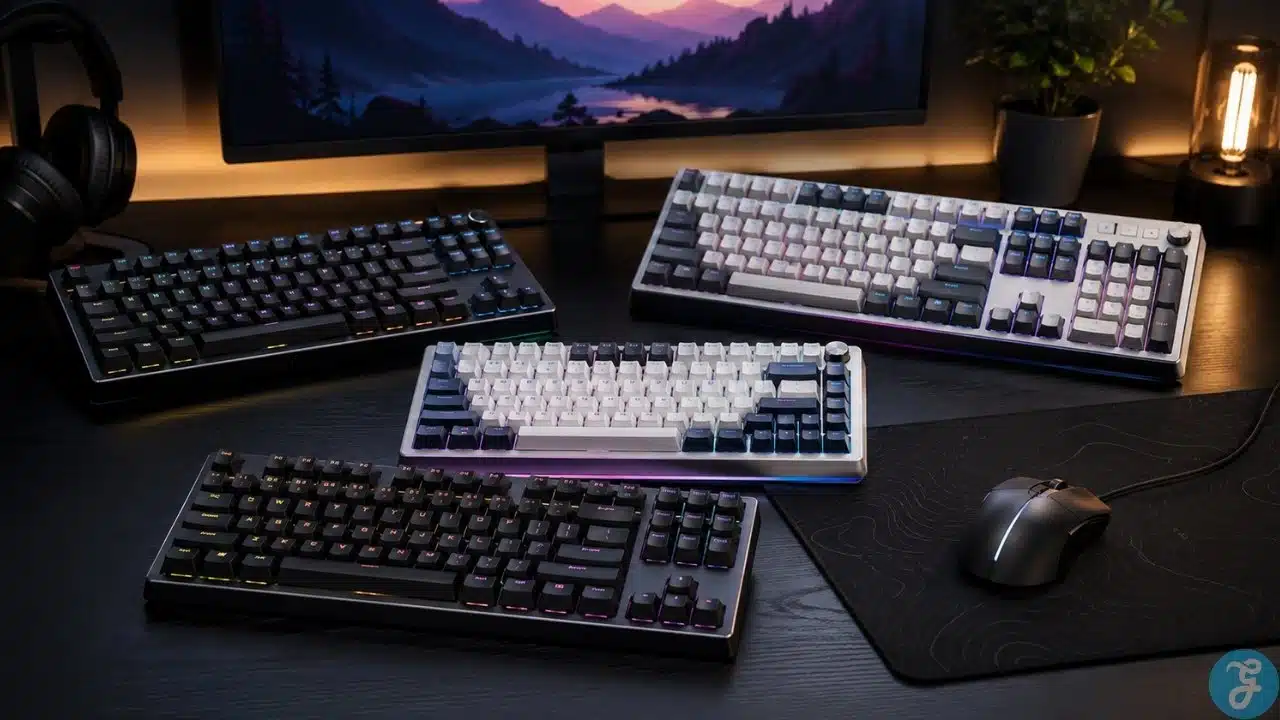
Buying a gaming keyboard used to be easier. Pick a layout, choose a switch color, decide how much RGB you could tolerate, and move on. Now the serious gaming keyboard market is full of Hall effect switches, magnetic sensors, adjustable actuation, rapid trigger, analog input, 8K polling, custom profiles, and software features that sound useful until you realize you may never touch half of them.
The best mechanical keyboards for gaming are not all built for the same player. A competitive FPS player may genuinely benefit from rapid trigger and short actuation. Someone who mainly plays RPGs, strategy games, survival titles, or single-player action games may care more about layout, typing feel, wireless support, and comfort.
This list focuses on keyboards that make sense for real gaming setups, not just keyboards with aggressive marketing. Some are built for esports speed. Some are better daily-use boards. One is here because full-size keyboard users still exist, despite what the TKL crowd keeps shouting.
How We Picked These Gaming Keyboards
A keyboard can have excellent specs and still feel annoying after two weeks. So the selection was not based on speed claims alone.
The main things that mattered were:
- Switch behavior, including Hall effect, magnetic, optical, analog, and mechanical performance
- Gaming features such as rapid trigger, adjustable actuation, profiles, and low-latency modes
- Layout practicality for gaming and daily use
- Build quality, stabilizers, keycaps, case feel, and typing comfort
- Software quality and how much tuning the keyboard actually needs
- Whether the keyboard has a clear reason to exist at its price level
A quick warning before the list: rapid trigger is useful, but it is not magic. It helps most in movement-heavy games where fast key reset matters. It will not turn poor aim, weak map sense, or panic crouching into a tournament-ready playstyle.
7 Best Mechanical Keyboards For Gaming Worth Buying
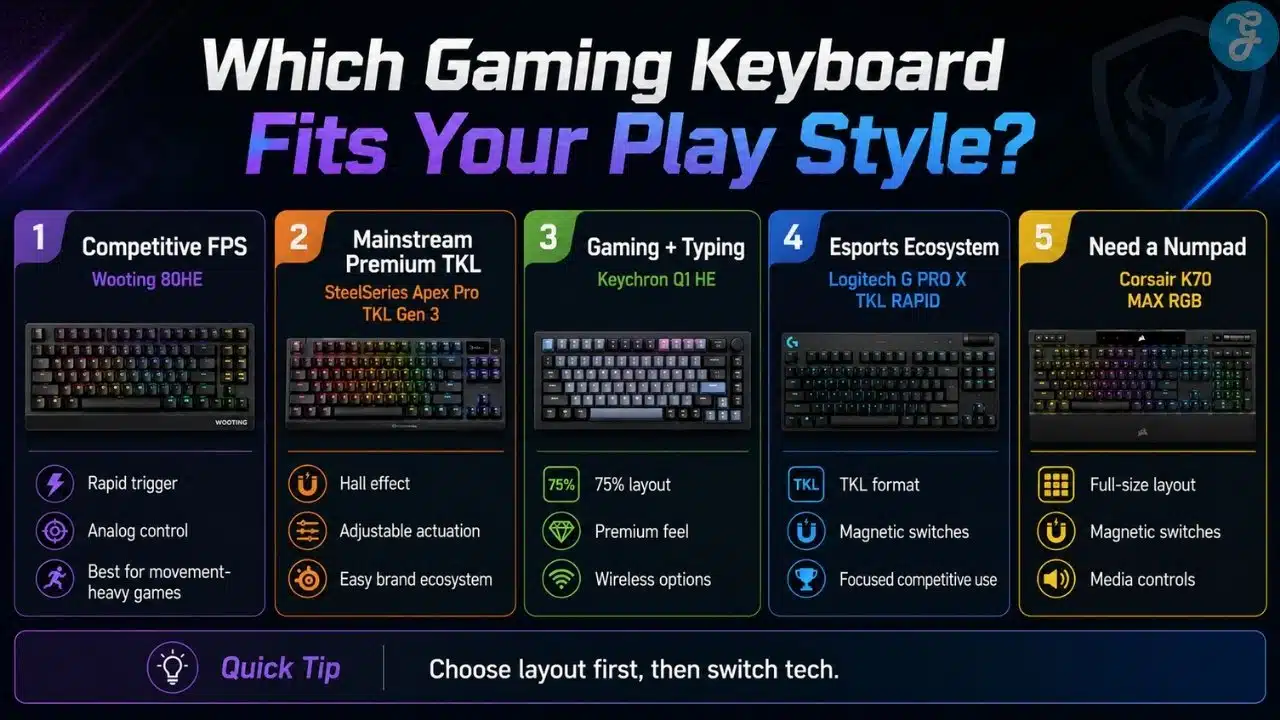
1. Wooting 80HE
The Wooting 80HE is the strongest overall choice for players who want serious gaming control without dropping too many everyday keys.
Wooting has become one of the main names in Hall effect gaming keyboards because its boards are built around fine control, not just flashy hardware. The 80HE supports true 8K polling, per-key scanning, rapid trigger, analog input, and deep tuning through Wootility. That combination makes it especially strong for games where movement precision matters.
The 80% layout is also a smart middle ground. It is more practical than a 60% board because you still get arrow keys and a function row, but it does not take up as much desk space as a full-size keyboard. For FPS players who need more mouse room, that matters.
This is the keyboard to compare first if competitive gaming is your priority. The rapid trigger implementation is excellent, the software is mature, and the layout feels more livable than ultra-compact boards.
The downside is simple: not everyone needs this much control. If you mostly play slower games, the 80HE may feel like buying racing tires for a daily grocery run.
Best for: Competitive PC gamers who want rapid trigger, analog control, and a practical layout.
Worth buying if you play: Valorant, Counter-Strike, Apex Legends, Fortnite, osu!, or other games where repeated movement inputs matter.
Think twice if: you want wireless support, a softer typing-first board, or a cheaper casual gaming keyboard.
2. SteelSeries Apex Pro TKL Gen 3
The SteelSeries Apex Pro TKL Gen 3 is the safer mainstream pick for gamers who want Hall effect performance without stepping too far into enthusiast territory.
Its OmniPoint 3.0 switches support adjustable actuation and rapid trigger, giving players control over how quickly each key activates and resets. That is the main reason to consider it over a traditional mechanical keyboard.
The TKL layout is also one of the best formats for gaming. It removes the number pad, keeps the arrow keys and function row, and gives your mouse hand more room. For most PC gamers, that is a better compromise than both 60% and full-size layouts.
What makes the Apex Pro TKL Gen 3 easier to recommend than some faster niche boards is its overall polish. It feels like a complete gaming product: recognizable software, a familiar layout, strong retail availability, and enough features for serious play without making the setup feel too technical.
It is not cheap, and the OLED display should not be treated as a major buying reason. The switches and layout matter much more.
Best for: Gamers who want a premium TKL keyboard with Hall effect switches and mainstream software support.
Why it stands out:
- Strong adjustable actuation system
- Practical TKL layout
- Good balance between competitive features and everyday usability
- Easier to approach than some specialist gaming boards
If Wooting is the more enthusiast-competitive pick, SteelSeries is the more familiar premium gaming choice.
3. Razer Huntsman V3 Pro TKL 8KHz
The Razer Huntsman V3 Pro TKL 8KHz is built for players who want an esports-style keyboard with fast optical analog switches, rapid trigger, and Razer’s gaming ecosystem.
This keyboard makes the most sense for competitive FPS players. Razer’s Gen-2 Analog Optical Switches support adjustable actuation and Rapid Trigger Mode, so movement keys can activate and reset very quickly when tuned properly. The 8KHz version pushes the performance angle even further.
The TKL format is the right call here. It keeps the board compact enough for low-sensitivity mouse movement while avoiding the awkwardness of some ultra-small layouts. Players who use function keys, arrows, or quick settings will appreciate that.
There is one important caution: very sensitive actuation can become irritating outside games. If you set keys too aggressively, typing can feel twitchy, accidental inputs become more likely, and the keyboard may feel less comfortable for normal work. Profiles matter.
Razer also offers advanced input features on supported Huntsman models. Competitive players should check tournament and game rules before relying on features that change directional input behavior.
Best for: FPS players who want a fast, gaming-first keyboard in the Razer ecosystem.
Useful for:
- Strafing and counter-strafing
- Quick peeks
- Movement-heavy shooters
- Players who already use Razer Synapse and Razer gear
Not ideal for: someone who wants the best typing feel, wireless freedom, or a quiet everyday keyboard.
4. Keychron Q1 HE
The Keychron Q1 HE is the best option here for players who want gaming features without giving up the feel of a premium keyboard.
Many competitive gaming keyboards feel fast but ordinary to type on. The Q1 HE takes a different route. It combines Hall effect magnetic switches with a 75% layout, aluminum body, double-gasket design, wireless support, Bluetooth, wired USB-C, and QMK-style customization.
That makes it better for people who use the same desk for gaming and work. If you game at night but spend the day writing, editing, coding, or handling office tasks, typing feel matters. The Q1 HE is one of the more convincing choices for that mixed use.
The 75% layout also deserves credit. It saves space compared with full-size keyboards but keeps important keys within reach. For many users, it feels less cramped than a 60% board and more desk-friendly than a full-size layout.
The Q1 HE does ask more from the buyer. It is not as plug-and-play as a simple gaming keyboard. You are buying into a more customizable board, which is great if you enjoy tuning and less great if you want everything handled for you.
Best for: Gamers who want Hall effect switches, better typing feel, and a premium desk setup.
Buy it for: gaming plus daily typing, 75% layout, solid build, and wireless flexibility.
Skip it if: you only care about competitive FPS performance and want the most direct esports-focused setup.
5. Logitech G PRO X TKL RAPID
The Logitech G PRO X TKL RAPID is a focused esports keyboard for players who want magnetic analog switches inside a familiar Logitech G setup.
It uses a tenkeyless layout, magnetic analog switches, rapid trigger, adjustable actuation, dual-shot PBT keycaps, and a detachable USB-C cable. Logitech’s KEYCONTROL system adds more advanced key behavior through G HUB, which matters if you want deeper per-key customization.
This keyboard is more direct than the Keychron Q1 HE and less enthusiast-heavy than Wooting. It is for players who want a competitive keyboard that fits cleanly into a Logitech setup with a Logitech mouse, headset, or existing G HUB profiles.
The detachable cable is useful if you move your keyboard between setups or attend events. The TKL layout also keeps it sensible for FPS players.
It does not offer wireless, and it is not the most exciting keyboard for typing-focused users. Its strongest value is in competitive gaming, not in being a luxurious all-purpose board.
Best for: Logitech users and competitive players who want a TKL rapid-trigger keyboard.
Good fit if: you already use Logitech G HUB and want one software ecosystem.
Less useful if: you mostly play games where rapid trigger makes little difference.
6. ASUS ROG Azoth Extreme
The ASUS ROG Azoth Extreme is the premium desk setup pick. It is not the most practical value choice. That needs to be said clearly.
This keyboard is for people who want high-end build quality, wireless flexibility, premium materials, an OLED touchscreen, a control knob, and a more polished typing feel than many pure esports keyboards. It uses a 75% layout and leans into the enthusiast-gaming crossover space.
The Azoth Extreme makes more sense if your setup matters to you as much as raw gaming response. It can work well for gaming, writing, editing, and general desktop use, and it looks more refined than many aggressive gaming keyboards.
But the price and feature set push it into luxury territory. If your only concern is competitive FPS input performance, there are better-value choices above it. If you want a premium wireless keyboard that still performs well for gaming, it becomes much more appealing.
Best for: Premium wireless gaming setups and users who care about build, feel, and aesthetics.
What you are really paying for:
- High-end materials
- Wireless flexibility
- Premium 75% design
- OLED touchscreen and control knob
- Better desk presence than standard esports boards
This is not the keyboard most people need. It is the keyboard some people will want, and there is a difference.
7. Corsair K70 MAX RGB
The Corsair K70 MAX RGB is the best pick on this list for players who still want a full-size keyboard.
A lot of gaming keyboard advice now assumes everyone should use TKL or 75%. That advice makes sense for FPS players, but it does not fit everyone. Some gamers use the number pad. MMO players, spreadsheet users, productivity-heavy users, and people who like dedicated media controls may still prefer a full-size board.
The K70 MAX RGB uses Corsair MGX magnetic-mechanical switches with adjustable actuation, full-key rollover, anti-ghosting, and a 104-key layout. It also keeps the familiar Corsair-style media controls and volume roller, which are genuinely useful if you adjust sound often.
The main issue is size. A full-size board pushes your mouse farther to the right. If your desk is small or you play low-sensitivity shooters, that can become annoying.
Still, not every gamer wants a compact board. The K70 MAX RGB gives full-size users modern magnetic switch tuning without forcing them to change how they work.
Best for: Gamers who want magnetic switches, a number pad, and dedicated media controls.
Choose this if: you play games and also use your keyboard for productivity, macros, MMOs, or number-heavy work.
Avoid it if: you need more mouse space or want a cleaner, competitive FPS setup.
Best Mechanical Keyboards For Gaming By Player Type
Best overall for competitive gaming: Wooting 80HE
The strongest choice for rapid trigger, analog control, and serious tuning.
Best mainstream premium TKL: SteelSeries Apex Pro TKL Gen 3
A polished Hall effect gaming keyboard that feels easier to recommend to general buyers.
Best Razer esports option: Razer Huntsman V3 Pro TKL 8KHz
Fast, aggressive, and built for FPS players who like Razer’s software ecosystem.
Best gaming and typing balance: Keychron Q1 HE
A better fit for players who work and game at the same desk.
Best Logitech esports keyboard: Logitech G PRO X TKL RAPID
Focused, portable, and ideal for Logitech G users.
Best premium wireless setup: ASUS ROG Azoth Extreme
Expensive, but strong for users who want both gaming performance and luxury desk feel.
Best full-size option: Corsair K70 MAX RGB
The right choice if you still need a number pad and media controls.
How To Choose The Right Keyboard
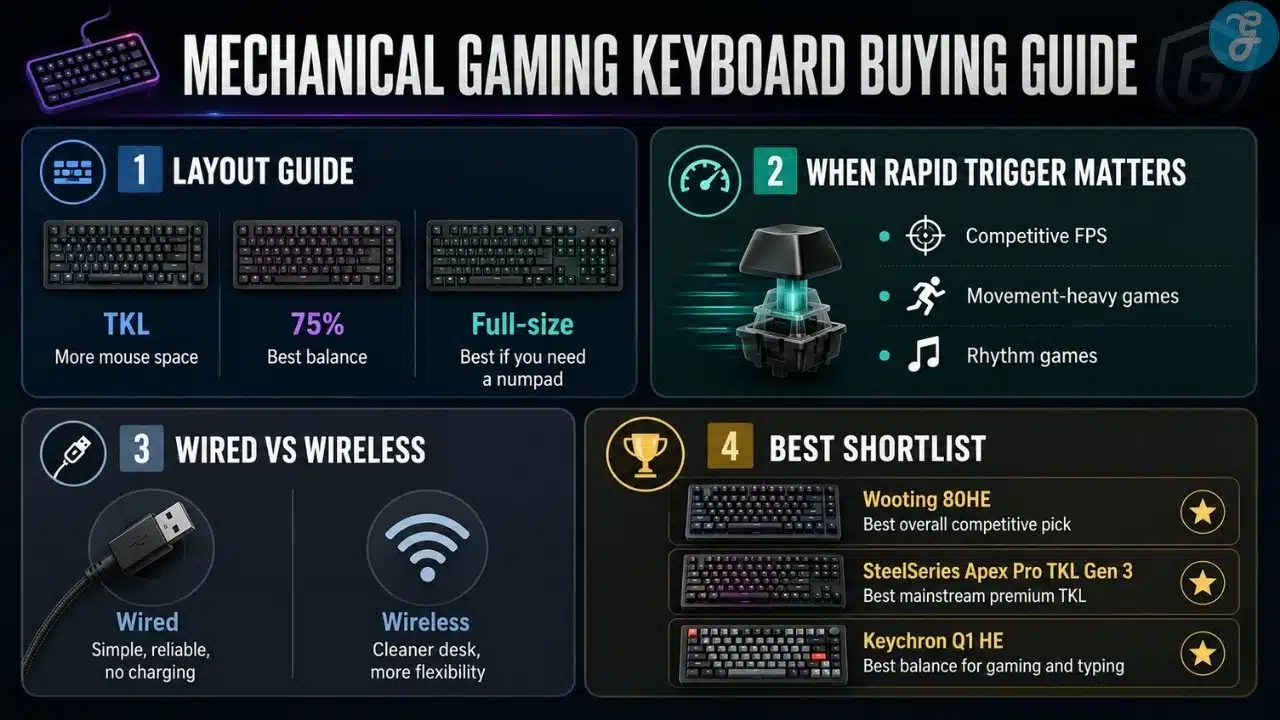
Start with your games, then your layout.
If you mostly play competitive shooters, look at rapid trigger, adjustable actuation, and desk space first. Wooting 80HE, SteelSeries Apex Pro TKL Gen 3, Razer Huntsman V3 Pro TKL 8KHz, and Logitech G PRO X TKL RAPID are the most relevant options.
If your keyboard also has to handle writing, editing, coding, or schoolwork, do not ignore typing feel. Keychron Q1 HE and ASUS ROG Azoth Extreme are stronger mixed-use choices.
If you use a number pad every day, do not let keyboard trends push you into TKL. The Corsair K70 MAX RGB exists for a reason.
A Few Buying Mistakes To Avoid
- Do not buy rapid trigger only because reviewers talk about it. Buy it if your games benefit from fast reset behavior.
- Do not choose 60%, TKL, or 75% only because it looks cleaner. Make sure you can live without the missing keys.
- Do not assume wireless is better. For competitive players, wired is still simple, reliable, and one less thing to charge.
- Do not ignore software. Adjustable actuation is only useful if the software is manageable.
- Do not pay extra for a screen or knob unless you will actually use it.
Final Buying Advice
The safest recommendation for serious competitive players is the Wooting 80HE. It gives the strongest overall mix of rapid trigger control, practical layout, and software depth. The SteelSeries Apex Pro TKL Gen 3 is easier to recommend to mainstream buyers who want similar modern gaming features in a familiar package.
The Keychron Q1 HE is the more balanced pick for people who care about both gaming and typing. The Razer Huntsman V3 Pro TKL 8KHz and Logitech G PRO X TKL RAPID make the most sense for esports-focused setups. The ASUS ROG Azoth Extreme is premium and expensive, but attractive for a high-end wireless desk. The Corsair K70 MAX RGB is the practical answer for full-size users.
The best mechanical keyboards for gaming should match your games first. Everything else – RGB, displays, knobs, wireless extras, and premium materials – should come after that.
Frequently Asked Questions (FAQs) About Best Mechanical Keyboards For Gaming
What Is The Best Mechanical Keyboard For Gaming Overall?
The Wooting 80HE is the strongest overall pick for competitive gaming because of its rapid-trigger control, Hall effect switches, practical layout, and strong software tuning. For a more mainstream premium choice, the SteelSeries Apex Pro TKL Gen 3 is easier to recommend.
Are Hall Effect Keyboards Better For Gaming?
Hall effect and magnetic keyboards can be better for competitive gaming because they allow adjustable actuation and rapid trigger. They are most useful in FPS, rhythm, and movement-heavy games. For slower games, the difference is much smaller.
Is TKL Better Than Full-Size For Gaming?
TKL is better for many gamers because it creates more mouse space while keeping arrow keys and function keys. Full-size keyboards are still better if you regularly use a number pad for MMOs, spreadsheets, macros, or work.
Do You Need Rapid Trigger For Gaming?
Not for every game. Rapid trigger matters most when fast key reset improves movement or repeated inputs. It helps more in games like Valorant, Counter-Strike, Apex Legends, Fortnite, and rhythm games than in story-driven or turn-based titles.
Which Keyboard Is Best For Gaming And Typing?
The Keychron Q1 HE is one of the best choices if you want both gaming features and a more premium typing feel. The ASUS ROG Azoth Extreme is also strong for typing and wireless setups, but it is much more expensive.