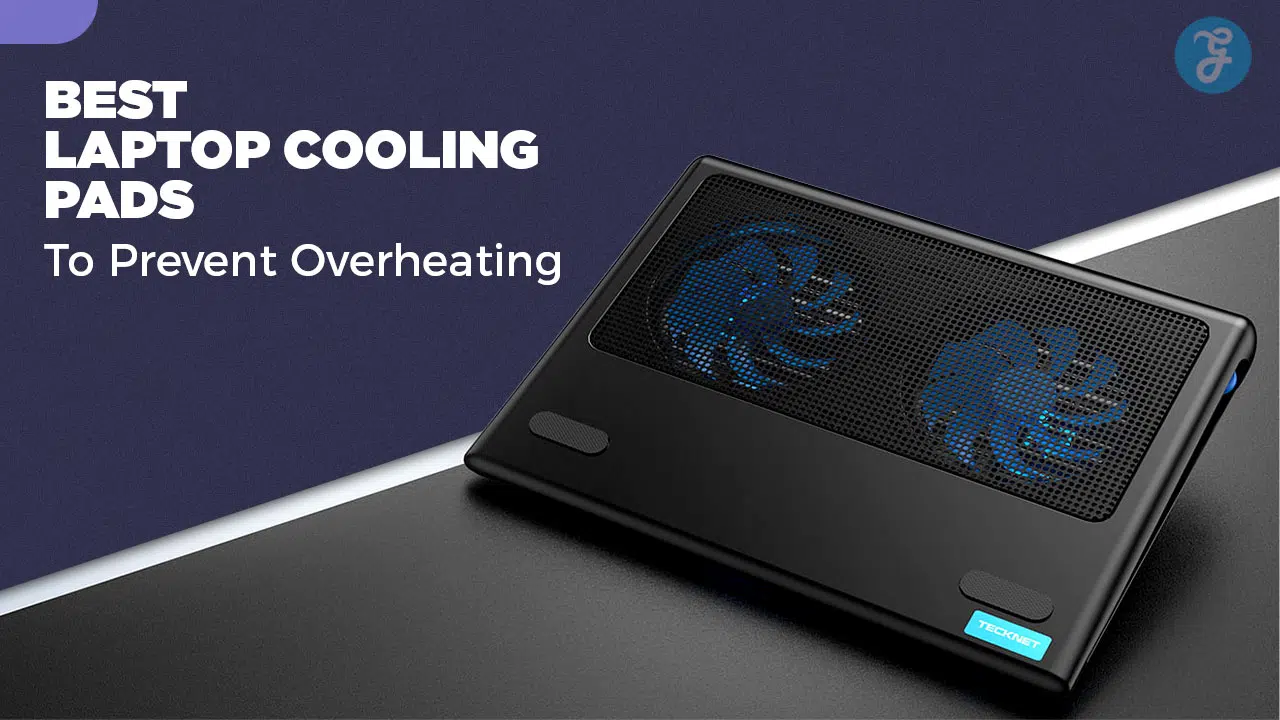
Modern high-performance laptops generate significant heat during intense gaming or rendering tasks. This heat often leads to thermal throttling, which reduces your processor speed and frame rates. Using a high-quality laptop cooling pad 2026 models provide is the most effective way to maintain peak performance. These devices use active airflow to lower internal temperatures and extend the lifespan of your hardware.
How We Selected the Best Laptop Cooling Pads 2026
Our evaluation process prioritized actual temperature reduction over flashy aesthetics. We looked at cooling pressure, noise levels, and the physical seal between the pad and the laptop, which is the most critical factor for high-end cooling. Below are the specific metrics we used to rank the market’s top options.
| Criteria | Evaluation Metric | Why It Matters |
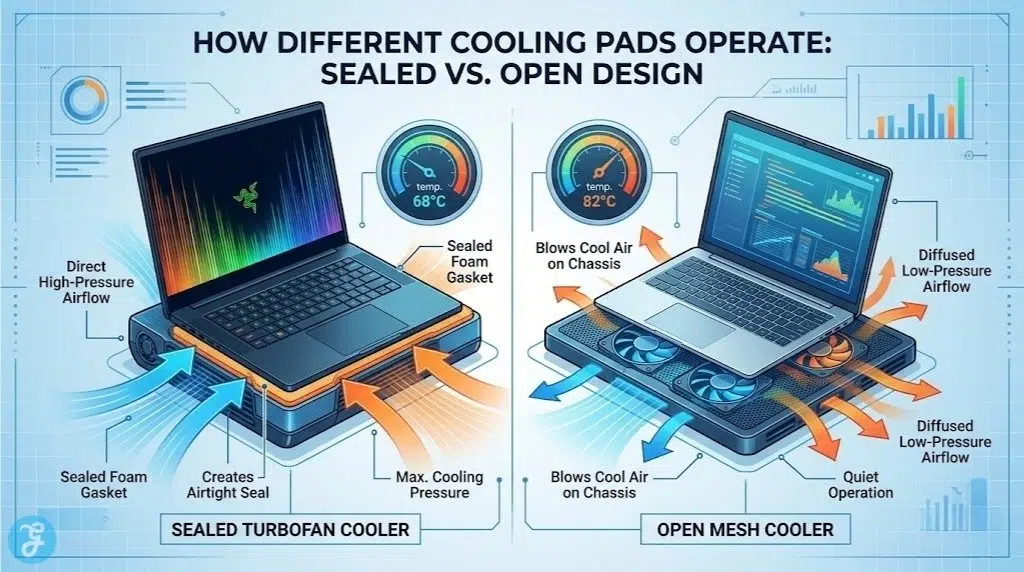
| Cooling Mechanism | Sealed Turbofan vs. Open Axial Fans | Sealed turbofans force air into the chassis, dropping temps by up to 15°C, whereas open fans simply blow air at the plastic shell. |
| Fan Speed & Pressure | RPM and mmH2O | Higher pressure (not just airflow) is required to push past dense internal laptop heatsinks. |
| Acoustics | Decibel Level (dB) at Max Speed | High-RPM turbofans can sound like jet engines; we evaluated if the noise trade-off is worth the cooling gain. |
| Ergonomics | Adjustable Height Levels | Proper angles improve your posture and naturally enhance passive airflow. |
| Build Quality | Material and Foam Density | High-quality memory foam ensures an airtight seal across different laptop sizes and shapes. |
The Top 10 Laptop Cooling Pads for 2026
Selecting the right cooling solution depends on your specific laptop size and internal fan layout. Some pads focus on raw turbo-power for gaming, while others prioritize a silent operation for office environments. We have curated this list to cover every use case from budget-friendly stands to professional-grade pressure chambers.
1. llano V12 Ultra
The llano V12 Ultra is the undisputed king of laptop cooling right now. It utilizes a massive 5.5-inch diameter turbofan enclosed in a premium chassis with a soft foam gasket. When you place your laptop on the foam, it creates an airtight seal, forcing cold air directly into your bottom vents. It is one of the few coolers on the market that includes smart software control, allowing you to set custom fan curves based on your laptop’s real-time temperature.
-
Best features: Smart software integration, LCD screen, and a massive 2800 RPM turbofan.
-
Pros: Unmatched cooling performance (regularly dropping temps by 12–15°C) and excellent build quality.
-
Things to consider: It is very expensive and gets incredibly loud at maximum speed.
2. IETS GT600 V2
IETS was the pioneer of the sealed-foam turbofan design, and the GT600 V2 refines their formula to perfection. It boasts a staggering 71.9 mmH2O of wind pressure, capable of pushing air through even the most restricted laptop chassis. What sets the GT600 apart is its magnetically sealed memory foam, which adapts to almost any laptop bottom (from 14 to 19.3 inches) better than standard foam. It also features a dual-layer washable dust filter to keep your laptop internals spotless.
-
Best features: Magnetic sealed foam, dual dust filters, and industrial-grade air pressure.
-
Pros: Exceptional cooling that prevents thermal throttling on flagship gaming laptops.
-
Things to consider: The physical control buttons are touch-sensitive and can be finicky compared to physical dials.
3. Razer Laptop Cooling Pad
Razer entered the premium cooling pad space recently, and their offering is exceptional—especially if you already use Razer gear. It features a large 140mm fan and comes with a selection of interchangeable foam gaskets to perfectly fit different laptop sizes (14″ to 18″). It integrates directly into Razer Synapse, allowing you to sync RGB lighting and program the physical buttons on the pad. For Razer Blade owners, it even unlocks “Razer HyperBoost” to safely draw more wattage.
-
Best features: Interchangeable foam gaskets and deep Razer Synapse software integration.
-
Pros: The smartest software ecosystem available and highly effective airtight cooling.
-
Things to consider: Carries a heavy “Razer tax” making it one of the priciest options on the list.
4. KLIM Everest
If you want massive cooling power without spending over $100, the KLIM Everest is the ultimate sweet spot. Instead of one massive fan, it uses twin turbine fans that spin at a dizzying 4,300 RPM. It features a sturdy build, an adjustable stand, and foam sealing to direct airflow. While it lacks the software finesse of llano or Razer, its raw cooling power per dollar is unmatched in the mid-range bracket.
-
Best features: Dual 4,300 RPM turbines and a highly durable, aggressive design.
-
Pros: Incredible value for high-end performance; effectively drops CPU temps by 8–10°C.
-
Things to consider: The high-pitched whine of the dual turbines can be grating at maximum speed.
5. Havit HV-F2056
The Havit HV-F2056 remains a legendary budget option for standard use. It does not use sealed foam or turbofans; instead, it relies on three quiet 110mm fans pushing air against a metal mesh surface. It is incredibly slim, lightweight, and perfect for throwing in a backpack. While it won’t drop temps by 15 degrees on a heavy gaming rig, it is more than enough to keep a work laptop from getting uncomfortably hot on your desk or lap.
-
Best features: Ultra-slim profile and whisper-quiet operation.
-
Pros: Highly affordable, travel-friendly, and very reliable for non-gaming laptops.
-
Things to consider: The open-fan design will not prevent heavy thermal throttling on high-end GPUs.
6. Cooler Master Notepal X3
Cooler Master takes a different approach to acoustics. Instead of using small, fast fans that create a high-pitched whine, the Notepal X3 uses a single, massive 200mm fan. Because the fan is so large, it can spin at a much lower RPM while still moving a massive volume of air (CFM). This results in a low, soothing hum rather than a jet-engine roar, making it the best high-airflow option for noise-sensitive environments.
-
Best features: Giant 200mm fan for high airflow with a low noise floor.
-
Pros: Excellent balance of cooling and acoustics; front vent design keeps your hands cool.
-
Things to consider: The design is quite bulky and takes up a lot of desk space.
7. Targus Lap Chill Mat
Not everyone uses their laptop on a desk. If you prefer working from the couch or bed, hard plastic cooling pads dig into your legs. The Targus Lap Chill Mat solves this by wrapping the bottom of the cooler in soft neoprene. It features dual fans hidden beneath a ventilated top, ensuring your laptop stays cool while keeping the heat completely off your lap.
-
Best features: Soft, comfortable neoprene base designed specifically for lap use.
-
Pros: Excellent ergonomics for couch use and very quiet fans.
-
Things to consider: Cooling performance is strictly entry-level; not suitable for gaming.
8. Thermaltake Massive 20 RGB
Finding a cooling pad that properly supports a massive 18-inch or 19-inch desktop replacement laptop is difficult. The Thermaltake Massive 20 RGB is built exactly for this purpose. It features a huge surface area and a sturdy build that won’t bow under the weight of heavy laptops. A 200mm fan provides the cooling, while a customizable RGB light strip wraps around the entire edge of the pad.
-
Best features: Extra-large surface area supports laptops up to 19 inches.
-
Pros: Very sturdy construction and easy-to-use physical fan speed controls.
-
Things to consider: Requires a lot of desk space and is very heavy.
9. TopMate C11
The TopMate C11 is the best option for those who prefer the traditional “multi-fan” open-mesh design over the newer sealed-foam style. It features six fans in total (two large, four small) and an LCD screen to control the speed and RGB lighting. It also comes with a built-in smartphone holder, which is a surprisingly useful addition for keeping your mobile device visible while you game or work.
-
Best features: Six-fan array and a convenient built-in phone stand.
-
Pros: Very quiet compared to turbofans and offers excellent height adjustability.
-
Things to consider: The plastic build feels slightly cheaper than aluminum competitors.
10. Liangstar Laptop Cooling Pad
If you want RGB lighting and decent cooling for under $30, the Liangstar is the best budget alternative on the market. It features a six-fan design similar to the TopMate but strips away the LCD screens to keep the price incredibly low. In recent benchmarks, it consistently outperformed other budget pads in actual temperature reduction, making it the smartest buy for gamers on a strict budget.
-
Best features: Six quiet fans and vibrant RGB at an entry-level price point.
-
Pros: Outstanding price-to-performance ratio and very lightweight.
-
Things to consider: Lacks a sealed chamber, so airflow is lost through the sides.
Quick Overview
The following table summarizes the core features of these top-tier coolers to help you make a fast, informed decision based on your setup.
Comparison Table
| Cooling Pad | Cooling Style | Max Laptop Size | Best For |
| llano V12 Ultra | Sealed Turbofan | 19″ | Absolute Best Performance |
| IETS GT600 V2 | Sealed Turbofan | 19.3″ | Hardcore Gamers |
| Razer Cooling Pad | Sealed Chamber | 18″ | Razer Ecosystem Users |
| KLIM Everest | Sealed Turbines | 17.3″ | Value High-Performance |
| Havit HV-F2056 | Open Mesh (3 Fans) | 17″ | Budget & Travel |
| Cooler Master X3 | Open Mesh (1 Fan) | 17″ | Quiet Operation |
| Targus Lap Chill Mat | Enclosed (2 Fans) | 17″ | Lap / Couch Use |
| Thermaltake Massive 20 | Open Mesh (1 Fan) | 19″ | Massive Laptops |
| TopMate C11 | Open Mesh (6 Fans) | 17.3″ | Multi-Fan Customization |
| Liangstar Pad | Open Mesh (6 Fans) | 17.3″ | Budget RGB Gamers |
Quick Picks
If you need a fast recommendation based on your current thermal issues:
-
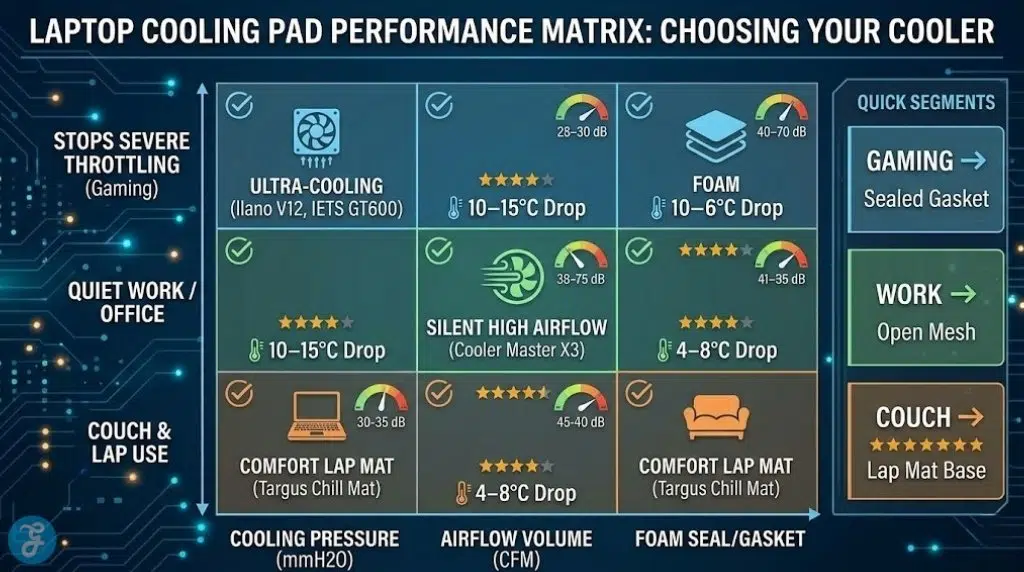
Best to Stop Severe Throttling: llano V12 Ultra
-
Best for MacBooks & Work Laptops: Havit HV-F2056
-
Best Balance of Price and Power: KLIM Everest
-
Best for Couch Browsing: Targus Lap Chill Mat
Final Thoughts On the Best Laptop Cooling Pads 2026
Choosing the best laptop cooling pads 2026 has to offer comes down to understanding the severity of your overheating issues. If you simply want to make your laptop more comfortable to type on or use on your lap, an inexpensive mesh pad from Havit or Targus is perfectly fine. However, if your games are stuttering due to severe thermal throttling, you must invest in a sealed-foam turbofan model like the llano V12 or IETS GT600. While they are loud and expensive, they are the only tools proven to physically force enough air through modern, densely packed heatsinks to keep your frame rates stable.