Fluency comes from consistent input, real output, and feedback that fixes mistakes before they harden into habits. The Best Language Learning Apps help most when they remove friction and give you a clear routine you can repeat daily.
This list focuses on apps that support the full fluency path, not just vocabulary drills. You will also get a simple way to combine 2 to 3 tools, so you can practice speaking, listening, reading, and recall in the same week.
How To Use The Best Language Learning Apps for Fluency
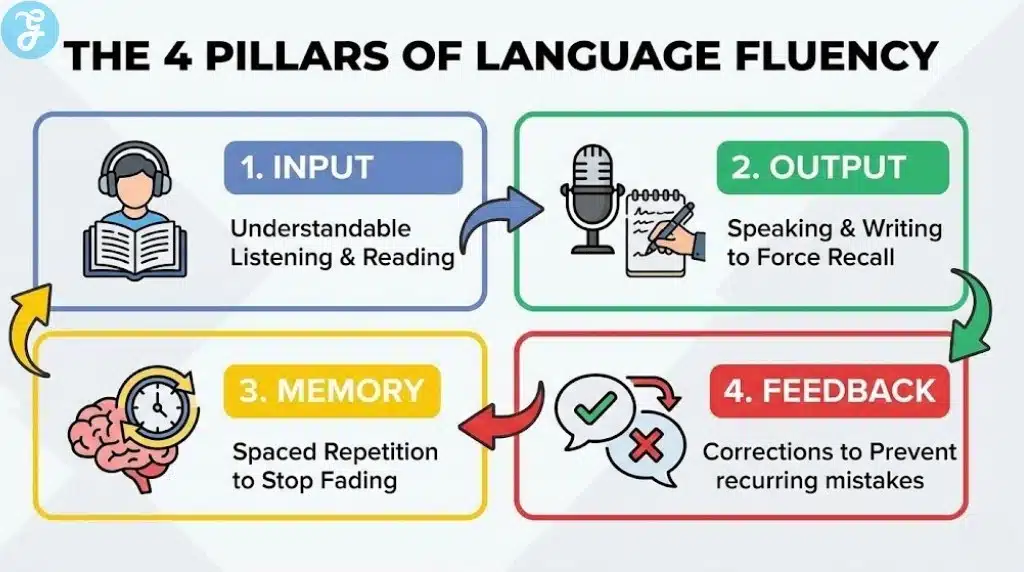
Most people fail with apps because they try to do everything in one place. Instead, build a small “stack” where each app has a job.
Here is the simplest fluency stack that works for most learners:
-
Course: Structured lessons for grammar and core sentences
-
Input: Real listening and reading in context
-
Output: Speaking with humans and getting corrected
-
Memory: Spaced repetition so words and phrases stick
If you cover all four, your progress stops feeling random and starts feeling predictable.
Quick Comparison Table
Use this table to pick your stack fast.
| App | Best For | Use It When You Need |
|---|---|---|
| Duolingo | Consistency | A daily habit that is easy to maintain |
| Babbel | Structure | Clear lessons that build practical sentences |
| Busuu | Feedback | Corrections on writing and speaking practice |
| Pimsleur | Speaking Reflexes | Faster responses and better pronunciation habits |
| Memrise | Real Phrases | Vocabulary that sounds like real life |
| LingQ | Immersion | Massive input through content you enjoy |
| Anki | Long-Term Memory | Faster recall and fewer “I forgot” moments |
| italki | Real Speaking | Tutor-led practice and personalized correction |
| HelloTalk | Language Exchange | Low-pressure chat and voice notes with natives |
| Language Reactor | Media Learning | Netflix and YouTube study with useful tools |
10 Best Language Learning Apps To Improve Fluency
Here they are:
1) Duolingo
Duolingo is a strong habit builder because lessons are short, gamified, and easy to repeat daily. It works best as a warm-up that keeps you consistent, especially at the beginner level.
How To Use It For Fluency
-
Treat it as daily reps, not your full plan
-
Say answers out loud to turn recognition into speaking
-
Pair it with real listening and conversation early
2) Babbel
Babbel is built for learners who want structure and clear progress. It focuses on practical language and conversation-ready patterns, which can make the jump to speaking feel easier.
How To Use It For Fluency
-
Rewrite each lesson pattern into 5 sentences about your life
-
Shadow the audio by repeating aloud until it feels smooth
-
Review weekly so older skills stay automatic
3) Busuu
Busuu stands out because it combines lessons with community feedback. You can submit writing and speaking exercises for correction, which helps you fix recurring mistakes faster.
How To Use It For Fluency
-
Post short speaking tasks and ask for specific corrections
-
Redo corrected versions to lock in the fix
-
Use Busuu for structure, then do live speaking elsewhere
4) Pimsleur
Pimsleur is one of the best options for building speaking reflexes, especially if you like audio learning. It pushes you to respond out loud, which trains speed and confidence.
How To Use It For Fluency
-
Do sessions out loud, not silently
-
Repeat tough lessons until responses feel automatic
-
Add reading and vocabulary, so you grow beyond the core dialogs
5) Memrise
Memrise is useful for learning phrases that sound more like real life, often through native speaker video-based lessons. It is a strong add-on when you want more natural vocabulary and listening exposure.
How To Use It For Fluency
-
Prioritize high-frequency phrases over rare words
-
Speak the phrase, then say it again faster
-
Save your best phrases into Anki for long-term recall
6) LingQ
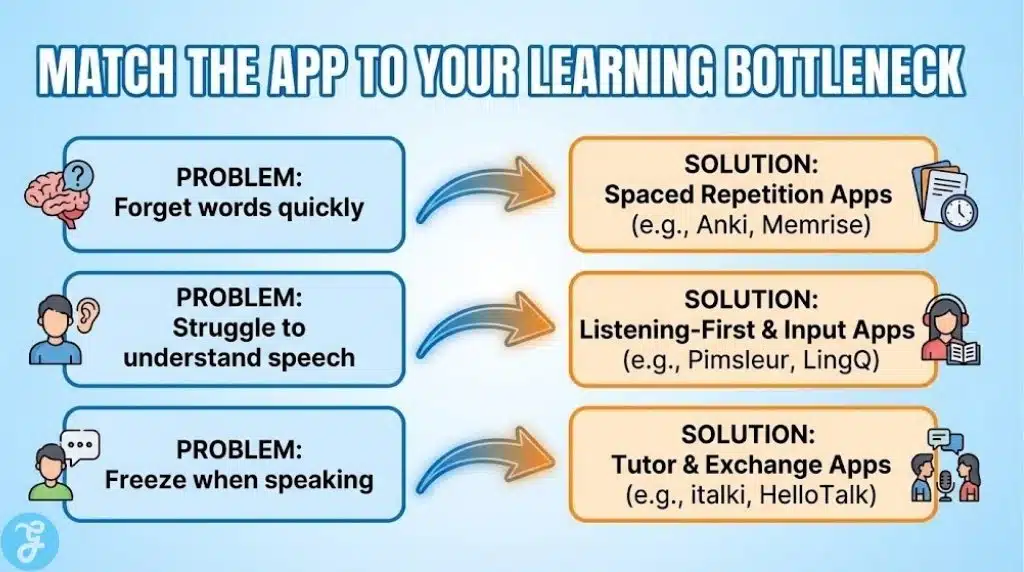
LingQ is an input powerhouse. It is designed to help you learn through reading and listening to content you actually care about, while tracking vocabulary as you go.
How To Use It For Fluency
-
Choose content you enjoy so you keep showing up
-
Re-listen to the same audio multiple times for speed
-
Focus on understanding the message, not translating every word
7) Anki
Anki is a spaced repetition flashcard system that helps you remember more with less total study time. It shines when you build cards from real phrases you keep missing in conversations and content.
How To Use It For Fluency
-
Make phrase-based cards, not single-word cards
-
Keep daily reviews short so you do not burn out
-
Add audio when possible to improve pronunciation memory
8) italki
italki is a direct fluency accelerator because it gives you live speaking time with tutors and teachers. If you want conversation comfort, nothing replaces real speaking with feedback.
How To Use It For Fluency
-
Book consistent sessions, even 30 minutes helps
-
Ask for correction on your top 3 recurring mistakes
-
Bring topics you care about so your vocabulary becomes personal
9) HelloTalk
HelloTalk is a language exchange community that lets you practice with native speakers through chat and voice features. It works best when you set clear goals so it does not become endless small talk.
How To Use It For Fluency
-
Send 5 voice notes per week, even short ones
-
Ask for corrections on one thing at a time
-
Copy corrected phrases into Anki so they stick
10) Language Reactor
Language Reactor helps you learn from native media, including Netflix and YouTube, using tools like dual subtitles and playback controls. It is a great bridge between “study language” and “live in language.”
How To Use It For Fluency
-
Rewatch short scenes until you understand without subtitles
-
Save useful phrases and practice saying them naturally
-
Combine it with speaking sessions so input turns into output
The Best Language Learning Apps Stack for Every Level
If you want a simple setup, choose one stack and commit for 30 days.
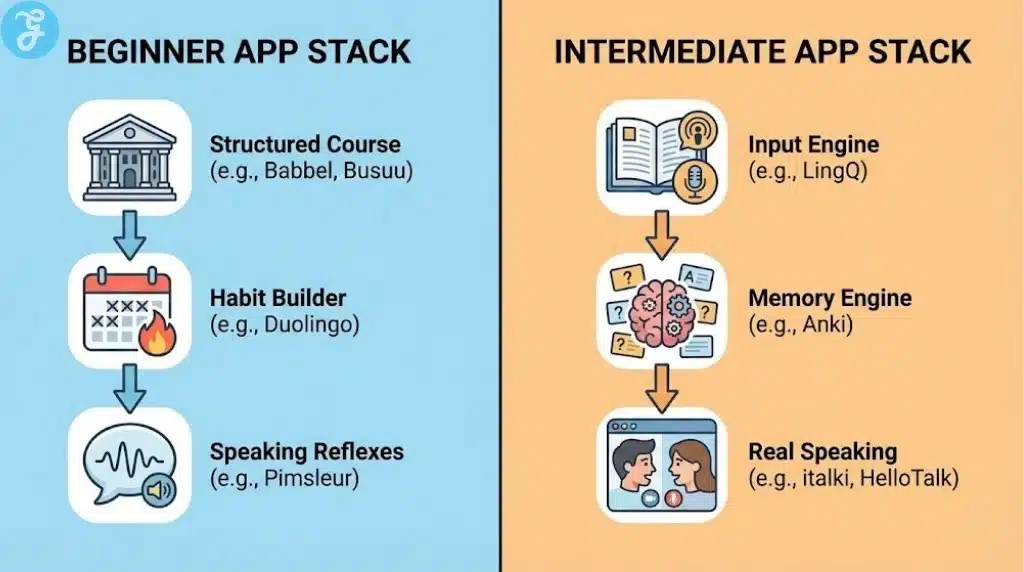
Beginner Stack
-
Course: Babbel or Busuu
-
Habit: Duolingo
-
Speaking: Pimsleur or short italki sessions
Intermediate Stack
-
Input: LingQ
-
Memory: Anki
-
Output: italki or HelloTalk voice notes
Fluency Push Stack
-
Media: Language Reactor
-
Volume Input: LingQ
-
Targeted Speaking: italki with correction focus
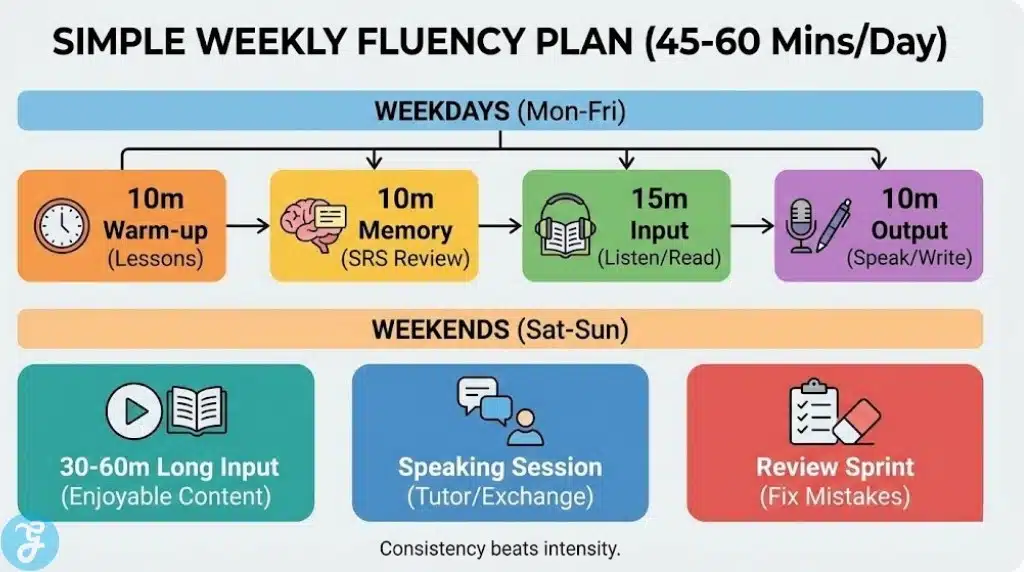
A Simple Weekly Routine That Gets You Fluent Faster
You do not need hours per day. You need balanced reps.
-
Daily: 10 minutes course + 10 minutes Anki
-
Daily: 15 minutes listening or reading input
-
Weekly: 2 speaking sessions with italki, or 2 long voice-note days on HelloTalk
-
Weekly: 1 media study session with Language Reactor
Keep the routine small enough to maintain. Consistency is the real multiplier.
Wrap Up
The Best Language Learning Apps do not magically make you fluent. They help you stay consistent, get enough input, speak sooner, and remember what you learn long enough to use it in real conversations.
Pick 2 to 3 apps with clear roles, follow a simple weekly routine, and measure progress by how comfortable you feel speaking and understanding. That is how app time turns into real fluency.