The best email tools for SaaS lifecycle marketing respond to customer behavior instead of sending the same sequence to everyone. A useful platform can welcome a new signup, react when setup stalls, encourage feature adoption, support an upgrade, and re-engage an inactive account.
That requires dependable event data, segmentation, exit rules, conversion reporting, deliverability controls, and integrations with the product, CRM, billing system, or data warehouse. This ranking uses verified capabilities and practical SaaS fit. Because plans change, confirm requirements before purchasing.
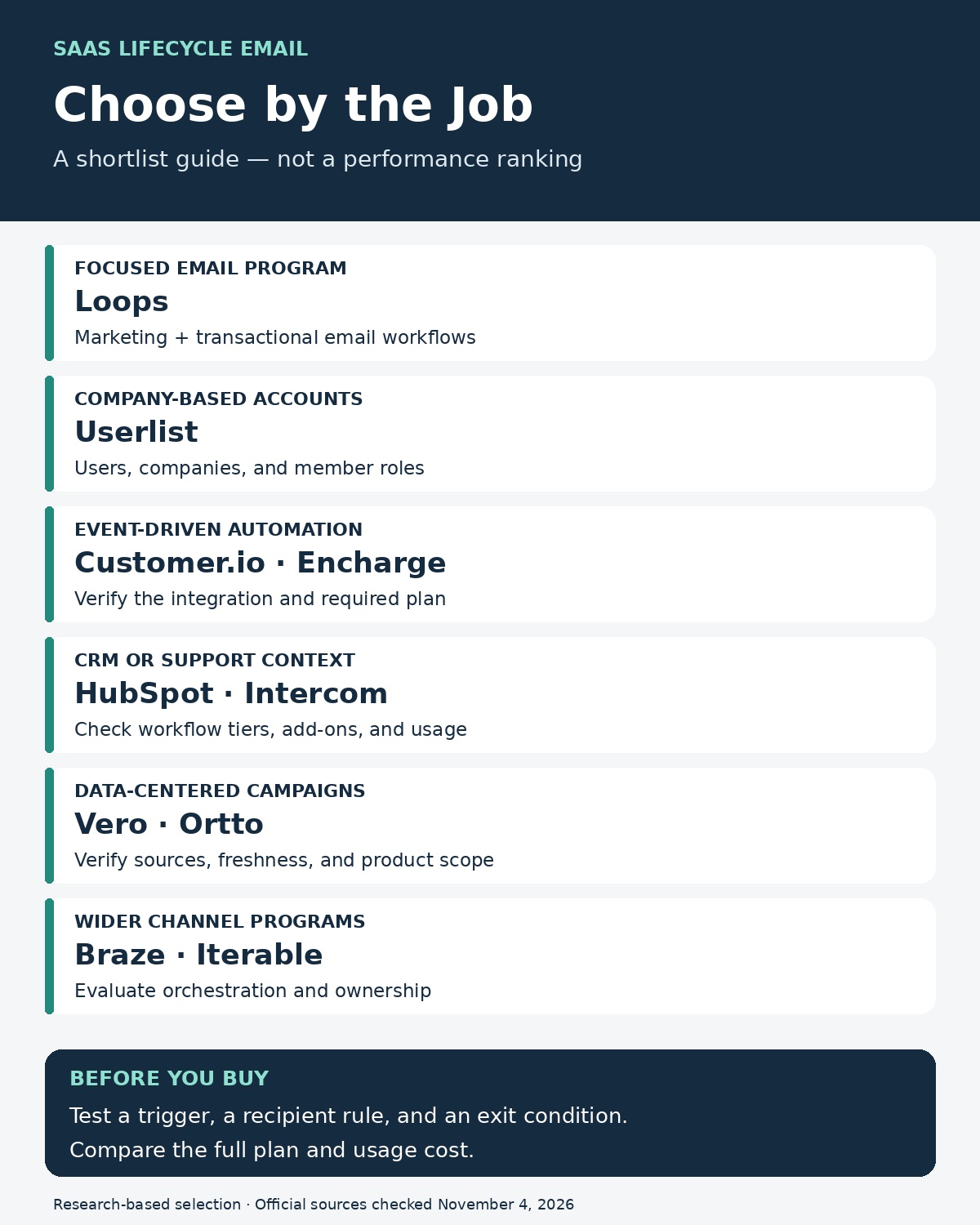
Customer.io is a strong starting point for product-event-driven journeys, Userlist deserves a close look when customers are companies with multiple users, and Loops offers a focused email workflow option for smaller SaaS teams. The right choice depends on the data your product can provide and the messages your team needs to coordinate.
The ten tools below cover different operating models, from email-focused products to broader customer engagement platforms.
Compare the shortlist by the job it needs to do
“Best fit” is an editorial assessment of documented capabilities. A listed starting price is not an equivalent quote across vendors: profile counts, send allowances, integrations, channels, and billing commitments differ. Dollar amounts below are in USD as displayed when checked; confirm taxes, contract terms, and your actual usage before buying.
| Tool | Strongest reason to shortlist it | Pricing or packaging to check | Main buying question |
|---|---|---|---|
| Customer.io | Event-driven, cross-channel lifecycle journeys | Essentials starts at $100/month, billed monthly; 5,000 profiles including people and objects | Who will maintain product events and customer identities? |
| Userlist | Company-aware B2B SaaS messaging | User-based pricing calculator; advanced workflow features vary by plan | Can the account and role model match your product? |
| Loops | A focused marketing and transactional email system | Free tier has a rolling send cap; paid tier up to 5,000 subscribers is $49/month | Can its workflow and audience model handle your required branches? |
| Encharge | Visual automation connected to product and business data | Growth starts at $99/month; Premium at $159/month on monthly billing at the displayed starting tier | Does your event integration require Premium? |
| Vero | Warehouse-connected audiences and product messaging | Confirm the product, event allowances, send volume, and billing terms | Are you buying Connect, broader journey capabilities, or both? |
| HubSpot Marketing Hub | Lifecycle campaigns connected to a sales CRM | Full workflow builder documented for Professional/Enterprise; onboarding and contact costs matter | Which product signals and workflows are included in the proposed package? |
| Intercom | Coordinating outbound engagement with in-product support | Core seats, campaign email usage, and optional Proactive Support Plus are separate considerations | Is lifecycle email part of an existing support operation? |
| Ortto | Customer data, journeys, and analytics in one platform | Current starting price not independently verified from an accessible pricing page | Does consolidating these functions reduce work in your actual stack? |
| Braze | Cross-channel orchestration with detailed journey controls | Request pricing; current page describes MAU-based pricing and Action Credits | Do the additional channels and controls justify the implementation? |
| Iterable | Coordinated customer journeys across a larger engagement program | Request a current quote; no numeric price established in this check | Can the team govern and measure the journeys it plans to build? |
For a strategy reference before choosing software, explore SaaS email marketing best practices, which cover the lifecycle stages these tools are intended to support.
1. Customer.io: Best Overall for Behavioral Lifecycle Automation
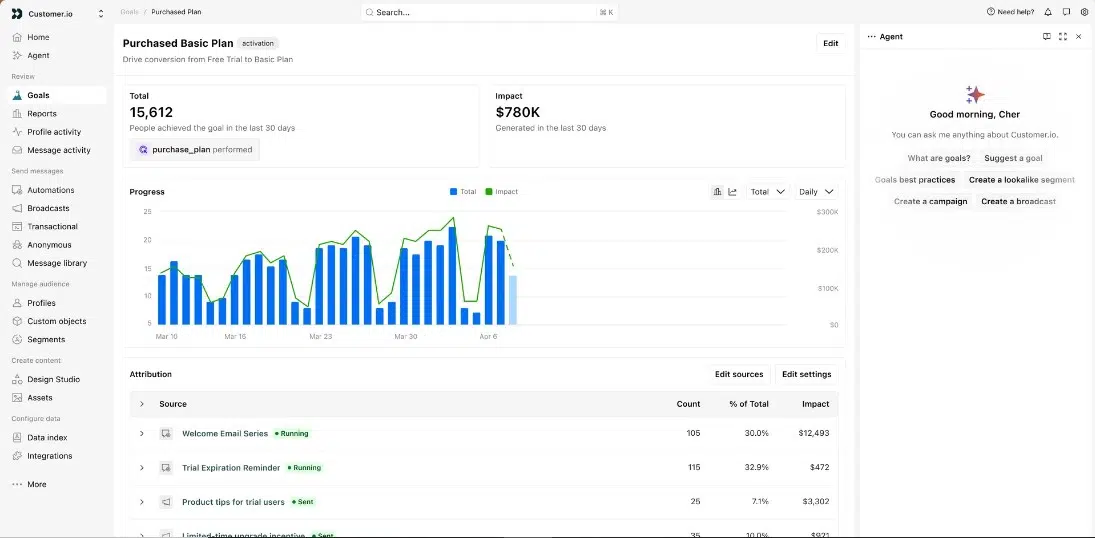
Customer.io is a strong all-around choice for messaging that follows product behavior. Journeys can begin from events, segments, forms, dates, customer relationships, or webhooks. Branching logic adjusts what happens next.
The platform supports email, in-app messages, push notifications, SMS, WhatsApp, Slack, webhooks, and transactional messages. It also offers A/B testing, conversion goals, subscription preferences, and account data.
It works best with clean event tracking and someone who can manage the data setup. Small teams may find it more powerful, and expensive, than necessary.
2. Userlist: Best for B2B SaaS Companies
Userlist recognizes that a B2B customer may be a company or workspace containing several users. Its data model covers users, companies, and their relationships.
That enables account-level workflows triggered by an approaching renewal, usage threshold, or decline in activity. Messages can target the administrator or another relevant role.
Userlist combines lifecycle email, broadcasts, transactional messages, in-app notifications, and visual workflows. Its channel range is narrower than that of enterprise platforms, while advanced testing and conversion features may require a higher plan.
3. Loops: Best for Early-Stage SaaS Teams
Loops brings marketing, product, and transactional email into a streamlined platform for founders and small growth teams.
Teams can create welcome sequences, onboarding reminders, trial-conversion flows, upgrade campaigns, win-back emails, password resets, and other operational messages. It also supports product events, dynamic segments, conversion goals, experiments, and SaaS integrations.
Its focus keeps the product approachable, but Loops remains primarily email-oriented. Companies that need advanced mobile engagement, account-level modeling, or complex omnichannel journeys may outgrow it.
4. Encharge: Best for No-Code SaaS Automation
Encharge gives non-technical teams a visual way to build behavior-based flows using email engagement, page activity, product actions, customer attributes, CRM data, and billing information.
It is particularly useful for lead nurturing, trial conversion, onboarding, sales handoffs, and reactivation. SaaS-focused integrations make it easier to connect marketing messages with billing and customer activity.
Plan selection matters. API events, transactional email, event-based segmentation, and some major integrations are limited to higher tiers. A business that needs deep product-event automation should verify the required plan instead of choosing on entry price alone.
5. Vero: Best for Warehouse-Connected Product Messaging
Vero gives teams more control over customer data. It can use product events and attributes delivered through an API, along with data held in supported cloud warehouses.
Its visual journeys can branch according to customer activity and coordinate email, SMS, and mobile push notifications. Dynamic content, localization, testing, and conversion reporting support more relevant communication across markets and lifecycle stages.
Vero is a sensible fit for product-led companies that want their data infrastructure to remain the source of truth. Smaller plans include profile, event, message, and push limits that high-volume products should calculate carefully.
6. HubSpot Marketing Hub: Best for CRM-Led B2B SaaS
HubSpot is most valuable when marketing, sales, and customer data already live in its CRM. Workflows can use contact properties, segments, forms, website behavior, lifecycle stages, and other CRM signals.
This data helps coordinate lead nurture, sales handoffs, onboarding, renewals, and expansion. HubSpot also provides branching, personalization, scoring, reporting, and internal notifications.
The free email product should not be confused with the full automation platform. Automated marketing emails and sophisticated workflows generally require Marketing Hub Professional or Enterprise. The price and required onboarding can put those plans beyond the reach of smaller startups.
7. Intercom — Best for Email and In-App Onboarding
Intercom is useful when communication must continue inside the product. Its Series builder connects emails with in-app posts, banners, product tours, behavioral rules, and automated actions.
A company could show an upgrade prompt inside its application, follow it with an email, offer a product tour, and stop the sequence when the customer upgrades. That creates a more connected experience than an email-only campaign.
Intercom makes the most sense for companies already using it for support or customer engagement. Advanced outbound campaigns may require an add-on, while email and other channel usage can produce separate charges.
8. Ortto: Best for Unified Data, Automation, and Analytics
Ortto combines a customer data platform with automation and reporting. It brings together profiles, custom activities, marketing engagement, billing information, support activity, and lead scores.
Teams can use this data to coordinate email, SMS, push notifications, and in-app messages. Transactional email, forms, surveys, dashboards, and custom reports further reduce the need to assemble several separate tools.
This broad scope is valuable to teams seeking a connected platform, but it creates more setup work than an email-focused product. Businesses should request current pricing and confirm which functions are included in the proposed package.
9. Braze: Best for Mobile-First Enterprise SaaS
Braze serves companies managing large audiences. Its Canvas builder coordinates email, mobile push, SMS, and in-app messages in response to real-time activity.
Dynamic personalization, experimentation, frequency controls, and journey reporting make it suitable for consumer subscriptions, fintech services, media platforms, and mobile-first software. Teams can adapt communication as behavior changes instead of relying on fixed sequences.
Braze uses enterprise-oriented pricing and requires mature data operations. Its cost and implementation demands will be excessive for many small or straightforward B2B SaaS businesses.
10. Iterable: Best for Enterprise Adaptive Journeys
Iterable builds cross-channel journeys from live customer signals. It connects email, SMS, push, and in-app communication with visual segmentation, personalization, and experimentation.
Workflows can change when a user adopts a feature, becomes inactive, changes preferences, or reaches a new lifecycle stage. This flexibility supports complex onboarding, retention, and reactivation programs at scale.
Iterable is better suited to organizations with dedicated lifecycle and data teams. Its enterprise sales process and implementation requirements make simpler tools more practical for most early-stage companies.
Run the same small evaluation before choosing
A sample onboarding flow is more revealing than a vendor’s prepared tour. Use test accounts and agree on the expected behavior before implementing anything. The following is an illustrative evaluation brief, not a test performed for this article.
A new trial account signs up. One member connects a data source; another has not logged in. Later, the account upgrades. The proposed system should distinguish the company’s progress from each person’s activity and stop trial-conversion messages after the upgrade reaches it.
| Check | What the vendor should demonstrate |
|---|---|
| Identity | One person can be matched to the correct user and account records |
| Trigger | A documented product event starts the intended workflow |
| Targeting | The message reaches the appropriate member or role |
| Exit | A completed goal prevents an obsolete reminder from being sent |
| Preferences | Marketing subscription choices and transactional routing behave as designed |
| Diagnosis | The team can explain why a message was sent, skipped, or delayed |
| Cost | The quote includes the plan, audience units, sends, events, channels, and required add-ons |
Ask what happens when an event arrives late or twice. Confirm whether a waiting workflow checks the latest state immediately before sending or only at an earlier step. These are implementation questions to resolve in the proposed plan; the same answer should not be assumed for every tool.
Measure the customer action the email is meant to support
Define the outcome before launching a sequence. For onboarding, that might be connecting a data source or completing a first project. For expansion, it could be an account adopting a paid feature. For reactivation, it might be a meaningful return to product use within a defined period.
Report the audience, observation window, and conversion rule alongside the result. A platform attributing an action to an email is not, by itself, proof that the message caused it. Where practical, compare a suitable holdout group with the messaged group.
Start with two candidates that match your operating model: Loops for a focused email program; Userlist for company-aware messaging; Customer.io or Encharge for event-driven flows; Vero or Ortto for data-centered work; HubSpot or Intercom for an existing CRM or support stack; and Braze or Iterable for a wider channel program. Put the same small journey through both before moving production campaigns.
Frequently Asked Questions on Email Tools for SaaS Lifecycle Marketing
1. What is SaaS lifecycle email marketing?
It uses customer data and product behavior to send relevant messages during signup, onboarding, activation, conversion, adoption, renewal, expansion, inactivity, and reactivation.
2. Which email tool is best for B2B SaaS?
Userlist is especially suitable for account-based B2B journeys. Customer.io offers a broader choice of channels and more flexible event-driven automation.
3. What is the best option for a small SaaS startup?
Loops is approachable for teams that want marketing, product, and transactional email together. Encharge is a stronger candidate when visual behavioral automation is the priority.
4. Can one platform send marketing and transactional emails?
Yes, several tools on this list support both. Critical messages such as password resets and security alerts should still be managed separately from promotional campaigns to protect reliability and sender reputation.
5. Which metrics should a SaaS lifecycle team track?
Track activation rate, time to value, trial-to-paid conversion, onboarding completion, feature adoption, upgrades, renewals, retention, and reactivation. Opens and clicks provide context, but they do not prove business impact.