When I began researching the best apps designed with autistic children in mind, I found plenty of confident promises. Apps claimed they could improve communication, build social skills, make routines easier, or support learning. The harder task was separating useful features from marketing language.
I looked at what each app actually does, whether it is still maintained, which devices and languages it supports, how its developer describes data collection, and whether its purpose aligns with established practices such as augmentative and alternative communication (AAC) and visual schedules.
This is not a ranking from universally best to worst. Autistic children have different communication methods, sensory preferences, interests, motor abilities, and support needs. A communication app cannot be judged by the same standard as a visual planner or learning game. The right choice starts with the child and the specific problem the app is supposed to solve.
Best Apps for Autistic Children at a Glance
| App | Best for | Platforms | Payment model |
| Proloquo2Go | Comprehensive symbol-based AAC | iPhone, iPad, Apple Watch | Premium one-time purchase |
| Avaz AAC | Multilingual, cross-platform AAC | iOS, Android | Trial; subscription or lifetime purchase |
| Jellow Basic AAC | Free AAC with Bangla support | iOS, Android, web | Free |
| Choiceworks | Routines, waiting, and feelings | iOS, Android, Chromebook | One-time purchase |
| First Then Visual Schedule HD | Step-by-step activities | iPhone, iPad | One-time purchase |
| Pictello | Personalized visual stories | iPhone, iPad | One-time purchase |
| Otsimo Special Education | Structured early-learning activities | iOS, Android | Free content and paid plans |
| AutiSpark | Preschool concepts and life skills | iOS, Android, Amazon Fire | Trial and paid access |
| Tiimo | Planning for older children and teens | iOS, Android, web, Mac, Apple Watch | Free and Pro plans |
| Social Cipher: Ava | Social-emotional learning for ages 10–15 | Mobile devices and computers | Usually requires a school or provider account |
Availability, payment models, and privacy disclosures were checked in October 2026. They can change and may differ by country.
1. Proloquo2Go: Best for Comprehensive AAC
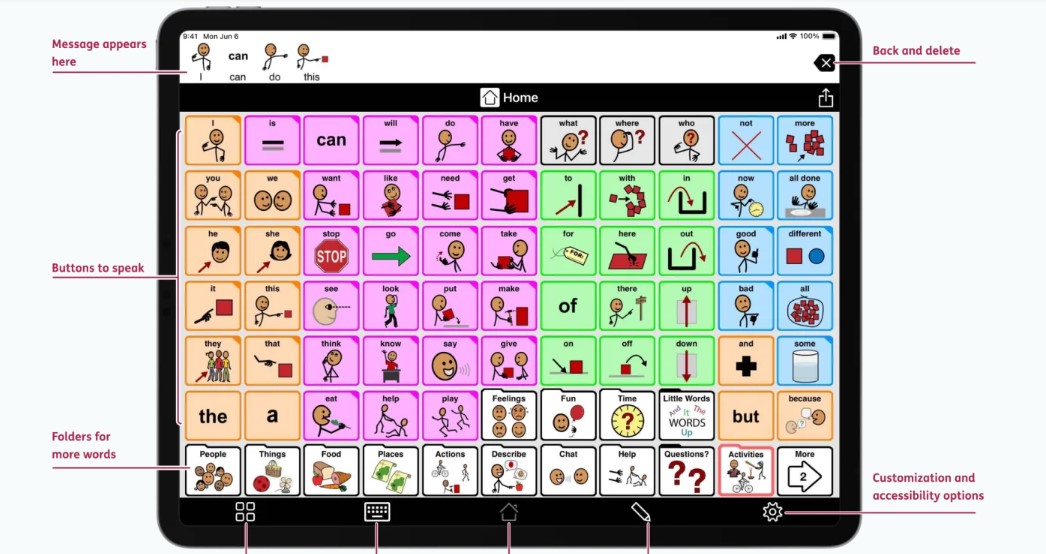
Proloquo2Go is designed for people who cannot rely on speech in every situation or who need another dependable way to communicate. It offers more than 25,000 symbols, extensive core and topic vocabulary, multiple grid sizes, custom photographs, typing, word prediction, switch access, and VoiceOver support.
Its strength is depth. Communication should extend beyond requesting food or toys. A useful AAC system needs space for opinions, questions, refusals, pain, feelings, humor, and personal interests.
Proloquo2Go supports English, Spanish, French, and Dutch, including bilingual configurations. However, it is restricted to Apple devices and has a high one-time price. Families should ideally compare AAC systems with a speech-language pathologist before purchasing one.
2. Avaz AAC: Best Multilingual Cross-Platform Option
Avaz combines pictures, symbols, text, and synthesized speech. It includes more than 40,000 SymbolStix images, core vocabulary, customizable boards, different complexity levels, high-contrast themes, and backup features.
Its main advantage is flexibility. Avaz runs on iOS and Android, and different editions support several European and Indian languages. The Indian version can be customized for Bengali, although families should test how completely their required language is supported before committing to a paid plan.
The app normally offers a trial followed by subscription or lifetime options. Prices and available language packages vary by region.
3. Jellow Basic AAC Communicator: Best Free Bangla-Friendly App
Jellow is the app I would highlight most strongly for Bangla-speaking children. Developed through IIT Bombay’s IDC School of Design, it was created for children with communication difficulties, including autistic children.
It provides approximately 1,200 culturally contextualized icons, thousands of sentence combinations, customizable boards, activity sequences, and external-switch access. It works on iOS, Android, and the web.
Most importantly, Jellow offers full Bangla support, while its iOS edition includes a custom Bangla keyboard. The basic app is free, and its current Apple listing says it does not collect data.
Some children may eventually need a deeper vocabulary system or a different layout. Even so, Jellow removes two major barriers, language and cost.
4. Choiceworks: Best for Routines, Waiting, and Feelings
Choiceworks separates three related but distinct needs: understanding a schedule, coping with a wait, and communicating feelings. Parents and educators can add personal photographs, video, text, and recorded audio. The app also includes timers, multiple profiles, sharing tools, and a feelings scale.
This is especially useful when uncertainty around transitions causes distress. A personalized board can show what is happening now, what comes next, and when a preferred activity will return.
Choiceworks supports iOS, Android, and compatible Chromebooks. Its developer reports no advertising, account requirement, or behavioral tracking, while current store disclosures say the core app does not collect data. Boards created on Android and iOS are not fully interchangeable.
5. First Then Visual Schedule HD: Best for Multi-Step Tasks
First Then Visual Schedule HD can produce a basic first-then board, full schedule, task analysis, choice board, visual narrative, or video model. Families and teachers can use included symbols or add personal photographs, recordings, and videos.
It is particularly suited to breaking down activities such as getting dressed, brushing teeth, packing a school bag, or preparing for an appointment. Timers can be attached when knowing the expected duration is helpful.
The app is an Apple-only, one-time purchase. Its current privacy label says it does not collect data. The main investment is not only money but preparation time: an adult still has to select the right steps and decide how much information to show at once.
6. Pictello: Best for Personalized Visual Stories
Pictello lets children, families, and educators create page-by-page stories using photographs, short videos, text, recorded speech, or text-to-speech. It also offers word highlighting, word prediction, switch-controlled playback, printing, and PDF export. More than 110 voices across 29 languages are available for speech output.
Real photographs make Pictello especially useful for preparing for an unfamiliar event. A story about visiting a dentist can show the actual building, waiting room, people, and equipment the child is likely to encounter.
The child should be involved whenever possible, choosing pictures, recording narration, or creating stories about personal interests. Visual narratives should explain and prepare, not pressure a child to hide discomfort. Pictello is Apple-only and reports some analytics that are not linked to identity.
7. Otsimo Special Education: Best Broad Activity Library
Otsimo offers short activities involving vocabulary, numbers, letters, colors, matching, sequencing, drawing, emotional recognition, and visual narratives. Its focused presentation may suit younger children who prefer brief, repetitive practice.
It is available on iOS and Android, with limited free material and several paid options. I would describe it as a structured learning resource, not autism therapy. Awards and developer statements about expert involvement do not establish long-term educational or clinical outcomes.
Parents should also review its privacy settings. Although Otsimo describes its environment as advertisement-free, its Apple disclosure reports identifier tracking and several categories of linked data.
8. AutiSpark: Best for Preschool Learning Practice
AutiSpark is explicitly marketed for autistic children. Its activities cover matching, sorting, tracing, spelling, early mathematics, receptive language, memory, puzzles, visual narratives, and daily-living sequences.
The developer advertises more than 200 games alongside printable worksheets and workbooks. The app runs on iOS, Android, and Amazon Fire, with full access requiring payment after a trial.
Its range makes it more relevant here than a generic preschool game. However, claims such as “expert approved” and “well researched” come primarily from the developer. I found no strong independent evidence establishing AutiSpark as a therapeutic intervention. Android currently reports no data collection, while iOS reports non-identifying usage analytics.
9. Tiimo: Best for Older Children and Teenagers
Tiimo is a visual planner developed with neurodivergent users in mind. It provides daily schedules, reminders, focus timers, to-do lists, widgets, calendar synchronization, and an optional AI planning feature.
It works across iOS, Android, web, Mac, and Apple Watch. Although its store rating begins at age nine, I see it as a better fit for older children and teenagers who can participate in organizing their own time.
Tiimo should support autonomy rather than become another system imposed by adults. Its disclosures include account, calendar, content, usage, or identifier data depending on the platform and features used. Parents should supervise the AI function and avoid entering unnecessary personal or health information.
10. Social Cipher: Ava: Best for Neurodiversity-Affirming SEL
Ava is a story-driven social-emotional learning game for neurodivergent students aged 10–15. Its situations involve problem-solving, emotions, relationships, communication, confidence, and self-advocacy.
Social Cipher says its team is majority neurodivergent and emphasizes empowerment rather than teaching autistic students to hide their traits. Its curriculum draws on CASEL and Building Blocks of Learning frameworks, although framework alignment is not independent proof of results.
Ava is primarily a school and private-provider product. The app may be free to download, but meaningful access normally requires the appropriate account or institutional arrangement. It makes most sense when an educator or professional can guide discussion around the situations in the game.
The Best App Is the One That Fits the Child
I would not judge any apps by the number of features advertised. The meaningful question is whether the child can communicate more freely, understand their day more clearly, participate with less unnecessary stress, or exercise greater independence. That is the standard that matters.
Frequently Asked Questions on the Best Apps for Autistic Children
1. Can an autism app replace therapy or classroom support?
No. An app may support communication, learning, planning, or routines, but it cannot provide a complete assessment or replace individualized professional support.
2. Will AAC stop a child from learning to speak?
Current evidence does not support that fear. AAC does not prevent speech development and may support functional communication. A child should not have to wait until speech has “failed” before receiving another reliable communication method.
3. Which free app is the best starting point?
Jellow Basic AAC is the strongest free choice in this list, particularly for Bangla and several South Asian languages. Cboard is another free, open-source AAC option worth discussing with a communication professional.
4. How are Choiceworks and First Then different?
Choiceworks combines schedules with waiting and feelings boards. First Then offers more emphasis on task breakdowns, video models, and schedule formats. The better choice depends on whether the child needs help with transitions and emotions or with completing multi-step activities.
5. Does assistive app use count as ordinary screen time?
AAC and visual supports serve a different purpose from passive entertainment. A device that gives a child a voice should remain accessible whenever communication is needed. Families can still balance other app use with sleep, movement, face-to-face interaction, play, and offline learning.