

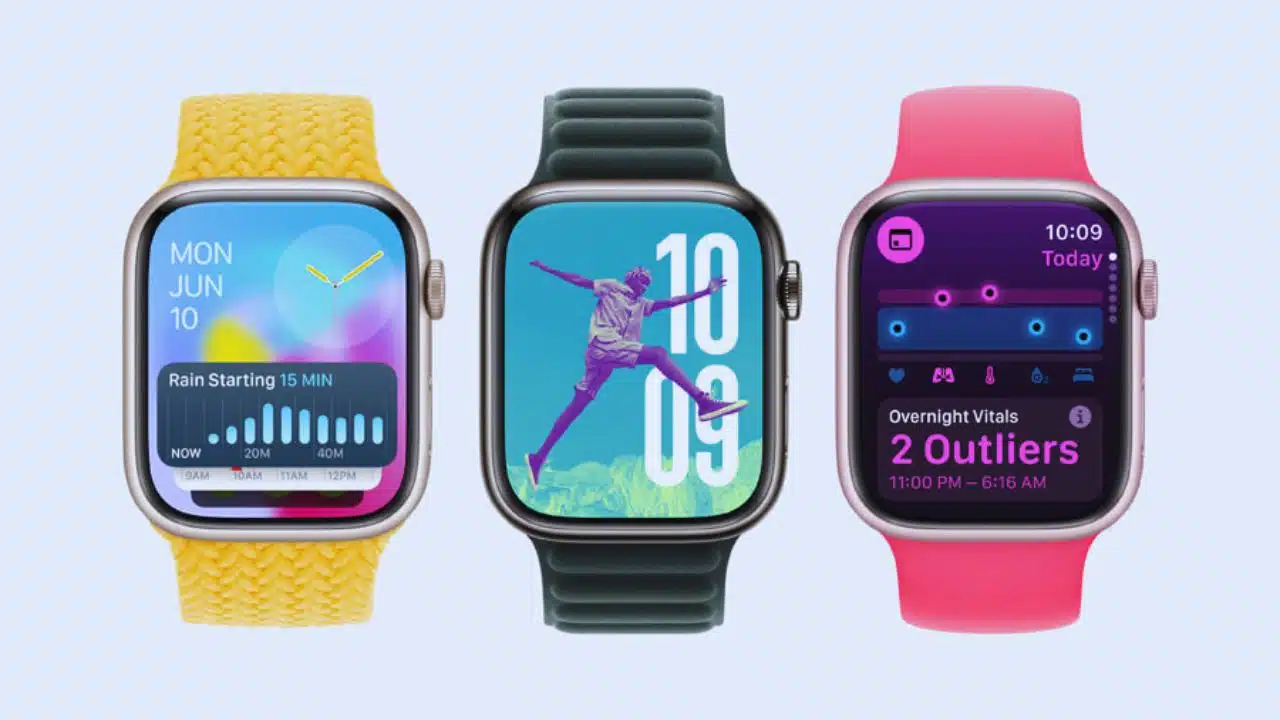
Apple recently hosted one of its largest WWDC keynotes, introducing a variety of updates, including a brand-new version of WatchOS. The upcoming WatchOS 11, set to enhance your Apple Watch, brings numerous features designed to improve its functionality and user experience.
However, it’s worth noting that WatchOS 11 will not be available for the Apple Watch Series 4, Series 5, or the original Apple Watch SE. If you own one of these models, you might want to consider upgrading to take advantage of these new features.
Track Your Strain and Recovery with Vitals and Training Load
One of the standout additions in WatchOS 11 is the Vitals app. This new feature tracks essential health metrics like heart rate, respiratory rate, wrist temperature, and blood oxygen levels while you sleep. These metrics are analyzed and displayed on a chart the next morning, helping you understand your health status and any deviations from your normal range.
If your metrics are outside the normal range, you’ll receive notifications suggesting possible causes such as lifestyle changes, alcohol consumption, or illness. This recovery tracking tool, similar to those offered by fitness bands like Whoop, is designed to be user-friendly and informative.
The Training Load feature will also debut in WatchOS 11, enabling you to monitor the strain your workouts place on your body. It compares the last seven days of workouts to the previous 28 days to help you assess your progress. Each workout will receive an effort rating from 1 to 10 based on various factors, including age, height, weight, heart rate, and elevation.
These features will likely appeal to serious athletes and casual users looking to adopt healthier habits.
Pause Your Rings
Ever worry about breaking your streak of closing your Apple Watch rings due to illness or needing a break? WatchOS 11 introduces the ability to pause your rings for a day, week, month, or longer, ensuring you don’t lose progress during times when you can’t maintain your usual activity levels.
Enhanced Support for Pregnancy
WatchOS 11 will allow pregnant users to log their physical and mental health, track gestational age, and record symptoms. The watch will also prompt you to review features like high heart rate notifications, which can be especially relevant during pregnancy. This feature integrates seamlessly with the Apple Watch’s cycle tracking experience.
Expanded Smart Stack Widgets, Including Live Activities
The Smart Stack feature, introduced in WatchOS 10, is getting an upgrade. New widgets for Shazam, Photos, Distance, and more will be added. Smart Stack will also offer widget suggestions based on the time of day, date, location, and daily routines, providing more accurate and contextual information. Additionally, interactive widgets will allow you to control apps directly from Smart Stack. Live Activities will also be integrated, enabling you to monitor events, track Ubers, food orders, and more.
Machine Learning-Enhanced Photos Face
The popular Photos face is receiving a significant update in WatchOS 11. Your watch will use machine learning to analyze your photo library and select the best images for your watch face, optimizing them with depth effects, colored backgrounds, fonts, and more. You can still customize the face to your liking, enjoying a new look every time you raise your wrist.
Universal Double-Tap Feature
Initially limited to select apps, the Double Tap feature is being expanded to all apps and third-party apps with WatchOS 11. Developers will also have access to the Double Tap API, allowing them to implement this feature in their apps.
Check-In Feature
The Check In feature from iOS 17 is coming to WatchOS 11. This feature allows you to keep track of friends or loved ones by having them confirm when they’ve reached their destination or completed activities like gym sessions. Check-In integrates with the Workout app and Messages.
Tap to Cash for Quick Payments
WatchOS 11 introduces Tap to Cash, a feature from iOS 18. This allows you to quickly send Apple Cash by holding your Apple Watch near another watch or iPhone, making peer-to-peer payments easier than ever.
Translate on the Fly
The new Translate app in WatchOS 11 supports 20 languages, automatically popping up in your watch’s Smart Stack when you’re in a region where a supported language is spoken.
Improved Workout Tracking with Enhanced GPS
WatchOS 11 enhances workout tracking for sports like soccer, American football, Australian football, outdoor hockey, lacrosse, skiing, snowboarding, golf, and outdoor rowing. These improvements leverage GPS advancements for more accurate results, and route maps will be available for more workout types.
Upgraded Tickets in Your Wallet
The digital wallet on your Apple Watch is getting an improved ticketing experience. WatchOS 11 will provide more information about events, including venue opening times, start times, seating details, and more. This information will be available in a widget in your Smart Stack as the event approaches.
WatchOS 11 Release Timeline
WatchOS 11 is currently available as an early developer preview, with public betas expected in July. The official rollout to all supported Apple Watches is anticipated this fall, likely in September.
Stay tuned for more updates and prepare to explore the new features of WatchOS 11, making your Apple Watch more powerful and user-friendly than ever.
The Information is Collected from MSN and Yahoo.



























