
An AI travel itinerary planner can help organize those choices around your interests, budget, and available time. How much help it provides depends on your instructions and its access to useful information. A conversational list of suggestions and a schedule checked against maps and opening hours deserve different levels of trust.
An affordable hotel loses some appeal when every outing starts with a long journey. A sightseeing plan can have a similar problem: plenty of interesting places, with barely enough time to move between them.
How an AI Travel Itinerary Planner Works
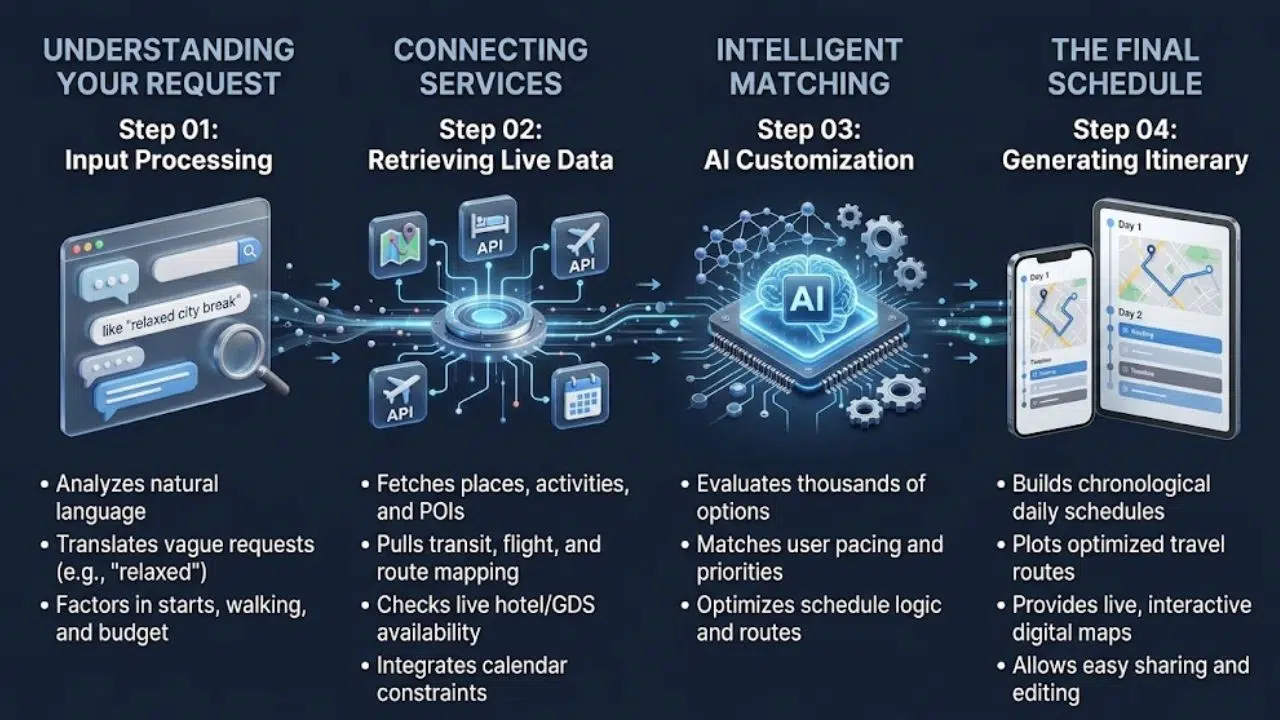
Personalized planning involves interpreting your request, finding suitable options, and arranging them into a schedule. Products handle those jobs differently.
Understanding Your Request
“Plan a relaxed city break” sounds clear until someone has to schedule it. Does relaxed mean a late start, short walks, or one main activity each day?
Conversation lets you explain those preferences. At its June 2023 launch, Booking.com’s AI Trip Planner combined existing recommendation models with conversational AI to help travelers describe requirements and refine suggestions. That launch illustrates the approach; check current product access before expecting the same experience in your market.
Using Connected Services
A connected AI travel itinerary planner can retrieve information before building a schedule. Google Cloud documents an example architecture combining place details, routes, and calendar commitments.
These are capabilities a developer can integrate, rather than features every travel app provides. Look for supporting sources and mapped locations, plus an explanation of what the tool actually checked.
Give the Planner Useful Details
Start with your destination, dates, group size, accommodation area, and arrival and departure times. Add the limits that would change a planning decision.
An AI travel itinerary planner needs a clear distinction between requirements and preferences:
| Detail | Firm Requirement | Flexible Preference |
| Budget | Stay within a stated total | Spend more on one meal |
| Mobility | Use step-free routes | Prefer shorter walks |
| Schedule | Keep a booked tour | Start after breakfast |
This distinction makes the result easier to judge. Missing a preferred café is manageable. Ignoring an access requirement may make the day impractical.
Explain Vague Preferences
Replace “budget-friendly” with an amount, currency, and the expenses it covers. For family trips, mention children’s ages and necessary breaks.
Describe access needs concretely, such as step-free entry or seating opportunities, then confirm essential arrangements with providers. Mention dislikes too. Avoiding nightlife or frequent hotel changes can be more useful than another broad interest.
How Recommendations Are Selected
Connected tools can draw from place databases and booking inventory. Google’s Places API supplies information including addresses, opening hours, reviews, and price levels.
An AI travel itinerary planner may also sit within a platform that personalizes recommendations using previous searches or reservations. Booking.com documents those signals alongside availability, pricing, and other factors. Explain which preferences apply now; an earlier business trip may say little about your family vacation.
Personalization does not guarantee complete market coverage. Booking.com also discloses supplier relationships and commercial ranking factors, including commission. Compare expensive recommendations with alternatives outside the platform before deciding.
Build a Workable Daily Schedule
Interesting stops need a sensible route between them. Google’s Routes API supports stop-order optimization using travel time while considering distance and turns. That requires a supported integration; it does not establish that every AI travel itinerary planner checks routes.
Ask for nearby activities to be grouped together and travel estimates matched to your transport mode. A driving estimate offers little help when you intend to take a bus.
Start With Fixed Commitments
Build around flights, timed admission, and existing reservations. Leave room for queues, meals, transport connections, and rest.
Keep arrival day realistic. Landing time still leaves arrival procedures, baggage, and the journey to your accommodation. A lighter first afternoon is easier to adjust than a chain of prepaid activities.
Set Clear Budget Limits
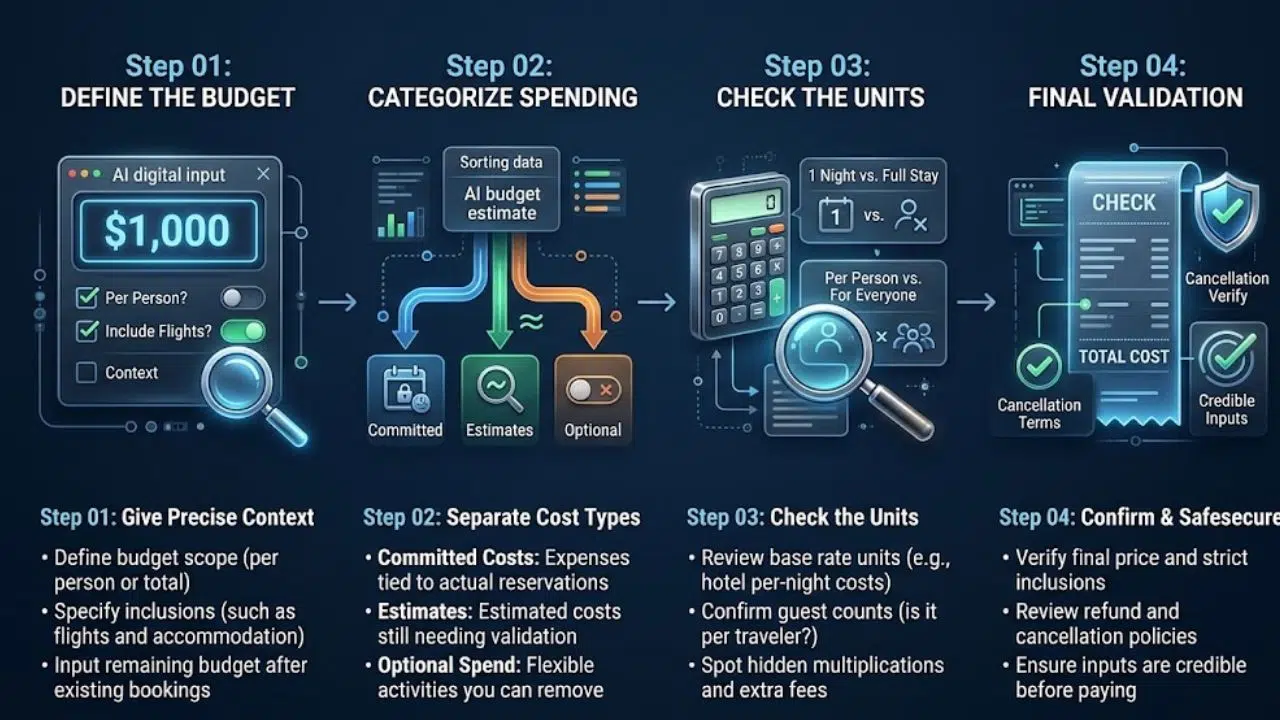
“Keep it under $1,000” needs context. Is that per person or for everyone? Does it include flights?
Give your AI travel itinerary planner the remaining budget after existing bookings. Ask it to separate:
- Committed costs: Amounts supported by actual reservations.
- Estimates: Expenses that still need checking.
- Optional spending: Activities you can remove.
Check the units behind each amount. A hotel rate may cover one night, while an attraction estimate may cover only one traveler.
A tidy total is useful only when its inputs are credible. Confirm the final price, inclusions, and cancellation terms before paying.
A Personalized Planning Example
Consider a hypothetical London trip for two adults and a nine-year-old who enjoy history and parks.
A useful request for an AI travel itinerary planner could read:
Plan three sightseeing days in London for two adults and a nine-year-old. Our hotel is near South Kensington. Include history and parks, with no more than two main activities daily, a seated lunch break, and no late evenings.
Our activity budget is £180 for the whole family, excluding accommodation, meals, and transport. Group nearby stops, show estimated travel times, identify advance-booking requirements, and suggest an indoor alternative each day. Flag information you cannot verify.
The budget is illustrative, not a claim that particular attractions fit it.
Review the response against the request. Does it treat £180 as a family total? Does “two activities” conceal several extra stops? Is the indoor alternative nearby?
If an afternoon feels crowded, keep the morning activity and request one optional stop near the hotel. Specific feedback gives the revision a clear purpose.
Refine the Plan Without Losing Priorities
Identify the actual problem: excessive walking, repeated restaurant suggestions, or too many paid activities.
Ask the AI travel itinerary planner to change one substantial issue at a time. Then check that it preserved reservations, spending limits, and essential breaks.
Useful questions include “Where is the schedule tightest?” and “What should be removed if we start two hours late?” Explanations can reveal weak assumptions, although they may contain errors themselves.
If a product offers memory, check what it retains. Repeat essential requirements when starting another trip instead of assuming they carry over.
Initial planning usually needs preferences rather than identity documents. Avoid uploading passport scans, payment details, or booking references to a general planning conversation.
Describe practical needs without unnecessary medical history. “Include regular seated breaks” may provide enough context.
Before connecting email or calendars, review permissions and privacy controls. Entering a few commitments manually may be sufficient, especially for a short trip. Obtain permission before sharing another traveler’s sensitive information.
Check These Details Before Booking
Generative AI can produce plausible but incorrect information. Concentrate your review on details that could disrupt the journey:
- Venues: Confirm opening days, ticket conditions, and the correct branch or entrance.
- Transport: Check routes for your intended departure time and travel mode.
- Essential needs: Confirm step-free access or serious food-allergy requirements directly.
- Reservations: Look for an actual booking confirmation, including dates and party size.
- Entry rules: Use relevant official government information for passport-specific requirements.
Open supporting links and check that they substantiate the recommendation. A link to a venue’s homepage does not necessarily confirm its holiday hours or ticket availability.
Save the checked itinerary and essential addresses somewhere accessible during the trip.
Final Thoughts
Before accepting a full itinerary, review its busiest day. Check the route, spending, and time left for meals and rest. If that day feels unrealistic, request fewer stops.
An AI travel itinerary planner earns its place when it helps you make those decisions clearly. Keep the useful suggestions, verify consequential details, and leave enough room to enjoy what you planned.
Frequently Asked Questions (FAQs) About AI Travel Itinerary Planner
Can You Plan Before Choosing a Destination?
Yes. Ask for destination ideas based on your departure point, season, interests, and budget. Compare transport costs before committing; an appealing destination may be expensive to reach.
Should You Pay Before Trying a Planner?
Try a sample itinerary first. Pay for features you will actually use, such as exports, map integration, or collaboration, after checking current plan limits.
When Is Human Planning Help Worthwhile?
Consider a travel professional for complex connections, specialized access arrangements, or a group with conflicting requirements. Ask what support is included if plans change during the journey.