AI productivity tools are becoming difficult to avoid. One app wants to write your emails. Another promises to plan the day, summarize every meeting, research complicated questions, clean up your documents, and move information between the rest of your software.
A useful tool should remove a recurring burden. It should reduce search time, administrative work, uncertainty, or mental load without creating a larger system that needs endless prompting and repair.
For this list, I focused on tools that address recognizable problems: planning, research, writing, task management, scheduling, meeting recall, knowledge retrieval, and repetitive administration. You almost certainly do not need all 12. Keep reading to understand what actually suits you.
What Are the Best AI Tools for Personal Productivity?
The strongest options for different personal workflows are:
- ChatGPT: General planning, analysis, writing, and file-based work
- Google Gemini: Google-connected productivity
- Microsoft 365 Copilot: Word, Excel, Outlook, and PowerPoint
- Claude: Long documents and careful reasoning
- Gemini Notebook: Research grounded in selected sources
- Perplexity: Current web research
- Notion AI: Connected workspace knowledge
- Motion: Automatic scheduling
- Todoist Assist: Lightweight task management
- Otter.ai: Meeting transcription and recall
- Grammarly: Everyday writing support
- Zapier: Repetitive cross-app automation
Find your most flexible general starting point. The specialist tools make sense only when they solve a recurring problem that a general assistant is not handling well.
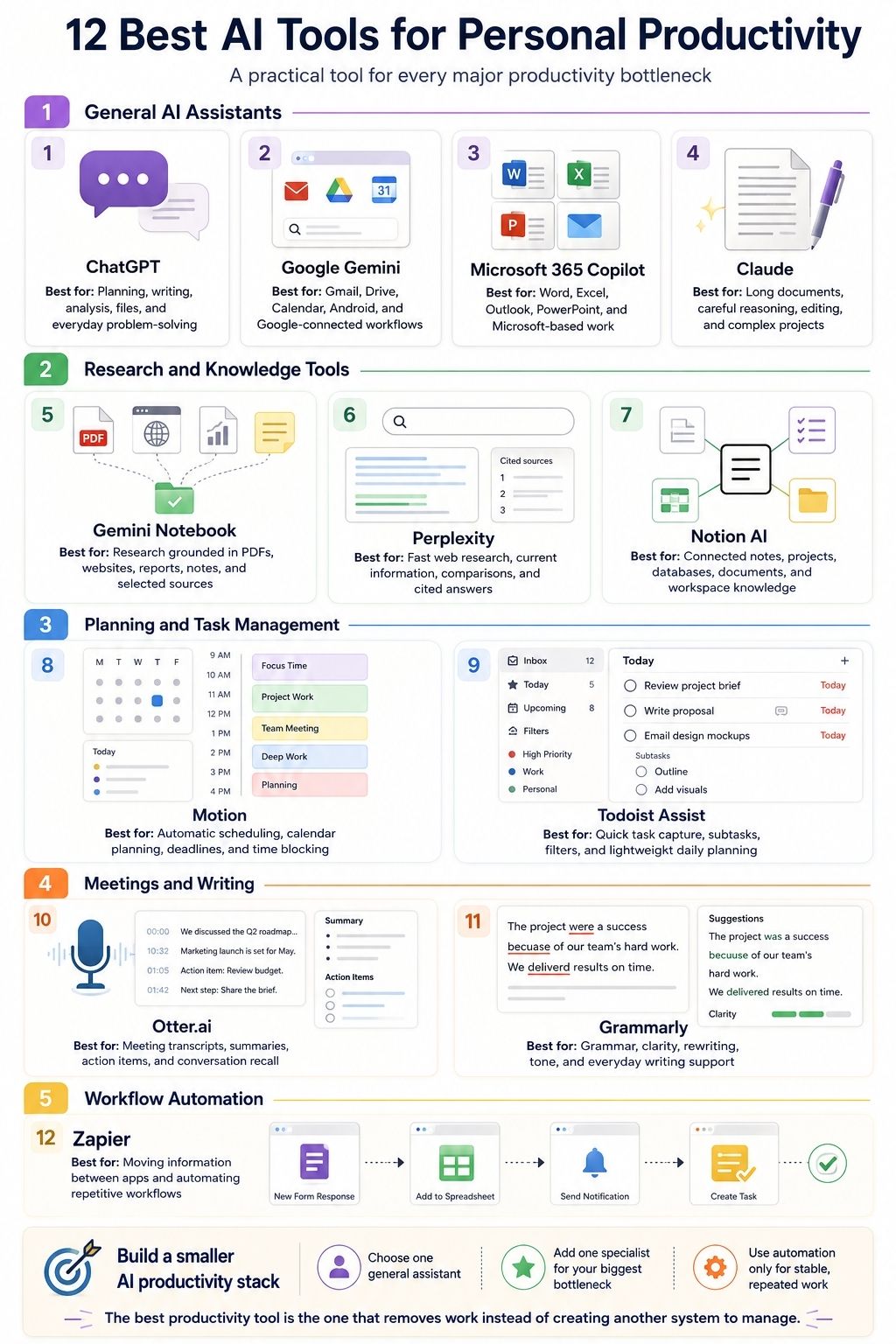
The 12 Best AI Tools for Personal Productivity
The best AI tools for personal productivity are not necessarily the ones with the most features. Each option below earns its place by solving a specific problem, from planning and research to writing, meetings, scheduling, and automation. The goal is not to use every tool, but to choose the few that remove the most friction from your daily work.
1. ChatGPT: The Most Flexible Starting Point
ChatGPT is the easiest place to begin when you need one assistant for several kinds of work.
It can help structure projects, analyze uploaded material, compare options, draft and revise documents, work with files, brainstorm, perform research, and maintain context across longer-running efforts. ChatGPT Projects group related chats, files, and instructions, while scheduled tasks support reminders, recurring briefings, and monitoring. Feature availability varies by plan and workspace.
Its range makes it useful for:
- Turning unstructured notes into a plan
- Breaking a large assignment into workable stages
- Comparing several files
- Preparing for a meeting
- Drafting and revising a report
- Exploring spreadsheet data
- Creating repeatable checklists
- Keeping one long project in a dedicated workspace
The danger is not usually lack of capability. It is overproduction. ChatGPT can create a 20-point plan when five decisions would have been enough. It can produce a polished document before the assumptions behind that document have been checked.
I would use it as a working partner, not an automatic final authority. Give it the real context. Ask it to identify uncertainty. Verify factual claims and calculations. Keep responsibility for the finished work.
2. Google Gemini: The Strongest Fit for Google Users
Gemini makes the most sense when Gmail, Drive, Google Calendar, Android, and Google Search already shape the user’s day.
Its Deep Research mode can use Google Search and selected personal sources such as Gmail and Drive. Gemini also supports recurring scheduled actions for briefings, reminders, and other repeated requests. Availability and limits depend on the account, subscription, device, and region.
That creates a practical advantage. The assistant does not always need someone to copy information out of one service and paste it into another. It can work nearer the calendar events, messages, files, and research sources already being used.
Useful applications include:
- Summarizing information from Drive files
- Preparing a research briefing
- Turning an email discussion into next steps
- Producing a recurring morning or weekly update
- Reviewing plans against calendar commitments
- Using voice assistance from a mobile device
Gemini is not automatically the better writer or thinker in every situation. Its value comes from integration.
The closer an AI tool gets to email, files, schedules, and personal information, the more carefully I would review permissions and every action it proposes.
3. Microsoft 365 Copilot: For Work Already Living in Office Apps
Microsoft 365 Copilot earns its place when Word, Excel, Outlook, PowerPoint, OneNote, and Teams are already the main working environment.
Copilot is available inside eligible Microsoft 365 Personal, Family, Premium, and business plans, although exact features, AI credits, and access rights differ. It can assist with drafting, rewriting, spreadsheet analysis, presentations, email summaries, and other work inside Microsoft applications.
Its strongest advantage is continuity. A user can work on a document, spreadsheet, presentation, or email without moving the material into a separate chat window. That can reduce copying, file uploads, and repeated explanations.
The tool is well suited to:
- Drafting a report from existing notes
- Summarizing a long Outlook conversation
- Exploring an Excel workbook
- Turning a Word document into presentation material
- Rewriting sections without leaving the file
- Retrieving permitted information from Microsoft 365 content
Copilot becomes harder to justify when someone already pays for several general assistants that perform the same drafting and summarization work.
Before adding it, I would ask whether its Office integration replaces friction or merely duplicates another subscription.
4. Claude: For Long Documents and Careful Reasoning
Claude is a strong choice for work that needs patient analysis rather than quick snippets.
Its Projects feature provides separate workspaces with their own chat histories, instructions, and knowledge bases. Claude can also work with uploaded documents and, in supported experiences, create or edit files such as spreadsheets, presentations, Word documents, and PDFs.
That makes it useful for:
- Developing a long report
- Comparing several documents
- Restructuring a large draft
- Stress-testing an argument
- Working through a complicated decision
- Maintaining context around one continuing project
- Producing editable deliverables
Claude’s calm, coherent writing can make an answer feel more settled than it really is.
A carefully written explanation may still contain a weak assumption, an unsupported claim, or a misunderstanding of the source material. The fluency helps with editing and reasoning, but it should never replace evidence.
5. Gemini Notebook: For Research Grounded in Your Sources
Google renamed NotebookLM to Gemini Notebook in July 2026. Existing notebooks remained accessible, but the product now sits more clearly inside the Gemini family. Gemini Notebook is different from a general assistant because it begins with the sources the user selects.
It can work with materials such as PDFs, websites, videos, audio, documents, and slides. Answers include inline citations back to the relevant source passages, and notebooks can generate formats such as Audio Overviews, study guides, quizzes, mind maps, presentations, and infographics.
This is one of the most useful tools for:
- Reviewing a set of research papers
- Studying course material
- Comparing policy or legal documents
- Preparing from interview transcripts
- Understanding a collection of reports
- Building a briefing from an approved source library
The citations make verification easier. They do not make every interpretation correct. The tool may miss a contradiction, overlook an important limitation, or connect two passages too confidently. I would use it to navigate and interrogate sources, not to avoid reading the sources that matter most.
6. Perplexity: For Fast, Current Research
Perplexity is useful when the main problem is locating and synthesizing current information from the web.
Its Research mode performs deeper searches and analysis, while Projects provide dedicated workspaces with custom instructions, files, source controls, and ongoing research context. Perplexity’s 2026 updates also expanded document processing, calculations, data analysis, and scheduled research tasks.
It works well for:
- Getting an initial view of a current topic
- Finding sources for deeper research
- Comparing updated products or services
- Mapping competitors
- Identifying areas where sources disagree
- Monitoring a topic on a schedule
The citations are useful, but they still need inspection. A source can be real and irrelevant. A sentence can cite an article that only partly supports it. Promotional pages can appear beside academic or government material without enough distinction.
Perplexity shortens discovery. Source judgment remains a human job.
7. Notion AI: When the Context Already Lives in Notion
Notion AI is most useful when Notion already contains the projects, documents, databases, meeting notes, and operating knowledge.
Notion Agent can use workspace and connected-app context to search, create, and edit pages and databases. Notion also offers research, enterprise search, connectors, meeting tools, and custom agents for recurring workflows.
That can support work such as:
- Summarizing an active project
- Finding decisions across old pages
- Preparing a recurring report
- Updating database records
- Converting meeting notes into actions
- Drafting from existing workspace material
- Answering questions from internal documentation
Notion AI is less convincing when the user does not already have a useful Notion workspace.
Creating several databases, dashboards, relations, and templates merely to make the AI useful can produce more maintenance than productivity. The complexity should come from the work being managed, not from the workspace built around it.
8. Motion: When the Real Problem Is Scheduling
Many people know what they need to do. Their failure point is assigning realistic time to it. Motion automatically schedules tasks using information such as deadlines, priorities, durations, dependencies, available work hours, and calendar events. It can reschedule tasks when higher-priority work or new meetings appear.
This is useful when a person repeatedly creates a long task list without deciding when the work will happen.
Motion can help:
- Turn tasks into time blocks
- Rebuild a plan after meetings appear
- Protect time for deadline-driven work
- Reveal that the week contains more work than available hours
- Keep recurring responsibilities visible
The schedule is only as realistic as the information entered. When every task is urgent, no priority system can help. When a two-hour job routinely takes five, automatic rescheduling becomes a continuous game of calendar Tetris.
Motion arranges time. It does not create it.
9. Todoist Assist: For Lightweight Task Management
Todoist Assist offers AI support without requiring users to build a large project workspace. It can turn forwarded emails into clearer tasks, create filters through natural-language instructions, help break larger tasks into subtasks, and support voice capture through Ramble.
This is a strong fit for someone who needs:
- Fast task capture
- A straightforward personal task list
- Help converting emails into actions
- Simpler project breakdowns
- Natural-language filters
- Voice entry while moving between activities
The restraint is part of the appeal. A user can gain AI assistance without turning personal productivity into a custom database project.
There is still a temptation to overcomplicate things. AI can divide a simple task into a dozen steps because it knows how. That does not mean all 12 belong on the list.
10. Otter.ai: For Meeting Memory
Otter.ai addresses a very specific problem: people forget what happened in meetings, lose action items, or spend too much attention taking notes.
Otter Notetaker can join supported Zoom, Google Meet, and Microsoft Teams calls, create live transcripts, capture slides, generate summaries, and support questions about the conversation.
It can be valuable for:
- Client conversations
- Team meetings
- Interviews
- Lectures
- Research discussions
- Preparing follow-up notes
- Finding an earlier statement without replaying the call
I would not let an automated meeting summary become the only record of an important decision. Transcripts can misidentify speakers, misunderstand names, and strip statements of context. Automated action items may assign the wrong person or turn a suggestion into a commitment.
Recording also raises consent, confidentiality, company-policy, and legal questions. Participants should know what is being captured, who can access it, and how it will be shared.
11. Grammarly: For Writing in the Flow of Work
Grammarly remains useful because it works close to the sentence being written. Its current tools provide grammar, clarity, tone, rewriting, drafting, proofreading, and context-aware generative assistance across supported applications and websites. Grammarly has also expanded into AI agents that can provide feedback, locate sources, and help predict reader reactions.
It works best for everyday communication:
- Emails
- Reports
- Proposals
- Applications
- Messages
- Client documents
- Final proofreading
The advantage is reduced context switching. The user does not need to move every paragraph into a separate assistant to receive help. The problem begins when every recommendation is accepted automatically.
Some rewrites make a sentence clearer. Others flatten personality, remove useful nuance, or replace a direct voice with generic professional language. Good writing should sound intentional, not merely standardized.
12. Zapier: For Repetitive Cross-App Handoffs
Zapier belongs last because automation should usually come after a workflow has become stable.
The platform connects applications, data, and AI models to run repeated processes. Its current tools support conventional trigger-and-action workflows as well as AI-assisted automation and agents across thousands of integrations.
Useful workflows might include:
- Turning an approved form response into a task
- Saving email attachments to the correct folder
- Sending meeting actions to a project system
- Creating calendar events from confirmed requests
- Moving selected information between spreadsheets and databases
- Producing a draft after a repeated trigger
The time savings can be substantial when the same manual handoff happens every day. The risks are also larger than with a writing assistant. An incorrect paragraph can be revised before publication. An automated message, calendar event, or database update may reach other people immediately.
Before automating a process, perform it manually enough times to understand its exceptions. Give the workflow an owner. Add a way to detect failure. Decide how mistakes will be reversed.
The Best AI Tool Gives Attention Back
The best AI tools for personal productivity do not simply produce more content. They remove something that was consuming useful attention. None of them can decide what deserves your attention in the first place. That judgment remains human.
I would build the smallest stack that solves the largest recurring problems, such as, one general assistant, one specialist, and one automation layer only when repeated work justifies it
The real measure of an AI productivity tool is not how much work it appears to perform. It is how much useful attention it gives back.
Frequently Asked Questions on AI Tools for Personal Productivity
1. What Is the Best Free AI Productivity Tool?
Several products offer free access, but limits, models, and included features change frequently. Choose the free tool that addresses your main bottleneck rather than selecting one only because it offers the largest usage allowance.
2. Can ChatGPT Be Used for Personal Productivity?
Yes. ChatGPT can help with planning, writing, research, file analysis, project organization, brainstorming, and scheduled tasks. Important outputs still require review and verification.
3. What Is the Best AI Tool for Research?
Gemini Notebook is strongest when answers should remain grounded in sources you provide. Perplexity is useful for current web discovery. General assistants can help with broader analysis when their research and citation features are used carefully.
4. Are AI Productivity Apps Safe?
They can be used responsibly, but risk increases when they access email, calendars, files, meetings, or workplace data. Review privacy controls, retention policies, permissions, and organizational rules before connecting sensitive information.
5. Is Notion AI Better Than ChatGPT?
They serve different purposes. Notion AI is strongest when the relevant projects and knowledge already live inside Notion. ChatGPT is a broader assistant for work across different projects, files, and formats.