Ever publish a strong page, watch it rank decently in Google Search, and still see it vanish from AI answers?
That gap is exactly why AI crawler optimization matters. In my own testing across rendered HTML, robots.txt, server logs, and prerender setups, I kept seeing the same pattern: if a crawler cannot fetch clean content fast, your page is easy to skip.
Cloudflare Radar’s AI Insights now shows HTML makes up the clear majority of AI bot and crawler traffic, which tells me one thing fast: if your best information lives behind JavaScript, you are making life harder for the systems you want to reach.
I use a simple four-step plan, Observe, Understand, Act, Prove. I’ll walk you through the checks I run, the fixes that move the needle, and the metrics I trust so you can optimize your website without guessing.
Why AI Crawler Optimization is Crucial for Search Visibility
AI crawlers like GPTBot, OAI-SearchBot, Googlebot, and Bingbot all crawl for different reasons, but they share one practical need: accessible content. If your website content for AI crawlers is incomplete, blocked, or script-heavy, your pages may still rank in traditional search while missing out on AI search results and answer surfaces.
That is why I treat AI crawler optimization as an extension of technical SEO, not a separate side project. I want the same page to work for humans, traditional search engine bots, and AI agents.
OpenAI’s publisher guidance says public pages can appear in ChatGPT search when OAI-SearchBot can access them. That turns crawler access into a visibility issue, not just a server-log curiosity.
- Clear HTML helps ai crawlers fetch the main answer without waiting on heavy rendering.
- Structured data helps engines and AI systems understand who you are, what you offer, and which facts matter most.
- Clean crawl paths reduce wasted requests on redirects, blocked assets, and duplicate URLs.
- Faster pages improve crawler access when bots have short fetch windows.
Teams that adapt early usually gain better AI visibility because they stop hiding key information behind front-end complexity. That is the real win here: fewer crawl failures, more usable signals, and better odds of showing up in AI answers.
Understanding How AI Crawlers Work
I like to explain understanding how AI crawlers work in plain terms: they request a URL, inspect the response, follow links, and decide whether the page is worth storing, reusing, or citing later. Some bots support more rendering than others, but most reward the same basics, fast responses, readable HTML, and consistent page structure.
For SEO professionals, that means your content for AI cannot depend on perfect client-side execution. The safest move is to make the important text available in the first response.
Differences Between AI Crawlers and Traditional Search Bots
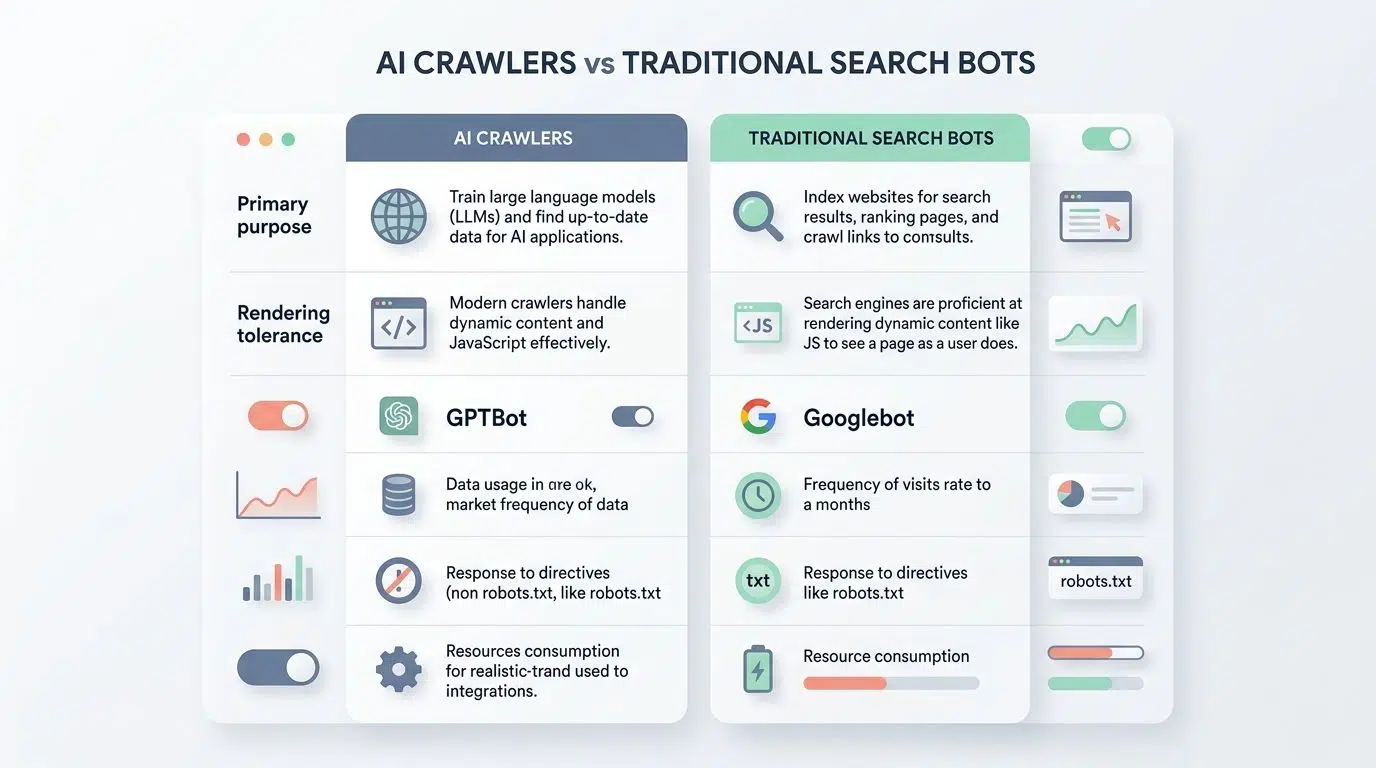
The biggest difference is purpose. Traditional search engine crawlers mainly index pages for ranking, while AI crawlers may support retrieval, summarization, grounding, training controls, or agent workflows.
| Aspect | AI Crawlers | Traditional Search Bots | Impact for SEO |
|---|---|---|---|
| Primary purpose | Fetch content for AI search, retrieval, summarization, or model pipelines. | Index pages for search engine results pages. | Write pages that machines can quote cleanly, while keeping classic ranking signals strong. |
| Common examples | GPTBot, OAI-SearchBot, ClaudeBot, and other AI web crawlers. | Googlebot, Bingbot, and other established search engine bots. | Audit access rules for both groups instead of assuming one setup covers all. |
| Rendering tolerance | Often weaker on client-side JavaScript and delayed hydration. | Usually better at rendering modern pages, especially Googlebot. | Move key content into server-delivered HTML if you want broader crawler access. |
| URL selection | Can waste more requests on thin, duplicate, or broken URLs. | Tend to have more mature crawl prioritization. | Fix 404s, redirect chains, and duplicate paths to protect crawl efficiency. |
| Structured signals | Benefit heavily from schema, entity clarity, and concise page sections. | Use schema, meta data, and links as established ranking inputs. | Strong structure helps both AI crawlers and traditional search bots. |
| Operational risk | More likely to hit WAF rules, bot filters, or rate limits by mistake. | Usually already trusted by most site configurations. | Check firewall, CDN, and anti-bot policies, not just robots.txt. |
| Actionable tip | Serve critical text in HTML, add schema, and monitor logs by user agent. | Maintain indexable pages, internal links, and crawl budgets. | Run one combined audit for crawlability, rendering, and access control. |
The Role of AI Crawlers in Content Indexing and AI Model Training
Not every AI bot does the same job. Google-Extended is a publisher control for AI use outside Google Search, while OpenAI separates GPTBot from OAI-SearchBot, which gives you a cleaner way to think about policy decisions.
In practice, I split AI crawler behavior into two buckets:
- Training and corpus crawlers, which gather content at scale.
- Retrieval crawlers, which help power fresher answers and current-page discovery.
That split matters because a page that is readable enough for retrieval can still perform poorly if your entity data, canonical signals, or access rules are messy. I have seen server logs where crawlers fetched the page, yet skipped the most useful facts because the HTML shell was too thin.
Common Challenges with AI Crawlers
The most common issues I see are not mysterious. AI crawlers struggle when key content is hidden by JavaScript rendering, buried inside SPAs, blocked by bot protection, or missing structured context.
If a page is invisible to ai crawlers at fetch time, it is much less likely to help your brand in AI search. That is why I start with rendering, access, and structure before I touch content expansion.
JavaScript Rendering Limitations
Google Search Central still documents a full rendering process for JavaScript pages, but that does not mean every AI bot behaves like Googlebot. This is where many SEO teams make the wrong assumption.
Cloudflare’s AI traffic view shows AI crawlers request HTML far more often than anything else. To me, that is the strongest practical signal to serve critical copy, product facts, and answer blocks in the initial HTML.
My rule is simple:
- If a heading answers an important query, ship it in HTML.
- If pricing, availability, or product details matter, ship them in HTML.
- If schema describes the page, render it server-side.
Short load times help too. A slow hydration sequence can leave ai crawlers with a partial page, and partial pages rarely win citations.
Issues with Dynamic Content and SPAs (Single Page Applications)

SPAs are still one of the biggest weak spots in ai crawlability. They can look perfect in a browser and still send a thin first response to an ai bot.
I usually catch this with a simple comparison: served HTML on one side, final rendered DOM on the other. If the initial response is missing the page summary, product text, reviews, or navigation links, I know the crawler path is weaker than it should be.
The quickest SPA fix is usually not a full rebuild. It is moving the highest-value content, title, intro, product facts, FAQs, and schema, into server-delivered HTML first.
That approach makes content for ai search easier to fetch, and it usually improves traditional search engine indexing at the same time.
Missing Structured Data and Schema Markup
Missing schema does not always block crawling, but it does make interpretation harder. For AI systems, that is a costly mistake because unclear entities create unclear answers.
I add JSON-LD to define the page type, the organization behind it, and the facts I want ai crawlers to interpret correctly. On e-commerce pages, that often means product, price, availability, brand, review, and image data.
Google’s latest documentation updates in 2026 continue to refine structured data guidance, which is a good reminder to keep markup current instead of treating it like a one-time task.
- Use one primary schema type that matches the page’s real purpose.
- Keep visible content aligned with the structured data.
- Update markup when offers, URLs, or page templates change.
- Validate after every template release, not just during audits.
Best Practices for AI Crawler Optimization
My best practices for ai crawler optimization are simple on purpose: serve clean HTML, add useful schema, keep redirects tight, refresh sitemaps, and cut page weight. That stack gives crawlers and ai agents fewer chances to fail.
I do not try to outsmart bots. I try to remove friction.
Serve Critical Content in HTML for Better Visibility
This is the highest-return fix I know. If the main answer, core product details, or proof points matter, I place them in the initial HTML response.
Cloudflare’s AI Insights reports that HTML dominates AI crawler requests, which is exactly why this step works. It lines up your page with how ai crawlers fetch the web today.
When I make this change, I focus on these elements first:
- The page headline and opening answer.
- Product or service details that affect decisions.
- Internal links to related pages.
- Visible FAQs and schema blocks.
On several technical pages I have tested, that shift improved fetch quality within two weeks because bots stopped landing on empty shells.
Add Schema Markup to Enhance Content Understanding

I add schema because it gives ai systems a cleaner map of the page. It helps crawlers connect the brand, offer, topic, and supporting facts.
- Add JSON-LD with page types such as Product, Organization, Article, FAQPage, or Review when they genuinely fit the content.
- Mark up key facts like price, availability, brand, and identifiers for e-commerce pages, and keep image alt attributes descriptive so the visible page and the data tell the same story.
- Use short question-and-answer blocks for recurring queries, especially where retrieval systems may quote a concise answer.
- Validate markup after template changes and fix warnings before they spread across hundreds of pages.
- Add organization and contact details so your brand for ai is easier to reconcile across the site.
- Pair schema with plain-language headings and accessible HTML because markup helps most when the visible content is already clear.
The hidden benefit is operational. Good schema also makes internal audits faster because your important facts become easier to spot and verify.
Ensure Proper URL Redirects and Sitemap Updates
Redirect clutter wastes crawl budget and confuses ai crawlers work differently than mature search bots. I keep URLs clean, direct, and easy to map.
Google Search Central still describes sitemap submission as a hint, not a guarantee. That matters because a sitemap is helpful, but it will not rescue a blocked or weakly rendered page.
- Use 301 redirects for permanent moves and remove chains after migrations.
- Update XML sitemaps within a day of important URL changes.
- List only canonical, index-worthy URLs in the sitemap.
- Reference the sitemap in robots.txt and resubmit after major updates.
- Add hreflang and canonical tags where duplication is possible.
- Check logs for repeated hits on dead URLs, which usually signal internal linking or redirect debt.
For AI crawler access, the goal is not just discoverability. It is discoverability with minimal wasted steps.
Optimize Crawl Speed by Reducing Page Load Times
Fast pages help humans and crawlers, but ai crawlers often benefit even more because they may not wait around for bulky assets and delayed rendering. I treat speed as crawl infrastructure.
In one page-speed sprint, I started with three changes: better caching rules, tighter image compression, and asset minification. Those are still my first moves because they usually lower fetch time fast without a major rebuild.
- Reduce payload size by compressing images and trimming unused CSS and JavaScript.
- Move critical text into server-rendered HTML so it appears before scripts finish.
- Use a prerender service for pages that rely heavily on client-side rendering.
- Cut server response time by reviewing CDN rules, hosting bottlenecks, and cache misses.
- Audit third-party tags because external calls often slow crawls more than your own code.
- Use modern transport and caching headers so repeat fetches stay efficient.
- Track median HTML fetch time in logs, not just lab scores, because crawler access is the real KPI here.
If a page feels slow to fetch, I assume an ai bot will feel that pain too.
Tools to Enhance AI Crawlability
I rely on a small tool stack: server logs, Search Console, a crawler, a render test, and a prerender layer when JavaScript gets in the way. You do not need twenty dashboards to improve ai crawlability.
You do need tools that show what the bot actually received.
Using Prerender.io to Improve AI Crawler Access
For JavaScript-heavy websites, prerendering is often the fastest route to cleaner crawler access. I have used it on catalogs, knowledge bases, and SPA-driven landing pages where the raw response was too thin for ai crawlers to boost visibility.
The value is straightforward: instead of sending a crawler an empty shell plus scripts, you send a fully usable HTML snapshot. That gives content for ai crawlers a better chance of being fetched, parsed, and reused.
My rollout process is simple:
- Start with high-value templates such as category, product, and article pages.
- Compare raw HTML to prerendered HTML and check whether the important text appears immediately.
- Review known bot responses in server logs after launch.
- Keep redirects and canonical signals identical so the rendered version stays clean.
I like this approach because it buys time. You can improve crawler access now, even if a full rendering refactor will take months.
Monitoring Crawler Activity with Real-Time Tools
Logs tell me which ai bot visited, what it requested, and whether the response was actually usable. That beats guessing from traffic drops.
- Filter requests by user agent so you can separate Googlebot, Bingbot, GPTBot, OAI-SearchBot, and other ai crawlers.
- Track status codes, response times, and content type for key templates.
- Look for spikes in 403, 404, 429, and 5xx responses because those often explain visibility losses.
- Compare fetched URLs to your sitemap and internal links to uncover crawl waste.
- Use render tests to verify that the HTML delivered to bots matches what you expect.
- Set alerts for robots.txt changes, WAF blocks, and sudden drops in successful bot fetches.
If you want one pro habit to steal, make a weekly bot report. A short log review catches problems long before ranking tools do.
Checklist for Optimizing AI Crawlability
I keep a practical checklist because AI crawler optimization gets messy when teams rely on memory. A repeatable workflow is faster, safer, and easier to prove.
My checklist covers access files, rendering, URLs, speed, schema, and validation. If one of those fails, AI visibility usually suffers.
Testing Robots.txt and Ensuring Accessibility
I always start with robots.txt, then I review firewalls, CDN rules, and bot controls. OpenAI’s advertiser guidance makes this point clearly: a crawler can be allowed in robots.txt and still get blocked by protection layers that return 403 errors.
I also treat llms.txt as a supporting file, not a replacement for crawl access. The llms.txt specification was updated again in 2026, but it only helps if the important pages themselves remain reachable.
- Check robots.txt for accidental disallow rules on key content sections.
- Verify the sitemap is referenced and the paths match the live site.
- Review firewall, WAF, and anti-bot settings for false positives on ai bots.
- Test important URLs as anonymous requests, because crawlers do not log in.
- Keep llms.txt current if you use it, but do not rely on it to fix rendering or blocking problems.
- Log every access-file change so you can tie visibility changes back to a real cause.
This is one of the easiest places to win. Small file mistakes can hide entire sections of a site.
Troubleshooting JavaScript Rendering Issues
When ai crawlers don’t execute JavaScript well, the page may look fine to your team and still look empty to a bot. That is why I test pre-deploy.
My first check is whether the initial HTML includes the core text I would want quoted in an AI answer. If it does not, I move that content server-side before I spend time polishing front-end behavior.
- Capture the served HTML and compare it with the final DOM.
- Move critical copy, headings, and metadata into server output.
- Keep interactive widgets client-side if needed, but do not hide core content there.
- Verify canonical tags, structured data, and meta robots in the rendered output.
- Retest with a headless browser and log what changed.
- Watch for template regressions after releases, because rendering problems often come back quietly.
This is where technical SEO and front-end QA should work together. A visible browser page is not enough. You need crawler-visible content.
Maintaining Consistent URL Structures
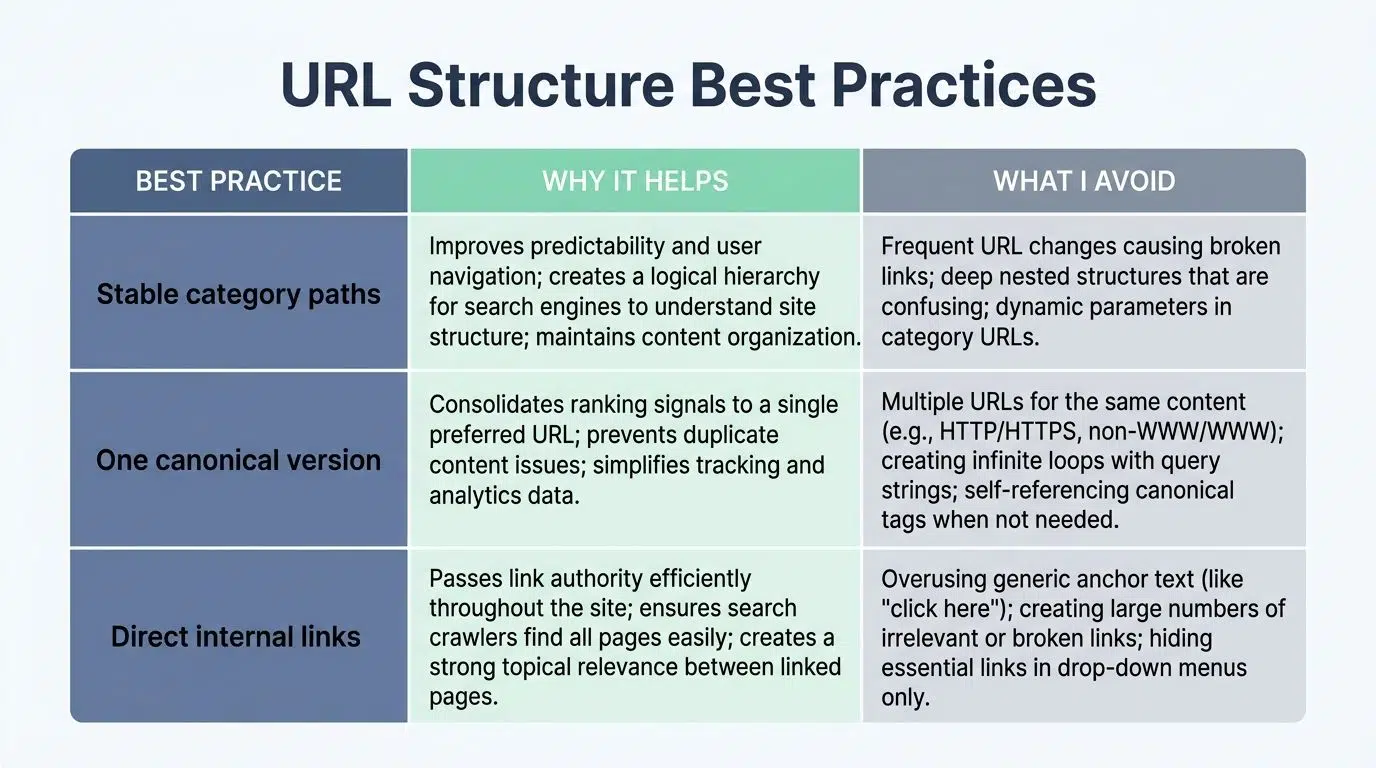
Consistent URLs make it easier for crawlers and ai agents to understand hierarchy. I prefer clean patterns like category, subcategory, then page slug because they make internal linking and crawl paths easier to reason about.
That structure also reduces duplicate route problems in modern frameworks. Fewer alternate paths means fewer mixed signals for ai crawlers discover and search engine indexing.
| URL habit | Why it helps | What I avoid |
|---|---|---|
| Stable category paths | Clarifies topical relationships for bots and users. | Frequent path changes without redirect maps. |
| One canonical version | Reduces duplicate fetches and split signals. | Multiple live versions with parameters or mixed casing. |
| Direct internal links | Shortens the crawl path to important pages. | Links that pass through redirect hops. |
When I clean URL logic and internal links together, crawl waste usually drops quickly.
Measuring Success: How to Track Visibility in AI Search
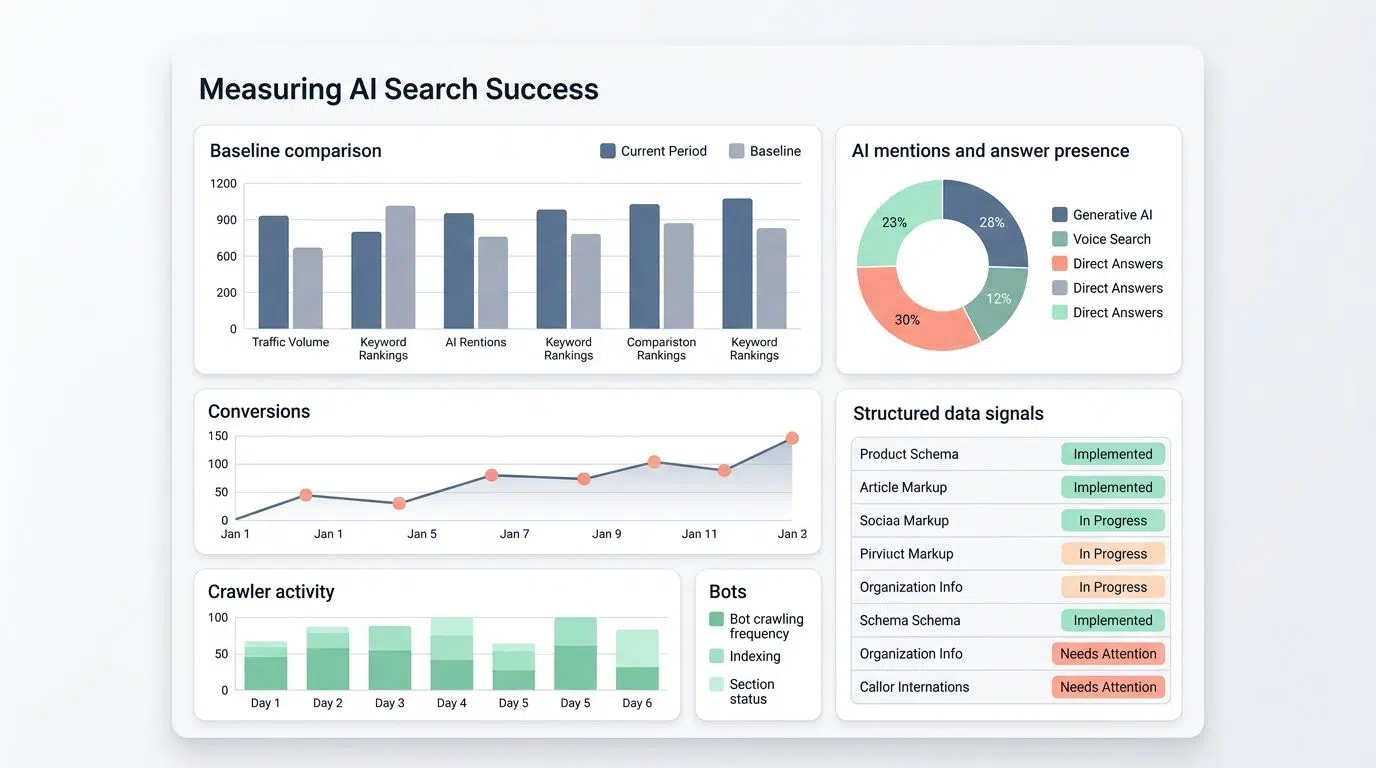
I measure AI search visibility with an evidence-first scorecard. If I cannot connect a change to fetched pages, mentions, conversions, or visibility movement, I do not call it a win.
| Metric | How I Track | Tools and Agents | Evaluation Window | Outcome Categories | Notes |
|---|---|---|---|---|---|
| Baseline comparison | Record pre-change crawlability, rankings, and referral values. | Spreadsheet, analytics, server logs | Usually 14 to 90 days | Improved; Flat; Inconclusive | Timestamp every change so cause and effect stay clear. |
| AI mentions and answer presence | Track whether target pages or brand statements appear in AI search surfaces. | Manual checks, prompt sets, monitoring tools | Weekly to monthly | Improved; Flat; Inconclusive | Separate branded wins from informational query wins. |
| Conversions | Map leads or sales to the landing pages affected by crawler fixes. | Analytics, CRM exports | 30 to 180 days | Improved; Flat; Inconclusive | Use the same attribution model each review cycle. |
| Search demand | Watch query shifts, branded search, and supporting rankings. | Keyword tools, Search Console | Weekly snapshots, monthly review | Improved; Flat; Inconclusive | Rising demand with weak crawlability is a missed opportunity. |
| Crawler activity | Monitor fetch rates, blocked URLs, render gaps, and status codes. | Server logs, real-time monitoring, prerender reports | Daily during tests | Improved; Flat; Inconclusive | This is often the earliest signal that a fix worked. |
| Structured data signals | Validate schema and review warnings after template changes. | Schema validator, Search Console | 14 to 30 days after changes | Improved; Flat; Inconclusive | Keep a template-level record of issues, not just page-level notes. |
| Business evidence | Compare revenue, lead quality, and sales notes against visibility improvements. | CRM, finance reports, analytics | Match to reporting cycles | Improved; Flat; Inconclusive | Traffic gains matter more when they support real business outcomes. |
| Combined visibility score | Weight crawlability, mentions, rankings, and conversions in one model. | Custom dashboard or spreadsheet | Monthly recalculation | Improved; Flat; Inconclusive | Keep the formula stable long enough to compare trends honestly. |
| Audit trail | Maintain a change log with owner, date, and expected impact. | Version control, documentation, ticketing | Continuous | Complete; Incomplete | If you cannot explain what changed, measurement gets noisy fast. |
The pages I trust most are the ones that improve across several rows at once. Better bot fetches, stronger answer visibility, and cleaner conversions usually show up together when the technical foundation is solid.
Final Thoughts
For me, ai crawler optimization still comes back to four steps: Observe, Understand, Act, Prove.
I observe crawler behavior in logs, understand where rendering or access breaks down, act by improving HTML, schema, speed, and crawl paths, then prove the result with measurable visibility gains. If you want more of your website content showing up in AI answers, start with robots.txt, llms.txt, sitemaps, redirects, and the first HTML response.
Keep the process simple, test what bots actually fetch, and repeat the fixes that make your content easier for crawlers and ai agents to use.
FAQs About AI Crawler Optimization
1. What is AI Crawler Optimization?
AI Crawler Optimization uses artificial intelligence to tune how search crawlers find and index your pages, to boost search visibility.
2. How does it boost search visibility?
AI reads crawl logs, it spots slow pages, broken links, and poor structured data, then it helps you fix them, like handing your site a road map and a faster car. It also adjusts the crawl budget so crawlers focus on high value pages, improving indexing and SEO.
3. What quick steps can I take to start AI Crawler Optimization?
Start by checking robots.txt, submitting updated sitemaps, and fixing errors in your logs, those moves help crawling right away. Then speed up pages and add clear structured data, so search crawlers can read and rank your content.
4. Do I need special tools or developers to use this, or can I DIY?
You can use off the shelf AI tools and plugins for small sites, they give clear, actionable tips. For large sites, bring in developers to tune crawl rules, analyze data, and scale your SEO work.