
Google can see your page, but not your content. JavaScript is silently breaking indexing. JavaScript SEO becomes important when your article looks perfect to readers, but search engines struggle to see the same content, links, metadata, or page structure.
That is a quiet problem for publishers. Your CMS may load article text, related posts, author boxes, comments, recommendations, ads, tables, or internal links with JavaScript. Everything may look fine in a browser. But if important content appears too late, breaks during rendering, or depends on user actions, search engines may not process the page the way you expect.
JavaScript is not bad for SEO. Modern publishing websites use it every day. The problem starts when JavaScript controls content that should be available quickly, clearly, and consistently.
For publishers, the goal is simple. Search engines should be able to discover the page, render the content, follow important links, understand metadata, and index the right version without unnecessary friction.
This guide practically explains JavaScript SEO, especially for article-heavy websites, blogs, news sites, and evergreen publishing platforms.
What Is JavaScript SEO?
JavaScript SEO is the process of making JavaScript-powered pages crawlable, renderable, indexable, and understandable for search engines.
It focuses on questions like:
- Can search engines see the main article content?
- Can they find internal links?
- Can they read title tags, meta descriptions, canonical tags, and structured data?
- Can they process dynamic content?
- Can they render the page without major errors?
- Can they access the required JavaScript and CSS files?
- Can the page load fast enough for real users?
For a publisher, JavaScript SEO is not only a developer issue. It affects editors, SEO teams, UX teams, ad teams, and anyone who changes article templates. A technically beautiful website can still underperform if search engines cannot access the content properly.
Why JavaScript SEO Matters for Publishers
Publishers often use JavaScript-heavy elements without thinking about SEO impact.
Common examples include:
- Related article widgets
- Infinite scroll
- Lazy-loaded content
- Comment systems
- Ad scripts
- Newsletter popups
- Paywall logic
- Interactive charts
- Video embeds
- Content recommendation blocks
- Client-side navigation
- Article filters
- Search result pages
- Single-page app sections
Some of these are useful. Some are necessary. But each one can create crawl, rendering, performance, or indexing issues if implemented badly. In large publisher sites, I’ve seen rendering issues cause indexing delays even when the content looks perfect in the browser.
The biggest risk is not that JavaScript exists. The bigger risk is that your primary content or important SEO signals depend entirely on JavaScript working perfectly.
For evergreen content, that can hurt long-term performance. A pillar article, cluster guide, or updated technical SEO page should not rely on fragile rendering before search engines can understand its value.
Good JavaScript SEO makes the publishing system more reliable.
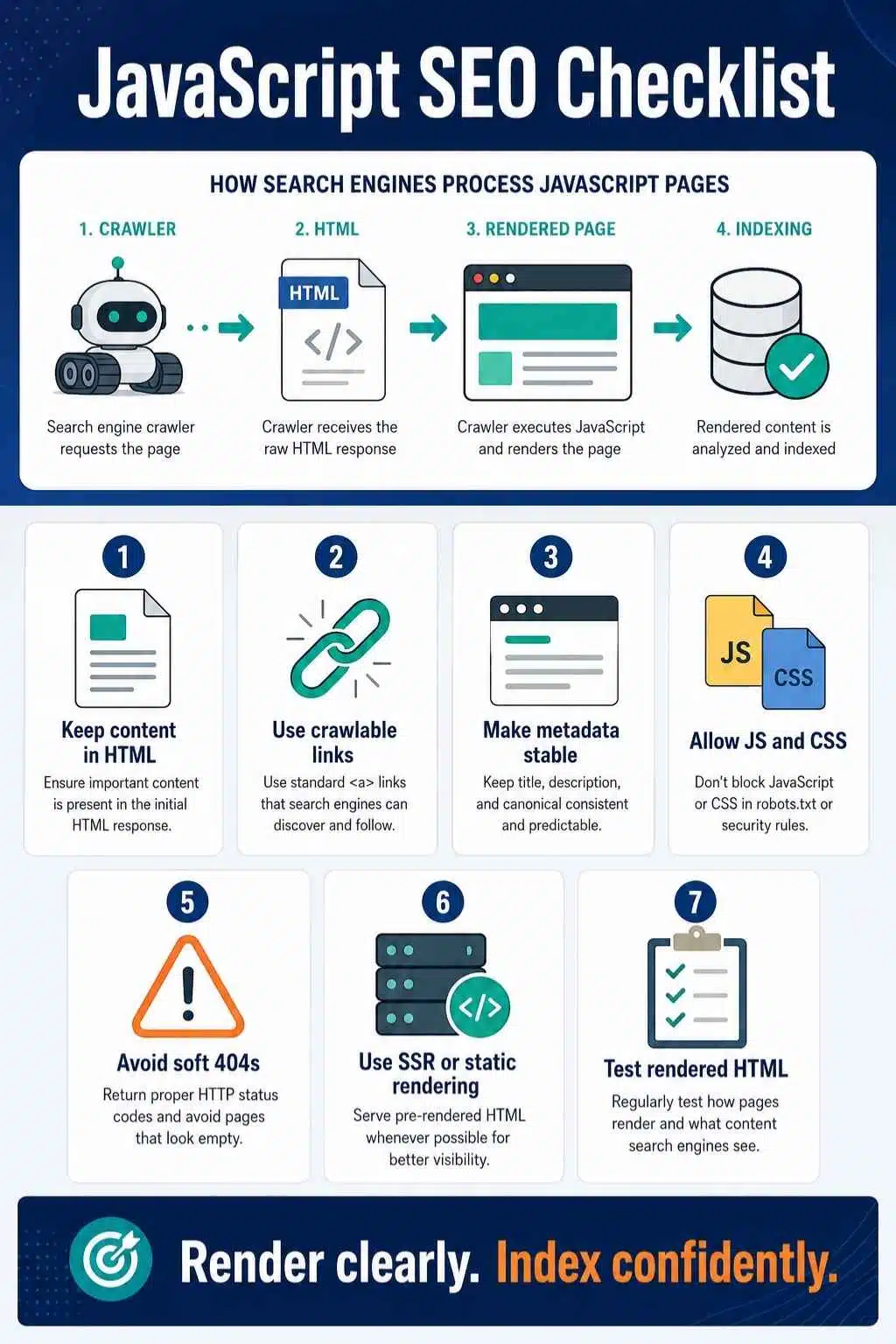
How Search Engines Process JavaScript Pages
A basic HTML page is easier for crawlers. The server returns the page, and the main content is already in the HTML. JavaScript-heavy pages can require extra steps.
In simple terms, the process looks like this:
| Stage | What Happens | Publisher Risk |
| Crawling | Search engine discovers and fetches the URL | Important links may be hard to find |
| Rendering | JavaScript runs, and the page is built | Content may fail to appear |
| Indexing | Search engine evaluates the content | Missing content or metadata can affect visibility |
This is why JS rendering SEO matters. If the main article body, author data, internal links, or structured data appear only after JavaScript runs, the page depends on successful rendering. That may work, but it adds complexity.
For publishers, the safest approach is to make the most important content and links available in the initial HTML whenever possible. JavaScript can enhance the experience. It should not hide the core value of the page.
Client-Side Rendering vs Server-Side Rendering vs Static Rendering
Not all JavaScript websites work the same way.
Client-Side Rendering
Client-side rendering means the browser downloads a basic HTML shell and uses JavaScript to build the page. This can create SEO risk if the initial HTML is thin and the main content appears only after JavaScript execution.
It may work for search engines that render JavaScript, but it can be slower, less reliable, and harder for some bots to process.
Server-Side Rendering
Server-side rendering means the server sends a more complete HTML version of the page before JavaScript takes over. This is usually stronger for SEO because crawlers and users receive meaningful content faster.
For publishers, server-side rendering is often a safer option for article pages, category pages, author pages, and topic hubs.
Static Rendering
Static rendering means pages are prebuilt as HTML files before users or crawlers request them. This can work very well for evergreen publisher content because articles do not always need to be generated from scratch on every request.
It can improve speed, crawlability, and reliability.
Hydration
Hydration means the server sends HTML first, then JavaScript adds interactivity. This can offer a strong balance when implemented well. Search engines and users see the content early, while JavaScript still supports interactive features.
For publisher SEO, the practical rule is clear: Send important content first. Add interactivity after.
What Content Should Not Depend Fully on JavaScript?
Some page elements are too important to hide behind fragile JavaScript. For publishers, these should be available as early and reliably as possible:
- Main article headline
- Article body content
- Author name
- Published and updated dates
- Canonical tag
- Meta robots tag
- Title tag
- Meta description
- Primary image information
- Internal links
- Breadcrumbs
- Related pillar or cluster links
- FAQ content
- Structured data
- Pagination links
- Category links
- Paywall markup, if applicable
That does not mean these elements can never be generated or enhanced by JavaScript. It means you should test whether search engines can actually see them in the rendered output.
If a crawler cannot see the main article body, the page has a serious JavaScript indexing problem.
Crawlable Links Matter
Internal links are a major issue in JavaScript SEO. A publisher may build a beautiful related-post carousel or topic cluster widget, but if the links are not crawlable, search engines may not treat them as proper links. Use real anchor links for important navigation and internal linking.
Good pattern:
<a href=”/technical-seo-guide/”>Technical SEO Guide</a>
Risky pattern:
<button onclick=”goToArticle()”>Read more</button>
Search engines need clear URLs in link attributes. Buttons, click events, empty links, or JavaScript-only navigation can weaken discovery.
For this article, your internal link to the broader guide on technical SEO for publishers should be a normal crawlable link, not a JavaScript-only click action. Strong internal links help both readers and crawlers understand your topic cluster.
JavaScript and Dynamic Content SEO
Dynamic content SEO becomes tricky when page content changes after the initial load.
Examples include:
- Related articles are loaded after scrolling
- Article lists loaded through filters
- Comments loaded from third-party tools
- Live updates
- Personalized recommendations
- Infinite scroll
- Interactive tables
- Paywall previews
- Location-based content
- User-specific content blocks
Dynamic content can be useful, but ask one question: Is this content important for search visibility?
If yes, make it crawlable, renderable, and linked through clean URLs.
For example, if a related article widget is important for internal linking, do not load it in a way that crawlers cannot process. If infinite scroll reveals more articles, each important article or archive page should still have its own URL.
Do not make search engines depend on scrolling, clicking, filtering, or storing browser state to discover key content.
JavaScript and Metadata
Metadata should be reliable. For publishers, this includes:
- Title tag
- Meta description
- Canonical tag
- Meta robots tag
- Open Graph tags
- Structured data
- Hreflang, if relevant
- Article schema
- Breadcrumb schema
- Author information
- Published and modified dates
Some frameworks allow metadata to change through JavaScript. That can work when rendered properly, but it is safer to provide critical metadata in the initial HTML whenever possible.
A common issue happens when the initial page loads one generic title, then JavaScript updates it after rendering. If rendering fails or delays, search engines may not process the intended metadata correctly.
For important articles, avoid relying on late client-side updates for critical SEO tags.
JavaScript and Structured Data
Structured data can be added with JavaScript, but it must appear correctly in the rendered page.
For publishers, structured data often includes:
- Article
- NewsArticle
- BlogPosting
- BreadcrumbList
- FAQPage, when appropriate
- Person
- Organization
- VideoObject
- ImageObject
The structured data should match the visible content. Do not generate a schema for content that users cannot see.
Also, avoid conflicts. If your CMS, SEO plugin, theme, and custom script all generate schema, you may end up with duplicate or inconsistent markup.
For article templates, test structured data after major theme changes, plugin changes, and JavaScript framework updates.

JavaScript and Page Speed
JavaScript can slow pages down, especially on mobile devices. Publisher pages already carry a lot of weight. They often include ads, analytics, social embeds, video players, recommendation widgets, newsletter tools, and tracking scripts.
Too much JavaScript can affect:
- Loading speed
- Interaction responsiveness
- Core Web Vitals
- Battery use
- Mobile experience
- Rendering reliability
- Crawl efficiency
JavaScript SEO is not only about indexing. It is also about performance. The best publisher pages avoid unnecessary scripts, delay non-essential features, and keep the article reading experience fast.
Ask this during audits:
Does this script help the reader or the business enough to justify its cost?
If not, remove it, delay it, or replace it with a lighter option.
JavaScript SEO Best Practices for Publishers
1. Keep Main Content in the Initial HTML When Possible
Your article body, headline, author details, and key internal links should not depend on fragile JavaScript.
Server-rendered or statically rendered article pages are usually safer for publisher SEO.
2. Use Crawlable Links
Important links should use proper anchor tags with real URLs.
Avoid JavaScript-only navigation for internal links that matter.
3. Make Every Important View Have Its Own URL
If a page view has unique content, it should have a clean URL.
Do not rely on URL fragments for major content sections.
4. Do Not Block JavaScript and CSS Resources
Search engines need important resources to render pages correctly.
Check robots.txt and server rules to make sure essential files are accessible.
5. Avoid Soft 404 Problems
If a page does not exist, return a proper 404 or 410 status, or handle it with a clear noindex setup.
Do not show an error message on a page that still returns a normal 200 status if the content is gone.
6. Use Server-Side Rendering, Static Rendering, or Hydration for Important Templates
These approaches help crawlers and users get meaningful content earlier.
For publishers, article pages, category hubs, and pillar pages should be as reliable as possible.
7. Test Rendered HTML, Not Just Browser View
A page can look fine in your browser but still render differently for search engines.
Use Search Console URL Inspection, Rich Results Test, and rendered HTML checks.
8. Keep JavaScript Lightweight
Reduce unused scripts, split code carefully, and delay non-essential features.
This improves both user experience and crawl efficiency.
Common JavaScript SEO Mistakes
Mistake 01: Putting Main Article Content Behind JavaScript
If the article body appears only after JavaScript runs, indexing depends on rendering.
That can work, but it creates avoidable risk. Important publisher content should be available as early as possible.
Mistake 02: Using JavaScript-Only Links
Buttons, click handlers, and scripts may help users navigate, but they are not always reliable crawl paths.
Use real links for important pages.
Mistake 03: Blocking JavaScript or CSS Files
If robots.txt blocks key resources, search engines may not render the page properly.
This can affect layout, content understanding, and mobile evaluation.
Mistake 04: Depending on Infinite Scroll Without URLs
Infinite scroll can be useful for readers, but every important page or article set needs a clean URL.
If crawlers cannot reach deeper content without scrolling, discovery may suffer.
Mistake 05: Relying on Browser Storage
Do not depend on cookies, local storage, or session storage to serve important content to crawlers.
Search engines may not preserve state across page loads.
Mistake 06: Creating Soft 404s in SPAs
A missing article should not return a normal 200 status with an error message.
Handle deleted or unavailable content properly with 404, 410, redirects, or noindex when appropriate.
Mistake 07: Treating Dynamic Rendering as a Long-Term Fix
Dynamic rendering may solve some rendering issues, but it adds complexity.
For long-term publisher SEO, server-side rendering, static rendering, or hydration is usually cleaner.
Best Tools for Checking JavaScript SEO
You do not need a huge tool stack to find many JavaScript SEO problems.
Start with:
- Google Search Console URL Inspection
- Rich Results Test
- Browser developer tools
- Rendered HTML comparison
- Crawl testing tools
- Server logs, if available
- PageSpeed Insights
- Core Web Vitals reports
The most practical test is simple: Compare the raw HTML, rendered HTML, and visible browser page.
If the raw HTML is empty, the rendered HTML is incomplete, or important links appear only after interaction, you have something to review. For publishers, test real article pages, not only the homepage. Article templates usually drive organic traffic.
Final Thoughts
JavaScript SEO is not about avoiding JavaScript. It is about using JavaScript in a way that does not hide your content from search engines or slow down your readers.
For publishers, this matters because article pages need to be reliable. Your headline, body content, author signals, internal links, canonical tags, structured data, and related content should be easy for crawlers to find and process.
The safest approach is practical. Send important content early. Use crawlable links. Keep metadata stable. Avoid JavaScript-only navigation. Control dynamic content. Test rendered HTML. Keep scripts lightweight.
JavaScript can make a publisher’s site faster, richer, and more interactive when used well. But when it controls too much of the core SEO experience, it can quietly create indexing and rendering problems.
Good JavaScript SEO makes sure your best content is visible, understandable, and ready to be indexed without unnecessary friction.
Frequently Asked Questions About JavaScript SEO
1. What is JavaScript SEO?
JavaScript SEO is the process of making JavaScript-powered pages crawlable, renderable, indexable, and understandable for search engines. It focuses on content visibility, links, metadata, structured data, rendering, and performance.
2. Can Google index JavaScript content?
Yes, Google can process and index JavaScript-rendered content. However, JavaScript adds an extra rendering step, and problems can happen if content, links, or metadata do not appear correctly in the rendered HTML.
3. Is JavaScript bad for SEO?
No. JavaScript is not bad for SEO by itself. The problem starts when important content, links, or SEO tags depend fully on JavaScript and fail to render correctly for search engines.
4. What is JS rendering SEO?
JS rendering SEO focuses on whether search engines can render a JavaScript-powered page and see the same important content users see. It includes checking rendered HTML, crawlable links, structured data, metadata, and page performance.
5. Should publishers use server-side rendering?
For important article templates, category pages, topic hubs, and evergreen guides, server-side rendering or static rendering is often safer. It gives users and crawlers meaningful content earlier.
6. How do I test JavaScript indexing problems?
Use Search Console URL Inspection, Rich Results Test, rendered HTML checks, browser developer tools, and crawl tools. Compare what appears in raw HTML, rendered HTML, and the visible browser page.
7. Is dynamic rendering still recommended?
Dynamic rendering is now better treated as a workaround, not a long-term default solution. Server-side rendering, static rendering, or hydration is usually cleaner for publisher websites.