
A service request can sit “with the right team” while nobody knows who owes the customer an update. A specialist may be investigating, the frontline agent may think the case has moved, and the clock keeps running. Small teams feel this gap sharply because one person often covers several roles.
Useful service operations escalation rules answer four questions at the moment a case changes: What happened? Who takes the next action? By when? What will the customer hear? The six rules below turn common warning signs into decisions a small team can document and practice. They are a starting framework; set the actual thresholds against your service commitments, staffing, and hours of coverage.
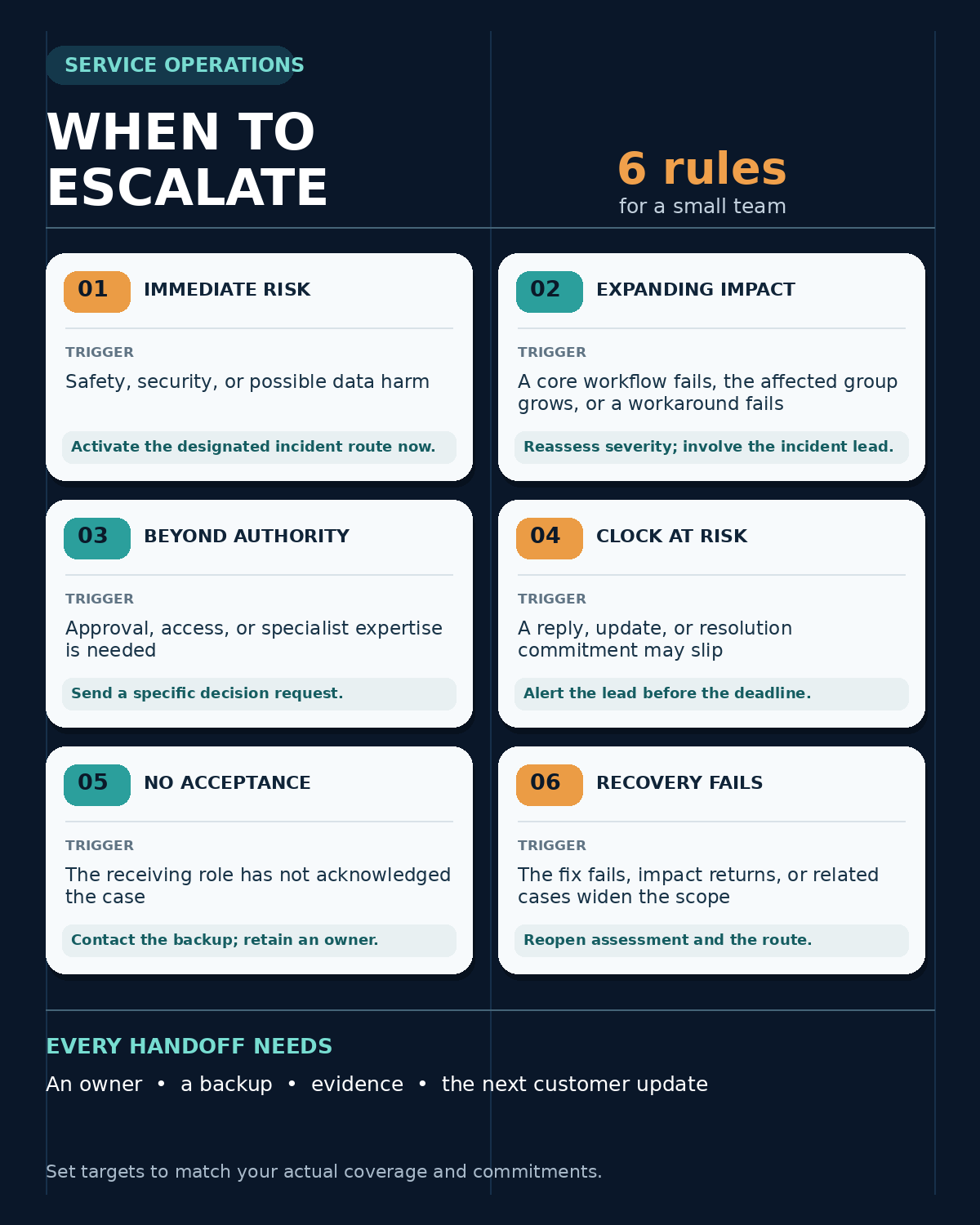
The Six Escalation Triggers at a Glance
An escalation can change priority, bring in expertise, or transfer decision authority. It should not make the original request disappear from view. Use roles rather than individual names in the policy, then map each role to a primary and backup contact on the current rota.
| Rule | Observable trigger | Immediate route |
|---|---|---|
| 1. Risk | Possible safety issue, security event, or data loss or exposure | Activate the designated incident or specialist route now |
| 2. Impact | A critical customer workflow fails, the affected group grows, or a workaround stops working | Reassess severity and involve the incident lead |
| 3. Authority | The next action needs approval, access, or expertise the current owner lacks | Send a specific decision request to the authorized role |
| 4. Time | The agreed reply, update, or resolution target is at risk | Alert the lead before the commitment is missed |
| 5. Handoff | The receiving role has not acknowledged the case within the agreed window | Contact the backup; keep an accountable owner |
| 6. Recovery | The proposed fix fails, impact returns, or related cases reveal a wider problem | Reopen assessment and the appropriate incident path |
These are triggers, not universal severity labels or response times. A low-volume team with weekday coverage needs different clocks and backup arrangements from a staffed 24-hour service.
1. Escalate Possible Safety, Security, or Data Harm Immediately
Some reports should bypass the ordinary queue even before the team knows whether an incident is confirmed. Examples include a customer who can see another account’s information, a suspected compromise, a failed data restore, or a service fault that may create a physical safety issue. The frontline agent’s job is to capture the report accurately and activate the designated response route, not to investigate beyond their access or promise a diagnosis.
Define the approved channel and receiving role in advance. Record what the customer observed, when it began, the affected service or account, and how to contact the reporter. Share sensitive details only through approved restricted channels. The incident owner can then verify scope, decide who else must be involved, and control notifications. The NIST incident response guidance treats preparation, coordination, response, and recovery as connected parts of cybersecurity risk management; a general support inbox cannot substitute for a defined security route.
For an unconfirmed report, tell the customer it has reached the appropriate team and when to expect the next update. Do not call it a breach or assure them their data is safe before the facts support either statement. If your service has a separate emergency or safety protocol, its instructions take precedence over this general support framework.
2. Raise the Level When Customer Impact Expands
Count affected customers, but also ask what they can no longer do. One client blocked from a time-critical core workflow may need faster attention than dozens of users seeing a cosmetic defect. A payment path that fails, an unavailable appointment system, or a broken integration without a usable workaround warrants a fresh severity assessment. Reassess again if more reports arrive or the workaround fails.
The frontline owner should link related requests to one incident record, give the incident lead a short impact summary, and keep the customer-facing cases traceable. The incident lead decides whether to mobilize a wider response and who coordinates technical work and communications. Atlassian’s incident handbook bases severity and paging on customer impact and documents a sequence of assessment, escalation, communication, review, and resolution. A small team can use the same decision logic with fewer people filling the roles.
Use a sentence the next shift can apply: “If a core workflow is unavailable and there is no practical workaround, alert the incident lead immediately.” Add service-specific examples and exceptions. This is more useful than “escalate important issues,” which leaves importance to whoever happens to read the ticket.
3. Escalate the Decision When the Current Owner Lacks Authority
An escalation does not always mean an outage. A refund outside policy, a change to account permissions, a contractual exception, or a fix requiring a specialist can be urgent even when the system works normally. The trigger is simple: the next safe action requires authority, access, or expertise the current owner does not have.
Send the receiving role a decision request rather than a vague “please advise.” Include the requested action, customer impact, relevant policy or contract, what has already been checked, and the time by which a decision is needed. The frontline agent should avoid promising approval or a resolution date that the decision-maker has not accepted. If the specialist only supplies advice, the original agent can remain the customer-contact owner; if ownership transfers, record the acceptance explicitly.
A short process document with roles, approvals, and exceptions helps new staff find this boundary without guessing. For a team of three, one person can fill several roles, but the policy still needs to distinguish who may investigate, who may approve, and who communicates the decision.
4. Escalate Before a Service Commitment Is Missed
Time-based escalation should start while there is still room to act. Mark the next first reply, progress update, or resolution commitment on the case. If the owner cannot meet it, alert the lead or backup early enough to reassign work, remove a blocker, or give the customer an honest update. Waiting until a dashboard shows a breach turns the rule into an after-the-fact report.
Define which clock matters. A first reply is not a fix, an internal handoff is not a customer update, and business hours are different from calendar hours. Zendesk’s SLA documentation separates reply, periodic update, work-time, and resolution targets and lets policies specify business or calendar hours. Your team’s actual contract and system configuration determine which targets apply; do not copy another company’s 15-minute example into your own policy.
Even without a formal SLA, the next update promised to a customer is a commitment worth tracking. Set an internal warning point with enough lead time for the available backup to respond. If the team only covers weekdays, say what happens outside those hours and avoid implying that an unstaffed inbox is an on-call service.
5. Re-Escalate an Unacknowledged Handoff
“Assigned to engineering” describes a destination, not an accepted handoff. The receiving queue might be unmonitored, the named specialist might be off duty, or the alert might have failed. Set an acknowledgment window for each route and a backup when that window passes. The window can vary by severity and coverage, but the ticket must show a person or monitored role responsible for the next action.
Until the transfer is accepted, keep the current owner responsible for follow-up and customer communication. After acceptance, record the receiving owner, the next action, and who will update the customer. Send a compact handoff: case ID, impact, start time, steps attempted, evidence location, customer commitment, and the precise help needed. Use approved access controls for attachments and account information.
The same principle applies when an incomplete client request is routed between teams: a change of queue should preserve the original history and an accountable next step. An automatic assignment rule is useful only if someone can see that its destination did not acknowledge the work.
6. Reopen the Escalation When Recovery Does Not Hold
A resolved ticket is not proof that the customer’s work has recovered. If a fix fails in the affected workflow, the problem returns, or new cases reveal that the original scope was too narrow, reassess impact and reopen the relevant incident or specialist route. Keep the earlier case linked so the next responder sees the attempted fix and its result.
Define a closure check for each common case type. For example, after restoring a booking service, verify that a representative booking can complete, check whether queued requests need recovery, and tell affected customers what is known. The person coordinating the response should confirm the service outcome; the communications owner should say when the next update is due if some work remains. In a very small team, those responsibilities may belong to the same person, but they should be stated.
If the issue recurs, record the trigger, the failed assumption, and an owner for the corrective action. Editorialge’s guide to handling SaaS downtime explains why recovery and follow-through matter beyond declaring the incident over. Review repeated escalations as evidence that a runbook, monitoring check, or ownership boundary may need to change.
Turn the Rules Into a One-Page Working Policy
For each rule, fill in six fields: the observable trigger, primary receiving role, backup role, acknowledgment target, customer-update owner, and where the case history is kept. Add the hours of coverage and the approved route for security or safety reports. The actual names and contact methods belong in a maintained rota, not in a static article or an outdated screenshot.
Here is a hypothetical handoff to test the policy. A customer reports that bookings cannot be completed. The frontline owner logs the affected workflow, first observed time, and available evidence. A second report arrives and no workaround is known, so Rule 2 activates the incident lead. If that lead does not acknowledge within the locally defined window, Rule 5 sends the alert to the backup while the frontline owner remains responsible for the customer’s next update. The test succeeds only if the team can locate the incident owner and the promised update without asking who has the case.
Run the same exercise with an after-hours report, a request outside an agent’s approval authority, and a fix that fails after closure. Check actual tickets for missed risk signals, unacknowledged transfers, breached updates, and reopened cases. Adjust thresholds and contacts when staffing, contracts, or systems change. A rule that depends on an unavailable person is not ready for the next shift.
Service Operations Escalation Rules: Make the Next Move Obvious
The value of service operations escalation rules is visible in the handoff: a real trigger leads to a reachable owner, a backup, a recorded action, and a truthful customer update. Start with these six conditions, adapt the timing to your commitments, and test them against the awkward cases your small team already sees. The policy is working when no case can become “someone else’s problem” without someone actually taking it on.