Retiring a help article takes more than removing it from the help center. Its URL may appear in another guide, a product tooltip, a saved support reply, or an AI answer. A customer can still reach obsolete instructions even when the original article is no longer visible in navigation.
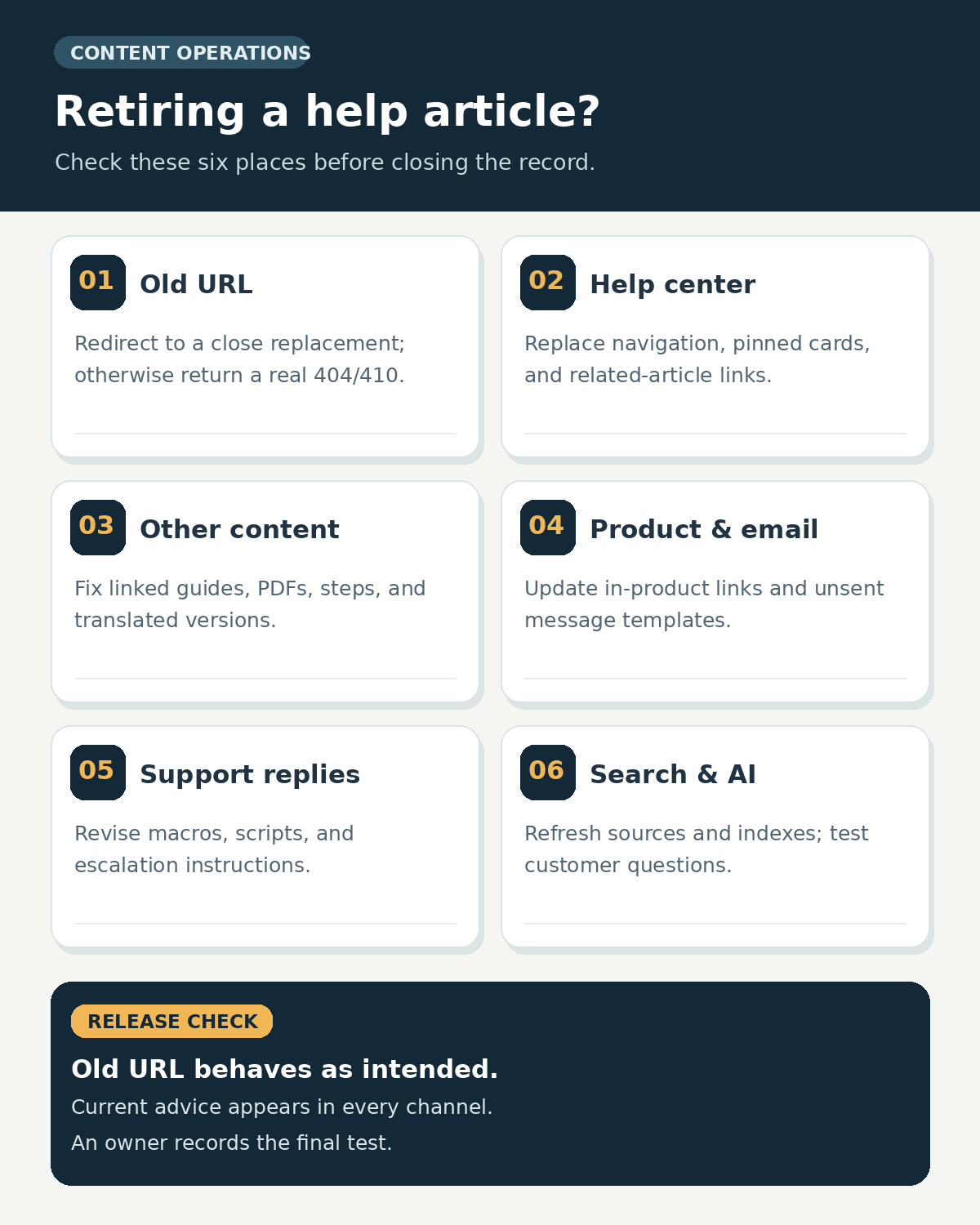
Before retiring the page, decide whether the underlying task still exists. If it does, update the article or publish an accurate replacement. If the feature has gone away, identify what a customer should do instead, if anything. Then use the six places below to trace every route to the old advice. This retired help article checklist is for public customer help content; internal policies and legally required records may need a separate retention decision.
1. The old article URL and its destination
Start with the exact URL customers already have in bookmarks, tickets, search results, and email. Make a destination decision before changing the article’s publishing status.
If a new page answers substantially the same question, point the old URL to that page with a permanent redirect where the platform permits it. Check that the destination actually covers the task, the relevant product version, and any important eligibility conditions. A retired article about exporting invoices, for example, should not redirect to a generic billing homepage that never explains how to export an invoice.
If there is no close replacement, let the removed URL return a genuine 404 or 410 response and give visitors a useful way to find current help. A substantive transition page can also be appropriate when customers need an explanation of a discontinued feature or a supported alternative; keep that page accurate and clearly dated. Avoid a page that says “not found” but returns 200, and avoid redirecting unrelated retired articles to the homepage. Google’s crawling guidance distinguishes a close replacement from content with no replacement.
Check the old URL in a browser and with an HTTP status check. Remove the retired URL from XML sitemaps or feeds that list current articles, and include the replacement where appropriate. The technical SEO checklist for publishers gives more context on status codes, internal links, and sitemaps. A CMS “archive” button does not, by itself, prove that the old URL behaves as intended.
Open the help center as a customer would. Check the collection or category containing the article, any pinned or promoted content, getting-started paths, related-article cards, and category landing pages. An archived article may disappear from its section while a manually curated card still names it or links to it.
Replace the card with the most useful current page, rewrite its label if the task changed, or remove it if there is no valid next step. Look at both desktop and mobile views, especially if the help center uses a different menu or recommendation layout on smaller screens. For a retired setup procedure, the category may need a short explanation of the new setup route rather than a silent gap in the sequence.
Record which modules are automatic and which are hand-edited. An automatically generated “related articles” panel should be checked after the index refresh; a pinned card may require a separate editor action. A final public-view check catches both.
3. Links inside other articles and localized copies
Search the knowledge base for the old URL, the retired title, and distinctive phrases from the procedure. Inspect links in troubleshooting guides, FAQs, release notes, downloadable PDFs, and screenshots with embedded instructions. A link checker can find a broken URL; it cannot tell whether a surviving redirect sends readers to an answer that still fits the surrounding sentence.
Edit each source article so its anchor and nearby text describe the current step. Remove obsolete instructions rather than merely changing the link. If a page says “choose Settings → Legacy Export” and that control has disappeared, pointing the phrase to a new export page still leaves the reader with a false step. The same principle applies to contextual internal links: the destination and the reason to click must agree.
Review every published language version separately. Some systems manage publishing schedules per translation, and local pages may have their own URLs, screenshots, and support routes. Assign a language owner to update or retire each version and verify the localized destination. Do not assume that unpublishing the source article changes every translation or every copy in a separate help center.
4. In-product help and customer messages
Look for the retired article where a customer is trying to act: tooltips, empty states, error messages, settings panels, onboarding checklists, QR codes, and “Learn more” links. Search the product code or content-management system for the old URL and title. Test the path with the account role and product version that previously used the feature.
Then check active lifecycle messages: welcome sequences, setup reminders, transactional templates, and scheduled campaigns. Update reusable templates and unsent messages. Past emails cannot be edited in customers’ inboxes; if they contain a consequential wrong instruction, decide whether a correction or targeted follow-up is needed. A redirect can help readers who click an old message, but the text of a new message should describe the current workflow.
For a phased product rollout, avoid sending every account to instructions for a version it cannot yet use. If both workflows remain active for different cohorts, the right action may be to split the help content by version or audience instead of retiring one page for everyone.
5. Support macros and team playbooks
Saved replies, chat shortcuts, ticket automations, call scripts, and internal agent notes can reproduce an old procedure long after the public page is gone. Search these assets for the article URL and for its distinctive steps. Prioritize frequently used macros and replies attached to the issue the retired article solved.
Replace the whole instruction where necessary, including button names, screenshots, eligibility, and escalation rules. Tell support staff what changed and when. If the old answer described a capability customers have lost, the replacement reply should explain the change plainly and say what support can still do. Do not leave agents to infer the policy from a broken link.
Test one representative ticket or chat flow with the revised macro. Confirm that it inserts the right text, reaches the right current article, and does not leave a second outdated snippet in the same response. Keep the retired article’s old title in the internal change record so agents can recognize past tickets without using the old advice.
6. Help center search and AI answer sources
Search for the question a customer would actually type, not just the exact retired title. Check instant search, full search, suggested articles, bot flows, AI answers, and any separately synced copy of the help center. Old titles, labels, indexed passages, or duplicate source documents can keep an obsolete answer in circulation.
Archive, unpublish, or exclude the appropriate source in each connected system; then wait for its documented sync or indexing cycle and retest. “Unlisted” is not always equivalent to unavailable to AI. For example, Intercom’s public-article documentation says an unlisted article can still be used by Fin, while unpublishing it disables it for Fin and Copilot. The controls vary by platform, so verify the actual source setting rather than assuming that hiding a page from the help center removes it from answers.
Run three checks: the old question, a paraphrase, and a follow-up that used to trigger the retired step. Inspect the answer and its cited source, not only the search-result title. The guide to finding stale help center answers offers further ways to track review queues and conflicting sources. If the system still quotes the old procedure, trace the source it used and repeat the check after fixing that source.
A small retirement record prevents repeat work
Keep one row for each retired article. The fields below make a later broken-link report or inaccurate bot answer actionable rather than sending the team back through the whole investigation.
| Record field | What to capture |
|---|---|
| Old article | Exact URL, title, language, product version, and current status |
| Decision | Update, replace, retain a transition page, redirect, or remove with 404/`410` |
| Current answer | Replacement URL or the approved explanation when no replacement exists |
| Owners | Content, product, support, localization, and search/AI owners as applicable |
| References | Source articles, UI strings, active messages, macros, and connected indexes checked |
| Verification | Date, tested old URL, representative customer question, result, and unresolved issue |
Treat the list as a release check: the URL has the intended behavior, active entry points lead to accurate advice, and a representative support reply and search answer agree with it. The responsible owners can then close the retired help article record and revisit it if a new source of stale guidance appears.
Make the Next Answer Clear
A retired help article should leave customers with a truthful next step. Open its former URL as a visitor, follow the most common in-product help link, send a current support reply, and ask the help search or bot the original question. Each route should reach accurate guidance or explain clearly that the task is no longer available.
When those checks agree, record the date and close the retirement task. If one still leads to an obsolete instruction, fix that source and test again. The work is finished when customers and support staff can tell which answer is current without having to guess.