
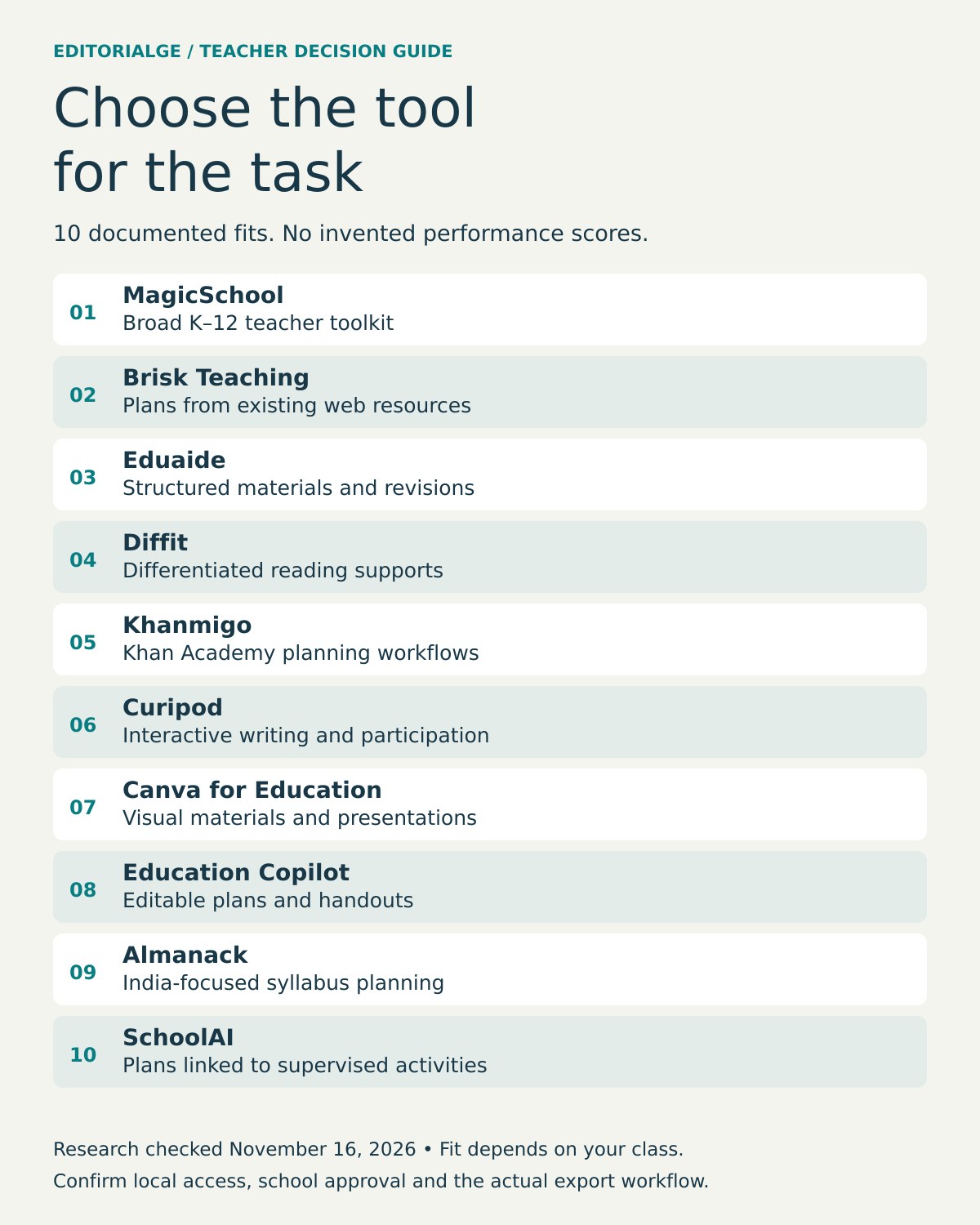
Best AI Lesson Planning Tools for Teachers can help educators turn a curriculum objective into a workable first draft—but the right choice depends on what the teacher needs after that first draft. MagicSchool provides a broad K–12 toolkit, Brisk Teaching helps teachers build materials while working in familiar browser-based resources, and Eduaide emphasizes structured instructional materials. Diffit is more useful when the central problem is differentiation; Curipod is geared toward interactive writing and classroom participation. None can independently verify that a lesson fits a particular class.
A useful lesson plan has more than an engaging opening and a list of activities. It needs a clear learning target, accurate subject knowledge, age-appropriate examples, realistic timings, ways to support students who need help, and a check that reveals whether learning happened. AI can draft parts of that sequence. A teacher must still make it teachable.
Quick answer: For an all-purpose starting point, consider MagicSchool. For work inside documents and web resources, consider Brisk Teaching. For structured resources and revisions, look at Eduaide. For differentiated reading, Diffit deserves attention. For free teacher-specific planning tools linked to Khan Academy, look at Khanmigo. These are editorial fit recommendations based on product documentation, not the results of a controlled hands-on contest.
How we selected these 10 tools
This is a research-led shortlist, not a score-based ranking. Candidates needed a documented lesson-planning function or a direct role in constructing, differentiating, delivering, or reviewing lessons. The comparison considers six factors: instructional fit; support for adapting materials; practical classroom workflow; export or reuse; visible pricing terms; and limitations or questions a teacher should resolve before adopting a tool.
Ten products were researched through official documentation and publicly visible pricing/help pages on November 16, 2026. For MagicSchool, Brisk and Eduaide, the ChatGPT research assistant also inspected the live public pages and captured evidence; Eduaide’s monthly/yearly selector was exercised. Zero authenticated lesson-generation or classroom tests were conducted. Provider descriptions show what a product offers or claims; they do not independently prove the pedagogical quality of its generated lessons. No authenticated classroom account, student cohort, or controlled output benchmark was used for this article. Accordingly, “best for” means a reasoned use-case recommendation, not a measured performance winner. Prices below are publicly displayed US-market amounts unless otherwise stated; regional checkout pricing can differ.
Best AI Lesson Planning Tools for Teachers: comparison at a glance
| Tool | Best-fit planning need | Publicly documented starting option | Decision-changing limitation |
|---|---|---|---|
| MagicSchool | Broad K–12 planning and teacher tasks | Free; Plus $8.33/user/month annual or $12.99 monthly | Enterprise management and integrations are separate |
| Brisk Teaching | Creating plans while using web resources and documents | Free teacher plan; institutional tiers quoted | Advanced school workflows may need institutional purchase |
| Eduaide | Structured plans, rubrics and revised resources | 24 free credits/month; Pro $5.99/month or $49.99/year | Free creation is limited; regional pricing can differ |
| Diffit | Differentiated readings and scaffolds | Free Basic; individual $14.99/month or $149.99/year | Premium exports and extended history cost extra |
| Khanmigo Teacher Tools | Planning connected with Khan Academy workflows | Free teacher tools in eligible locales | Paid learner access and student-facing access are distinct |
| Curipod | Interactive writing and class engagement | Free teacher plan | Free live sessions renew weekly; school plans quoted |
| Canva for Education | Visual lesson materials and presentations | Free to eligible education users | Eligibility and AI feature access should be checked |
| Education Copilot | Editable lesson plans and handouts | Free; Pro $9/month billed annually | Check grade fit: provider pages describe it inconsistently |
| Almanack | Curriculum planning for Indian boards | Free; Pro trial and paid tiers | Localized prices are dynamic; school setup needs checking |
| SchoolAI | Lesson drafts connected to supervised student activities | Lesson Plan tool documented | Confirm school entitlements, student access and privacy controls |
Comparison is editorial and unranked. Capabilities, access conditions and prices can change. The first three entries include genuine public-page screenshots with editorial annotations. Click an image to enlarge it and expand the verification notes below it.
1. MagicSchool — best for a broad K–12 teacher toolkit
MagicSchool is a sensible first stop for a teacher who wants one workspace for multiple preparation tasks rather than a separate subscription for every small job. Its public pricing page describes more than 80 teacher tools on the free plan, including lesson-related tools, quizzes and writing feedback. A teacher preparing a sixth-grade science unit could use the same environment to sketch an initial lesson, produce comprehension questions and generate a rubric to edit later.
The biggest attraction is breadth. That can also be the drawback: a large menu does not tell you which tool produces the strongest learning sequence for a specific curriculum. Before accepting any output, examine whether activities actually lead to the objective and whether the suggested assessment tests the same skill. A visually polished plan can still have a weak instructional progression.
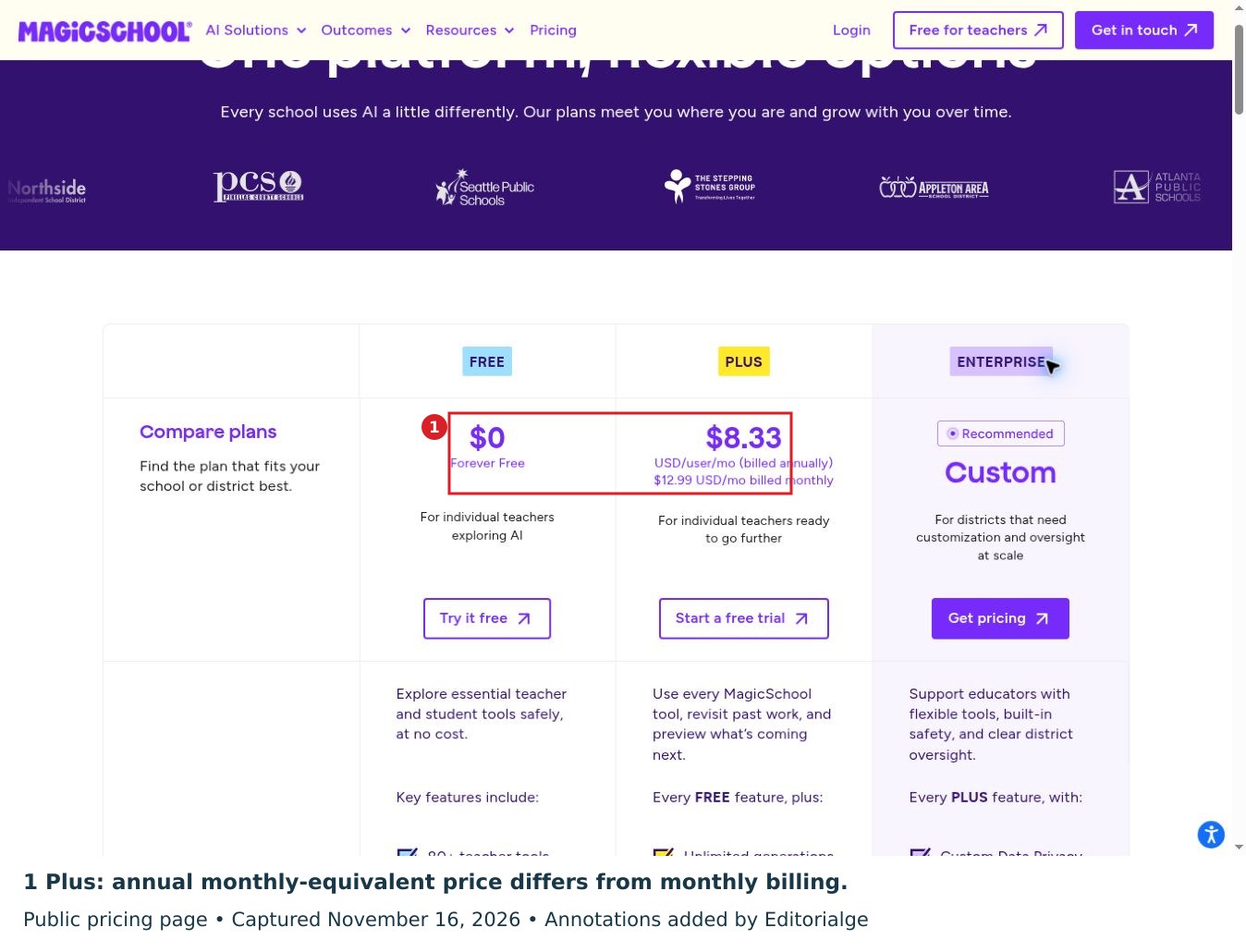
MagicSchool lists a $0 free plan. Plus is advertised at $8.33 per user per month when billed annually (approximately $99.96 annually), or $12.99 billed monthly. Enterprise pricing is customized and includes district-oriented controls and integrations. These figures are provider-published prices, not a quote for a particular school. For one teacher experimenting with AI, start with the free tier; for a district, examine the data agreement, account management, and integration requirements before buying.
Review note: MagicSchool is a reasonable broad-toolkit starting point, but the choice between Free and Plus depends on actual generation and revision needs. Before paying, try one objective-led lesson and record how much correction it requires.
Expand MagicSchool verification notes
Operator: ChatGPT research assistant, November 16, 2026, desktop browser, signed out. I opened the public pricing page, dismissed the cookie notice and scrolled through plan information. I verified Free at $0 and Plus at $8.33 per user per month billed annually versus $12.99 billed monthly. This establishes displayed terms only; no account, lesson output, export or classroom outcome was tested. Raw capture retained in the evidence pack.
2. Brisk Teaching — best for planning inside existing resources
Brisk addresses a different friction point: teachers often start with a document, article, slide deck or video rather than a blank lesson-plan page. Its browser extension and web experience work across resources educators already use. Brisk says its free tools include a lesson-plan generator, quizzes, rubrics and a presentation maker. That makes it relevant when the job is to convert a source resource into teachable material without constantly copying it between applications.
Imagine starting with a science article. A reasonable Brisk workflow is to identify the target concept, develop an outline or lesson plan based on that resource, then check whether the drafted examples and assessment are supported by the original material. The fact that an AI tool can generate questions from a source does not guarantee that those questions test meaningful comprehension rather than isolated facts.
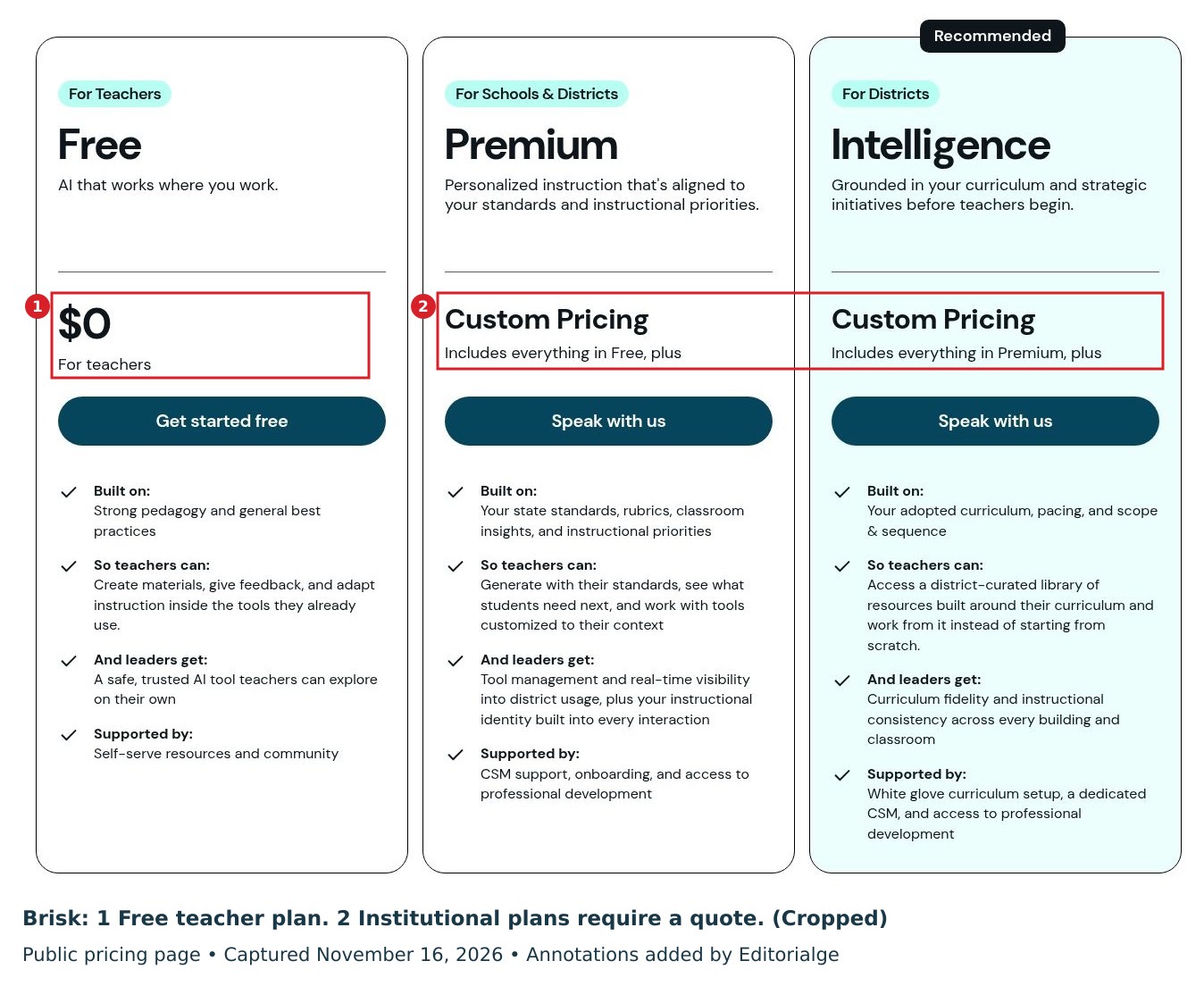
The official plan page lists Free for Teachers at $0. Its school and district plans use custom pricing, with additional institutional alignment, oversight or curriculum-grounding features. Brisk also describes a free teacher plan with more than 20 core AI tools. Educators should check browser permissions and their school’s policies before using student work or internal documents in any extension.
Review note: Brisk is most relevant when existing documents and web resources are the starting point. A school pilot should check browser permissions and whether the desired curriculum features are included in its quoted tier.
Expand Brisk verification notes
Operator: ChatGPT research assistant, November 16, 2026, desktop browser, signed out. I opened and scrolled the public plans page and inspected the Free, Premium, and Intelligence cards. Free showed $0; the other two showed custom pricing. I did not install the extension, process a document or evaluate a generated lesson. Raw capture retained in the evidence pack.
3. Eduaide — best for structured instructional materials and revisions
Eduaide is worth considering when a teacher is less interested in general chat and more interested in a resource-production workflow. Its publicly described tools cover lesson plans, worksheets, organizers, classroom games, assessments and related improvements. For a social studies unit, a teacher might draft a plan, create a vocabulary organizer and then revise an assessment to suit a particular age group. Those related artifacts are most useful when they share the same objective rather than merely the same topic.
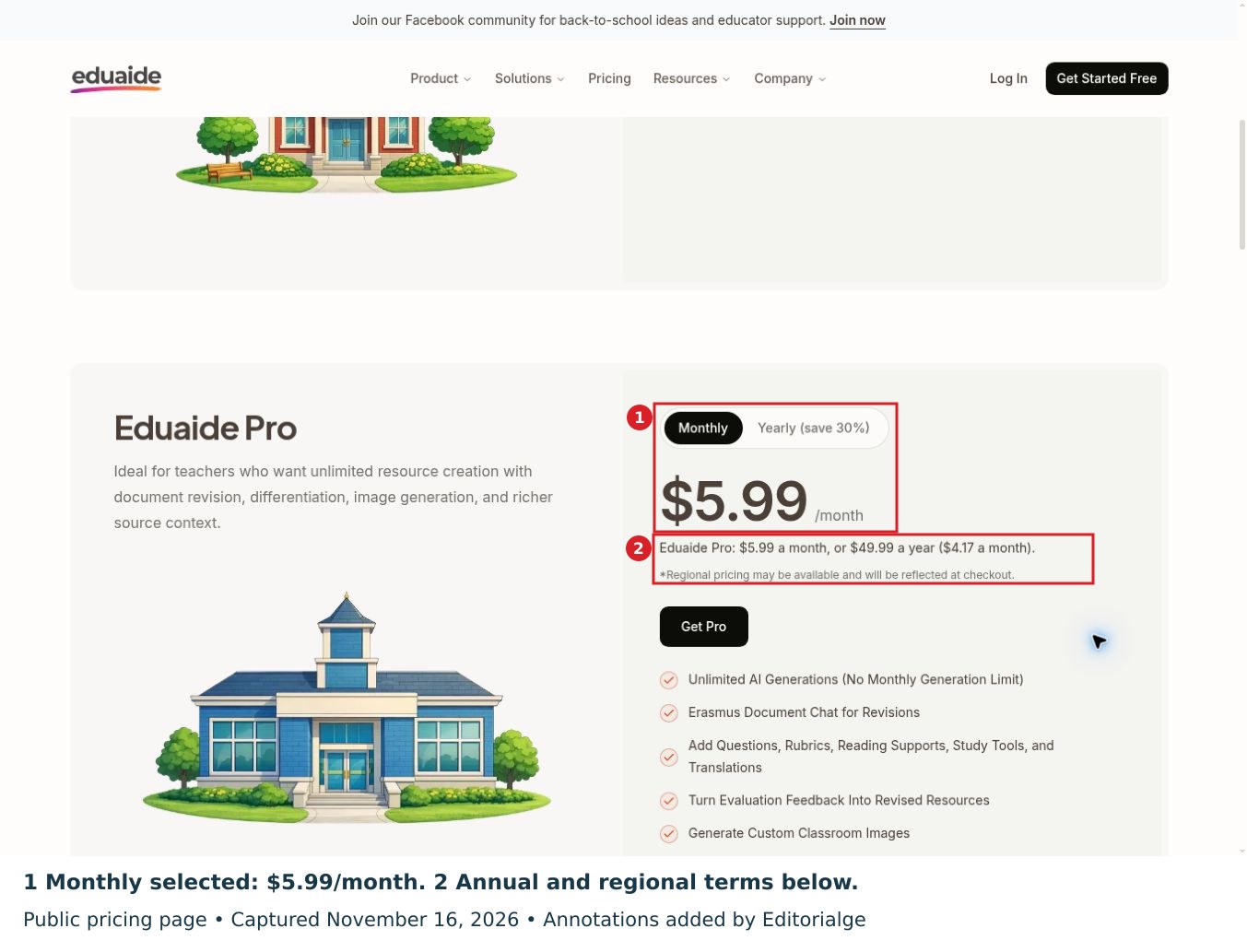
The free tier provides 24 monthly credits, described as up to eight resources. Pro is $5.99 billed monthly or $49.99 billed annually, equivalent to about $4.17 a month. Regional pricing may vary. In the public-page check, switching the billing control changed the prominent price from $5.99 per month to $49.99 per year. Pro includes additional revision, differentiation and contextual features. Because the pricing page has a billing-cycle selector, schools should confirm the exact charge and commitment shown at checkout rather than assume the displayed price applies universally. School and district pricing is quoted separately.
For an individual teacher, the practical comparison with MagicSchool is not simply “which has more templates?” It is whether Eduaide’s workflow requires fewer edits to get from a curriculum objective to a coherent plan, an appropriate task and a usable assessment. That question needs a real output test; this guide does not claim to have conducted one.
Review note: Eduaide’s structured resource workflow makes it a useful comparison for teachers who need a plan, a rubric and supporting materials together. Use the limited free allowance to assess coherence before committing to an annual plan.
Expand Eduaide billing interaction and verification notes
Operator: ChatGPT research assistant, November 16, 2026, desktop browser, signed out. I selected Monthly and observed $5.99 per month, then selected Yearly and observed $49.99 per year. The page also stated regional pricing may apply at checkout. Both states were captured. This was a billing-selector interaction, not a payment, authenticated resource-generation test or classroom trial.
4. Diffit — best when the same lesson needs different reading supports
Diffit belongs on this list because lesson planning often fails at the adaptation stage. A teacher may have a good plan for a topic but a class with widely different reading confidence, vocabulary knowledge, and support needs. Diffit focuses on creating, modifying, and differentiating instructional resources. The provider says its Basic tier can generate and edit materials, allow PDF downloads, and retain access to materials created during the last 90 days.
A useful workflow is to select one accurate source text, create appropriate versions for groups that need different levels of support, then compare them against the source. Check whether simplification has accidentally removed essential concepts, changed the scientific meaning, or reduced the cognitive challenge too much. A lower reading demand is not necessarily a lower learning goal.
Diffit lists Basic as free, with an individual premium subscription of $14.99 monthly or $149.99 yearly. More advanced export options, alignment tools, and history features are described under paid plans. Diffit is not the obvious choice for someone who only needs a full lesson outline; it is a stronger fit when differentiated material is the bottleneck.
5. Khanmigo Teacher Tools — best for planning alongside Khan Academy
Khanmigo’s free teacher-focused tools include lesson planning, rubric creation, exit tickets and activities that connect with Khan Academy’s learning content. This gives the service a distinct planning context: a teacher can move between planning a learning objective and identifying relevant Khan Academy practice, rather than treating the plan as a standalone document.
There is an important geographic clarification. Khan Academy updated its help guidance in October 2026 to say the free teacher tools are available in nearly every country and region, subject to listed exclusions, supported account languages and teacher-role requirements. Paid Khanmigo subscriptions are a different product and, according to that help page, remain available only in the United States. Some student-facing and district functions also require separate arrangements. Do not confuse free teacher planning tools with universal student access.
A good starting task is a single standards-linked mathematics lesson with an entry diagnostic and exit ticket. Inspect the plan for prerequisite knowledge and ensure Khan Academy recommendations fit the teacher’s actual syllabus. Khanmigo is especially attractive if Khan Academy already plays a role in the classroom, though teachers using a different learning ecosystem may prefer another workflow.
6. Curipod — best for interactive writing and student participation
Curipod is not primarily a conventional lesson-outline writer. Its differentiated value lies in live, student-facing writing activities and feedback. A teacher planning a persuasive-writing lesson can use it to structure an interaction around a prompt, ask students to respond, and then discuss patterns in their reasoning. It fits a lesson whose success depends on participation and visible student thinking rather than a printable plan alone.
The distinction matters when comparing tools. Curipod may add value to the delivery and formative-assessment portions of a lesson, but a teacher still needs to determine the curriculum objective, model suitable examples and decide how feedback should inform the next class. Automated comments can be useful prompts for revision; they should not be treated as unquestionable judgments about individual learners.
The publicly displayed free teacher tier has a weekly session allowance that renews, while school and district plans use custom pricing. The pricing page does not publish a fixed free-session number in the evidence checked for this guide, so this article does not invent one. If your main need is private lesson drafting rather than interactive writing, a broader planning suite may be a better initial choice.
7. Canva for Education — best for turning plans into visual materials
A teacher can have a sound lesson plan and still spend time producing slides, examples, worksheets and visual cues. Canva for Education addresses that production layer. Canva describes its Magic Write feature as an AI lesson-plan generator and offers it as part of Canva for Education for eligible teachers and educational institutions. The benefit is the connection between outlining a lesson and preparing the materials students will actually see.
Consider a primary-school geography lesson about weather. A teacher could draft an objective-led sequence, build a graphic sorting exercise and make a small set of presentation slides. The quality question is whether the visuals accurately represent the concept and match the children’s reading level. Attractive templates are not evidence of effective learning design, and generated diagrams should be checked closely for factual and labeling errors.
Canva says its education offering is free for qualifying users, but eligibility and specific AI features should be verified for a particular institution. Canva may be enough for a teacher whose planning requirements are modest and whose main difficulty is preparing visual materials. For complex differentiation or curriculum alignment, pair it with an appropriate planning review process rather than expecting design software to make those decisions.
8. Education Copilot — best for straightforward editable plans and handouts
Education Copilot focuses on producing educational documents from teacher instructions. Its public tool descriptions emphasize lesson plans, handouts, quizzes, unit plans and editable outputs. It may appeal to someone who wants a relatively narrow preparation workflow instead of a large ecosystem of AI functions. The provider’s homepage describes K–12 coverage, while its pricing FAQ describes the strongest fit as grades 4 and up. That inconsistency makes an age-specific trial particularly important for early-childhood and lower-primary teachers.
The current pricing page checked for this guide lists a free plan with three core templates and Pro at $9 per month billed annually, equivalent to $108 annually. The free tier can help a teacher assess whether the output format is usable before committing. Because the product also describes other template counts in marketing copy, verify precisely which tools are available under your chosen plan.
Its main advantage is understandable output: a teacher can ask for a lesson on a familiar topic, edit the sequence and export resources. Its main limitation is the same one affecting most text generators: the system cannot know a particular class’s prior misconceptions, available materials or school-specific expectations unless the teacher supplies them—and even then, the result needs review.
9. Almanack — best for India-focused syllabus planning
Teachers working with Indian curricula should not automatically adopt a US-centered list of standards. Almanack’s India pricing page specifically describes planning support for CBSE, ICSE and State Board curricula alongside unit planning, resources, slides and assessments. It therefore has a practical distinction for teachers working in those systems, especially where adapting an internationally oriented template would create extra work.
The published India page lists a free tier with lesson and unit planning, activities and assessment tools. It also describes a two-week Pro trial and paid individual, team and institution plans. The live price display is dynamic; a reliable fixed rupee figure was not visible in the source evidence used here, so no amount is quoted. The site indicates that final prices are shown in rupees at checkout. Check whether the particular state board, textbook edition and school timetable you use are covered accurately.
Almanack should be evaluated against a locally realistic lesson: select a specific syllabus chapter and require an objective, prior-knowledge check, activities using available classroom materials and a suitable assessment. “Syllabus-aligned” is a provider feature description, not proof that each generated plan matches an individual school’s current requirements.
10. SchoolAI — best for planning connected to monitored classroom activities
SchoolAI’s documented Lesson Plan tool lets teachers generate a draft, provide supporting material and then edit the result in a built-in editor. Its wider product is known for supervised student activities, so it may be relevant to a school interested in connecting the teacher’s planning work with student interaction and subsequent adjustments.
The official help article describes an explicit workflow: open Tools, choose Lesson plan, provide instructions and optional reference material, generate, and then edit. It also describes standards alignment and collaborative capabilities. Those are valuable functions to investigate, but schools should establish what is available in their actual account or institutional plan before treating the whole platform as a purchased bundle.
For a small pilot, a teacher could draft a topic using only non-sensitive material, check the generated plan against an existing lesson, and determine whether integration with student activities actually adds a benefit. Avoid importing identifiable students’ records, accommodations or results until a school’s legal, privacy and procurement review has authorized that practice.
Choosing across countries and school systems
An affordable US price does not establish access or curriculum fit elsewhere. A US teacher should specify the state, grade and adopted standard. A UK teacher should distinguish the relevant nation, key stage and exam specification. In India, identify the board, class, textbook edition and teaching language; Almanack’s India offering is a reason to investigate local fit, not proof that a generated plan is accurate. In other systems, supply the actual syllabus rather than accepting a US default.
Separate three questions: can the teacher open an account, is the desired feature included locally, and is student-facing use authorized by the school? Khanmigo’s broad free-teacher availability, for example, does not make every paid or student feature globally available. Confirm the payment currency, tax treatment, billing commitment and school purchasing route before comparing headline monthly rates.
Which tool should a teacher choose first?
Think in terms of the point in your planning process where you spend the most time. If you are repeatedly starting from a blank page, MagicSchool, Eduaide or Education Copilot may be a useful first comparison. If you already have good source material but dislike switching between tools, Brisk is more directly relevant. If lessons are sound but reading materials do not fit students’ needs, begin with Diffit. For interactive writing, consider Curipod; for slide-led teaching, Canva; for Khan Academy-supported lessons, Khanmigo. India-based educators should include Almanack when local syllabus mapping matters.
For related preparation routines, see our guide to AI workflows for educators. For a broader view of planning, tutoring and study support, compare our AI education tools guide.
This is why a “best overall” score would be misleading. A tool that drafts an impressive generic lesson could still lose to a simpler one that uses a teacher’s existing materials, fits school policy and requires fewer corrections.
A 45-minute lesson test teachers can actually run
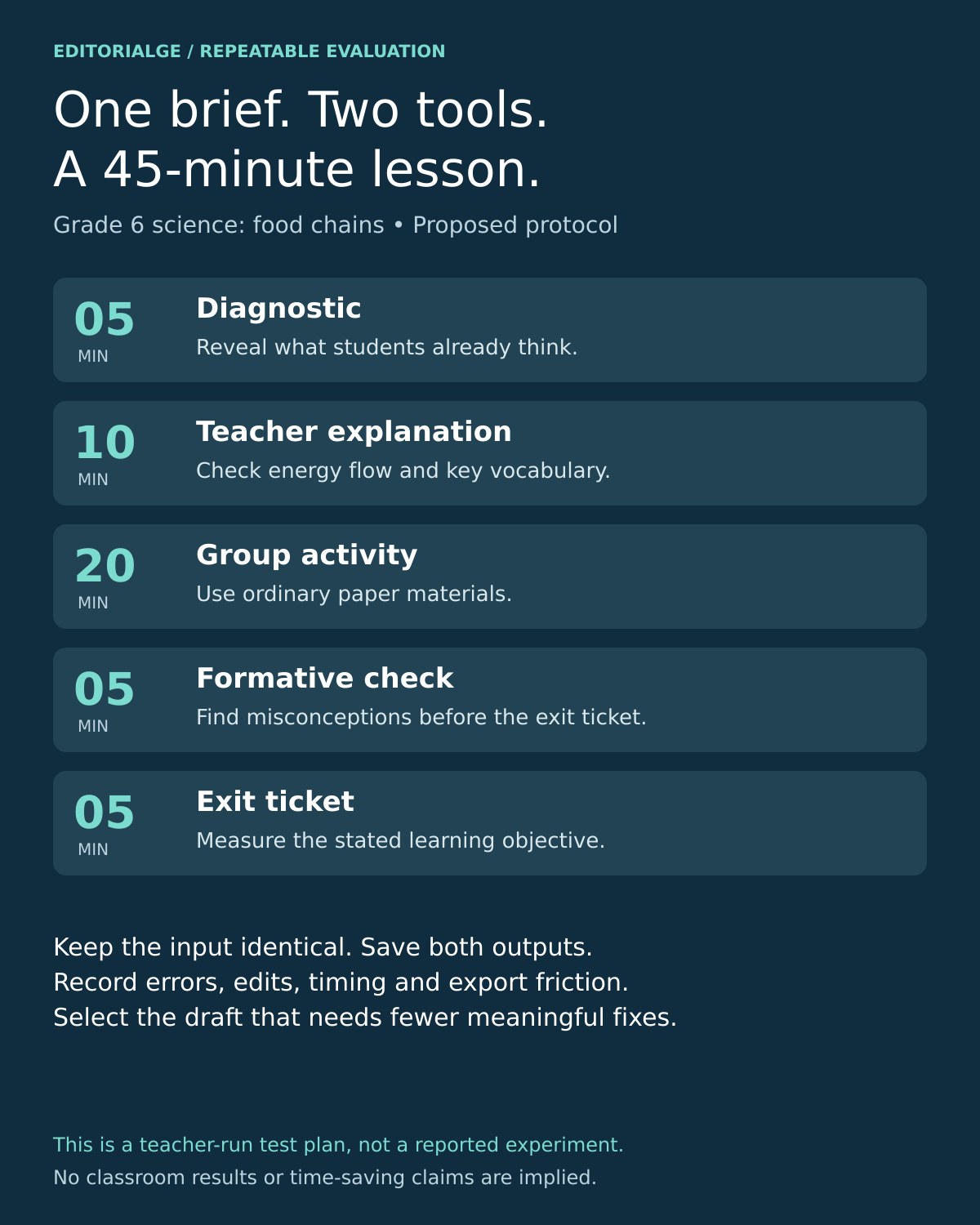
A fair comparison does not require dozens of artificial benchmarks. Choose a single lesson that you already understand well. For example: Grade 6 science, ecosystems and food chains, 45 minutes. Give two candidate tools the same synthetic, non-personal brief:
Create a 45-minute Grade 6 science lesson on food chains. Include one measurable learning objective, a five-minute diagnostic prompt, a ten-minute teacher explanation, a twenty-minute group activity using ordinary paper materials, a five-minute formative check, and a five-minute exit ticket. Provide one reading-support adjustment, one extension task, common misconceptions, and a materials list. Do not invent curriculum-standard identifiers; ask for the jurisdiction if needed.
Then assess the results against what you would actually teach. Does the draft distinguish food chains from food webs? Are energy-flow explanations scientifically accurate? Does the activity fit a real classroom? Does the exit ticket measure the intended learning? Can the teacher adapt and export it efficiently?
You can record these observations in a simple worksheet: tool/version, date, input, source documents, factual errors, standards edits, differentiation edits, time adjustments, export friction and final teacher judgment. Do not turn that worksheet into invented star ratings. If you run a genuine classroom test, retain the raw inputs and outputs, mark what was changed and report who performed the test. Until then, the workflow is a proposed evaluation protocol, not our experimental finding.
The checks AI cannot make on a teacher’s behalf
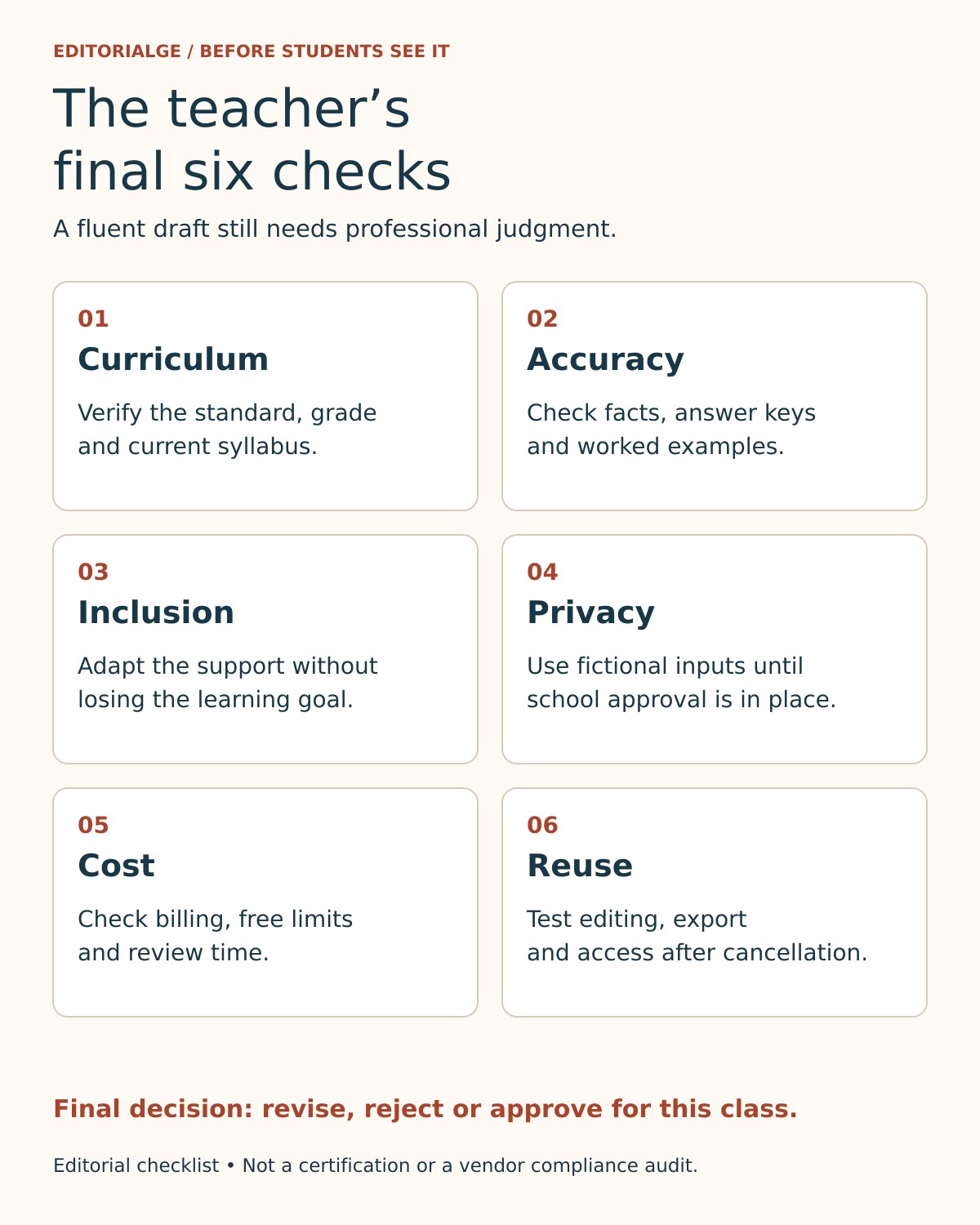
A generated plan may be grammatically polished and still teach an inaccurate concept. For every proposed lesson, the teacher should validate the content against appropriate sources, inspect examples and verify that any stated curriculum code is real and applicable. A source cited by the model is not automatically a source that supports the claim.
The US Department of Education’s 2023 report on AI and the future of teaching and learning discusses opportunities alongside risks and calls for educator involvement in decisions. It is background guidance, not an endorsement of the products in this list.
Privacy also matters. Do not paste students’ names, grades, individualized learning plans, medical information, identifiable writing samples or school-only documents into an unapproved service. Use fictional examples when evaluating a new provider and follow the school’s procurement and data-protection rules. A vendor’s claim of compliance does not replace an institutional assessment of data flows, retention, access controls, and agreements.
Our guide to responsible AI chatbot use for teachers gives additional preparation examples.
Accessibility requires more than asking AI to “make it easier.” A revised activity should preserve the learning goal while adjusting reading demand, language, presentation or participation. Teachers should also examine whether the proposed tasks work for students who need different types of support. Finally, account for the real cost of adoption: training, reviewing output, managing files and correcting weak plans may matter more than a low monthly subscription.
Frequently asked questions
What is the best free AI lesson planning tool for teachers?
MagicSchool offers an extensive free teacher toolkit, while Brisk, Khanmigo Teacher Tools and several others provide free starting options. The best fit depends on whether you primarily need lesson drafts, browser-based resource creation or a planning workflow tied to an existing content library. Check individual free-tier limits and geographic eligibility before choosing.
Can AI lesson planning tools write standards-aligned lessons?
Many providers advertise standards-aware templates or tools. That does not guarantee correctness for every grade, jurisdiction or current syllabus version. Teachers should specify the applicable standard and verify the generated objective, learning sequence and assessment before using a draft in class.
Can AI replace a teacher’s lesson planning?
AI can draft, reorganize and adapt materials, but it cannot independently determine whether a lesson meets a specific class’s needs or whether the output is pedagogically sound. The educator remains responsible for validation, accessibility decisions and the final teaching plan.
Is it safe to enter student information into lesson planning AI?
Do not enter identifiable student information unless the school has reviewed and authorized the service and its data practices. First evaluate products with synthetic examples, then follow applicable school, district and legal requirements.
How should teachers compare AI lesson plan generators fairly?
Use the same grade, topic, objective, time limit and constraints; save both outputs; check factual accuracy, curriculum fit, differentiation, edit burden and export options; and document the results. Do not infer measurable improvements in teaching or student learning without appropriate evidence.
Final Verdict
The best AI lesson planning tools for teachers are not necessarily the ones that generate the longest plan or promise the largest time savings. Start with the part of teaching preparation you most need to improve, choose two eligible tools, use the same non-sensitive lesson brief and measure how much meaningful teacher editing remains. A good AI-assisted plan should make the teacher’s judgment easier to apply, not pretend that judgment is unnecessary.
Editorial transparency: AI assistance supported research and drafting. The visible first-person verification notes describe actions performed by the ChatGPT research assistant, not personal classroom experience attributed to a human byline. The evidence pack retains original public-page captures, annotated copies, dates, source addresses, and the limits of the checks. No authenticated product-output test, teaching experience, student-outcome study or independent human reviewer endorsement is claimed.