
Image rights tracking tools help a social team connect each picture to its license, restrictions and expiry date before it enters a content calendar. The hard part is not finding a place to store a file: it is knowing whether the planned channel, territory and campaign are covered when the post goes live.
This research-led comparison covers eight asset-management options that can support that workflow. It is based on vendor documentation, not hands-on testing. Most are digital asset management systems rather than social calendars; connecting them to a calendar may require a link, integration or manual check. Features, permissions and pricing depend on the product and agreement.
Image rights tracking tools compared
| Tool | Useful starting point | Question for a demo |
|---|---|---|
| Bynder | Rights information alongside assets | How are limited-use dates and access configured? |
| Canto | Asset approval and expiration | What happens in portals and after download? |
| Brandfolder | Asset expiry and distribution | Which links and embeds are affected? |
| MediaValet | Expiry reporting | Who receives alerts and can export reports? |
| Adobe Experience Manager Assets | Enterprise licensing and expiry | Which connected publishing paths honor expiry? |
| Aprimo | Rights metadata and governance | How are contracts and campaign uses linked? |
| PhotoShelter for Brands | License expiration alerts for visual libraries | What remains accessible after an alert? |
| ContentCamel | License data and sharing warnings | How are social placements tracked? |
1. Bynder: keep usage information with the asset
Bynder’s asset detail view can include copyright information, custom fields, restrictions and expiration dates. Its documentation also describes limited-use and archive dates. That makes it a candidate for a brand team that needs people to find both an approved photograph and its usage context in one library.
Ask an administrator to show how your own channel and territory fields would appear to a social editor. A visible date is valuable, but it does not by itself prove that a downloaded copy or scheduled social post has been removed.
2. Canto: connect approval status to expiry
Canto exposes an asset’s status, expiration and digital-rights information in its information view. Its instructions say a file must be marked approved before an expiration date is set. For teams already using approval as a gate, this offers a practical point at which to record the license window.
Walk through a portal user’s experience on the expiry date and check the account time zone. Record the permission evidence separately from the status: a green approval label is not a substitute for the underlying license.
3. Brandfolder: examine what expires downstream
Brandfolder supports availability and expiration at the Brandfolder level. Smartsheet also documents automatic expiration of its Smart CDN link when an asset expires, is unapproved or deleted, with caching potentially lasting up to 24 hours. That is relevant when a campaign uses supported embeds as well as downloaded images.
Social networks frequently retain uploaded copies, so ask the team to demonstrate its actual delivery path. Do not assume an expired DAM asset removes a previously published post or every external copy.
4. MediaValet: review upcoming and expired assets
MediaValet documents reports for assets that have expired or have a future expiry date. A marketing operations team can use that view to prepare a renewal or replacement queue before a campaign reaches its end date.
Confirm which users can run the report, whether alerts are available in your agreement and how the report reaches the person who owns the social calendar. An export is only useful if someone is accountable for acting on it.
5. Adobe Experience Manager Assets: govern a complex publishing environment
Adobe documents licensing information and expiration controls in Experience Manager Assets, including restrictions on actions for expired assets and license acceptance before downloads in its documented workflow. This can suit an organization already using Adobe’s broader experience platform and managing a large asset estate.
Implementation matters. Ask which asset repository, publishing channel and user roles the controls apply to, and test an expired asset in a nonpublic environment. A connected social scheduling tool may need a separate approval or removal procedure.
6. Aprimo: build governance around rights records
Aprimo describes using rights-related metadata such as license terms, expiration, permitted channels and territories alongside digital assets. For an organization with legal, marketing and creative teams, that structure can support a shared review of what a campaign is authorized to use.
Ask to see how signed agreements, model releases and individual campaign placements are associated in the specific configuration being offered. A sophisticated taxonomy still needs clear ownership and reliable data entry.
7. PhotoShelter for Brands: put license alerts near a visual library
PhotoShelter for Brands documents a license-alert workflow and an IPTC Usage Rights field that can show usage information near an asset. This is particularly relevant to teams managing photography libraries and recurring image licenses.
There is a meaningful limitation: its support documentation says license alerts do not move assets from galleries or change their visibility and access settings. An alert should therefore trigger a named owner’s review; it should not be treated as automatic removal.
8. ContentCamel: record license details at the sharing step
ContentCamel describes storing the rights holder, license type and expiry against an asset, with advance warnings and an acknowledgment step for expired assets when sharing. It may be worth evaluating when the immediate need is making licensing information visible as material is distributed.
Verify the current product and plan with a representative and demonstrate the workflow with a real sample license. In particular, establish how a specific scheduled social placement is linked back to the asset and who records a renewal decision.
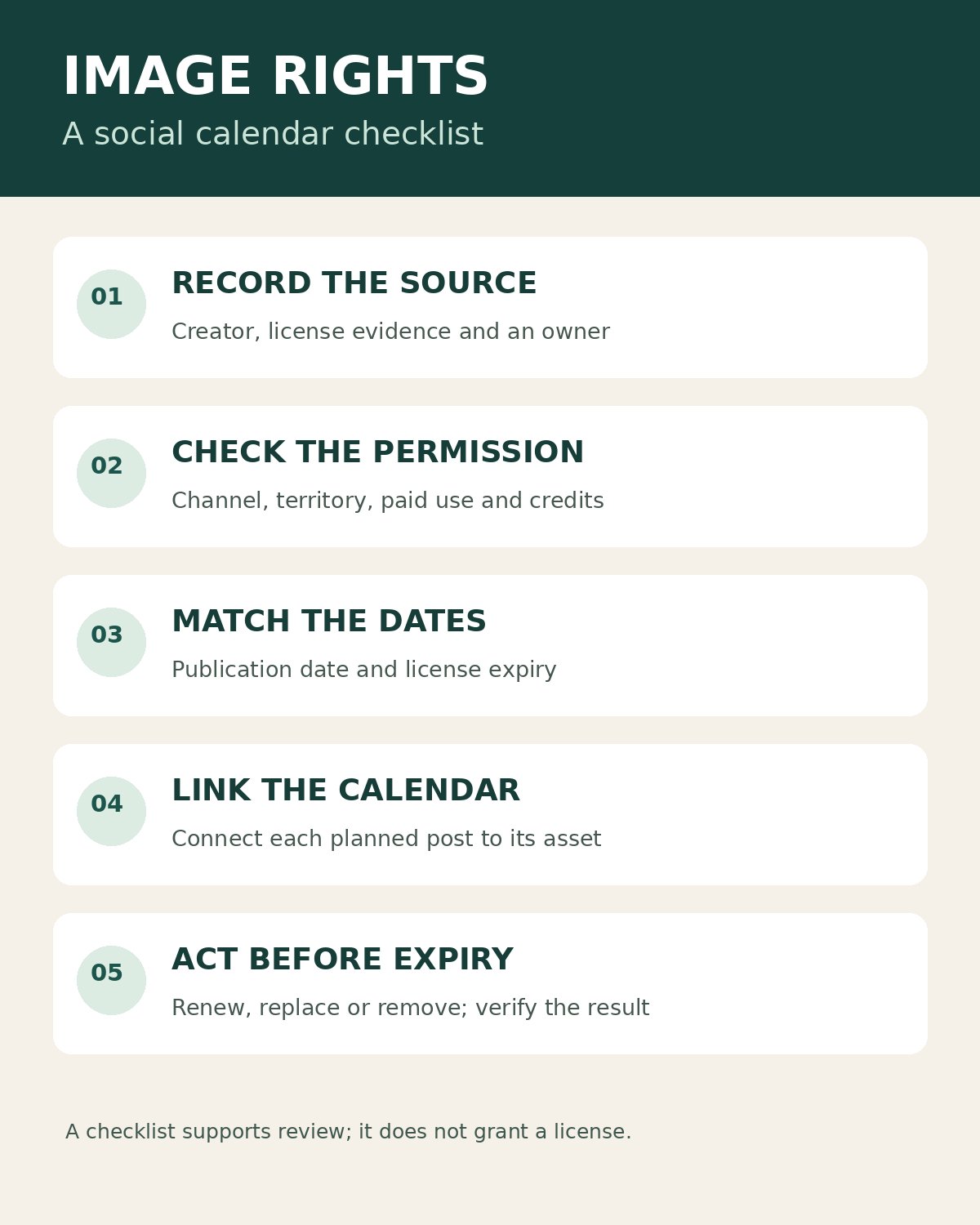
Start with a rights record for each image and a separate record for each planned use. An image may be authorized for an organic post but require a different permission for paid advertising, or it may have a limited term. Read the actual agreement and document its conditions rather than assigning assumptions to a generic “licensed” checkbox.
- Record the creator or rights holder, source, agreement or receipt, and internal owner.
- Note the permitted channels, territory, dates, credit requirements and any restrictions on edits or paid promotion.
- Place a stable asset link and its rights status on the calendar entry. Check the intended publication date against the license window.
- Set an advance review date and assign a person to renew, replace or remove the image when needed.
- Keep a record of published URLs or placements and verify the result of any removal or replacement.
For background on permission and copyright, the U.S. Copyright Office’s copyright overview explains the rights associated with creative works. The terms of a particular license still need individual review.
Image discovery is a separate task from documenting permission. Editorialge’s guide to image search techniques explains ways to locate images; finding an image online does not establish a license to use it.
Questions to ask before choosing
Test one realistic campaign: choose a licensed photograph with a near-term expiry, restrict it to an organic channel and create a future social entry. Have an editor find the license, check the intended use, and follow the alert through to a renewal or replacement decision. Ask whether the calendar shows a live rights status, whether a copied file can bypass it, and how the team identifies posts already published.
Compare the cost of administration as well as subscription terms. Larger DAM platforms can offer granular controls but need setup; a lighter system may be easier to maintain while requiring more manual checks. Confirm plan limits, integrations, permissions and current price directly before purchase.
Choosing image rights tracking tools
The best image rights tracking tools are the ones your team can maintain and check at the moment a post is planned. Start with a clear rights record, an accountable reviewer and a working link to each calendar entry. Then test expiry and removal across the actual channels you use; software supports that process but does not determine whether a particular use is authorized.