A customer follows a help article to Settings, but the menu moved in last week’s release. The old answer still looks polished, and your support bot may quote it with confidence. Finding that kind of drift takes more than sorting pages by age. A page can be old and correct, or edited yesterday and already wrong.
Start with the signal you need: a scheduled review, a gap in a live conversation, or a page that deserves closer inspection. These seven tools cover different parts of that workflow. We compared documented features and access conditions, with no hands-on testing or vendor scoring.
We evaluated where each signal comes from, who can act on it, and how much work remains before you can call an answer current. A review date tells you when to check. Customer feedback tells you where to look. An answer debugger tells you which source to investigate. In all three cases, the final check is whether the instruction works for the intended customer, plan, and product version.
What Each Tool Can Flag
| Tool | Documented signal | Best fit |
|---|---|---|
| Zendesk | Articles due for verification | Teams managing an existing Zendesk help center |
| Document360 | Stale status when a review comes due | Documentation teams that want a review queue |
| KnowledgeOwl | Needs Review status after a configured time | Teams auditing by time since last edit |
| Guru | Verification status, owner and interval | Support teams maintaining internal answers |
| Intercom Fin | Answer sources and content suggestions | Teams investigating outdated AI answers |
| Help Scout Docs | Article ratings and search reports | Small teams prioritizing fixes from reader feedback |
| Confluence Cloud | Page activity, edit dates and owner filters | Teams auditing internal source pages before updating public answers |
Check the feature in the plan you would actually buy. The cost of a second tool, the staff time needed to review alerts, and the work of synchronizing changes can matter more than a price per seat. The broader knowledge base tools comparison can help if you are also choosing where to publish your articles.
1. Zendesk for Review Rules in an Existing Help Center
Zendesk documents verification rules that mark qualifying articles for review after a set interval and notify their owners. Filters let a team apply a shorter interval to a group of release-sensitive articles. Check access to the rules and the publishing permissions needed to close a review.
Why choose it? If your content already lives in Zendesk, you can give owners a review queue in the system they use to edit the answer. Best for teams that can label high-risk pages and assign an accountable owner. The rule measures review status, so someone still needs to test the instructions.
Use a label such as billing-policy for pages that change when invoices or permissions change. Set a review rule for that group and confirm that the responsible owner actually receives the notification. Zendesk sends these notices to article owners and does not let you add extra recipients to the rule, so ownership matters. For a release that moves a menu, send affected articles for review immediately instead of waiting for the next interval.
2. Document360 for a Visible Stale Status
Document360’s review reminder documentation says a published article enters the Stale state when its configured review date arrives. Check your project defaults, permissions, and what happens to the reminder when a new version is published.
Why choose it? A documentation lead can make overdue checks visible without relying on a shared calendar. Best for teams that want a clear list of articles to review ahead of a release. The Stale badge identifies a due date, so it cannot tell you which instruction needs fixing.
Document360 supports reminders for individual articles and groups. A release lead can use an immediate reminder for a redesigned setup flow, while routine checks continue on a schedule. Before adopting it, check whether your project clears the Stale state or resets the review date when a page is republished. If a typo correction clears your signal, keep a separate record of when someone actually followed the procedure.
3. KnowledgeOwl for Time Since Last Edit
KnowledgeOwl’s Article editor settings can move an article to Needs Review after a configured period since its last edit. Its publishing-status documentation also describes setting that status manually.
Why choose it? A small team can start with a simple age rule and send an individual article for review when a release changes it. Best for teams that want a review queue without building custom automation. Keep a separate record of accuracy checks if minor edits would otherwise obscure when the procedure was last tested.
Pair the age rule with a release checklist. For example, if a new sign-in flow changes what admins see, manually flag the affected articles for review even if they were edited recently. If all you need is a straightforward review queue for published docs, this workflow is easier to evaluate than a separate monitoring product. If you need to trace a bot reply to the passage it used, evaluate the bot’s debugging controls separately.
4. Guru for Ownership of Internal Answers
Guru’s verification documentation describes the verifier, last verification date and expiration interval on Cards. A Card can be marked as not expiring. Its separate Knowledge Agent features may use configured quality checks. Verify which of these capabilities your plan includes before designing the workflow around it.
Why choose it? When agents answer customers from internal Cards, a visible verifier gives them someone to ask about a questionable procedure. Best for support organizations maintaining agent-facing answers. If a public help page repeats the same policy, review it separately or confirm how you keep the copies in sync.
For an internal refund procedure, assign the Card to the team that owns the policy and pick a review interval that reflects how often the policy changes. Guru distinguishes native Cards from connected external documents, which may have different verification behavior. Confirm that your verifier can update the source that agents actually rely on, especially if the Card points to a document maintained elsewhere.
5. Intercom Fin for Tracing a Bad Answer to Its Source
Intercom’s Fin answer debugger lets teammates inspect relevant sources behind an AI response. Its Optimize documentation also describes recommendations based on content gaps and patterns in conversations. Check access to Fin and the relevant controls before adopting this workflow.
Why choose it? If a customer gets the wrong cancellation instructions, the team can inspect whether Fin drew on an old article or another source. Best for teams already monitoring Fin in production. Signals driven by conversations can miss low-traffic content, so add a review schedule for critical answers.
For a wrong answer in an actual conversation, inspect the sources before rewriting the article. A correct page can still produce a bad answer if Fin was given a conflicting snippet, an answer for a different customer segment, or a synced copy that has not caught up. Fix the relevant source or guidance, then rerun the same question in the intended audience context. A clean result for one audience is only evidence for that scenario.
6. Help Scout Docs for Reader Feedback
Help Scout’s Docs report shows article ratings when you enable them. A teammate also needs the relevant reporting permission. Use poorly rated articles or repeated searches as leads when deciding what to review.
Why choose it? A team with more articles than reviewers can start with pages customers already find frustrating. Best for small support teams that can pair feedback with a check against the current product. A low rating could reflect confusing wording, an answer that does not match the search, or an outdated step.
Review ratings alongside the queries customers used. If people searching for “download last month’s invoice” repeatedly land on an article about creating an invoice, inspect the search match before assuming the article is stale. A page with few visits may have too little feedback to tell you much. Keep sensitive billing, access, and security articles on a review list even when ratings are sparse.
7. Confluence Cloud for Auditing Internal Source Pages
Atlassian’s content manager, available to space admins on Confluence Premium and Enterprise, can filter pages by last update, activity and deactivated owners. Atlassian says the Last active filter excludes pages with children. Check your space and plan before relying on the resulting list.
Why choose it? When the public help center takes its billing or setup instructions from Confluence, reviewing those source pages can catch drift before it reaches customers. Best for teams with a clear map from internal procedures to public answers. This audit covers the selected Confluence space, so check the public copies and any AI retrieval separately.
Use the last-updated and owner filters to build a review list when responsibility for a feature changes hands. Then map each internal page to the public article, support macro, or bot source that reuses it. A rarely viewed page can still be critical if a bot retrieves it or an agent uses it during a rare incident. Decide whether to correct, redirect, or retire the page after checking those dependencies.
Run the Same Trial Before You Buy
In a sandbox, create four sample answers: a correct old article, a recent article with a wrong menu path, two conflicting answers for the same plan, and a correct answer that applies only to admins. Use the same product version and test accounts for every tool. Record which pages it surfaces, whether it explains why they were surfaced, and whether an owner can investigate and close the issue.
| What you observe | What to check next |
|---|---|
| Only the old article is flagged | Use the tool as a review queue and add a release-triggered check for recent changes. |
| The conflicting answers surface together | Check whether they truly conflict for the same plan, role, and version. |
| The bot gives an admin answer to a regular user | Inspect audience rules and the cited source before rewriting the article. |
| The wrong answer persists after a source edit | Check sync status and competing sources, then retest the exact question. |
This is a proposed evaluation, with no product scores. Judge a review scheduler on whether it reliably routes work to the right owner. Judge an answer debugger on whether it gives you enough context to trace the failure. If your current stack already covers one of those jobs, trial a new tool against the gap that remains.
The Consortium for Service Innovation’s Knowledge-Centered Success guide calls the practice of checking an answer while using it “Reuse is Review.” For a SaaS team, that means making it easy for an agent to flag a wrong step in the moment, while keeping scheduled checks for critical pages that customers rarely visit.
A Practical Way to Decide What to Fix First
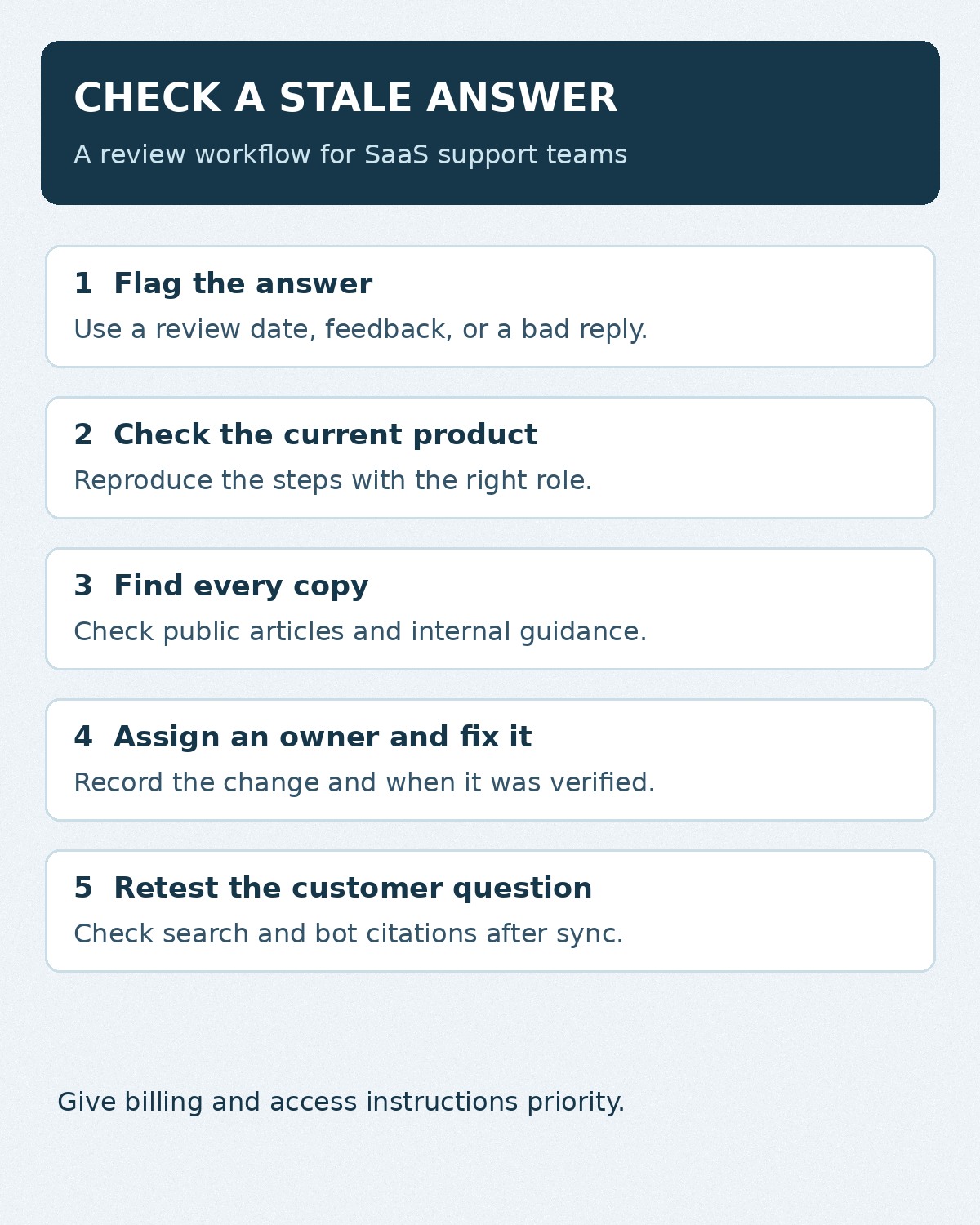
Consider a hypothetical SaaS team that changes where workspace owners download invoices. It finds three possible issues. An internal agent Card still says Billing → History, the public article mentions the old button, and a bot answer cites both. Give the billing owner the release ticket and a test workspace with the right role. Have them verify the new path, update both sources, then ask the bot the original question and inspect the citations after the content syncs.
Track the article URL, triggering change, responsible owner, last verified date and outcome. Prioritize anything that can block access, affect billing or repeatedly send customers down the wrong path. Leave stable, low-risk content on a slower review cycle. If you are choosing a system, use this scenario alongside the knowledge base buying checklist to see whether it can support your review process.