
A knowledge base has to do two jobs: help someone find an answer and give them a reason to trust it. Those jobs call for different software depending on whether the reader is a colleague, a customer or a developer integrating your product.
This shortlist covers 7 best knowledge base tools across those audiences. Notion and Confluence are candidates for internal working knowledge; Document360, Zendesk and Help Scout address customer documentation and support needs; Guru emphasizes governed internal answers; and GitBook focuses on product documentation. These are use-case recommendations, not a measured ranking.
Compare the Best Knowledge Base Tools Before Choosing a Plan
Prices are the observed US-dollar offers unless otherwise stated. Annual rates are monthly equivalents under annual billing, not month-to-month subscriptions. Taxes, migration, extra sites, security options and AI usage can change the total.
| Tool | Potential fit | Observed price or access | Check before buying |
|---|---|---|---|
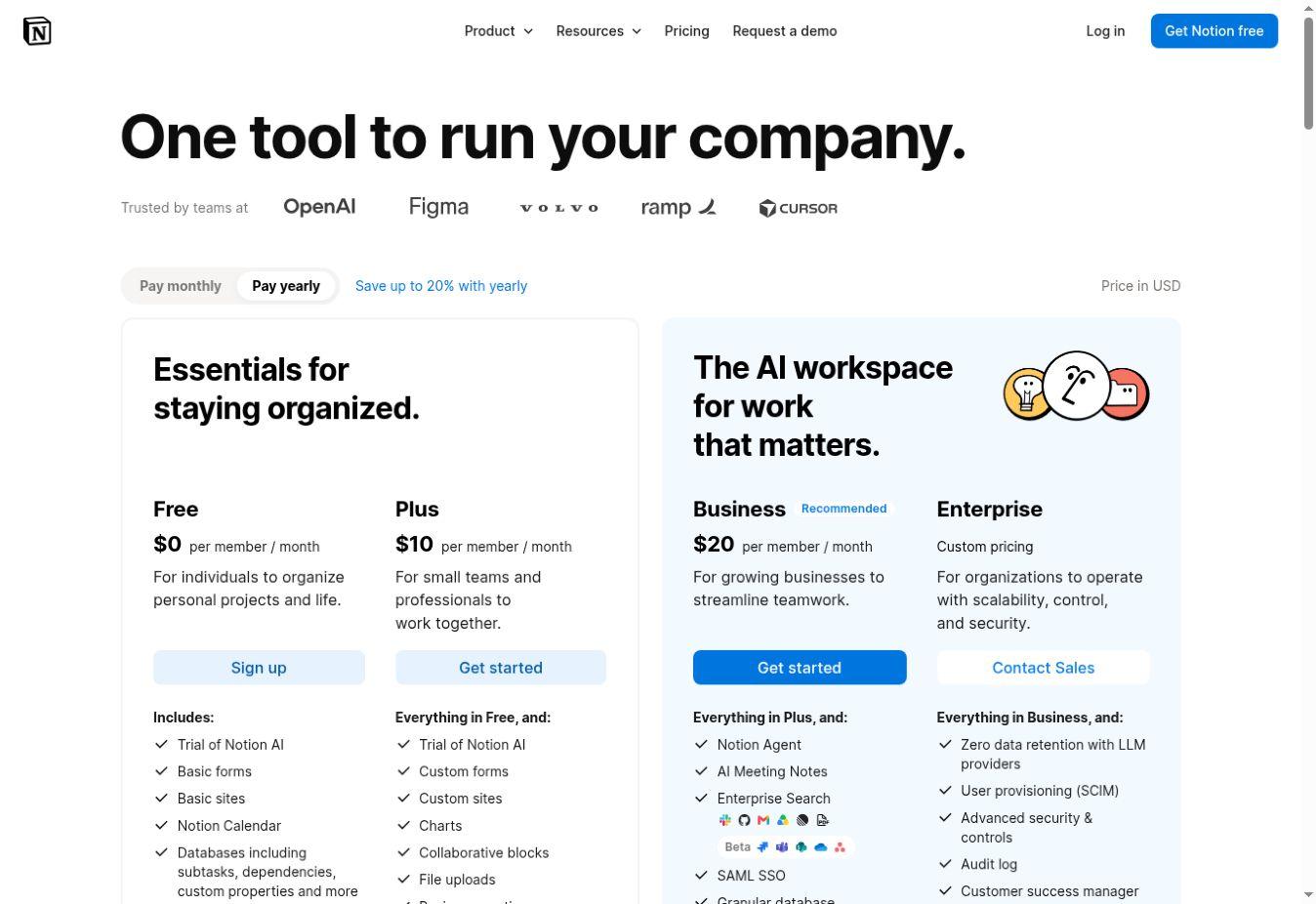
| Notion | Internal wiki and working documents | Plus $10; Business $20 per member/month, yearly billing | Business lists Verify any page; Free and Plus list AI trials |
| Confluence | Project and team knowledge | Free up to 10 users; paid quote not verified | Free has restricted permission controls; account for Guard if needed |
| Document360 | Managed internal or customer knowledge base | Custom configuration quote | Specify editors, readers, languages, workspaces and AI needs |
| Zendesk Knowledge | Knowledge within a support platform | Suite Team $55 per agent/month, paid yearly | Do not substitute the $19 Support Team price |
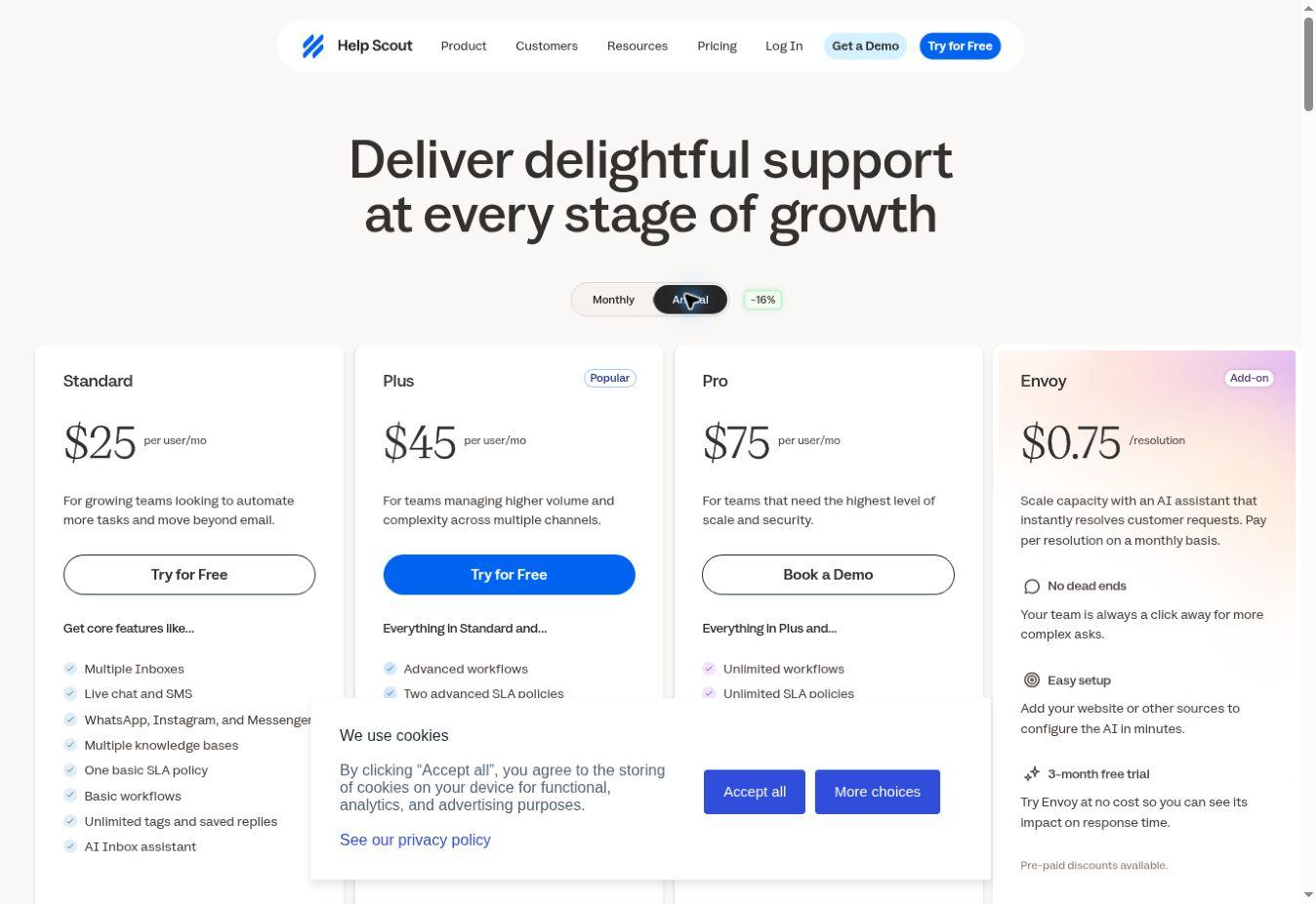
| Help Scout Docs | Help articles alongside a support inbox | Standard $25 per user/month, annual selection | Docs site limits and AI resolutions are separate buying questions |
| Guru | Governed internal search and answers | Custom package; contact sales | Clarify implementation, connectors and ongoing knowledge ownership |
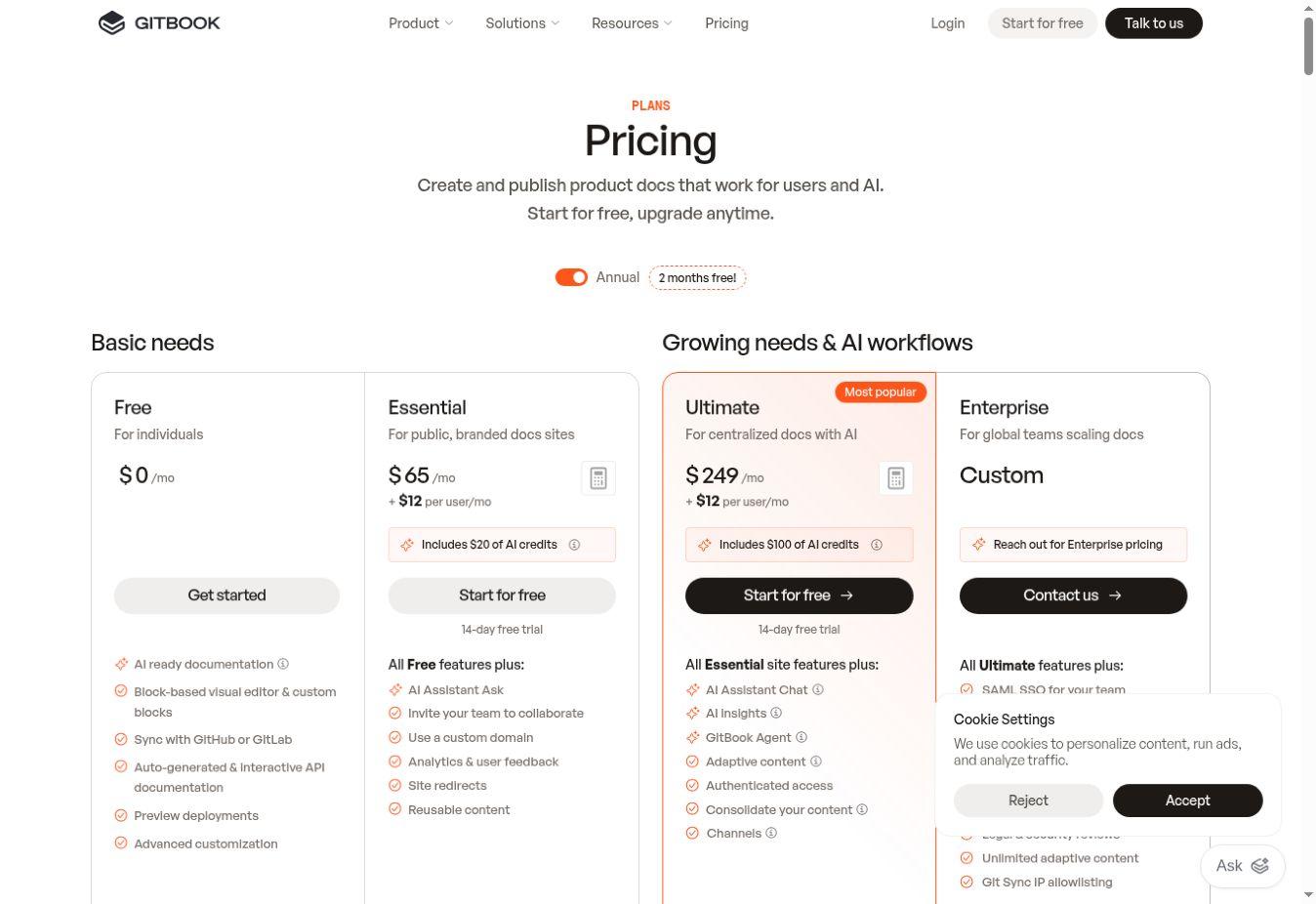
| GitBook | Public product and developer docs | Essential $65 per site/month plus $12 per user/month, annual billing | Authenticated access is listed on Ultimate and Enterprise |
1. Notion
Consider Notion when the knowledge base belongs beside meeting notes, project information and structured databases. Its plan comparison combines those workspace functions with publishing and collaboration options.
The buying distinction is governance. The browser displayed Plus at $10 and Business at $20 per member per month with yearly billing selected. Business lists verify any page and private teamspaces. Free and Plus list trial AI access, so a lower subscription should not be presented as equivalent to the full Business AI package.
Begin with a small handbook and agreed-upon page owners. A flexible workspace needs naming rules and an archive process. If your main requirement is a public developer portal, compare the publishing and access requirements separately. Editorialge’s Notion alternatives guide provides a broader shortlist when the workspace itself is the decision.
2. Confluence
Confluence is a candidate for teams organizing knowledge around projects and shared spaces, particularly where Atlassian software is already established. Its comparison lists page versioning, page-tree organization and integrations.
The free plan supports up to ten users, but it is not a substitute for a paid permission model. Atlassian’s content-permissions documentation says content access cannot be restricted on free. Check this before placing material in a space that should be limited to a department.
A paid price was not established: the browser’s pricing component remained in a loading state when inspected, though the feature comparison was readable. Ask for the quote at your actual user count. Include any required Atlassian Guard subscription rather than assuming every identity-management control is included.
3. Document360
Document360 is worth evaluating when documentation needs its own editorial process. Its current pricing and feature page lists category management, revision history, reusable blocks, translation and a custom workflow builder.
The page now asks for a configuration-based quote. Its FAQ identifies team accounts, workspaces, languages, security requirements, privacy model and AI Premium Suite usage as pricing factors. A reader account for a private knowledge base is also different from an editor account.
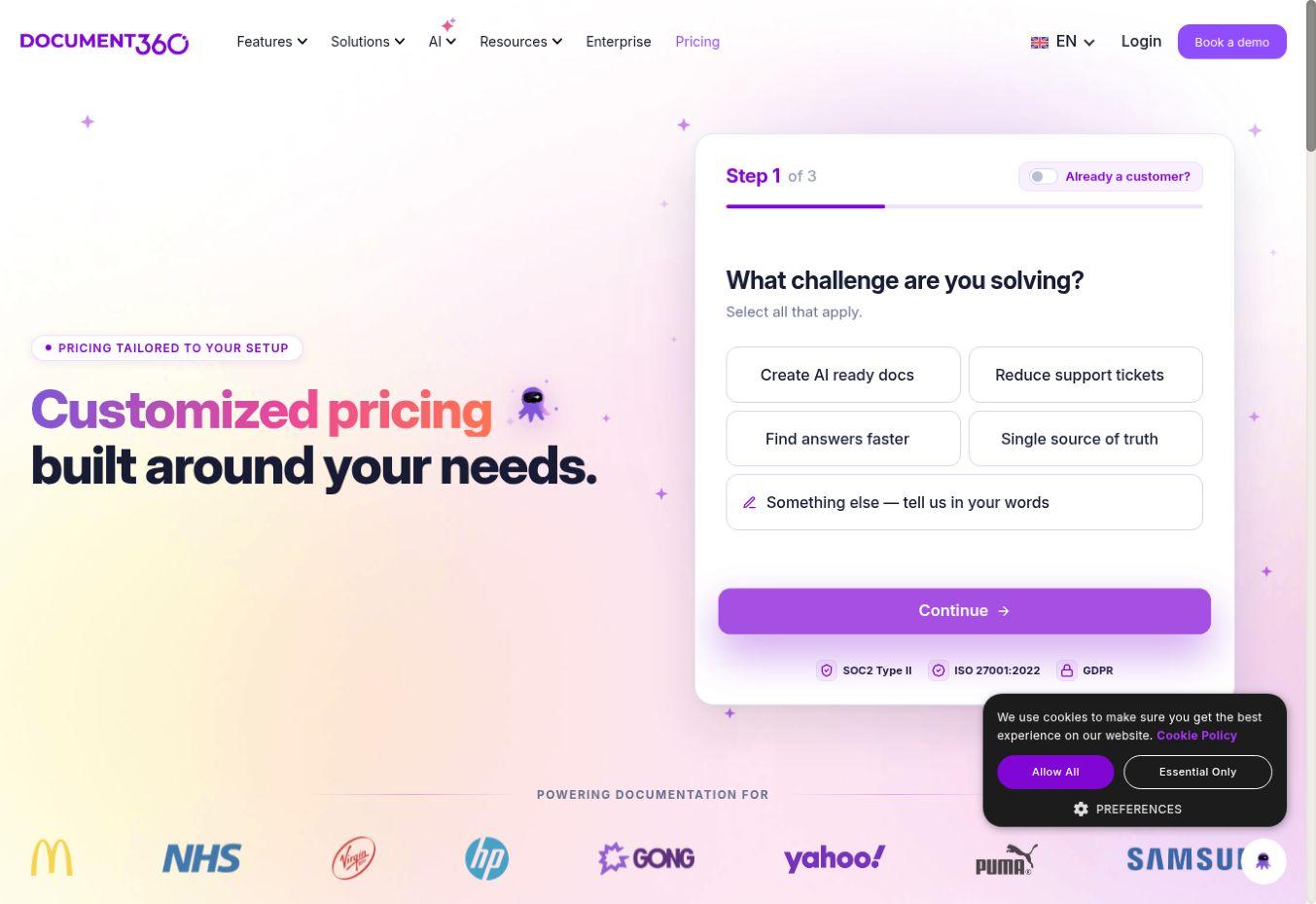
Take a written configuration into the sales discussion: who writes, who reviews, who reads privately and how many language versions must be maintained. Ask which features and services the quote actually includes. The visible feature catalog does not establish that every proposed configuration includes everything.
4. Zendesk Knowledge
Zendesk makes sense to evaluate when knowledge must be managed alongside customer support. Its Suite Team card explicitly lists a knowledge base at $55 per agent per month paid yearly.
The $19 Support Team offer is a different plan. Using that lower headline as the entry price for the listed Suite knowledge-base package would mislead a buyer. Check the exact entitlement, help-center configuration and any AI usage terms in the proposed order.
The operational reason to consider Zendesk is support context: reviewers can decide which recurring questions deserve durable answers. It deserves a narrower shortlist if you already need the wider service platform. If all you want is an employee handbook, compare the cost and maintenance burden against a simpler internal wiki.
5. Help Scout Docs
Help Scout combines Docs sites with its support platform. On the pricing page, Standard displayed $25 per user per month with Annual selected. The comparison lists two Docs sites for Standard, while the free offer includes one Docs site and has a ten-article limit.
AI customer service is a separate cost decision. The page lists Envoy as an add-on at $0.75 per resolution. Publishing help articles should not be confused with buying unlimited automated customer answers.
Consider it when your team wants help with content close to inbox work. Before migrating, check your article count, number of sites and access needs. Pilot a small collection of genuine recurring questions, then inspect how the content reads on the published site and how users can reach human support.
6. Guru
Guru’s current offering is a customized enterprise knowledge package. It describes verification workflows, governed search and cited, permission-aware answers alongside implementation and knowledge-management expertise.
This is a different buying exercise from purchasing a few wiki seats. Ask how existing sources are connected, who verifies their content, what the implementation includes and how a changed permission propagates to search and answers. The public page does not provide a fixed per-user price for this guide.
Consider Guru when repeated internal questions span several systems and ownership matters. A claim of permission-aware retrieval still needs testing against your organization’s actual access rules. This research did not validate retrieval accuracy or permission isolation.
7. GitBook
GitBook combines product-documentation publishing with GitHub or GitLab sync and API-documentation features. Essential is displayed at $65 per site per month plus $12 per user per month under annual billing.
The distinction that changes the shortlist is reader access. The comparison places authenticated access on Ultimate and Enterprise; Ultimate is displayed at $249 per site per month plus user charges. A private share link and authenticated access are different provisions. Check the required access model before committing to a site plan.
Consider it when product docs must stay close to release work. Verify collaboration and review needs against the plan, and budget for AI usage separately where applicable. For a wider technical shortlist, see Editorialge’s documentation tools for SaaS products.
Compare the Whole Bill for Your Actual Audience
A per-member internal workspace, a per-agent support suite and a per-site documentation service are not directly interchangeable. Count writers, reviewers, support agents and readers separately before comparing prices.
For example, assume ten billed members in Notion Plus at the observed annual rate: 10 × $10 gives a $100 monthly equivalent. If business-only controls are required, the same seat count at $20 gives $200. That is a plan-choice example, not evidence that either configuration meets your requirements.
For one GitBook Essential site and five billed users, the displayed formula is $65 + (5 × $12), or $125 per month under annual billing. If authenticated reader access requires Ultimate, the same hypothetical site and users become $249 + $60, or $309. Confirm the billable-user definition and configuration before treating either calculation as a quote.
Neither example includes taxes, migration, or extra AI usage or implementation. The useful comparison is the total for a configuration that meets the requirement, not the smallest number visible on a landing page.
A Practical 30-day Setup Plan
- Week one: Collect a small set of recurring questions from support, onboarding or project work. Identify the intended reader and the person responsible for each answer. Select one home for each canonical answer so copies do not compete.
- Week two: Move a representative sample into the candidate tool. Include a short answer, a longer procedure, an image, a link to a related page and something that needs restricted access. Use synthetic material for permission tests. Check authoring and reading separately.
- Week three: Ask readers who did not write the pages to find answers using the wording they would normally use. Record unsuccessful searches and confusing instructions. Where AI answers are enabled, inspect the cited source and whether uncertainty is handled appropriately. Never assume a fluent reply is correct.
- Week four: Update one procedure, archive a duplicate and export part of the collection. Confirm who can approve changes and how someone takes over an absent owner’s work. Test restricted access with the actual roles you intend to use before adding confidential material.
Keep a simple log of answer-finding success, wrong answers, maintenance work and actual costs. A failed search is useful evidence: it may reveal a missing article, unfamiliar terminology or an access problem. Do not infer reduced support demand merely because the help center received visits.
What to Choose First
Start with the reader. For an internal working wiki, compare Notion and Confluence. For help content connected to an existing service operation, compare Help Scout and Zendesk. Put Document360 on the shortlist when documentation governance needs dedicated attention. Evaluate Guru for governed internal answers across sources, and GitBook for product-documentation publishing.
Before signing, name the person who will maintain the first twenty useful answers. That responsibility will outlast the trial and the launch. Software can make the work easier; someone still has to notice when the answer changes.