
Two of your pages rank for the same search, and neither one reaches page one. That’s the most common sign of cannibalization, and it’s why I keep a short list of keyword cannibalization fixes ranked by effort. Some take five minutes. Others need a full rewrite and a redirect. The goal is to use the smallest fix that solves the problem.
After almost 10 years of writing SEO content, I’ve seen that most cannibalization starts before anything goes live. It starts at the research stage, when two briefs chase the same query. I cover that side in my post on keyword research mistakes. This article is about fixing the damage once the pages are published.
How I Confirm the Problem Before Choosing Keyword Cannibalization Fixes
Don’t fix anything until you’ve confirmed the problem. Here’s what I check:
- Google Search Console. Open the performance report and filter by the query. Then click the Pages tab. If two or more URLs show up and trade places over time, you have a real candidate.
- Semrush Position Tracking. Its Cannibalization report flags keywords where more than one of your pages ranks in Google’s top 100. Note that the report is only available on the Guru and Business plans.
Also, not every overlap is a problem. If your pages hold the first and second spots, there’s no cause for concern. The real trouble is when both pages are stuck on page two or lower.
Keyword Cannibalization Fixes at a Glance
| Fix | Effort | Best for |
|---|---|---|
| Point internal links to one page | Low | Pages with mixed link signals |
| Rewrite titles and H1s | Low | Look-alike titles |
| De-optimize the weaker page | Low–Medium | A secondary page competing on the main keyword |
| Add a canonical tag | Medium | Near-duplicate pages that both need to exist |
| Noindex the weaker page | Medium | Pages that don’t belong in search |
| Change one page’s intent | High | Two useful pages with the same angle |
| Merge and 301 redirect | High | Two thin or near-identical articles |
| Rebuild the topic cluster | Highest | Many posts overlapping on one topic |
Start at the top of the table. Move down only if a smaller fix doesn’t work.
The 8 Keyword Cannibalization Fixes [Ranked by Effort]
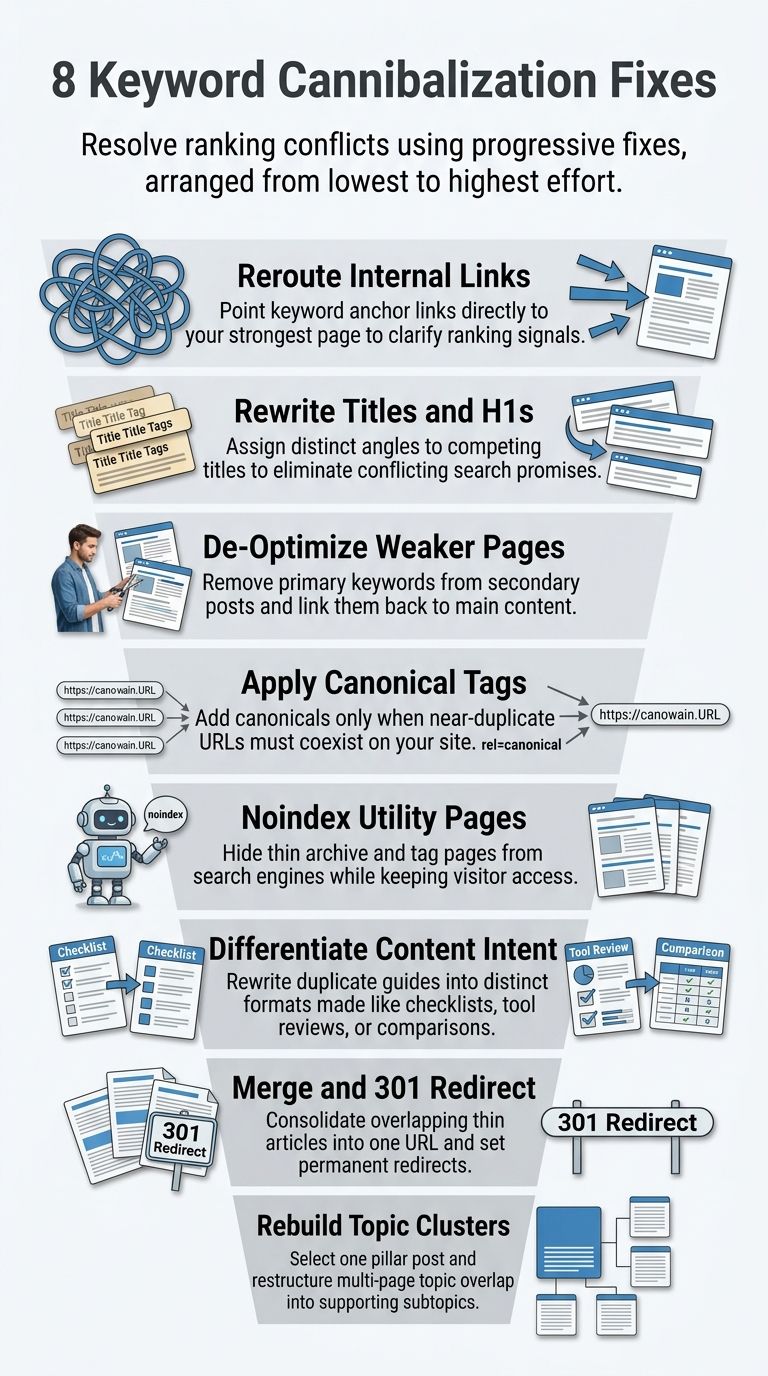
Keyword Cannibalization Fixes #1: Point Internal Links to One Page (Low Effort)
First, pick a winner. It’s usually the page with more clicks, more backlinks, or a better match to the search. Next, find every internal link that uses the keyword as anchor text. Point those links to the winner. Then stop linking to the weaker page with that anchor.
This takes minutes, it’s easy to undo, and it sends Google a clear signal about which page matters.
Keyword Cannibalization Fixes #2: Rewrite Titles and H1s (Low Effort)
Many conflicts come from titles that look almost the same. Take “Keyword Research Guide” and “Keyword Research Tips.” To Google, those two pages promise the same thing.
Give the weaker page its own angle. For example, change the second title to “Keyword Research for Small Blogs: A Beginner’s Checklist.” Update the H1 to match.
Keyword Cannibalization Fixes #3: De-optimize the Weaker Page (Low–Medium Effort)
Sometimes the weaker page is useful, but it leans too hard on the main keyword. So take the keyword out of its title, headings, meta description, and intro. Use its own secondary keyword instead.
Then add a link from the weaker page to the main page. That way, the weaker page supports the main page instead of competing with it.
Keyword Cannibalization Fixes #4: Add a Canonical Tag (Medium Effort)
Use a canonical tag only when two near-duplicate pages both need to exist. Examples include a print version, a filtered product page, or a syndicated copy.
Keep in mind that the tag doesn’t force anything. Google’s documentation says redirects are the strongest signal and canonical tags are a strong one. Google can still pick a different URL if your other signals disagree. So don’t use a canonical tag on two different articles. It works poorly for that.
Keyword Cannibalization Fixes #5: Noindex the Weaker Page (Medium Effort)
This fix is for pages that visitors need but search engines don’t. Tag archives, thin category pages, and internal search results are good examples.
Don’t use noindex as a replacement for a canonical tag. Google’s guidance specifically advises against using noindex to choose a canonical URL.
Keyword Cannibalization Fixes #6: Change One Page’s Intent (High Effort)
This is the fix for two good pages that answer the same question in the same way. Keep one page as the main guide. Rewrite the other to serve a different need, such as a comparison, a checklist, or a tool roundup.
Before rewriting, look at what Google actually shows for each query. Features like People Also Ask boxes, videos, and product carousels tell you the intent. My guide to hidden SERP features walks through what to look for.
You’ll also need new keywords for the rewritten page. The usual tools often suggest the same terms your main page already targets. These places to find keywords outside keyword tools help you find fresh angles.
This fix takes real time. You’re changing the headings, the examples, and often half the body text.
Keyword Cannibalization Fixes #7: Merge the Pages and 301 Redirect (High Effort)
Use this fix when both pages are thin or say almost the same thing. Here’s how:
- Keep the URL with more backlinks and traffic.
- Move the best parts of the other page into it.
- Add a 301 redirect from the old URL to the kept one.
- Update all internal links so they point straight to the kept URL.
This is the cleanest fix because a redirect is Google’s strongest signal for choosing one URL. But it’s also the hardest to undo, so be sure before you do it.
Keyword Cannibalization Fixes #8: Rebuild the Topic Cluster (Highest Effort)
Sometimes the problem isn’t two pages. It’s six or seven posts on the same topic, all written at different times by different people.
To fix this, map every post to one main query. Pick one post as the pillar page. Turn the others into focused supporting posts that link back to the pillar. Then merge any posts that have no unique job left.
This can take weeks on a large site. Do it only when the smaller fixes keep failing.
Case Study: Choosing Keyword Cannibalization Fixes With Cannibalization Compass
The hardest part is usually not doing the fix. It’s knowing which fix fits the problem. That’s why we built Cannibalization Compass, a free micro SaaS tool on Editorialge.
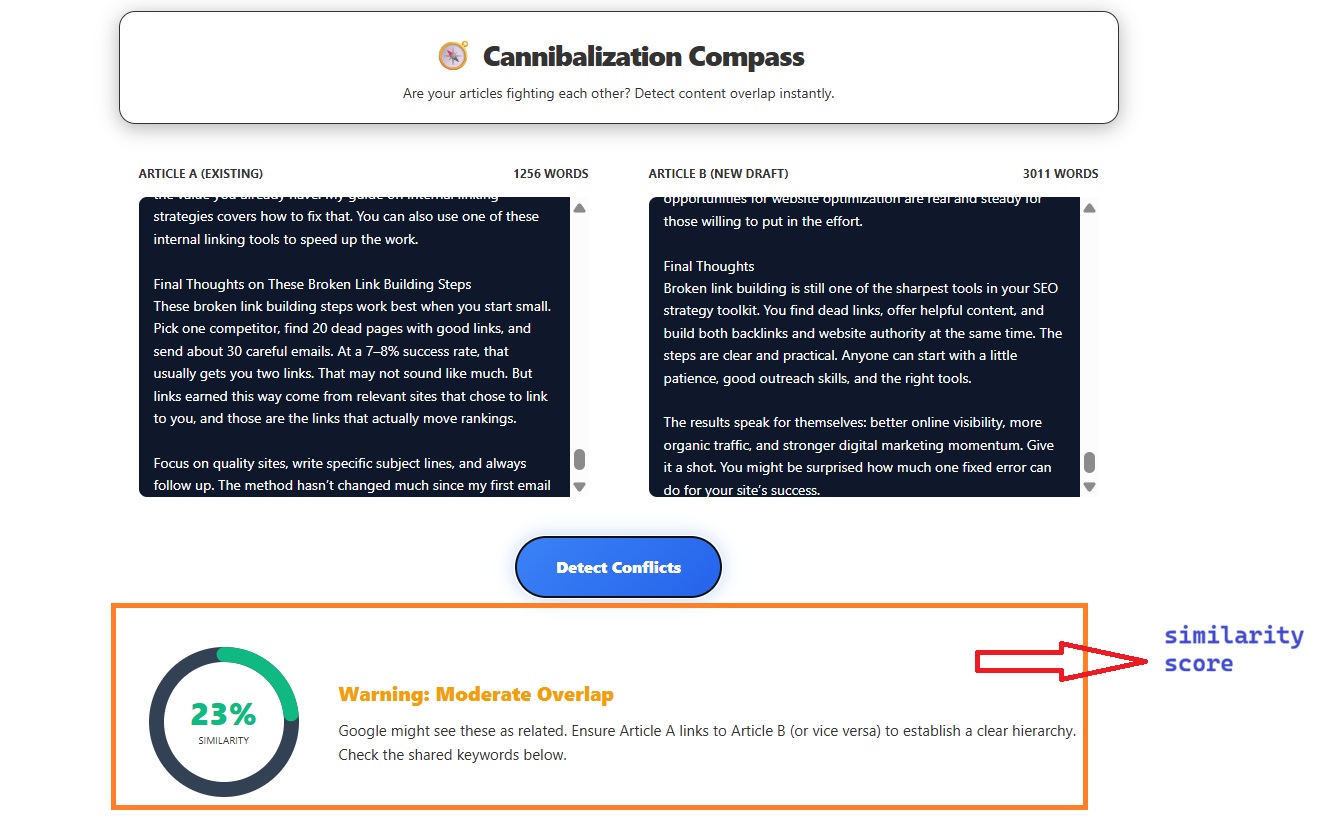
How it works: Paste your existing article as Article A and your new draft as Article B. Then click “Detect Conflicts.” The tool shows a similarity percentage and a list of the terms both articles share.
The result points you to a fix from the list above:
- Over 75% similar: The new draft is basically a rewrite of the old post. Merge the best parts into the old post and redirect the new URL if it’s already live. That’s Fix #7.
- 40–60% similar: The articles cover different topics but use the same headings and keywords. Give the new draft its own angle. That’s Fix #2 or Fix #6.
- Low similarity, but many shared terms: Both articles overuse the same secondary keyword. Pick one page as the main page for that term, use the term less on the other, and add an internal link. That’s Fix #1 plus Fix #3.
A typical example: Say an older post covers keyword research basics, and a new draft covers keyword research for beginners. If the tool scores them in the 40–60% range and the same core phrases top the shared terms list, you have an intent split. The answer isn’t a merge. Give the draft a new H1 and new headings, change its secondary terms, and add a link back to the older guide.
One limit to know: the tool compares text, not rankings. I use it before I publish, then check Search Console after. Used together, they catch problems early and confirm which pages actually compete.
Final Thoughts on Keyword Cannibalization Fixes
The best keyword cannibalization fixes are often the smallest ones. Confirm the problem in Search Console first. Then start with internal links and titles. Give Google time to recrawl, and check again before moving to a bigger fix. Save merges and cluster rebuilds for when nothing smaller works.
To prevent the problem, run every new draft through Cannibalization Compass before it goes live. Catching it before publishing is much easier than fixing it after.