
I first tried broken link building steps back in 2015. I found a dead link in a blogger’s post and emailed him about it. He replied fast. We chatted for a while, and then he replaced the broken link with my URL. That one email taught me the whole idea. You help a site owner fix a problem, and your page becomes the fix.
Almost 10 years later, I still use the same method. The tools have changed and my emails are sharper, but the core is still simple. If you want the background first, read my full guide on broken link building. This post is the practical version: the exact steps, in order.
Broken Link Building Steps at a Glance
Here is the full process in one list:
- Pick sites that are worth a link
- Find dead pages that still have backlinks
- Check who links to each dead page
- See what the dead page used to say
- Build or pick a replacement page
- Find the right person to email
- Write a specific subject line and a short email
- Follow up
- Track results and fix your own broken links
Now let’s go through each one.
The 9 Broken Link Building Steps I Follow
Broken Link Building Steps #1: Choose Sites Worth a Link
This is where I went wrong at the start. I targeted low-quality sites because they were easy to reach. Some said yes, but those links did nothing for rankings or traffic.
Now I only go after sites in my niche that have real readers. Before I add a site to my list, I ask three questions:
- Is it on the same topic as my page?
- Does it get real search traffic?
- Would I link to this site myself?
If any answer is no, I skip it. A short list of good sites beats a long list of weak ones.
Broken Link Building Steps #2: Find Dead Pages With Backlinks
Early on, I used Screaming Frog because a client paid for the license. It crawls a site and flags broken outbound links, which works well for checking one resource page at a time. Later I switched to Ahrefs, and more recently I’ve started using Semrush.
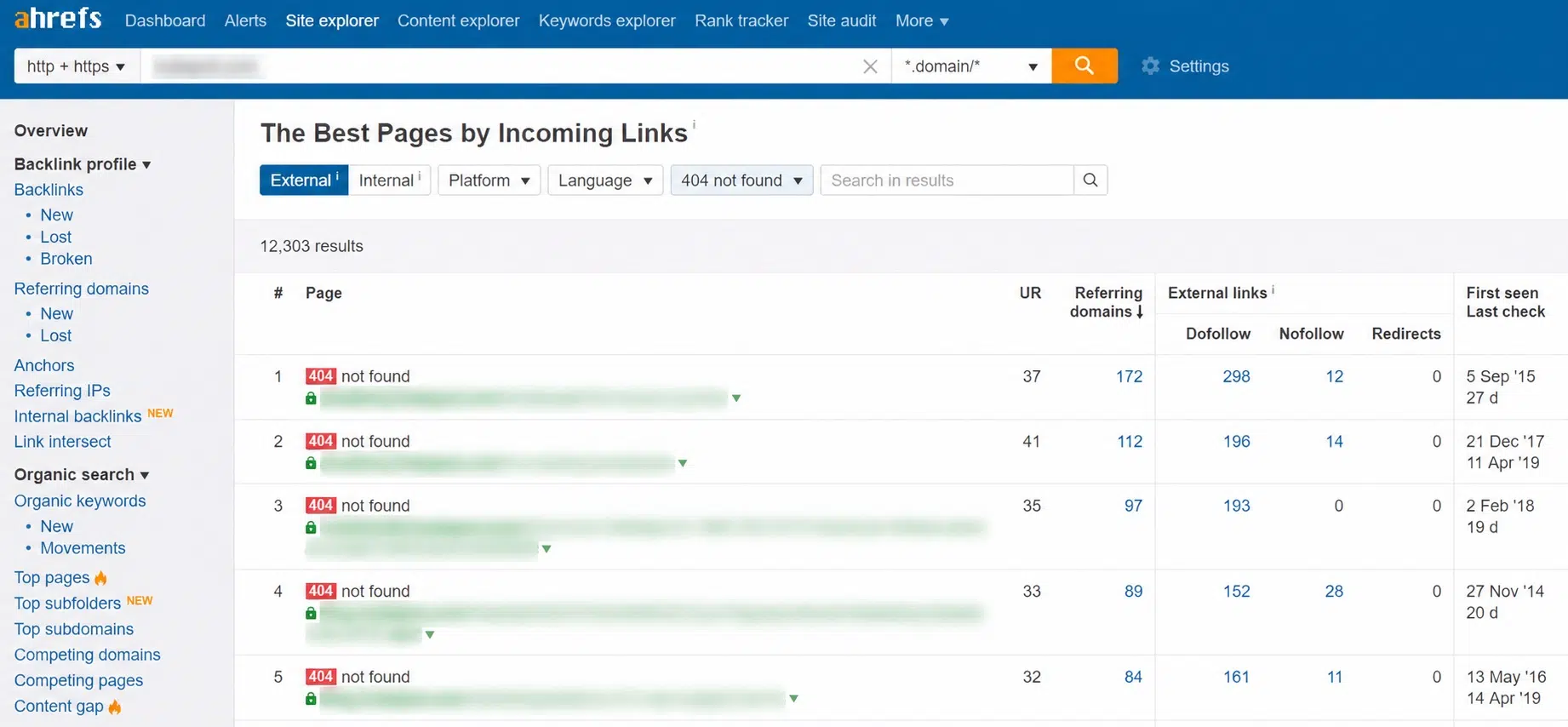
In Ahrefs, go to Site Explorer, open the Best by links report under the Pages section, and apply the “HTTP code: 404 not found” filter. Run this on a competitor’s domain, not yours. I sort the results by referring domains, so the dead pages with the most linking sites show up first.
Ahrefs also has a separate report for a different angle. Enter a domain and open the Broken links report in the Outgoing links section. It lists the site’s broken outbound links, which makes it a strong source of link-building leads.
In Semrush, the path is different. Open Backlink Analytics, enter the domain, go to the Indexed Pages tab, and tick the Broken Pages checkbox.
Broken Link Building Steps #3: Check Who Links to Each Dead Page
Not every dead page is worth your time. Click the backlink count next to each page and look at the sites linking to it.
I want links from real blogs and publications in my niche. If most of the links come from spam directories or scraper sites, I move on. A dead page with 20 links from good sites is worth more than one with 200 junk links.
I put everything in one spreadsheet:
- The linking page
- The dead URL
- The anchor text
- The contact person (filled in later)
Broken Link Building Steps #4: See What the Dead Page Used to Say
You need to know why people linked to the page in the first place. The Wayback Machine at web.archive.org helps here. Paste in the dead URL and open an older snapshot.
The anchor text is another clue. If ten sites link with the words “email open rate data,” they link for the numbers. Your replacement needs those numbers too.
Broken Link Building Steps #5: Build or Pick a Replacement Page
If you already have a page that covers the same thing, update it and make it stronger. If you don’t, create one.
Your page should cover everything the dead page covered, with newer facts and a clearer layout. Don’t pitch a page that is only loosely related. Site owners notice, and it makes the whole email look lazy.
Broken Link Building Steps #6: Find the Right Person to Email
On small blogs, this is easy: email the author. On bigger sites, look for the editor of that section. Author bios, contact pages, and LinkedIn usually give you what you need.
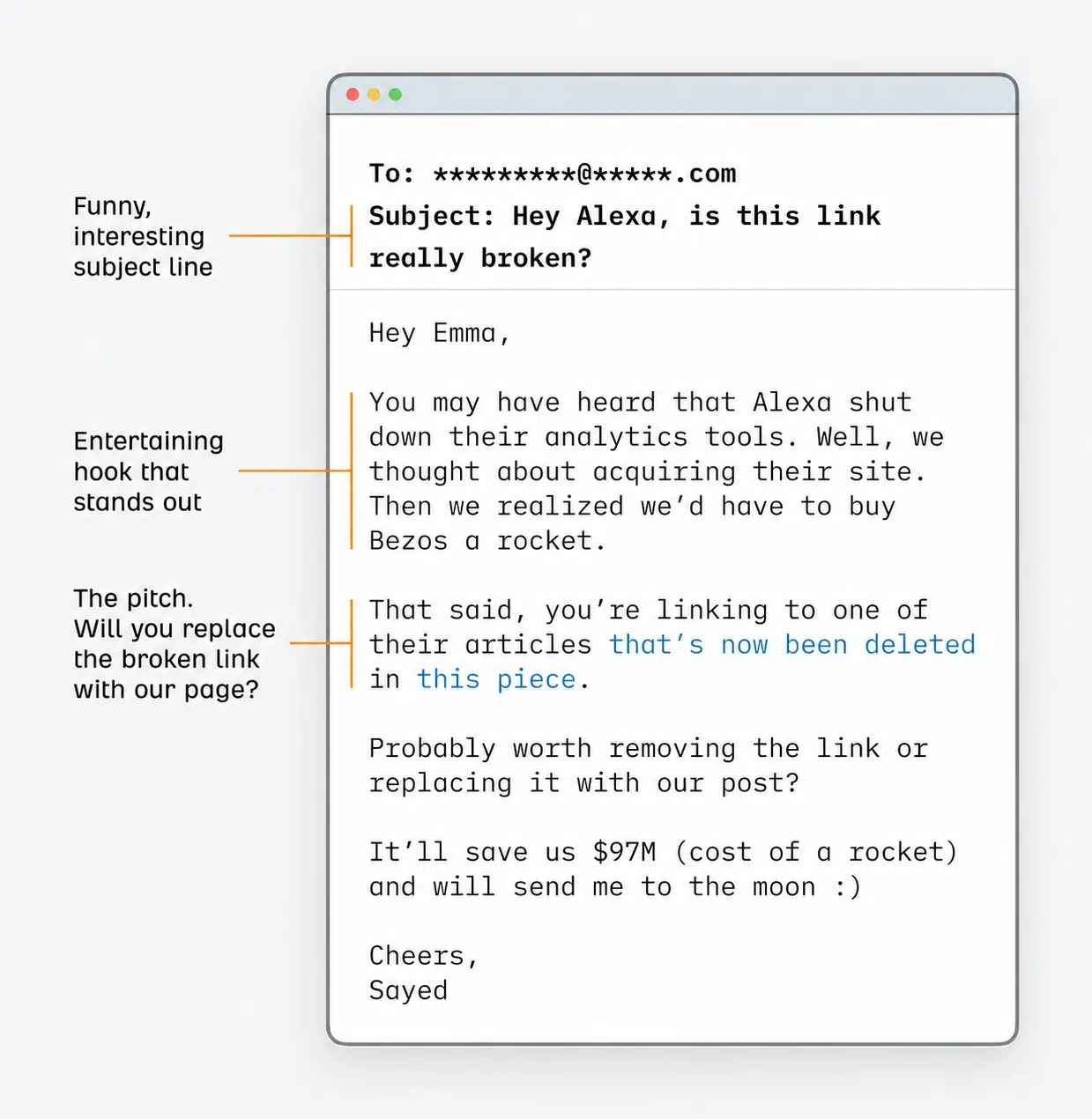
Send the email to a real person, not a general “info@” inbox, whenever you can.
Broken Link Building Steps #7: Write a Specific Subject Line and Short Email
My subject lines are always accurate and specific. The site owner should know exactly what the email is about before opening it. Something like:
Subject: Broken link in your post on [topic]
Then keep the email short:
Hi [Name],
I was reading your post on [topic] and noticed the link to [dead page title] no longer works. It goes to a 404 page.
I wrote a guide that covers the same points with updated data: [your URL]. It might work as a replacement.
Either way, thought you’d want to know about the broken link.
Point out the problem first, then offer your fix. Skip the long intro about who you are.
The data supports specific subject lines too. A study of 12 million outreach emails by Backlinko and Pitchbox found that longer subject lines got a 24.6% higher average response rate than short ones.
Broken Link Building Steps #8: Follow Up
This is the step most people skip. It’s also where I get a lot of my wins.
Here’s the honest truth: most of my outreach emails get no reply. Roughly 7–8% end in a link. That’s normal. The same Backlinko study found that only 8.5% of outreach emails got any response at all.
That’s why I always follow up. The study found that one follow-up email alone led to 65.8% more replies. Keep the follow-up short, wait about a week, and don’t send more than one or two.
Broken Link Building Steps #9: Track Results and Fix Your Own Broken Links
Track three things for every email: sent, replied, and linked. After a few rounds, you’ll see which site types and subject lines work for you.
Also, check your own site. The same tools that find broken links on other sites will find them on yours. Broken internal links waste the value you already have. My guide on internal linking strategies covers how to fix that. You can also use one of these internal linking tools to speed up the work.
Final Thoughts on These Broken Link Building Steps
These broken link building steps work best when you start small. Pick one competitor, find 20 dead pages with good links, and send about 30 careful emails. At a 7–8% success rate, that usually gets you two links. That may not sound like much. But links earned this way come from relevant sites that chose to link to you, and those are the links that actually move rankings.
Focus on quality sites, write specific subject lines, and always follow up. The method hasn’t changed much since my first email in 2015. It still works because it’s built on helping someone else first.