
AI agents can read ordinary web pages, but complex websites rarely make the job easy. Documentation may be split across hundreds of URLs. Old and new product versions can sit beside each other. Navigation, scripts, advertising, cookie notices, and repeated page elements add material that an agent does not need.
The proposed llms.txt format offers a more deliberate route through that content. It gives AI agents a brief description of a site or project, followed by a curated list of useful resources.
For documentation-heavy websites, that can be worthwhile. For a small site with clear navigation and only a few pages, it may be unnecessary. More importantly, llms.txt is still an emerging convention. It is not a guaranteed route into AI-generated answers, a new search-ranking factor, or a replacement for technical SEO.
What Is llms.txt?
An llms.txt file is a Markdown document intended to help language models and AI agents understand a website and locate its most useful content.
Jeremy Howard published the original proposal in September 2024. Version 2 arrived in August 2026, adding clearer guidance on directory-level files, Markdown alternatives, and how agents can discover the correct resources.
A site-wide file normally appears at:
https://example.com/llms.txt
Version 2 also allows files within individual sections:
https://example.com/docs/llms.txt
A file placed in /docs/ describes the content beneath that path. When several files could apply, the proposal tells agents to use the most specific one.
That matters for large websites. A developer-documentation team could maintain a file for its own section without needing to manage the entire domain. A university could do the same for an individual department, while a software company could maintain separate files for product documentation and API references.
How the File Helps an AI Agent
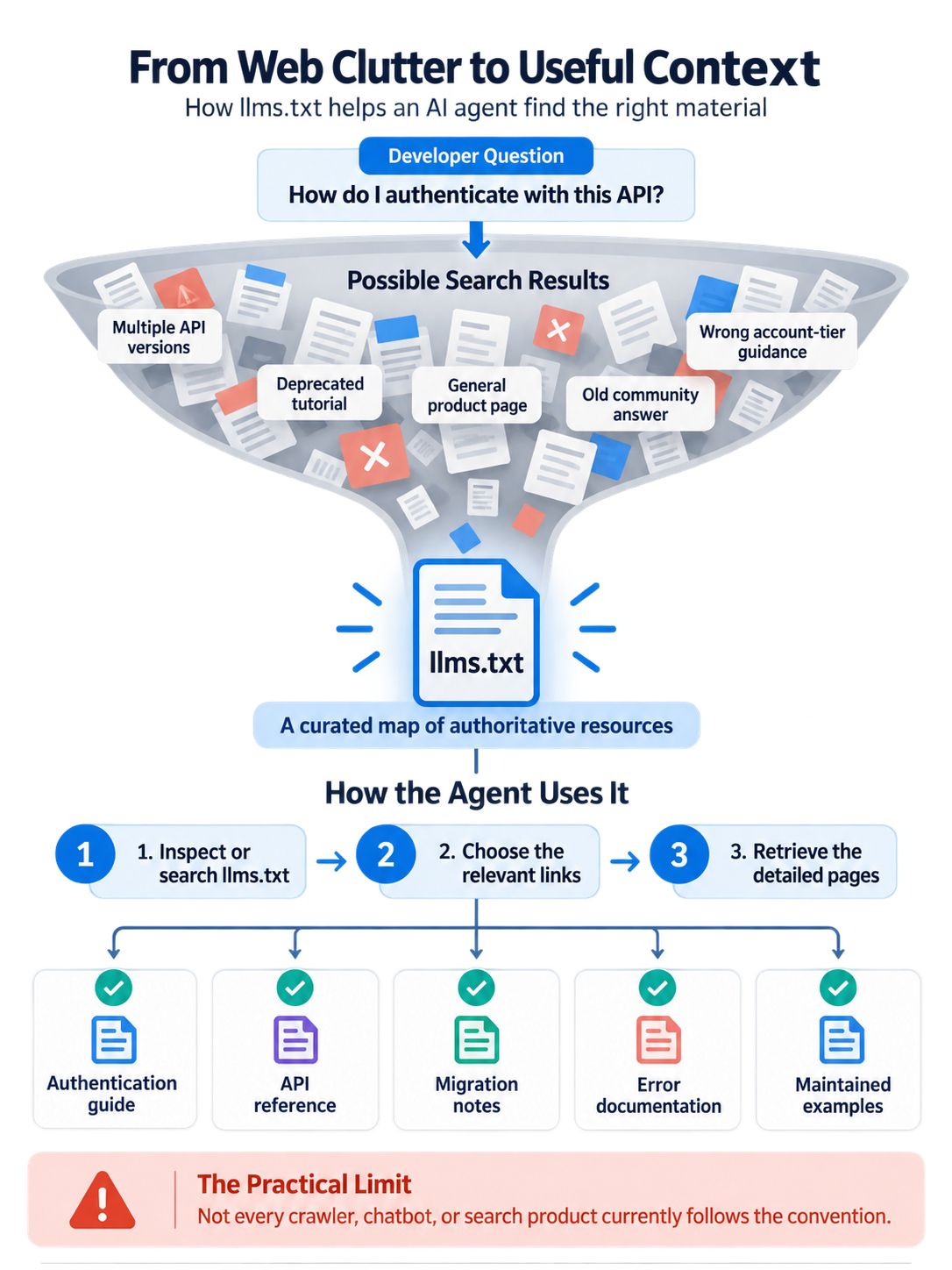
The file works like a curated contents page. It gives an agent enough context to decide which resources deserve attention.
Consider a developer asking an AI coding assistant how to authenticate with a platform’s API. A normal web search might surface:
- Documentation for two API versions
- A deprecated tutorial
- A general product page
- An old community answer
- A support article written for a different account tier
A useful llms.txt file can point directly to the current authentication guide, API reference, migration notes, error documentation, and maintained examples. It can also warn that a legacy API should not be used for new integrations.
The file should remain compact. Copying an entire knowledge base into it would defeat the purpose. The agent needs a reliable map, not another copy of the website.
Under the current proposal, an agent is expected to inspect or search the file, select the relevant links, and retrieve the detailed pages it needs. That describes the intended behaviour. It does not mean every commercial crawler, chatbot, or search product currently follows the convention.
The Recommended File Structure
The proposal uses Markdown because people can read it easily, while software can still parse its headings and links.
An H1 containing the site or project name is the only required component. In practice, a file that contains nothing more than a heading would provide little value.
A useful implementation usually includes:
- The name of the site or project
- A short description in a blockquote
- Any context needed to interpret the linked material
- H2 sections grouping related resources
- Links with short, specific descriptions
- An optional group for secondary material
Here is a simplified example:
# Example Analytics Platform

> Example Analytics provides privacy-focused web analytics for small businesses and agencies.

Use the current API documentation for all new integrations. The legacy API remains available only for existing implementations.

## Core Documentation

- [Getting Started](https://example.com/docs/getting-started.md): Installation and initial account setup
- [API Reference](https://example.com/docs/api.md): Current endpoints, parameters, and response formats
- [Authentication](https://example.com/docs/authentication.md): API keys, token handling, and common errors

## Policies

- [Privacy Policy](https://example.com/privacy.md): Data collection and retention practices
- [Service Status](https://status.example.com): Current incidents and scheduled maintenance

## Optional

- [Company Blog](https://example.com/blog): Product announcements and general articles
The short descriptions beside the links do real work. Labels such as “Documentation,” “Resources,” or “Learn More” tell an agent almost nothing. A good description identifies the subject, version, intended reader, or limitation of the resource.
The Optional heading remains a convention for secondary links. In version 2, however, it no longer carries the special processing meaning associated with the original proposal’s context-expansion tools.
Markdown Pages and Discovery Signals
The proposal encourages sites to provide clean Markdown versions of pages that agents are likely to need.
It recognizes two URL patterns:
- Adding
.mdto the complete page URL, such as/guide.html.md - Replacing the original extension, such as
/guide.md
For a directory-style URL, the equivalent may be index.html.md or index.md.
A site does not have to create Markdown copies of every page. Converting hundreds of thin articles or short landing pages would add maintenance without much benefit. Prioritize API references, setup guides, policies, specifications, and other pages where stripping away the interface makes the information easier to retrieve.
Version 2 also recommends two standard link relations:
rel="alternate" type="text/markdown"identifies a page’s Markdown alternative.rel="describedby"identifies the llms.txt file covering the page or directory.
These can be included as HTML <link> elements or HTTP Link headers. They give compatible agents a discovery route that does not depend on guessing filenames.
Support still varies by client. Adding the signals is sensible when the publishing system can manage them reliably, but they should not delay more urgent improvements to the content itself.
llms.txt Does Not Control Crawling or Training
The similar names invite comparison with robots.txt, but the files serve different purposes.
A sitemap helps search engines discover URLs. A robots.txt file communicates crawling preferences to compliant automated clients. An llms.txt file provides context and points agents toward selected resources.
It does not:
- Block a crawler
- Grant access to protected content
- Prevent model training
- Express a licensing agreement
- Remove a page from search results
- Guarantee that an AI service will use or cite a page
Those distinctions are not merely technical. A company that publishes private or unannounced URLs in llms.txt has made them easier to discover. The file is public, so it should never contain credentials, private endpoints, internal instructions, customer information, or links that depend on secrecy.
Actual protection requires authentication and server-side authorization. Even robots.txt is not an access-control system; its rules are requests that compliant crawlers are expected to follow.
AI Providers Use Separate Crawler Controls
Website owners who want to manage AI access need to examine the current documentation for each provider. “AI crawling” is not a single activity.
OpenAI currently separates OAI-SearchBot, which supports visibility in ChatGPT search, from GPTBot, which crawls material that may be used to improve and train its generative AI foundation models. ChatGPT-User may retrieve a page in response to a user’s request rather than through automatic crawling.
Anthropic similarly documents separate agents for model development, search, and user-requested retrieval: ClaudeBot, Claude-SearchBot, and Claude-User.
Google-Extended works differently. It is a control token used in robots.txt, not a separate HTTP crawler identity. Google says publishers can use it to manage certain Gemini training and grounding uses. It does not affect inclusion or ranking in Google Search.
These policies can change. Before adding rules, confirm the latest user-agent names and their stated purposes. Blocking a search crawler while intending only to restrict training may reduce visibility in that provider’s search experience.
Will llms.txt Improve AI Search Visibility?
There is no verified basis for promising a ranking or citation boost.
The convention has gained practical support. OpenAI and Anthropic publish llms.txt files for their developer documentation. Some documentation platforms and CMS tools can generate the file, and Chrome’s Lighthouse includes a check for it within its agentic browsing audits.
That is meaningful adoption, but it is not evidence of a direct ranking benefit.
Chrome describes llms.txt as an emerging convention and currently treats it as optional. If a site does not provide the root file and returns a normal 404 response, the Lighthouse audit is marked as not applicable. A server error during retrieval may be flagged, but the absence of the file is not presented as an SEO failure.
Lighthouse support should not be confused with Google Search support. No official documentation establishes llms.txt as a Google Search ranking signal.
The defensible benefit is narrower: when a compatible agent chooses to inspect the file, it gets a cleaner and more intentional route through the site.
Which Websites Should Consider Adding One?
Software documentation is the strongest use case. API references, SDK guides, migration instructions, code examples, and version notes often contain similar terminology but very different instructions. A curated file can reduce the risk that an agent selects obsolete material.
Product-support sites are another good fit, especially when their content covers different devices, subscription tiers, regions, or software versions.
Research organizations, universities, standards bodies, and large service businesses may also benefit when they have a small group of authoritative reports, policies, datasets, or technical resources buried inside a much larger site.
The case is weaker for:
- Small brochure sites with only a few pages
- Blogs without durable reference content
- Publishers planning to list every article automatically
- Sites whose documentation is already contradictory or outdated
- Teams without anyone responsible for maintenance
For a large news or magazine site, an automatically generated feed of recent articles is unlikely to help. A shorter file pointing to editorial policies, author information, topic hubs, data resources, and durable explainers would be more useful.
How to Build a Useful llms.txt File
Start with the questions an agent may need the site to answer. Do not begin by exporting the sitemap.
Choose the pages that provide the clearest, most authoritative answers. Use canonical URLs and leave out tracking parameters, internal search results, temporary campaigns, staging domains, and resources that require a login.
The introductory text can prevent common mistakes by explaining:
- Which product or API version is current
- Which documentation is deprecated
- Whether instructions differ by country or account type
- Where live service status is reported
- Which pages contain policy rather than technical guidance
Keep the hierarchy shallow. A handful of clear sections is easier to use than dozens of narrow categories.
After publishing, confirm that the file returns a successful HTTP response:
curl -i https://example.com/llms.txtInspect the response body as well as the status code. Redirect rules, security plugins, CDN settings, or application fallbacks can return an HTML error page at a URL that appears correct.
Test every link. A carefully formatted file pointing to outdated instructions or redirected documentation creates more confusion, not less.
The Maintenance Problem Is Easy to Underestimate
Creating the file is simple. Keeping it trustworthy is the harder part.
Common failures include mixing current and deprecated documentation, using vague link labels, filling descriptions with marketing copy, and allowing URLs to break after a site migration.
Ownership should be decided before publication. The file belongs with the team responsible for the linked content, not in an abandoned technical SEO checklist. Review it during documentation releases, product-version changes, URL migrations, and major policy updates.
If nobody can maintain it, a short file containing only stable cornerstone resources is safer than a large automated inventory.
Final Thoughts
The llms.txt proposal solves a specific problem: AI agents often need a concise, trustworthy route through websites built primarily for human browsing.
For a developer portal, knowledge base, or complex product-documentation site, that route can be genuinely useful. Create a short file, point it toward current authoritative pages, and give someone responsibility for maintaining it.
For a small or poorly organized website, llms.txt should wait. Fix inaccurate pages, confusing navigation, duplication, broken links, and access problems first. A machine-readable map is only valuable when the destination is worth reaching.
Frequently Asked Questions
Does llms.txt have to be placed at the root of a website?
No. A site-wide file normally appears at /llms.txt, but version 2 also permits files within subdirectories. For example, /docs/llms.txt can describe the content under /docs/. When several files apply, agents are expected to use the most specific one.
Should llms.txt link only to Markdown pages?
No. It can link to ordinary HTML pages, Markdown files, external documentation, source repositories, or other useful resources. Clean Markdown is often preferable for detailed documentation because it removes navigation and other interface elements, but it is not mandatory.
Is there a recommended size for an llms.txt file?
The proposal does not set a fixed length or file-size limit. Keep the file small enough to work as a curated guide. If it contains hundreds or thousands of URLs, it is probably duplicating the sitemap rather than helping an agent choose the right material.
Can llms.txt be generated automatically?
Yes, but an automatically generated file still needs editorial review. A generator can collect URLs and update links, but it may include thin pages, outdated documentation, duplicate resources, or vague descriptions. Automation is most useful when the publishing rules already identify which content is authoritative.