
Treat a publisher’s article like a basic SaaS landing page, and you are begging for a headache. Between programmatic ads, paywalls, and cookie banners, editorial content carries massive technical baggage. Editors push engagement, ad ops ruthlessly protect viewability, and developers just try to prevent a total collapse. That is exactly why mastering Core Web Vitals for Publishers requires more than basic speed tweaks.
The reality hits when a PageSpeed report shows the site buckling under its own weight. Passing these metrics isn’t about appeasing Google. It is a brutal tug-of-war to support revenue, discovery, and reader loyalty simultaneously. The true challenge is accelerating load times without ripping out the monetization tools that pay the bills.
Ultimately, this forces the conversation back to the reader. Does the story render instantly? Do late-loading banners violently shove text down the screen mid-sentence? These aren’t just minor engineering bugs. They are real friction points that actively destroy editorial trust and bleed your revenue.
What Core Web Vitals Measure and Why Publishers Should Care
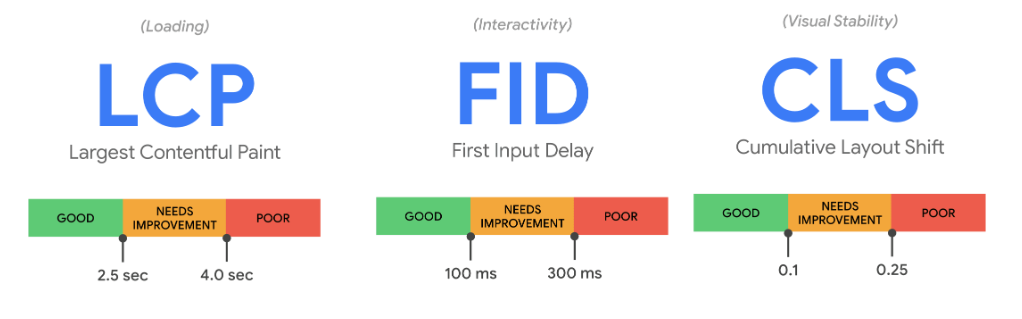
Google’s Core Web Vitals measure the actual friction a reader feels: how fast the page loads, if it responds when clicked, and if the layout jumps around. Right now, that boils down to Largest Contentful Paint (LCP), Interaction to Next Paint (INP), and Cumulative Layout Shift (CLS).
For a publisher, each metric maps to a very real headache:
- LCP (Target: 2.5s or less): Does the story appear quickly?
- INP (Target: 200ms or less): Do menus, videos, and interactive widgets respond without freezing?
- CLS (Target: 0.1 or less): Do ads, late-loading web fonts, or banners brutally shove the content down the screen?
Keep in mind that these targets aren’t based on one flawless lab test. Google grades you on the 75th percentile of actual users. A blazing-fast load on a developer’s MacBook over gigabit Wi-Fi proves nothing. The page has to survive a mid-range Android phone struggling on a 3G connection—which is exactly where heavy ad scripts choke.
The shift from First Input Delay (FID) to INP fundamentally changed how publishers need to approach responsiveness. While FID only tracked the very first interaction, INP monitors the entire lifecycle of the visit. That is a huge deal for article pages loaded with comment sections, infinite scroll, and complex ad tech.
Let’s be clear: Core Web Vitals won’t magically rescue thin content. They are just one piece of the page experience puzzle, not a golden ticket to the top of search results. Quality and relevance always win. But in a brutal search environment where ten sites have a great answer, you can’t afford to be the one with a jittery, slow-loading page.
Treat these metrics as reader-experience signals. A delayed hero image makes a story look broken. A frozen menu frustrates navigation. A late-loading ad that shifts a paragraph mid-sentence infuriates readers.
Why Publisher Sites Struggle With Core Web Vitals
Unlike a basic landing page built for a single sign-up, publishing pages are a chaotic mix of competing goals. Delivering the story is just step one. The page also has to load ads, track analytics, recommend related reads, handle GDPR consent, and aggressively pitch a subscription. All that dead weight makes performance notoriously hard to control.
Most of the bleeding usually stems from the same culprits:
- Bloated Templates Efficiency has a dark side. When you use one master template for thousands of articles, a single bad piece of code goes viral across your entire archive. If your standard news post loads a heavy affiliate widget or video player script that it doesn’t even use, you’re paying a performance tax for absolutely nothing.
- Ad Slots and Bidding Scripts Ads pay the bills, but poorly managed header bidding destroys rendering times. Removing ads isn’t a viable option, so the battle shifts to loading order and reserved space. If ad ops and developers aren’t collaborating closely, you lose. When monetization trumps everything else, the reader experience slowly rots.
- Layout Shifts from Dynamic Modules Readers do not care about your header bidding logic. They just hate it when the paragraph they are reading suddenly drops halfway down the screen. CLS is rampant in publishing because newsletter boxes, related content carousels, and promotional units often fire long after the text appears.
- Consent Banners and Paywalls Poorly implemented cookie banners and aggressive paywall prompts frequently wreck both LCP and CLS. Blocking interaction before a reader even sees the value of an article ruins the experience before it begins.
- Third-Party Script Overload Throwing Prebid.js, Taboola widgets, heatmap trackers, and social embeds onto a page adds up fast. Every third-party script needs a designated owner and a strict expiration date. If nobody knows what a legacy tracking pixel does anymore, kill it.
- At this point, fixing your Core Web Vitals stops being a pure engineering ticket and becomes a core product strategy. The priorities? Load the main article first. Stop trackers from delaying clicks. Keep the layout locked down when ads inject. Purge dead scripts.
How to Audit Core Web Vitals for Publishers Without Getting Lost
Testing your homepage and calling it a day is worthless.
A fast homepage proves nothing about your ad-heavy article templates or infinite-scroll video pages. To actually diagnose the issue, you must audit specific page types: standard articles, evergreen guides, high-ad-density pages, category hubs, and paywalled content.
Rely on Search Console’s CWV report and CrUX (Chrome User Experience Report) to spot widespread URL grouping issues. And remember to divorce your field data from your lab data.
Field data tells you what your actual readers are suffering through. Lab data helps you isolate the bug in a controlled setting. If your field data is terrible but your Lighthouse score is perfect, you likely have real-world bottlenecks—regional latency, heavy ad auctions, or aggressive logged-in cookie states.
More importantly, an audit needs accountability. If you find a massive CLS issue caused by an ad slot, it requires ad ops and dev to fix it together. Hero image problems belong to editorial and front-end teams. The goal isn’t pointing fingers; it’s building a prioritized backlog with strict owners and clear recheck dates. CWV optimization is ongoing maintenance, not a one-and-done launch project.
Improving LCP, INP, and CLS (Without Breaking Revenue)
You don’t have to strip an article page to the bone to pass a speed test. It’s about giving the headline, body text, and key media VIP treatment, while loading secondary junk later.
Protecting the First Screen (LCP)
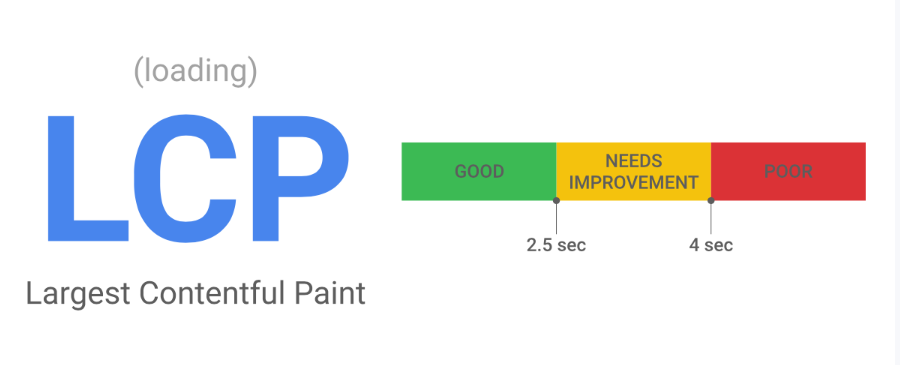
In publishing, the LCP element is almost always a massive hero image or a heavy headline block. Slow server responses, unoptimized images, or render-blocking CSS will brutally delay it.
The actual story needs to win the loading race. Never let your headline or hero image lose priority to a tracking script or a sidebar ad. Ensure critical LCP assets are discoverable immediately in the HTML, and for the love of God, don’t lazy-load your above-the-fold hero image.
Editorial workflows are frequently the real culprit here. If a writer uploads an uncompressed 4MB stock photo, developers can’t save you. Your CMS should automatically force proper sizing and modern image formats so editors don’t have to think like performance engineers. Protecting LCP doesn’t mean killing revenue—it just means sequencing the load order intelligently.
Reducing Interaction Friction (INP)
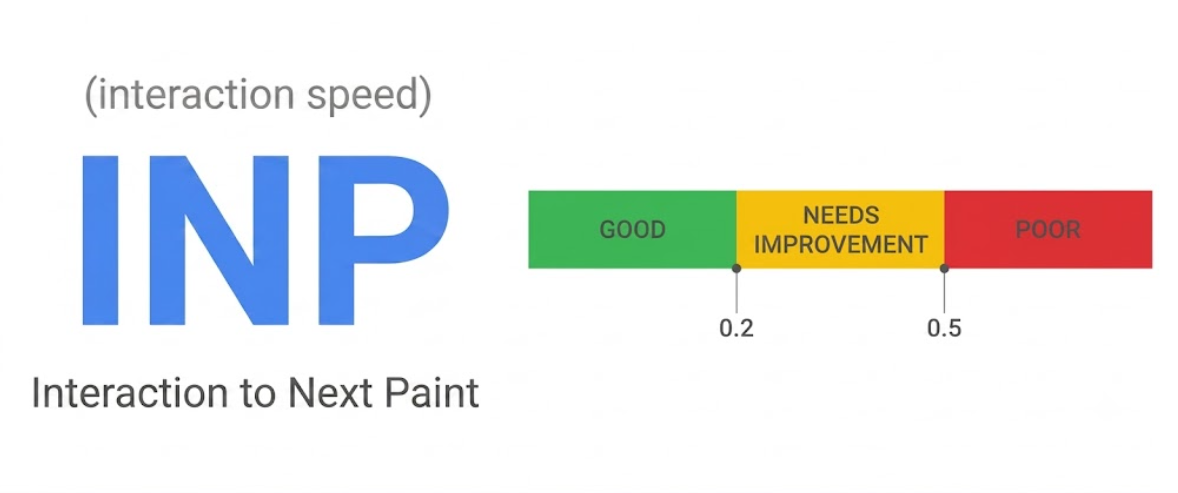
INP usually exposes a page drowning in JavaScript. A site might look fully loaded, but when a reader tries to open the hamburger menu or dismiss a newsletter popup, the browser hesitates.
Publishing pages are notoriously script-heavy. Header bidding, analytics, consent managers, and related-content widgets all fight for the main thread. To fix INP, test the page the way a frustrated reader would. Mash the menu button. Close the cookie banner. Try to scroll past a sticky ad.
Find out which script is choking the main thread right at that moment. Ask the hard product questions: Does this feature actually justify its performance cost? Can we delay it? Can we kill it entirely? You need a strict script budget, not just a vague goal to “be faster.”
Making the Layout Predictable (CLS)
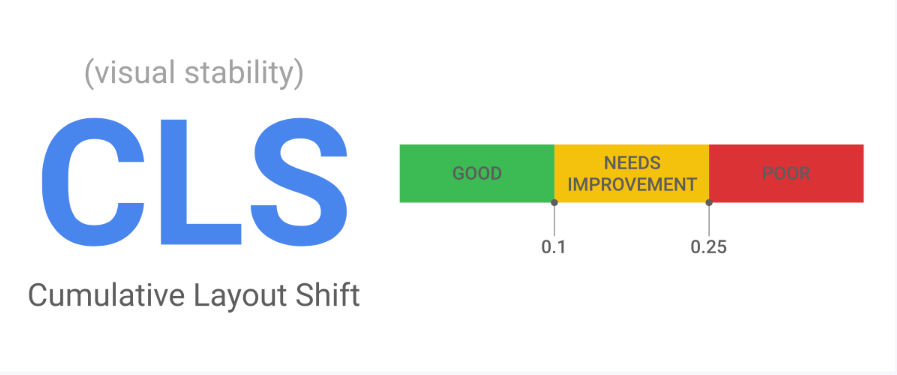
A slow page is annoying, but a shifting page is infuriating.
CLS happens when elements load late and bully the content out of the way. Set explicit width and height dimensions for every image and embed. Use sensible minimum heights for ad containers before the auction even finishes. If an ad slot collapses when empty, control how that reflow affects the surrounding text.
Editors and product managers should ask one ruthless question before approving a page design: Can I read this paragraph without the page violently shifting under my eyes? If the answer is no, your design is actively harming your content.
What Most People Get Wrong About Core Web Vitals
Handing Core Web Vitals entirely to your engineering team is a recipe for failure.
Performance degrades because of decisions made by editorial, ad ops, marketing, and product teams. If everyone keeps throwing heavy baggage onto the page, developers will always be fighting a losing battle.
Stop viewing ads and Core Web Vitals as mortal enemies. Ad-supported media and excellent user experience can coexist. Load the content first, reserve the ad space, and purge unnecessary tracking scripts.
Finally, stop over-trusting a single score. PageSpeed Insights is helpful, but it’s just one tool. Combine field data, lab diagnostics, and business context to see the full picture.
A Practical Core Web Vitals Workflow for Publishers
Don’t try to fix everything at once. Target the templates driving the most revenue or organic traffic.
- Segment by Template: Isolate news articles, evergreen guides, and video pages.
- Pull Real Field Data: Let CrUX and Search Console dictate where the real-world fires are before arguing over lab tests.
- Map Metrics to Causes: LCP means looking at hero images and server response. INP means hunting down heavy JS blocking the main thread. CLS means finding unreserved ad slots and late-loading embeds.
- Protect the Content Path: Make sure the headline and body text render flawlessly before the commercial machinery wakes up.
- Review New Features Ruthlessly: Before launching a new popup or widget, demand a performance check. Does it hurt CLS? Who owns it? When does it expire?
- Fix Editorial Workflows: Train writers to upload optimized images and limit unnecessary third-party embeds. Keep the payload light.
- Test the Trade-offs: Ripping out a heavy ad unit might fix your INP but crater your RPM. A/B test these decisions. Watch revenue per session just as closely as your web vitals.
- Recheck Constantly: Launching a new CMS, swapping ad partners, or adding a new paywall will reset your scores. Monitor performance like it’s a living, breathing metric.
The Bottom Line
Stop obsessing over a flawless Lighthouse score and focus on removing the friction that actually drives your readers away.
LCP is about getting the story on screen. INP is about respecting the user’s clicks. CLS is about keeping the text stable while your business model loads in the background. Improving this requires a unified front across editorial, SEO, development, and ad ops.
Start with your most critical article template. Identify the bleeding metric, find the specific culprit, assign it to a clear owner, and measure the real-world impact. You don’t need technical perfection—you just need a stable, responsive page that respects the reader’s time and attention.
FAQs About Core Web Vitals for Publishers
What are Core Web Vitals for Publishers?
Think of these as Google’s “usability scorecard” for media-heavy sites like news outlets or niche blogs. They grade your site on the stuff that actually matters to a reader: how fast the content appears, if the site feels snappy or jittery when tapped, and whether ads or banners shift the layout mid-read.
Do Core Web Vitals directly affect SEO rankings?
Google treats them as a tie-breaker, not a magic ranking shortcut. Great content and real authority still win every time, but if you’re in a competitive niche where ten sites have the same answer, a fast, stable page gives you the edge. Don’t count on them for a quick ranking boost if your content is thin.
Which Core Web Vital is most difficult for publishers?
CLS (Cumulative Layout Shift) is usually the biggest headache. It’s hard to prevent ad slots, cookie banners, and paywalls from shoving your content around after it loads. INP (Interaction to Next Paint) is a close second, especially if your site is bloated with header bidding scripts, video players, and third-party widgets.
How can publishers improve Core Web Vitals without removing ads?
You don’t need to strip your site of ads to pass these tests. The trick is to play nice with the browser: reserve static space for ad slots so they don’t jump, delay non-critical scripts, prioritize your main headline and content, and actually test how your ad stack impacts real user experience.
Should publishers test only their homepage for Core Web Vitals?
Testing just your homepage is a rookie mistake. Homepages rarely reflect the performance of your deep-link traffic. You need to audit your high-traffic article templates, category hubs, and video-heavy pages, as each template carries different technical baggage.
What is the best first step for CWV optimization?
Start with your top traffic driver: check your field data in Search Console, hunt for the primary bottleneck (is it the hero image, a heavy script, or an ad slot?), task one person with fixing that specific template, and recheck your data once the fix is live.