


An online store can rank for hundreds of keywords and still struggle to sell. Category pages attract the wrong visitors, product pages disappear behind filters, and Google receives three different versions of the price from the page, structured data, and Merchant Center. The traffic report may look healthy while the catalog remains harder to find than it should be.
That disconnect is why the SEO tactics e-commerce stores need in 2026 must go beyond adding keywords to product descriptions. Strong e-commerce SEO connects search intent, store architecture, product data, mobile usability, and commercial content. If one of those parts breaks, rankings and revenue can drift apart.
This matters even more as product discovery spreads across traditional results, Google Images, Lens, Shopping, AI Overviews, AI Mode, and other commerce experiences. Google’s latest guidance confirms that its generative AI features still rely on core Search systems. Stores do not need special AI files or questionable “GEO hacks.” They need crawlable pages, accurate data, original content, and a technically clear website.
Why I Rely on These E-Commerce SEO Tactics
From what I have seen, e-commerce SEO problems rarely come down to one missing keyword or a poorly written title. The bigger issues usually sit deeper in the store: products that are difficult to reach, category pages that do not match search intent, filters generating duplicate URLs, or product data that changes depending on where Google reads it.
These tactics have helped because they address those problems at the source. Some made important products easier to crawl and understand. Others improved category relevance, product-page usefulness, shopping visibility, or the experience visitors had after clicking through. No individual tactic worked like a magic switch. The difference came from getting these parts to support one another.
That is also why experienced store owners and SEO teams continue using them. They are practical, scalable, and tied to problems that affect both search visibility and sales. A clearer site structure helps Google and customers. Better product information supports rankings and buying decisions. Accurate feeds improve product eligibility while reducing the risk of shoppers seeing outdated prices or availability. These are not short-term tricks; they are improvements that make the entire store work better.
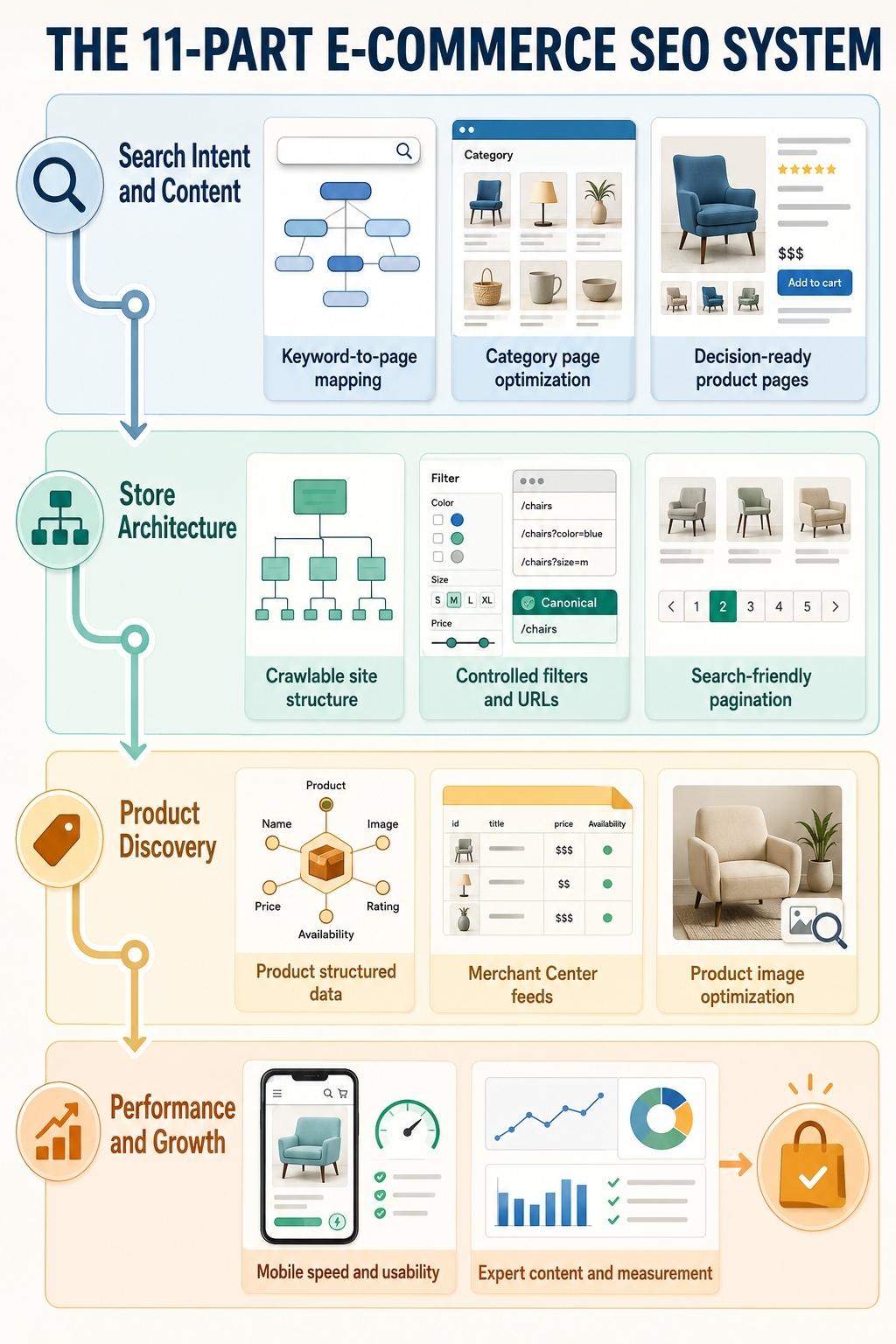
11 SEO Tactics E-Commerce Stores Should Prioritize
| No. | SEO tactic | Primary problem it addresses |
| 1 | Match keywords to the right page type | Search-intent mismatch |
| 2 | Strengthen category pages | Weak commercial landing pages |
| 3 | Create decision-ready product pages | Duplicate or unhelpful product content |
| 4 | Simplify site architecture | Buried and orphaned products |
| 5 | Control faceted navigation | Duplicate and excessive URLs |
| 6 | Make JavaScript catalogs crawlable | Products hidden behind interactions |
| 7 | Implement complete product structured data | Unclear product details |
| 8 | Improve Merchant Center feeds | Missing or inconsistent listings |
| 9 | Optimize product images | Weak Images and Lens visibility |
| 10 | Fix mobile performance and shopping friction | Slow, unstable product experiences |
| 11 | Build expert content and measure commercial results | Generic content and misleading KPIs |
1. Match Search Intent to the Correct Store Page
Keyword research for an online store is not finished when a spreadsheet contains search volume and difficulty scores. Every valuable query needs an appropriate destination.
Broad commercial phrases such as “men’s waterproof hiking boots” usually belong on a category or subcategory page. An exact model name belongs on its product page. Questions involving comparisons, sizing, care, compatibility, or use cases often need buying guides or supporting articles.
A practical keyword map should follow this pattern:
- Broad product type: Category page
- Important attribute or use case: Subcategory or carefully selected facet
- Brand, model, or SKU: Product page
- Comparison or buying question: Guide, comparison, or editorial page
This prevents several pages from competing for the same intent. It also stops stores from forcing informational phrases into product pages where they do not help someone make a purchase.
Use the language customers actually use, including differences between beginner and specialist searches. However, avoid creating hundreds of near-identical pages for every minor keyword variation. Google’s current AI-search guidance explicitly warns against scaling pages around every possible query variation when those pages add no distinct value.
2. Turn Category Pages Into Useful Commercial Destinations
Category pages often have more ranking potential than individual products because they remain available when stock changes and can satisfy broader shopping intent. Yet many stores treat them as little more than product grids.
A good category page should quickly explain what the collection contains, help shoppers distinguish between major options, and make important products easy to reach. That may include a concise introduction, useful filters, buying considerations, bestselling items, relevant subcategories, and links to sizing or comparison resources.
Keep the visible copy useful. A wall of generic text above the products delays the shopping experience, while a block of keyword-heavy copy hidden at the bottom rarely helps anyone. Place a short orientation near the top and add deeper guidance lower on the page only when the subject needs it.
Titles and headings should also be specific. “Women’s Shoes” says much less than “Women’s Waterproof Trail Running Shoes” when that is what the page genuinely contains.
3. Build Product Pages That Answer Buying Questions
Manufacturer descriptions give a store inventory content, but they rarely give it a competitive search advantage. The same paragraph may already appear across distributors, marketplaces, and competing retailers.
Effective product SEO adds information that helps someone judge suitability. Depending on the item, this can include:
- Dimensions, materials, fit, capacity, or compatibility
- The difference between available variants
- What comes in the package
- Care, installation, or maintenance requirements
- Shipping, warranty, and return conditions
- Original photographs, video, or demonstrations
- Verified customer questions and reviews
- Honest limitations or unsuitable use cases
Unique content does not mean replacing ordinary words with elaborate synonyms. It means supplying details that competing pages leave unanswered.
Google’s product-review guidance places particular value on expertise, original evidence, useful measurements, comparisons, and explanations of benefits and drawbacks. Stores should apply that standard to buying guides and editorial reviews without claiming to have tested products they have not actually used.
When a product temporarily sells out, keeping the page available with an accurate availability status, restock information, and relevant alternatives will often preserve more value than deleting it. If a discontinued item has a genuine replacement, a redirect may be appropriate. If no close substitute exists, do not send every expired product to the homepage.
4. Create a Store Structure That Shoppers and Crawlers Can Follow
A product should not depend on an XML sitemap or internal search box for discovery. It needs a crawlable path through the store.
The usual hierarchy is straightforward:
Homepage → Category → Subcategory → Product
Google evaluates relationships between pages through navigation and cross-page links. The number and prominence of internal links can also help it understand which categories and products matter most.
Link bestselling or strategically important products from relevant categories, guides, seasonal pages, and sometimes the homepage. Use descriptive anchor text rather than vague phrases such as “view item.” Breadcrumbs can provide another clear route while helping shoppers understand where they are.
Audit the catalog for orphan pages, especially after migrations, redesigns, and seasonal collection changes. A valid page that no internal page links to is easy for a team to overlook and harder for search engines to interpret as important.
5. Control Filters, Parameters, and Duplicate URLs
Faceted navigation is useful for shoppers and dangerous when left unmanaged. Color, size, price, material, brand, rating, and sorting controls can generate thousands of URL combinations from a modest catalog.
Not every combination deserves indexing. A facet should normally become an indexable landing page only when it has distinct search demand, a stable product selection, useful content, and enough value to stand on its own.
For the remaining combinations:
- Keep sorting, session, tracking, and temporary parameters out of crawlable internal links where possible.
- Consolidate duplicate versions with consistent canonical signals.
- Use persistent, understandable URLs for pages intended to rank.
- Prevent empty and near-empty filter combinations from becoming indexable landing pages.
- Avoid producing endless parameter combinations that return substantially the same products.
Robots directives, canonical tags, and noindex controls perform different jobs. They should not be applied blindly. For example, if a page is blocked in robots.txt, Google may be unable to crawl it and read a canonical or noindex instruction placed on the page.
Google’s e-commerce URL guidance recommends minimizing alternative URLs that return the same content and giving product variants identifiable, stable URLs.
6. Make Pagination and JavaScript-Loaded Products Crawlable
Infinite scroll and “Load more” buttons can create a smooth browsing experience, but crawlers do not behave like shoppers. Google generally discovers URLs through links with an href attribute; it does not reliably click buttons or trigger actions that require scrolling or interaction.
A JavaScript catalog should therefore provide crawlable paginated URLs for every product batch. Each results page needs a stable URL, and products should appear in normal links that search engines can follow.
Also check what Google receives on mobile. Important descriptions, products, images, internal links, and structured data should not disappear from the mobile rendering.
XML sitemaps still help stores communicate preferred URLs, particularly on large or frequently changing sites. Include canonical, indexable pages and use lastmod only when a page has materially changed. Search Console’s URL Inspection tool can then show whether Google sees the content and links expected on the rendered page.
7. Implement Complete Product and Merchant Structured Data
Structured data gives Google explicit product information. It does not guarantee a rich result or replace strong content, but incomplete or inaccurate markup wastes an important e-commerce opportunity.
For purchasable products, relevant fields may include:
- Product name, description, image, brand and identifiers
- Price, currency, condition and availability
- Valid reviews and aggregate ratings
- Shipping details and return policies
- Variant attributes such as size, color, material or pattern
- Loyalty-program information where applicable
Stores selling variants should review ProductGroup and Product markup. Google supports properties that identify the parent product, define what varies, and connect individual variants. This can help the search engine understand that several colors or sizes belong to one product family.
All marked-up information must match what shoppers can see. Adding an unavailable price, hidden review score, or outdated stock status creates inconsistency rather than clarity. Validate the implementation with the Rich Results Test and monitor the Merchant listings and Product snippets reports in Search Console.
8. Treat Merchant Center as Part of Organic Product Visibility
Merchant Center is not limited to paid Shopping campaigns. Eligible free product listings can appear across several Google surfaces, including Search, Shopping, Images, Lens, Maps, YouTube, and Gemini.
Google recommends using product-page structured data and a Merchant Center feed together when possible. Structured data helps Google understand the landing page, while a feed gives the merchant more direct control over catalog updates and product attributes.
The feed should accurately represent:
- Product titles and descriptions
- GTINs, brands and other identifiers
- Item group IDs and variant details
- Prices, sale prices and currencies
- Availability
- Shipping and return information
- High-quality product images
The store, structured data, and feed should agree. If the page says “out of stock” while Merchant Center reports availability, the listing can become inaccurate or limited. Large or frequently changing stores may need scheduled feeds or an API-based setup rather than occasional manual uploads.
9. Optimize Product Images for Search and Shopping Discovery
A product image can rank, carry a product annotation, appear in a rich result, or help a shopper discover an item through Google Lens. That makes image optimization a meaningful part of online store optimization.
Use original, high-resolution images where possible. Show useful angles and important details rather than uploading multiple photographs that barely differ. Give each image a stable URL, descriptive filename, accurate alt text, and relevant surrounding content.
Alt text should describe the image naturally. “Black waterproof hiking boot with reinforced toe” is useful. Repeating every footwear keyword is not.
Google uses alt text, page content, filenames, and computer vision to understand an image. It also recommends placing images near relevant text and avoiding generic filenames.
Compress files, provide responsive image sizes, reserve image dimensions to prevent layout shifts, and avoid lazy-loading the main product image if doing so delays its appearance. An image sitemap can help with images that are otherwise difficult to discover, particularly when a store relies heavily on JavaScript.
10. Improve Mobile Performance Without Stripping Useful Content
Product templates become heavy quickly. Image galleries, review platforms, recommendation engines, chat widgets, tracking scripts, and personalization tools can all compete for browser resources.
Current good Core Web Vitals thresholds are:
- Largest Contentful Paint: 2.5 seconds or less
- Interaction to Next Paint: 200 milliseconds or less
- Cumulative Layout Shift: 0.1 or less
These targets should be met at the 75th percentile of page visits, with mobile and desktop assessed separately.
Start with the elements that affect real shopping. Compress and properly size the primary image, reduce unnecessary scripts, reserve space for galleries and promotional bars, and stop third-party widgets from blocking important interactions.
Do not improve mobile speed by removing valuable descriptions, reviews, specifications, or structured data. Google uses mobile content for indexing, so the mobile version should contain the same essential information as the desktop page.
Shipping costs, delivery estimates, returns, and product availability should also be easy to find. Baymard’s 2026 research compilation places average documented cart abandonment at 70.22%. That is not a ranking statistic, but it is a reminder that traffic loses value when basic purchasing questions remain unanswered.
11. Publish Expert Content and Measure What Reaches Revenue
A blog full of generic “top tips” articles will not automatically strengthen a store. Supporting content works when it answers questions that arise before, during, and after product selection.
Useful formats include:
- Evidence-based buying guides
- Product and model comparisons
- Sizing, fit or compatibility resources
- Installation and maintenance guides
- Material or ingredient explanations
- Original product demonstrations
- Calculators, selectors and decision tools
- Answers based on genuine customer-support questions
This content should link naturally to the categories and products it supports. It can also earn legitimate references when it provides original data, useful visuals, specialist insight, or a tool worth sharing. Buying links or manufacturing artificial mentions creates risk and does not build genuine authority.
Google’s 2026 AI-search guidance specifically recommends non-commodity, expert-led material that contributes something beyond a generic summary. It also states that stores do not need special AI markup or llms.txt files to appear in Google’s generative search features.
Performance should then be measured beyond rankings. Use Search Console to evaluate queries, landing pages, click-through rates, indexing, product snippets, and merchant-listing appearances. Connect this with analytics and store data to monitor organic revenue, assisted conversions, product views, add-to-cart activity, and purchases.
A keyword ranking higher is useful. A landing page attracting the right shopper and contributing to a sale is the result that matters.
Where Should an E-Commerce Store Start?
Trying to implement all 11 tactics simultaneously can bury a small team. A sensible order is:
- Fix access and indexing: Check architecture, orphan pages, filters, canonicals, pagination, rendering, and sitemaps.
- Correct catalog data: Align product pages, structured data, stock information, and Merchant Center feeds.
- Improve valuable landing pages: Work first on categories and products already receiving impressions or generating revenue.
- Address mobile friction: Prioritize templates with poor Core Web Vitals or weak conversion performance.
- Expand supporting content: Build guides around proven customer questions and commercially important categories.
- Measure and refresh: Improve pages using search and sales data instead of publishing endlessly.
The correct order may change for an individual store, but technical access must come before aggressive content production. Publishing more pages will not solve a catalog Google cannot crawl or understand.
Make SEO Serve the Catalog, Not the Checklist
The best SEO tactics e-commerce stores can adopt are the ones that make products easier to discover, understand, compare, and purchase. That requires more than publishing longer descriptions or chasing higher keyword counts.
Build clear category paths. Give products original and decision-useful information. Control filters before they multiply. Keep product feeds accurate. Make images and mobile pages work properly. Then judge success by qualified discovery and revenue, not by a dashboard full of impressions that never turn into customers.
Frequently Asked Questions About SEO Tactics E-Commerce
1. What is e-commerce SEO?
E-commerce SEO is the process of improving an online store’s visibility in unpaid search and shopping experiences. It covers category and product content, keyword targeting, technical crawlability, internal linking, structured data, Merchant Center information, images, page experience, and supporting content.
2. How long does e-commerce SEO take to work?
Technical corrections can improve crawling or listing eligibility relatively quickly, but meaningful ranking and revenue growth often take several months. Timing depends on the store’s current condition, competition, catalog size, authority, update frequency, and the extent of the changes.
3. Should category or product pages target the main keywords?
Broad product-type and attribute-based searches usually fit category or subcategory pages. Exact models, SKUs, and highly specific product searches normally belong on product pages. Search intent should determine the destination rather than search volume alone.
4. Do unique product descriptions still matter?
Yes, but uniqueness by itself is not enough. A rewritten manufacturer description offers little value if it does not add specifications, compatibility information, comparisons, use cases, limitations, original media, or answers to genuine buying questions.
5. What should a store do with out-of-stock products?
Keep temporarily unavailable product pages live when restocking is likely, and display an accurate availability status with useful alternatives. For permanently discontinued products, redirect only when there is a genuinely relevant replacement or equivalent category. Otherwise, return an appropriate 404 or 410 response rather than misleading users with an unrelated redirect.
6. Does product schema improve rankings?
Product structured data is not a guaranteed ranking boost. It helps Google interpret product details and can make a page eligible for richer product appearances. Correct schema, helpful content, crawlability, Merchant Center data, internal links, and overall page quality need to work together.

























