


A weak brief usually fails after the draft arrives.
The editor expected a sharper angle. The SEO strategist expected better search coverage. The writer thought the piece was supposed to be beginner-friendly. The reviewer flags missing evidence. Then the team spends days fixing decisions that should have been made before writing started.
That is why a practical content briefs guide matters. A brief is not a keyword sheet, a template exercise, or an administrative form. It is the working agreement between strategy, editorial judgment, search intent, and production.
A strong brief does not remove the writer’s thinking. It removes unnecessary guessing.
What a Content Brief Should Actually Do
A content brief is a planning document for a specific piece of content. It explains what the content should accomplish, who it is for, what it must cover, what it should avoid, and how the finished draft will be judged.
Teams often confuse briefs with weaker documents:
- A keyword list
- A loose outline
- A project management ticket
- A competitor summary
- A title with a deadline
Each of those can help, but none is enough on its own.
A keyword list may support search coverage, but it does not explain the reader’s problem. An outline may create structure, but it may not explain the angle. A task ticket may keep the assignment moving, but it rarely gives the writer enough editorial direction.
A useful brief sits between planning and drafting. It should answer the questions a good writer would ask before starting:
- Who is this for?
- What does the reader already know?
- What problem are we solving?
- What should this piece do better than existing results?
- What claims need evidence?
- What should the article avoid?
- What does a strong finished draft look like?
If the brief does not answer those questions, revision becomes the planning stage. That slows production and usually weakens the article.
Why Briefs Matter More as a Team Grows
One editor can explain assignments casually to two writers. That same habit breaks when there are multiple writers, SEO inputs, freelance contributors, product reviewers, legal checks, regional pages, and different publishing channels.
This is where briefing becomes part of content operations.
Recent B2B content marketing research shows a familiar production problem: many teams still lack a scalable model for content creation, and consistency remains a major challenge. A content brief does not solve that alone. It cannot replace strategy, editing, research, or realistic deadlines. But it does reduce one common source of waste: unclear assignments.
That matters more than teams sometimes admit.
When the brief is vague, every person fills in the blanks differently. The writer guesses the angle. The editor rewrites the structure. The SEO strategist asks for missing sections. The reviewer challenges unsupported claims. None of that means the writer failed. Often, the assignment was never clear enough to begin with.
Start With the Reader Before the Keyword
Keywords matter. Search intent matters. Competitor review matters. But if the brief starts and ends with SEO inputs, the finished article often becomes a rearranged version of existing search results.
Begin with the reader’s situation.
For an article about content briefs, the reader may not need another definition only. They may be struggling with vague assignments, repeated edits, missed search intent, inconsistent freelance drafts, or too much back-and-forth between SEO and editorial teams.
That changes the article.
A weak brief might say:
“Write a 2,000-word article about content briefs. Include SEO keywords, headings, and examples.”
A stronger brief says:
“Write for content managers and editors who already publish content but struggle with unclear assignments and too many revision rounds. Explain what to include in a brief, what to leave out, and how to make briefs useful without over-controlling the writer.”
The second version gives the writer a real job. It also gives the editor a fairer way to judge the draft.
What to Include in a Content Brief
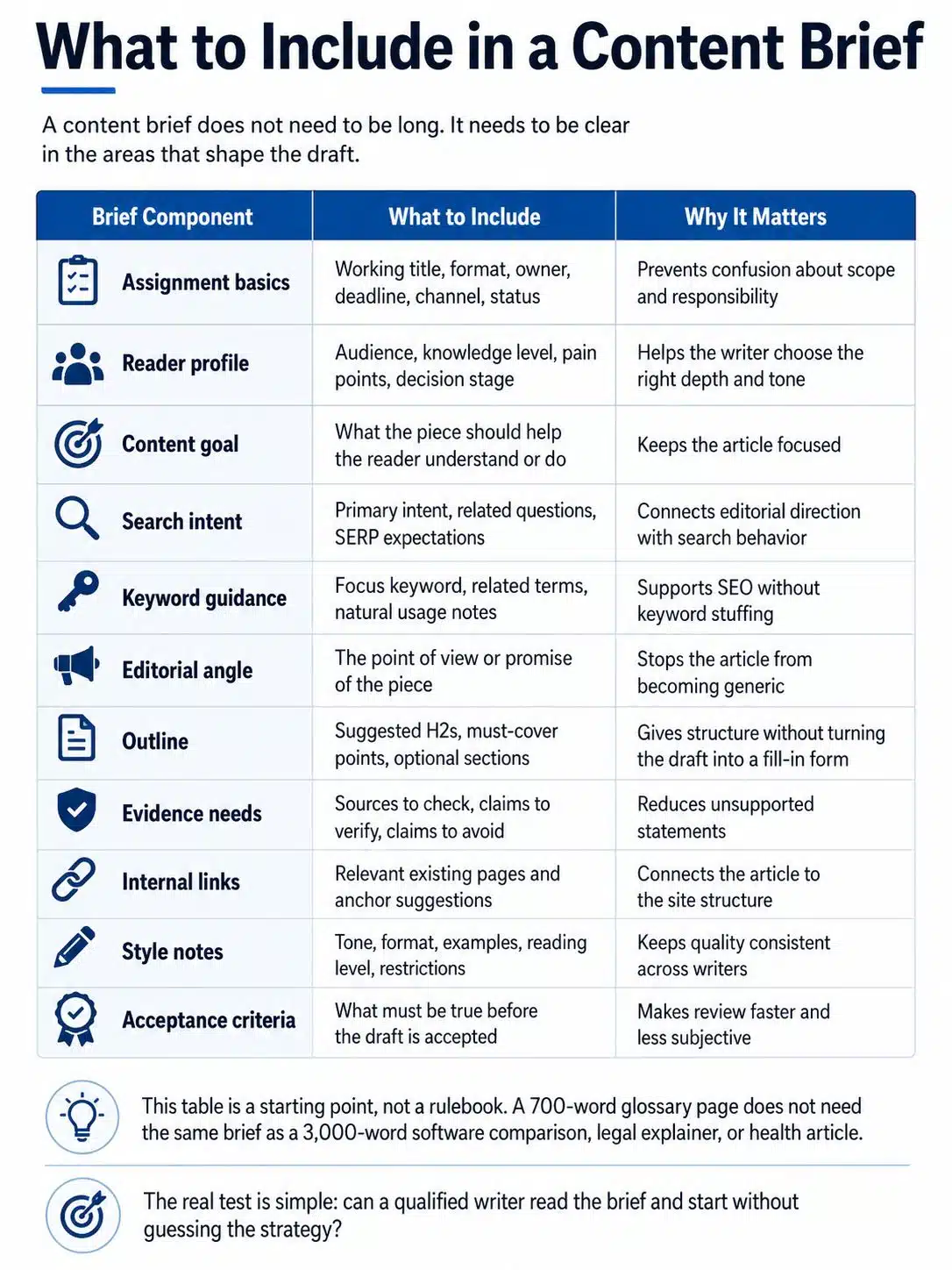
A content brief does not need to be long. It needs to be clear in the areas that shape the draft.
| Brief Component | What to Include | Why It Matters |
|---|---|---|
| Assignment basics | Working title, format, owner, deadline, channel, status | Prevents confusion about scope and responsibility |
| Reader profile | Audience, knowledge level, pain points, decision stage | Helps the writer choose the right depth and tone |
| Content goal | What the piece should help the reader understand or do | Keeps the article focused |
| Search intent | Primary intent, related questions, SERP expectations | Connects editorial direction with search behavior |
| Keyword guidance | Focus keyword, related terms, natural usage notes | Supports SEO without keyword stuffing |
| Editorial angle | The point of view or promise of the piece | Stops the article from becoming generic |
| Outline | Suggested H2s, must-cover points, optional sections | Gives structure without turning the draft into a fill-in form |
| Evidence needs | Sources to check, claims to verify, claims to avoid | Reduces unsupported statements |
| Internal links | Relevant existing pages and anchor suggestions | Connects the article to the site structure |
| Style notes | Tone, format, examples, reading level, restrictions | Keeps quality consistent across writers |
| Acceptance criteria | What must be true before the draft is accepted | Makes review faster and less subjective |
This table is a starting point, not a rulebook. A 700-word glossary page does not need the same brief as a 3,000-word software comparison, legal explainer, or health article.
The real test is simple: can a qualified writer read the brief and start without guessing the strategy?
Assignment Basics: Boring Details That Prevent Delays
The simplest fields are often the ones that prevent production problems.
Every brief should include the working title, content type, target depth, writer, editor or owner, due date, publishing channel, and current status. For larger teams, add the SEO owner, reviewer, approval path, and whether the piece is new, refreshed, merged, or rewritten.
This is not administrative clutter. A writer should not have to guess whether the assignment is a blog post, landing page, tutorial, comparison article, glossary entry, or pillar page. Those formats require different decisions.
A landing page needs conversion clarity. A tutorial needs steps. A comparison article needs criteria. A pillar page needs breadth and internal linking. A thought leadership article needs a stronger point of view.
Word count is useful, but it should not be treated as a ranking formula. Google’s current search guidance does not support the idea of a magical word-count target for ranking. The better question is whether the article is deep enough to satisfy the reader’s task without padding.
So instead of only writing “2,000 words,” add scope:
“Explain the full briefing workflow, include practical examples, and avoid beginner-only definitions.”
Word count gives size. Scope gives direction.
Reader Profile: Avoid Persona Fluff
A useful reader profile is not a decorative persona.
“Marketing manager, age 30–45, interested in SEO” does not help much. It may be true, but it rarely changes the draft.
Better reader notes sound like this:
“The reader manages writers or freelancers and wants to reduce revision cycles. They understand basic SEO terms but may not have a mature editorial process. They need a practical briefing structure they can use immediately.”
That gives the writer useful signals. The article should be practical, not academic. It should not waste space explaining what SEO is. It should focus on workflow, examples, and decisions.
Good reader notes often include:
- What the reader already knows
- What they are struggling with now
- What they need to decide or do after reading
This matters for global content because readers may work in different markets, budgets, publishing systems, and team sizes. A freelance writer working with one client and a content lead managing twenty writers may search the same topic, but they do not need the same level of process detail.
Search Intent Needs More Than One Word
Search intent is useful only when it is specific.
Do not write only “informational.” That label is a starting point, not an editorial direction.
For the focus keyword “content briefs guide,” the likely intent is practical learning. The reader wants to know what a content brief includes, how to create one, and how to use it to improve content production. They may want a template, but the deeper need is process clarity.
A stronger search intent section explains:
- What the searcher is probably trying to solve
- What existing results commonly cover
- What your article should cover better
- What should be left out because it distracts from the task
For example, if many search results focus on downloadable templates, your article may still include a template-style checklist. But it should also explain the judgment behind each field. A blank template without editorial reasoning often creates another form to fill out, not a better workflow.
Keyword Guidance Without Stuffing the Draft
Keyword guidance belongs in the brief. It should not dominate the brief.
Include the focus keyword, a few related phrases, and notes on natural usage. Do not hand writers a giant keyword list and expect good prose. That usually produces stiff writing and repeated terms.
For this topic, a sensible keyword section might look like this:
- Focus keyword: content briefs guide
- Related phrases: content brief template, SEO content brief, editorial workflow, content planning, writer brief, content strategy
- Usage note: use the focus keyword naturally in the introduction, one subheading, the body, Final Thoughts, meta title, meta description, and slug
The brief should also explain which concepts matter. For this article, “search intent,” “reader pain points,” “internal links,” “evidence requirements,” and “acceptance criteria” are more useful than repeating “content brief” in every paragraph.
Google’s SEO guidance supports writing clear, useful content for readers and avoiding outdated habits such as excessive repetition. The brief should help writers create pages that are easy to understand, not pages that sound like they were assembled around a keyword list.
Editorial Angle: The Part Many Briefs Skip
Many weak briefs skip the angle. That is why so many articles sound interchangeable.
The angle is the editorial promise. It tells the writer how the article should approach the topic.
Weak angle:
“Explain what content briefs are.”
Stronger angle:
“Show content teams how to create briefs that reduce guessing, improve first drafts, and keep SEO requirements from overwhelming editorial quality.”
That one sentence changes the draft. It tells the writer to focus on workflow and judgment, not only definitions.
An angle does not need to be clever. It needs to be useful. If the topic is crowded, the angle becomes even more important because it gives the article a reason to exist beyond covering the same subheadings as everyone else.
Outline: Give Direction Without Freezing the Article
Most briefs should include an outline. The outline should guide the writer, not trap them.
For straightforward SEO articles, suggested H2s can save time and prevent missed sections. For expert-led or opinionated pieces, the outline may need to be looser so the writer can shape the argument.
A practical outline marks the difference between required sections and optional ideas.
Required sections might include:
- What a content brief is
- What to include
- How to connect briefs to search intent
- Common briefing mistakes
- A practical workflow for creating briefs
Optional additions might include:
- A short checklist
- A weak-vs-strong brief example
- A section on AI-assisted briefs, if relevant
- A note on when a short brief is enough
This helps the writer prioritize. It also helps the editor avoid punishing the writer for not including every minor planning note.
The outline should not copy competitor pages line by line. That is one of the quickest ways to create content that feels familiar before the reader has reached the second section.
Evidence Requirements: Say What Must Be Verified
This is where many briefs fail.
If the article includes software features, laws, medical claims, financial advice, cybersecurity guidance, platform policies, pricing, statistics, or technical instructions, the brief should say what must be verified and where to check it.
For a content strategy article, the evidence needs may include:
- Google Search documentation
- Current industry research
- Recognized content strategy references
- Internal analytics, if available
- Existing company pages that need to be linked or updated
For a product comparison, the evidence section should be stricter. It may need official pricing pages, product documentation, compatibility notes, support pages, app store listings, and a date for when details were checked.
The brief should also warn against claims the writer should not make.
For example:
- Do not claim a tool is “best” unless the article explains the criteria.
- Do not cite old statistics without checking the original source.
- Do not say a process “guarantees rankings.”
- Do not invent testing notes.
- Do not turn competitor headings into a rewritten outline.
- Do not treat AI-generated summaries as verified sources.
This section protects the publication. It also protects the writer from making claims they cannot support.
Internal Links Should Be Planned Earlier
Internal links are often added during editing, but they work better when they are planned before writing starts.
The brief should list relevant existing pages and suggest where they might fit naturally. This helps the new article support the site’s broader structure.
For an article about content briefs, useful internal links might point to existing pages on:
- Editorial calendar planning
- Keyword research
- Internal linking
- SEO content writing
- Content audits
- Blog strategy
Anchor text should be natural and accurate. “Read more” is usually less helpful than a descriptive phrase such as “editorial calendar planning” or “internal linking workflow,” assuming the linked page actually covers that topic.
Do not overload the brief with internal links. A few relevant links are better than a long list that forces the writer to bend the article around unrelated pages.
There is also a practical CMS issue here. If links are added after the article is written, they often appear in awkward places. Planning them earlier helps the writer build smoother context around them.
Style Notes Should Be Usable
“Write in a professional tone” is too vague. Most writers will agree with it and still produce very different drafts.
Better style notes explain what the article should feel like on the page:
- Use short paragraphs, but avoid choppy one-line sections.
- Explain with examples rather than slogans.
- Avoid exaggerated claims about SEO results.
- Use tables only when they simplify decisions.
- Write for working editors and content teams, not absolute beginners.
- Keep the tone practical and calm.
Examples help. If your publication has model articles, include one or two. If there are phrases, claims, or structures the brand avoids, include those too.
Style guidance should not erase the writer’s voice. It should define the editorial boundaries.
Acceptance Criteria Make Review Less Personal
One of the most useful additions to a brief is a short acceptance checklist.
This makes review easier because the editor is not relying only on preference. The writer also knows what “ready” means before submitting.
A useful acceptance checklist might include:
- The introduction states the reader’s problem quickly.
- The article explains what to include in a content brief and why each part matters.
- The focus keyword appears naturally, not repeatedly.
- The article includes practical examples of weak and strong briefing.
- Claims about search, strategy, or statistics are verified.
- Internal links are included where relevant.
- The ending gives practical guidance rather than repeating the article.
This does not replace editing. It makes editing more focused.
It also helps when more than one person reviews the draft. Without acceptance criteria, one reviewer may ask for more SEO coverage while another asks for a sharper editorial angle. Both may be right, but the writer needs to know which standard matters most for this assignment.
A Practical Workflow for Creating Better Briefs
A brief should not take longer to create than the content itself. Match the effort to the value and risk of the assignment.
For a standard evergreen article, this workflow is enough:
- Confirm the topic and business reason.
- Review the search intent and competing results.
- Define the reader’s real problem.
- Choose the angle.
- Build a practical outline.
- Add keyword and internal link guidance.
- List evidence requirements.
- Add style notes and acceptance criteria.
- Give the writer room to improve the structure if the draft needs it.
For a high-stakes article, add subject-matter input before writing begins. A short conversation with a product expert, legal reviewer, clinician, engineer, or senior editor can prevent major revisions later.
For lower-stakes content, keep the brief lighter. Over-briefing slows the team down and can make simple assignments feel heavy.
A useful rule: the brief should be detailed where wrong assumptions are costly. It can be lighter where the assignment is simple, familiar, and low risk.
Common Briefing Mistakes That Create Revision Loops
The most common briefing mistake is vagueness. The second is giving the writer too many disconnected inputs.
A 900-word brief full of keywords, competitor links, scattered notes, and unexplained internal links can be worse than a short brief with clear direction. Writers need priorities, not a pile of material.
Watch for these problems:
- The brief gives keywords but no reader problem.
- The outline copies competitor headings without judgment.
- The target audience is too broad.
- The angle is missing.
- The editor and SEO owner disagree but leave the writer to resolve it.
- The brief asks for originality but gives no evidence, examples, or point of view.
- The word count is fixed before the scope is understood.
- The brief includes internal links that do not fit the topic.
- The same template is used for every content type.
A brief should reduce uncertainty. If it creates more uncertainty, it needs editing before the writer starts.
When a Brief Should Be Short
Not every assignment needs a full brief.
A short brief is usually enough for:
- A minor update to an existing article
- A simple glossary page
- A newsletter intro
- A social caption based on a published article
- A low-risk internal announcement
In those cases, the brief may only need the goal, audience, source material, length, tone, and deadline.
The mistake is using short briefs for complex work. A software comparison, medical explainer, financial guide, legal topic, or high-value landing page needs more planning. The risk is higher, and the cost of revision is larger.
Where AI-Assisted Briefs Fit
AI tools can help organize notes, cluster related questions, summarize source material, or turn rough planning into a cleaner outline. Used carefully, that can save time.
But AI-generated briefs need editorial review. They often produce safe, generic structures. They may miss the brand’s point of view, overstate claims, or suggest sections that do not match the reader’s real need.
Use AI for first-pass organization, not final judgment.
The editor should still decide whether the topic is worth publishing, what the article should say that is not already obvious, which sources are acceptable, which claims need verification, what the writer must prioritize, and what the article should leave out.
A brief is a strategy document. The formatting can be automated. The judgment should not be.
A Practical Content Brief Template
Use this as a starting structure and adjust it for the assignment.
Working title:
Clear, specific, and close to the intended article title.
Content type:
Blog post, guide, landing page, comparison, tutorial, glossary, case study, or update.
Reader:
Who they are, what they already know, and what they need help with.
Content goal:
What the article should help the reader understand, decide, or do.
Search intent:
What the searcher expects and what the article must satisfy.
Focus keyword and related terms:
Include natural usage notes, not just a list.
Angle:
The editorial promise or point of view.
Required sections:
The main ideas the article must cover.
Optional sections:
Useful additions if they fit the flow.
Evidence requirements:
Sources to check, claims to verify, claims to avoid.
Internal links:
Relevant existing pages and suggested anchor context.
Style notes:
Tone, formatting, reading level, examples, and restrictions.
Acceptance criteria:
A short checklist for the writer and editor.
This is enough for most evergreen editorial content. For technical, medical, legal, financial, or safety-related topics, add reviewer requirements and stricter sourcing rules.
Final Thoughts
A strong content briefs guide should not teach teams to fill out longer forms. It should help them make better editorial decisions before writing begins.
The best briefs are clear, specific, and useful. They explain the reader, the intent, the angle, the evidence needs, and the structure without suffocating the writer. They reduce avoidable revision because they move important decisions earlier in the workflow.
If your team is dealing with inconsistent drafts, missed search intent, vague assignments, or too much editing after submission, do not start by blaming the writer. Look at the brief first.
Better briefs create better drafts. Better drafts create calmer editing. Calmer editing is one of the quiet advantages of a mature content operation.























