

A page can have strong writing and still waste its images.
The product photo may be too large. The tutorial screenshot may be missing a useful description. The infographic may contain text that never appears anywhere else on the page. The hero image may load slowly because the site treats it like every other image below the fold.
That is why image SEO alt text matters, but it should not be treated as a magic field inside WordPress, Shopify, Webflow, or any other CMS. Alt text is one part of a larger image optimization process. The image has to be relevant, discoverable, fast, and understandable when someone cannot see it.
The practical challenge is deciding what each image is doing. A product photo, a search icon, a decorative divider, a chart, and a tutorial screenshot should not be handled the same way. The best image SEO work is not louder. It is more precise.
Image SEO Is Bigger Than the Alt Text Field
Alt text gets attention because most publishing systems give it a neat little box. Fill the box, feel productive, move on.
That is not enough.
Search engines use several signals to understand images: the image file, filename, page content, nearby text, captions, structured data where relevant, and the way the image is embedded in the page. If the surrounding article is thin or the image is generic, a clever alt description will not rescue much.
A home office article is a good example. A vague stock image of a laptop and coffee cup does not add much. A photo showing cable clips under a desk, a compact wall shelf setup, or a before-and-after desk layout gives readers something useful. Once the image is specific, the alt text can be specific too.
A practical image SEO review should ask five questions:
- Does this image help the reader understand the page?
- Is it placed near the section it supports?
- Can search engines discover it through normal page markup?
- Does the alt text describe its purpose?
- Is the file light enough for the layout and device?
This is where many teams split responsibility badly. Editors choose images. Designers export them. Developers control templates and lazy loading. SEO teams audit missing alt attributes. If nobody owns the full workflow, image SEO becomes inconsistent quickly.
Writing Image SEO Alt Text That Helps Real Users
Alt text is a text alternative for an image. It may be read by screen readers, shown when an image fails to load, and used by search engines to better understand an image’s relationship to the page.
The best alt text describes what the image contributes in context.
Weak alt text for a tutorial screenshot:
Screenshot
Better:
WordPress media library field for adding alt text to an uploaded image.
That tells the reader what the screenshot shows and why it belongs there. It also gives search engines useful context without stuffing keywords.
For a product image, the description should usually be direct:
Black waterproof hiking boots with rubber soles and red laces.
For a decorative divider, the best answer may be no description at all:
alt=""
That empty alt attribute is not lazy. It tells assistive technology to skip an image that adds no information.
The mistake is forcing SEO language into every image. If the image is genuinely about image SEO alt text, use that phrase naturally. If it is a decorative shape, a repeated icon, or a generic background image, adding the keyword makes the experience worse.
A Simple Test Before You Write Alt Text
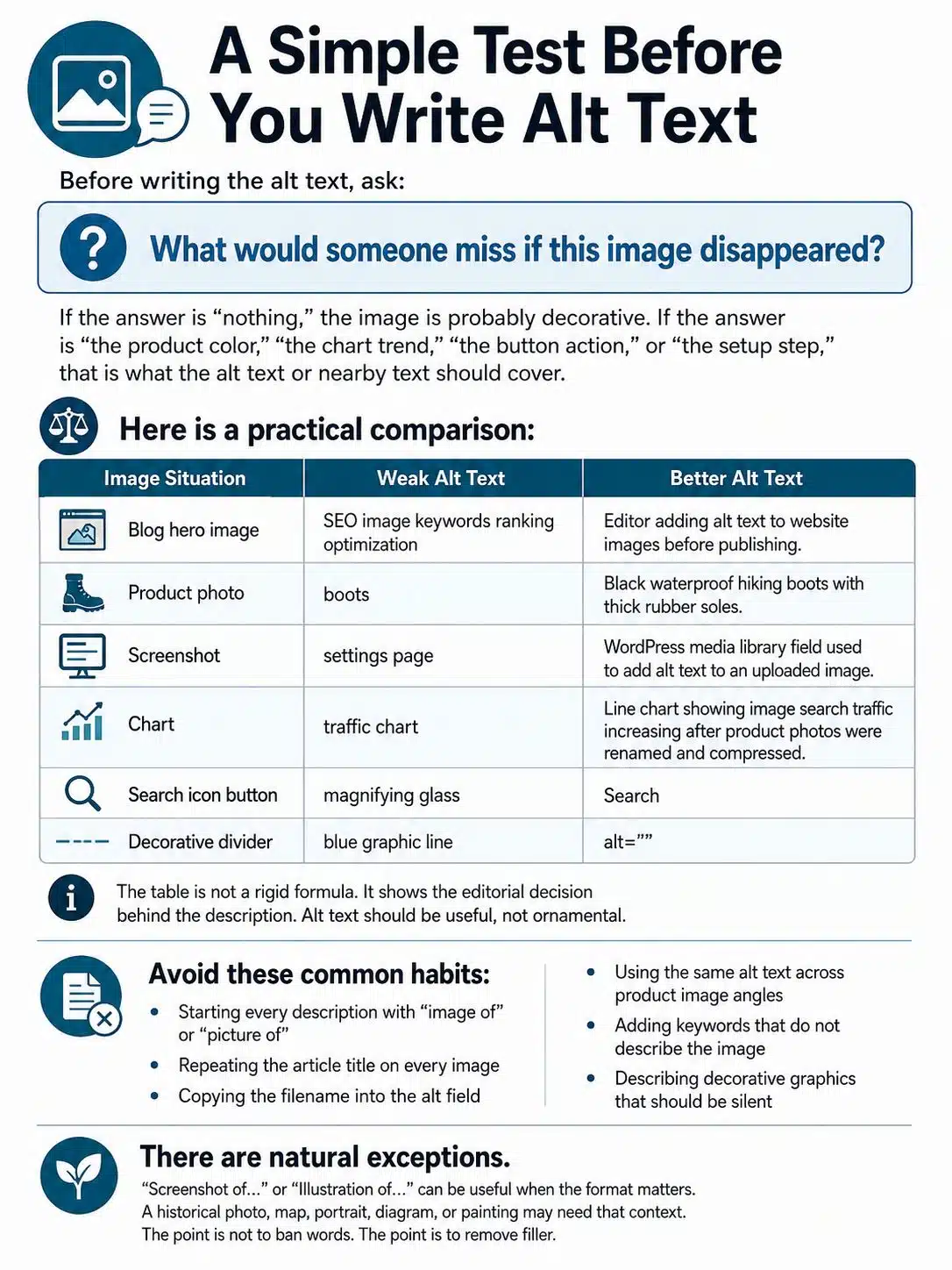
Before writing the alt text, ask:
What would someone miss if this image disappeared?
If the answer is “nothing,” the image is probably decorative. If the answer is “the product color,” “the chart trend,” “the button action,” or “the setup step,” that is what the alt text or nearby text should cover.
Here is a practical comparison:
| Image Situation | Weak Alt Text | Better Alt Text |
|---|---|---|
| Blog hero image | SEO image keywords ranking optimization |
Editor adding alt text to website images before publishing. |
| Product photo | boots |
Black waterproof hiking boots with thick rubber soles. |
| Screenshot | settings page |
WordPress media library field used to add alt text to an uploaded image. |
| Chart | traffic chart |
Line chart showing image search traffic increasing after product photos were renamed and compressed. |
| Search icon button | magnifying glass |
Search |
| Decorative divider | blue graphic line |
alt="" |
The table is not a rigid formula. It shows the editorial decision behind the description. Alt text should be useful, not ornamental.
Avoid these common habits:
- Starting every description with “image of” or “picture of”
- Repeating the article title on every image
- Copying the filename into the alt field
- Using the same alt text across product image angles
- Adding keywords that do not describe the image
- Describing decorative graphics that should be silent
There are natural exceptions. “Screenshot of…” or “Illustration of…” can be useful when the format matters. A historical photo, map, portrait, diagram, or painting may need that context. The point is not to ban words. The point is to remove filler.
Match the Alt Text to the Image’s Job
Featured Images and Editorial Graphics
A featured image usually introduces the topic. It should not be so vague that it could fit any article on the site.
For an article about image optimization, this is too thin:
Laptop on desk
A stronger version:
Website editor reviewing image filenames and alt text before publishing.
That description connects the visual to the article. It is still simple, but it gives the image a role.
Abstract editorial graphics need more restraint. If the image is only a design background with icons, it may not deserve detailed alt text. If it communicates the topic, describe the concept briefly. Do not pretend a generic illustration contains information it does not actually show.
Product Images
Product images should describe what shoppers can see.
Useful product alt text may include the product type, color, material, visible feature, model variant, or angle. For example:
Blue ceramic travel mug with silicone lid.
Side view of a black leather backpack showing the water bottle pocket.
Interior view of a laptop backpack with padded sleeve and zip compartments.
Avoid turning alt text into advertising copy. “Best office chair for back pain” is not a good description of a chair image. It is a claim. A more useful version would be:
Black ergonomic office chair with adjustable headrest and lumbar support.
Ecommerce sites often have the same issue at scale: every product image gets the same alt text because the CMS pulls from the product title. That is better than nothing, but it is weak for galleries. A front view, side view, close-up, and interior shot should not all carry the same description.
Screenshots
Screenshots are common in software tutorials, SaaS documentation, troubleshooting guides, and SEO articles. The alt text should identify the screen and the task.
Weak:
Dashboard screenshot
Better:
Analytics dashboard showing the image search traffic filter selected.
A screenshot should not carry the whole instruction by itself. If the reader needs to click a menu, change a setting, or compare values, write that step in the body copy too. The article should still make sense if the screenshot fails to load.
Charts, Graphs, and Infographics
Charts and infographics are where many websites fall short.
A simple chart may only need a concise alt attribute:
Bar chart comparing JPEG, PNG, WebP, and AVIF file sizes for one product photo.
A more detailed chart needs a text explanation nearby. If the point of the chart is that image traffic rose after file cleanup, say that in the article. If the chart contains several data points, provide a short summary or table in visible text.
Infographics are even more likely to cause problems. If all the useful information is trapped inside the image, some readers will miss it. Search engines may also have less usable context than they would from real HTML text.
The safest rule: if the infographic contains original tips, steps, statistics, or comparisons, include those details in the page copy as well.
Logos, Icons, and Buttons
A logo used as a brand identifier should usually name the brand:
Google Search Central logo
An icon used as a control should describe the action:
Open menu
Download report
Close dialog
This difference matters. A trash can icon inside a dashboard is not mainly “a trash can.” For the user, it means delete. A magnifying glass on a button means search. Functional images need functional text.
Decorative Images
Decorative images should usually use an empty alt attribute:
<img src="divider.svg" alt="">
This applies to flourishes, background shapes, spacing graphics, repeated patterns, and mood images that do not add meaning.
When possible, decorative visuals are better handled with CSS. If they appear as HTML images, the empty alt attribute helps assistive technology skip them. Do not simply omit the alt attribute. Empty alt text and missing alt text are not the same thing.
Filenames, Formats, and Image Discovery
A filename is a small clue, not an SEO strategy by itself.
Use clear filenames:
black-waterproof-hiking-boots.jpg
Avoid camera defaults:
IMG_8843.jpg
Also avoid overloaded names:
best-cheap-waterproof-hiking-boots-buy-online-discount.jpg
The first filename is readable. The last one looks like a keyword dump.
For important content images, use standard HTML image markup rather than hiding the image only as a CSS background. CSS background images are fine for decoration. They are a poor choice for core product photos, recipe images, charts, or tutorial screenshots.
Format choice also needs some judgment:
- JPEG still works well for many photos.
- PNG is useful for transparency or crisp interface details.
- SVG works well for logos, icons, and simple vector graphics.
- WebP and AVIF can reduce file size, but teams should check CMS support, CDN handling, browser fallback, and social preview behavior before changing a large library.
Google Search supports several common formats for images referenced in the src attribute of an img element, including BMP, GIF, JPEG, PNG, WebP, SVG, and AVIF. That does not mean every publishing workflow handles every format equally well. A CMS plugin, CDN setting, or social sharing tool can still create problems.
Image sitemaps can help on larger or more complex sites, especially when images are loaded through JavaScript, hosted on a CDN, or buried inside galleries. A small blog may not need manual sitemap work if the CMS already handles it. A marketplace, recipe site, travel site, or image-heavy publication should review it more carefully.
Speed Is Not Separate From Image SEO
A slow image can make a useful page feel unfinished.
The usual problems are basic:
- A 4000px image is uploaded for a layout that displays it at 900px.
- Large photos are saved as PNG when JPEG, WebP, or AVIF would be lighter.
- The same image size is served to mobile and desktop users.
- The hero image is lazy-loaded even though it appears above the fold.
- Width and height are missing, causing layout movement.
- Compression is so aggressive that product details or chart labels become blurry.
The top image on a page deserves extra care because it may become the Largest Contentful Paint element. If that image is delayed, the page can feel slow even when the rest of the content is ready. Lazy loading is useful for images lower down the page, but it is often the wrong default for the main hero image.
Developers can handle responsive images, srcset, sizes, CDN resizing, caching, and careful use of fetch priority. Editors still need sensible upload habits. Do not upload a huge image and assume the site will always clean it up perfectly.
For teams, the underrated fix is a publishing standard: preferred dimensions, accepted formats, filename rules, compression workflow, and guidance for hero images versus inline images. That prevents every writer from guessing.
Structured Data and Social Preview Images
Structured data is not needed for every image, but it matters for certain page types, such as products, recipes, articles, videos, and other rich-result formats.
The image used in structured data should match the page and be accessible to search engines. A blocked, irrelevant, or misleading image can create problems even if the markup is technically valid.
This is especially relevant for ecommerce and publishing sites. A product page should not mark up a generic lifestyle image if the actual product image is the better representation. An article should use a primary image that fits the content, not a random stock image chosen only because it looks polished.
Social preview images are a separate issue. Open Graph and other preview metadata influence how a page may appear when shared on platforms and messaging apps. These preview images do not replace alt text, but they should be checked before publishing. A page can have careful image SEO and still look weak in social shares if the wrong image is selected.
A Practical Image SEO Workflow for Publishing Teams
For a small site, image SEO can be a checklist. For a larger site, it needs to be part of the publishing system.
A realistic workflow looks like this:
- Choose an image that supports the section.
- Resize or export it at a sensible dimension.
- Use a short, descriptive filename.
- Place the image near relevant text.
- Write alt text based on the image’s purpose.
- Use empty alt text for decorative images.
- Add captions only when they help the reader.
- Keep important images in standard HTML.
- Check page speed after publishing.
- Give complex visuals a text equivalent.
Automated tools can find missing alt attributes. They can also flag suspiciously long or repetitive descriptions. They cannot reliably judge whether the alt text is right for the page.
That human review matters most on revenue pages, tutorials, medical or financial content, legal explainers, product pages, and technical guides. AI-generated alt text can help draft descriptions at scale, but it should not be trusted blindly. It may describe the objects in the image while missing the reason the image appears on that page.
What to Fix First on an Existing Site
If your site already has hundreds or thousands of images, do not start with every decorative icon. Start where better image SEO can actually improve the page.
Prioritize:
- Product images on important revenue pages
- Article hero images on high-traffic pages
- Screenshots in tutorials
- Charts and infographics with unique information
- Images used as buttons or links
- Pages already receiving image search impressions
- Pages with slow-loading above-the-fold images
Then look for repeated system problems.
If every uploaded image keeps the original camera filename, fix the publishing checklist. If the CMS uses the same product title for every gallery image, review the template or import process. If the CDN serves oversized images to mobile users, that is a technical delivery problem, not an alt text problem.
The fastest gains usually come from fixing the workflow, not polishing one image at a time forever.
Common Mistakes That Are Worth Avoiding
The most common mistake is copying the page title into every alt field. It looks neat in the CMS but creates a poor experience. A page titled “How to Optimize Product Images” may include a hero image, three screenshots, a compression example, and a file naming example. Those images should not all have the same alt text.
Another mistake is describing decorative images. Screen reader users do not need to hear about every divider, swirl, or background pattern.
Keyword stuffing is still a problem too. A string like this is not useful:
healthy lunch ideas easy healthy lunch recipes meal prep healthy food lunch
That is not writing. It is noise.
Complex visuals need extra care. A process diagram, map, chart, or infographic may require a short alt attribute plus a visible explanation nearby. Do not try to force a full chart interpretation into one alt attribute.
Finally, do not treat image SEO as an afterthought handled after publication. It is easier to choose the right image, filename, size, and alt text before the page goes live than to repair a messy media library later.
Final Thoughts
Good image SEO alt text is practical, not decorative. It helps a person understand what an image means when they cannot see it, and it gives search engines cleaner context about the page.
Start with the images that matter most: product photos, tutorial screenshots, charts, hero images, and visuals on high-traffic pages. Describe what the image contributes. Keep decorative visuals quiet. Put important information from infographics and charts into real text. Make sure key images are discoverable and not slowing the page down.
That is the standard worth following: useful images, clear descriptions, fast delivery, and enough editorial judgment to know when an image should speak and when it should stay silent.
FAQs about Image SEO and Alt Text Optimization
Should every image have alt text?
Every meaningful image should have a text alternative. Decorative images should usually use an empty alt attribute, written as alt="", so assistive technology can skip them. The decision depends on whether the image adds information, performs a function, or only decorates the page.
How long should alt text be?
Most alt text should be a short phrase or one clear sentence. If the image needs a long explanation, add that explanation in the visible page content instead of forcing it into the alt attribute.
Does alt text help SEO?
Alt text helps search engines understand image content and how the image relates to the page. It is useful for image SEO, but it works best alongside relevant copy, clean filenames, crawlable images, good performance, and useful content.
Can AI tools write alt text?
AI tools can help create first drafts, especially for large media libraries. They still need review because they may describe visible objects without understanding the image’s role on the page. Important pages and sensitive content should not rely on unreviewed AI-generated descriptions.