


Real estate agents do not lose deals only because they lack effort. Many lose them because the work arrives from too many directions at once. A buyer inquiry comes in while a listing description needs edits. A seller wants a pricing update. A lead asks about school zones. A social post is overdue. A follow-up email should have gone out yesterday.
The market rewards speed, but real estate still runs on trust. That is why AI cannot be treated as a shortcut for relationship-building. It works better as a support system around the agent: drafting listing copy, organizing lead details, preparing market content, improving follow-up, building social assets, and reducing the manual work that keeps agents from talking to real people.
The best AI workflows real estate agents can use are practical and repeatable. They do not replace judgment, licensing knowledge, local expertise, or compliance review. They help agents move faster without letting the business become sloppy.
Real estate is one of the strongest AI industry use cases because agents work across sales, marketing, client education, data interpretation, and service operations every day. A useful property AI workflow connects those tasks into a cleaner system.
Below are 13 AI workflows for real estate agents who want to generate leads, improve listing quality, respond faster, and close with less friction.
1. Property Listing Description Generator
Use case: Listings and property marketing
AI tools: ChatGPT, Claude, Gemini, Canva Magic Write, Grammarly, ListAssist, MLS description tools where available
Result: Faster listing copy, clearer property positioning, stronger listing presentation
A listing description is not just a paragraph under photos. It tells buyers what to notice, frames the property’s strongest features, and supports the agent’s marketing strategy.
AI can speed this up, but it needs accurate input. If the agent only types “write a description for a 3-bedroom house,” the output will sound like every other listing online. The workflow should start with a property brief.
Include:
- Property type
- Location area, without exaggerating or implying protected-class preferences
- Bedroom and bathroom count
- Square footage if verified
- Lot size if verified
- Renovations and upgrades
- Standout rooms
- Outdoor features
- Parking or garage details
- Nearby practical amenities
- Seller-approved highlights
- MLS rules or word limits
- Phrases to avoid
A useful process:
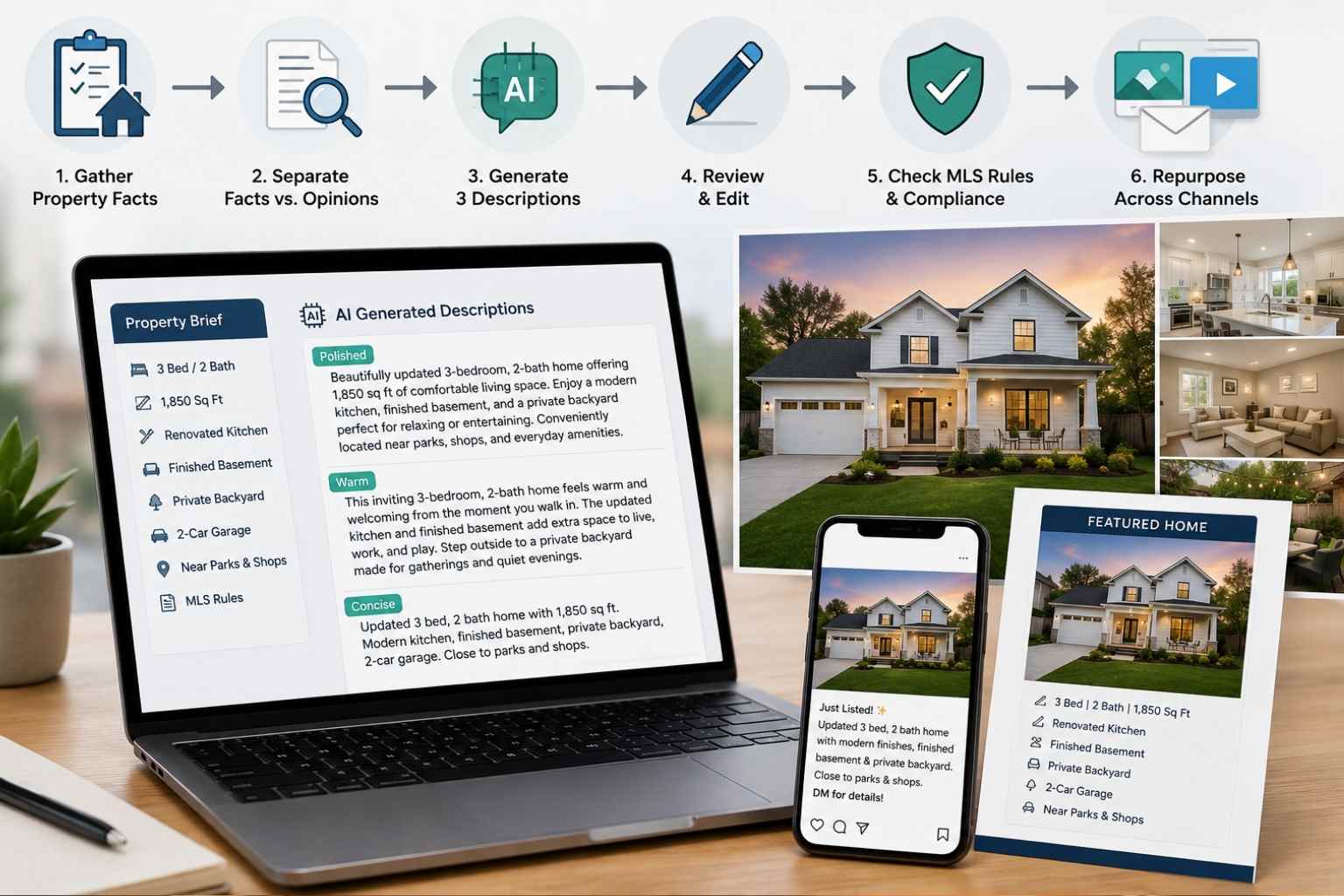
- Gather verified property facts from the seller, MLS data, inspection notes, and agent walkthrough.
- Separate facts from opinions. “New roof in 2024” is a fact if documented. “Best home in the neighborhood” is not useful.
- Ask AI to create three versions: polished, warm, and concise.
- Ask AI to remove vague phrases and fair-housing-sensitive language.
- Rewrite the strongest version manually.
- Check the final copy against MLS rules, brokerage standards, and local advertising laws.
- Use the final description as the base for social captions, email copy, flyer text, and video scripts.
A practical prompt:
“Write three MLS-friendly listing description options using the property facts below. Keep the tone polished and specific. Do not invent features. Avoid exaggerated claims, protected-class language, or assumptions about the ideal buyer. Include one short version for social media.”
The agent’s review is the most important step. AI may make a home sound better than it is, add features that were not provided, or use language that creates compliance risk. Listing copy should sell the property clearly, not distort it.
Output: A listing copy package with MLS description, short social caption, email blurb, and flyer-ready summary.
2. AI Virtual Staging Workflow
Use case: Listings, visual marketing, buyer engagement
AI tools: REimagineHome, Virtual Staging AI, Matterport, Canva, Photoshop AI tools, brokerage-approved staging platforms
Result: Better visual presentation for vacant or dated spaces, stronger buyer interest, more flexible listing assets
Empty rooms often feel smaller online than they do in person. Poorly furnished rooms can distract buyers from the layout. AI virtual staging can help buyers understand how a space might function.
That does not mean agents should digitally redesign a property until it becomes misleading. The point is to help buyers visualize potential, not create a fantasy version of the home.
A responsible virtual staging workflow:
- Start with professional property photos.
- Choose only rooms where staging would clarify scale or use.
- Decide the style based on the likely property positioning, not personal taste.
- Use an AI staging tool to add furniture or design options.
- Compare the staged image with the original photo.
- Remove anything that changes the real condition, structure, view, room size, or permanent features.
- Label staged or AI-enhanced images according to MLS, brokerage, and local requirements.
- Keep original unstaged photos available for transparency.
- Use staged images in listing galleries, brochures, social posts, and email campaigns where allowed.
AI virtual staging works best for:
- Vacant living rooms
- Empty bedrooms
- Unclear bonus rooms
- Awkward office corners
- Outdoor patios that need scale
- New construction or renovated spaces
It is risky for hiding damage, making rooms look larger, changing window views, removing permanent fixtures, or masking structural problems. Buyers may forgive a styled room. They will not forgive feeling tricked.
Agents should also avoid over-designing the space. A modest starter home does not need luxury-hotel staging. A family townhouse does not need furniture that makes the layout look impossible to live in. The staging should make the property easier to understand.
Output: A set of realistic, clearly disclosed staged images plus original comparison photos for transparent property marketing.
3. Lead Qualification Chatbot
Use case: Lead generation and client intake
AI tools: Website chatbot tools, HubSpot, Intercom, Tidio, Manychat, Zillow Premier Agent tools, Follow Up Boss, Rechat, custom ChatGPT-powered workflows
Result: Faster first response, cleaner lead data, better prioritization
Real estate leads can arrive at awkward times. Someone fills out a form at midnight. A buyer asks about a property during a showing. A seller wants a valuation but gives almost no context. Slow response can cost the conversation.
A lead qualification chatbot helps collect the first layer of information before the agent steps in.
The chatbot should not pretend to be the agent. It should ask useful questions, route the lead, and set expectations.
A good workflow asks:
- Are you buying, selling, renting, or researching?
- What area are you interested in?
- What is your timeline?
- What property type do you want?
- Are you pre-approved or paying cash?
- Do you need to sell before buying?
- What price range are you considering?
- What is the best way to contact you?
- Would you like to schedule a consultation?
The process:
- Add the chatbot to the website, landing page, or social channel.
- Build separate flows for buyers, sellers, investors, renters, and relocation leads.
- Keep the questions short.
- Tag the lead based on urgency and intent.
- Send hot leads to the agent or team immediately.
- Push the contact into the CRM.
- Trigger the correct follow-up email or text sequence.
- Review chatbot transcripts weekly to improve poor responses.
This workflow is valuable because not every lead deserves the same speed or message. A seller who wants to list within 30 days needs a different response than a buyer casually browsing homes six months out.
Do not let the chatbot give legal, mortgage, tax, or valuation advice. It can collect details and share general next steps. Specific advice belongs with licensed professionals and verified data.
Output: A lead intake system that captures buyer and seller details, scores urgency, and sends better-prepared leads to the agent.
4. Neighborhood Analysis Content System
Use case: Local SEO, client education, lead generation
AI tools: ChatGPT, Gemini, RPR, MLS data, Google Trends, Google Search Console, local government data, Canva, Notion AI
Result: Stronger local authority, useful content for buyers and sellers, more search visibility
Agents often say they know the local market. Content is where they prove it.
A neighborhood analysis workflow turns market knowledge into useful pages, emails, videos, and social posts. AI can help organize the information, but the agent must verify all facts.
Start with one neighborhood or local area. Gather:
- Current active listings
- Recent sold properties
- Median or typical price ranges where available
- Days on market
- Housing styles
- Commute considerations
- Local parks, shops, transit, or practical amenities
- School district information from official sources where appropriate
- Property tax or HOA considerations where relevant
- Buyer questions from past conversations
- Seller concerns from listing appointments
Then use AI to organize the content.
Ask it to create:
- A buyer-friendly neighborhood guide
- A seller-focused market update
- A short video script
- A social carousel outline
- An email newsletter version
- FAQ ideas
- Internal links to related neighborhood or listing pages
The agent should add practical judgment. AI may summarize numbers, but it cannot walk the streets, notice traffic patterns, understand a micro-market, or know why one side of a neighborhood performs differently from another.
A clean workflow:
- Pick one neighborhood each week or month.
- Pull verified local data.
- Add field notes from showings and client conversations.
- Ask AI to structure the content by buyer questions.
- Create one long neighborhood guide.
- Repurpose it into short videos, email, social posts, and listing presentation slides.
- Update the page when market conditions change.
Avoid turning neighborhood content into lifestyle stereotypes. Keep the focus on property types, amenities, access, market data, and buyer-relevant practical details.
Output: A local content hub that supports SEO, buyer education, listing presentations, and lead capture.
5. Email Follow-Up Automation
Use case: Client communication, lead nurturing, retention
AI tools: HubSpot, Follow Up Boss, Rechat, Mailchimp, ActiveCampaign, Constant Contact, ChatGPT, Grammarly
Result: Faster follow-up, fewer cold leads, more consistent nurturing
Many agents do not have a lead problem. They have a follow-up problem.
A buyer asks for a showing, then goes quiet. A seller downloads a valuation guide, then never replies. A past client says they may know someone moving soon, then the note disappears in the inbox.
AI-assisted email automation can reduce that leakage.
Start by building follow-up tracks:
- New buyer lead
- New seller lead
- Open house visitor
- Website valuation lead
- Past client
- Investor lead
- Cold lead reactivation
- Post-closing nurture
Each track needs a clear purpose. Do not send the same generic newsletter to everyone.
A practical buyer sequence might include:
- Immediate reply with a warm confirmation
- Short question about timeline and financing
- Property search preference email
- Local market explainer
- Showing availability reminder
- New listing alert invitation
- Soft check-in if no response
For sellers:
- Confirmation of inquiry
- Request for property details
- Explanation of pricing factors
- Short case-style market update
- Preparation checklist
- Invitation to book a consultation
- Follow-up after no response
AI can draft subject lines, email copy, short text messages, and variations by lead type. The CRM handles timing, segmentation, and reminders.
A useful prompt:
“Create a 7-email follow-up sequence for a seller lead who requested a home valuation but has not booked a call. Keep the tone professional and helpful. Do not pressure the lead. Include one short text-message version for each email.”
Agents should review every automated message for accuracy, tone, and compliance. The email should sound like a helpful local professional, not a mass marketing machine.
Output: A CRM-based follow-up system with buyer, seller, open house, and past-client sequences.
6. Social Media Listing Promotion Workflow
Use case: Marketing, listing visibility, lead generation
AI tools: ChatGPT, Canva, CapCut, Buffer, Later, Hootsuite, Meta Business Suite, Instagram tools, TikTok editing tools
Result: More listing content from one property, better consistency, stronger engagement signals
A listing can produce more than one “Just listed” post. It can become a full content set if the agent has a workflow.
The mistake is posting the same flyer everywhere. Social platforms reward different formats. Buyers also notice different details depending on the channel.
Start with a listing asset folder:
- Professional photos
- Video clips
- Property facts
- Neighborhood notes
- Price and showing details
- Seller-approved highlights
- Open house schedule
- Disclosure language if needed
Then ask AI to create platform-specific content.
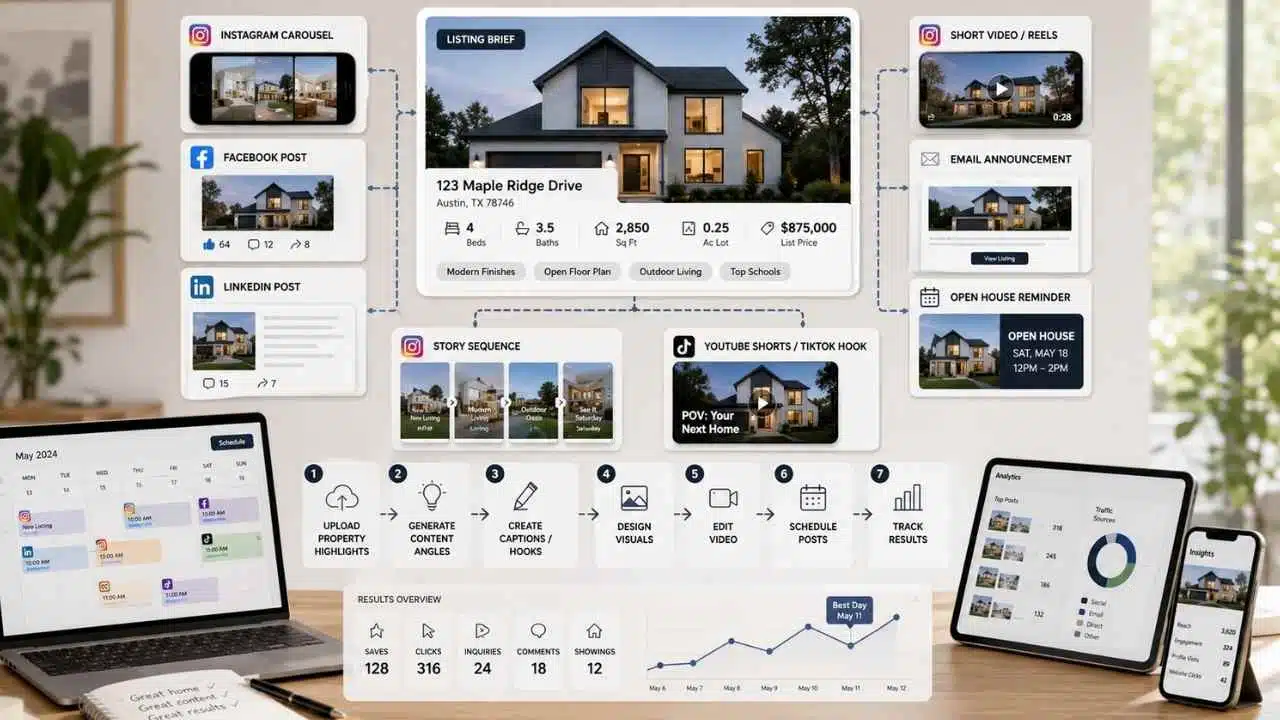
For one listing, the workflow can produce:
- Instagram carousel
- Short video script
- Facebook post
- LinkedIn-style market angle
- TikTok/Reels hook
- Email announcement
- Open house reminder
- Story sequence
- YouTube Shorts script
- Pinterest pin copy if relevant
The process:
- Upload or list the property highlights.
- Ask AI for 10 content angles.
- Choose 3 that match the property and audience.
- Draft captions and video hooks.
- Design visuals in Canva.
- Edit video in CapCut or another editor.
- Schedule posts across channels.
- Track saves, clicks, inquiries, comments, and showing requests.
- Reuse the best-performing angle in paid ads if appropriate.
Keep the property facts consistent across every platform. A wrong square footage, old price, or misleading feature can create trouble quickly.
Good listing social content does not only sell the house. It answers buyer questions: What makes this property different? Who might it suit based on practical needs? What should someone know before booking a showing?
Output: A multi-platform listing promotion kit built from one listing brief.
7. Buyer Persona Generator
Use case: Lead generation, buyer consultation, marketing strategy
AI tools: ChatGPT, Claude, CRM analytics, Google Analytics, Meta audience insights where available, Notion AI
Result: Better messaging, more relevant property recommendations, stronger consultation prep
A buyer persona is not a stereotype. In real estate, it should describe buying context: budget, timeline, lifestyle needs, financing stage, property priorities, and decision pressure.
AI can help agents organize buyer patterns from real conversations and CRM notes.
For example, an agent may notice several buyer groups:
- First-time buyers who need financing education
- Move-up buyers who must sell first
- Remote workers seeking more space
- Investors comparing rental yield and renovation risk
- Downsizers focused on maintenance, location, and accessibility
- Relocation buyers who need area guidance
The workflow:
- Export anonymized CRM notes or manually summarize buyer conversations.
- Remove personal or sensitive details.
- Group buyers by intent, timeline, price range, and decision barriers.
- Ask AI to identify common questions and objections.
- Build buyer personas based on real patterns.
- Create matching email sequences, search alerts, consultation questions, and content ideas.
- Update personas every quarter as market conditions change.
A useful prompt:
“Based on these anonymized buyer notes, identify practical buyer segments. For each segment, include their likely timeline, main concerns, property priorities, financing readiness, content topics, and best follow-up style. Do not use protected-class assumptions.”
This workflow helps agents stop writing vague content. A first-time buyer needs different help than a relocating executive. An investor needs different details than a family looking for school information from official sources.
Buyer personas also help with property recommendations. Instead of sending every new listing, the agent can explain why a property does or does not match the client’s stated priorities.
Output: A buyer persona document that improves messaging, consultation calls, property alerts, and follow-up.
8. Seller Consultation Prep Workflow
Use case: Listings, seller conversion, presentation planning
AI tools: ChatGPT, RPR, MLS tools, Cloud CMA, Canva, Google Sheets, Notion AI
Result: Better listing appointments, stronger seller trust, faster preparation
Seller appointments are won before the meeting starts. The agent needs property facts, recent comps, neighborhood movement, likely seller objections, and a clear explanation of the process.
AI can help prepare the meeting structure, but pricing recommendations must come from verified market data and professional judgment.
A seller prep workflow:
- Pull property data from MLS, tax records, RPR, or brokerage-approved sources.
- Review recent comparable sales, active competition, and expired listings.
- Note visible property strengths and possible issues.
- Ask AI to summarize the seller’s likely questions.
- Create a meeting agenda.
- Draft a listing presentation outline.
- Prepare a pricing explanation in plain language.
- Create a short post-meeting follow-up email.
- Add tasks to the CRM after the meeting.
AI can help translate market analysis into seller-friendly language. It can explain why list price, condition, timing, and buyer demand have to be discussed together.
A useful prompt:
“Create a seller consultation agenda for this property using the market notes below. Include likely seller questions, pricing discussion points, prep recommendations, and a post-meeting follow-up email. Do not invent comps or valuation numbers.”
The agent should not let AI write a price opinion without data. That is the professional’s job. AI can make the explanation clearer.
Output: A seller meeting packet with agenda, pricing talking points, listing prep notes, and follow-up copy.
9. Open House Planning and Follow-Up Workflow
Use case: Lead generation, listing marketing, buyer qualification
AI tools: ChatGPT, Canva, QR form tools, Google Forms, Typeform, CRM tools, email automation platforms
Result: Better open house capture, faster follow-up, more organized lead routing
An open house should not end when the last visitor leaves. The real value often comes from what happens afterward.
AI can help agents plan the event, capture better visitor information, and follow up based on buyer intent.
The workflow:
- Create a simple open house landing page or QR form.
- Ask visitors for name, contact method, buying timeline, agent status, financing stage, and property feedback.
- Use AI to create a pre-event promotion plan.
- Generate social posts, email invites, flyer copy, and neighborhood reminder captions.
- During the open house, collect visitor notes.
- After the event, group visitors by urgency.
- Send tailored follow-up messages within the same day.
- Add tasks for serious buyers.
- Summarize feedback for the seller.
AI can draft different follow-ups:
- “Thanks for visiting” note
- Buyer qualification message
- Similar homes email
- Price-change alert invitation
- Seller feedback summary
- Agent-to-agent follow-up for represented buyers
A smart follow-up asks one useful question instead of sending a long sales pitch. For example:
“Was the layout close to what you are looking for, or should I send options with a larger kitchen and more storage?”
That kind of question helps the agent move the conversation forward.
Output: An open house system that captures leads, sorts interest level, and sends timely follow-up.
10. AI-Powered Market Update Newsletter
Use case: Client communication, past-client retention, local authority
AI tools: ChatGPT, RPR, MLS reports, Google Sheets, Canva, Mailchimp, HubSpot, Rechat
Result: Consistent market education, stronger past-client relationships, repeat and referral opportunities
Most people do not understand real estate market data the way agents do. They see headlines, then ask whether prices are rising, whether it is a good time to sell, or whether buyers still have leverage.
A market update newsletter helps agents stay useful between transactions.
The workflow:
- Pull verified local market numbers from trusted sources.
- Choose one clear angle for the update.
- Ask AI to summarize the data in plain language.
- Add the agent’s local interpretation.
- Create versions for email, blog, social, and short video.
- Include one practical takeaway for buyers and one for sellers.
- Avoid predictions that sound certain.
- Send to segmented contacts.
- Track replies, clicks, and consultation requests.
A useful format:
- What changed this month
- What buyers should watch
- What sellers should understand
- One neighborhood note
- One common misconception
- One invitation to ask for a property-specific review
AI can help simplify data. It should not make claims the data does not support. Real estate markets are local, and even within the same city, price behavior can vary by property type and price band.
Output: A repeatable monthly market update that keeps the agent visible and useful.
11. Listing Presentation Builder
Use case: Seller conversion, listing appointments, brand authority
AI tools: ChatGPT, Canva, Gamma, Beautiful.ai, PowerPoint Copilot, RPR, Cloud CMA
Result: Faster listing presentations, clearer seller communication, better professional positioning
A listing presentation should not be a brag deck. Sellers want to know how the agent will price, prepare, market, negotiate, and communicate.
AI can help build a presentation that feels specific to the property instead of generic.
The workflow:
- Collect property facts and seller goals.
- Pull relevant market data.
- List the property’s likely buyer questions.
- Ask AI to create a presentation outline.
- Build slides in Canva, Gamma, Beautiful.ai, PowerPoint, or another design tool.
- Add local data, marketing plan, timeline, and preparation checklist.
- Include examples of listing assets such as photo plan, social plan, email plan, and open house plan.
- Review every data point and remove filler slides.
- Create a one-page leave-behind summary.
The strongest listing presentation usually answers:
- How will the property be positioned?
- What needs to be fixed or prepared?
- How will the price be explained?
- What will happen in week one?
- How will buyer feedback be handled?
- What will the seller receive after showings?
- What happens if the home does not get enough activity?
AI can help turn those answers into a clean structure. The agent must provide the strategy.
Output: A property-specific listing presentation with seller agenda, market explanation, preparation plan, and marketing timeline.
12. Video Tour and Short-Form Content Workflow
Use case: Listings, social media, buyer education
AI tools: ChatGPT, CapCut, Canva, Descript, TikTok tools, Instagram Reels tools, YouTube Shorts tools
Result: More video content from each listing, better buyer engagement, more efficient editing
Video works because buyers want context. Photos show rooms. Video can show flow, light, layout, street feel, and practical movement through a property.
AI can help script, edit, caption, and repurpose video content.
A clean workflow:
- Record raw walkthrough clips on a phone or camera.
- Capture exterior, entry, main living area, kitchen, primary bedroom, outdoor space, and one standout detail.
- Write basic notes about the property’s strongest features.
- Ask AI to create a 30-second, 60-second, and 2-minute script.
- Use CapCut, Descript, or Canva to cut the video.
- Add captions if needed.
- Create several hooks for different platforms.
- Repurpose the same tour into Reels, Shorts, TikTok, email, and listing page embeds.
- Track watch time, saves, clicks, and showing requests.
Good video scripts are specific. Instead of saying “beautiful home with amazing features,” the script should point out details buyers care about: storage, natural light, room flow, renovation quality, parking, outdoor use, or flexible workspace.
AI can help create a shot list too:
- Start with exterior
- Show entry flow
- Move through main living area
- Highlight kitchen function
- Show outdoor space
- End with the strongest selling point
The video should match the real property. Avoid filters, edits, or AI enhancements that make the space look different from reality.
Output: A video content kit with shot list, scripts, captions, and repurposed short-form versions.
13. CRM Pipeline and Task Prioritization Workflow
Use case: Operations, lead management, client communication
AI tools: Follow Up Boss, HubSpot, Rechat, Zillow Premier Agent app, Monday.com, Notion, Zapier, ChatGPT
Result: Better lead organization, fewer missed tasks, cleaner pipeline visibility
Real estate CRM systems fail when agents treat them like a storage box instead of a daily operating system. AI can help make the CRM more useful by summarizing notes, prioritizing leads, drafting follow-ups, and turning conversations into tasks.
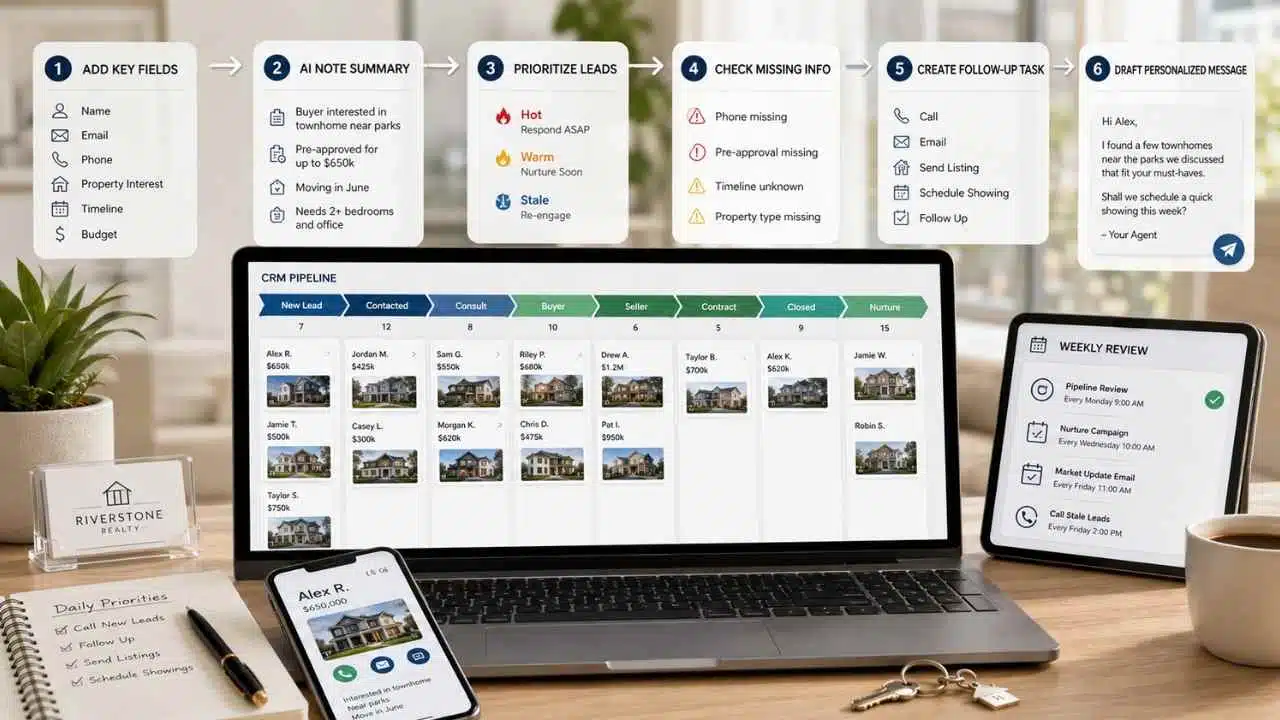
The workflow:
- Clean the CRM stages: new lead, contacted, consultation booked, active buyer, active seller, under contract, closed, past client, nurture.
- Add required fields such as timeline, budget, location, property type, financing status, and next action.
- Use AI to summarize long notes.
- Ask AI to identify missing information.
- Create follow-up tasks based on lead stage.
- Draft personalized messages from CRM notes.
- Review hot leads daily.
- Review stale leads weekly.
- Use automation only where it supports timely, relevant contact.
A daily AI-assisted CRM prompt might be:
“Review these anonymized lead notes and group contacts by urgency. Suggest the next best action for each lead. Do not write legal, financial, or valuation advice.”
For agents with a large database, this workflow can also find referral opportunities, past-client check-ins, cold leads worth reviving, and clients who need market updates.
The point is not to automate every relationship. The point is to stop losing track of relationships.
Output: A cleaner CRM pipeline with prioritized leads, next actions, and faster message drafting.
How These Real Estate AI Workflows Support
How AI changes daily work in practical business settings. Real estate is a strong example because agents do not only sell properties. They create content, interpret local data, manage leads, prepare presentations, coordinate marketing, and maintain client relationships.
These workflows also show why AI workflow examples need industry context. A general AI writing prompt is not enough for real estate. The workflow has to account for listing accuracy, fair housing rules, MLS requirements, local market data, client privacy, and the trust-heavy nature of property decisions.
For real estate agents, AI creative workflows usually connect four areas:
- Listing presentation and property marketing
- Lead generation and qualification
- Client communication and follow-up
- Local market education and authority-building
That is where realtor AI tools become useful. They help agents prepare faster, communicate more consistently, and repurpose verified information across channels. The agent still has to bring the local expertise.
Common Mistakes Real Estate Agents Make With AI
AI can help agents move faster, but it can also make mistakes look polished. That is dangerous in real estate because buyers and sellers act on the information they receive.
Using AI to Invent Property Details
Never let AI add upgrades, finishes, square footage, school information, views, lot details, or neighborhood claims that were not verified. A polished falsehood is still a falsehood.
Ignoring Fair Housing and Advertising Rules
Listing copy, social ads, buyer personas, and neighborhood content need careful review. Avoid language that suggests preference, exclusion, or assumptions about who should live in a property or area.
Over-Editing Listing Photos
Virtual staging and image enhancement should help buyers understand the home. They should not hide defects, alter permanent features, change views, or make rooms appear larger than they are.
Letting Automation Sound Cold
Fast follow-up is good. Robotic follow-up is not. A lead who is about to make a major financial decision wants clarity and confidence, not a drip campaign that feels detached from their situation.
Treating AI as a Valuation Tool
AI can organize data and draft explanations. Pricing strategy still needs verified comps, market context, property condition, and professional judgment.
Feeding Sensitive Client Information Into Tools Carelessly
Agents should be careful with private client details, financial information, negotiation notes, contracts, and personal circumstances. Use approved tools and understand data policies before uploading sensitive material.
AI Adoption Roadmap for Real Estate Agents
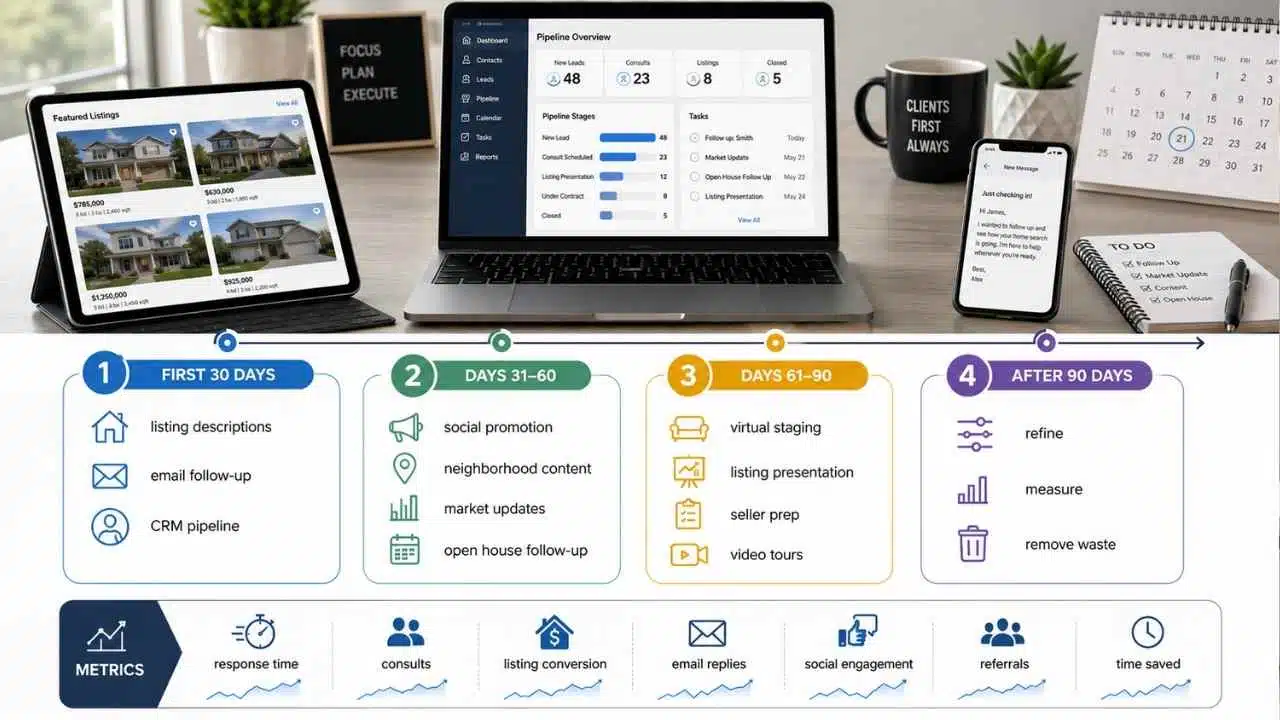
Agents do not need all 13 workflows at once. That would create more work, not less. Start where the business has the most friction.
First 30 Days: Fix the Visible Bottlenecks
Choose three workflows:
- Property listing description generator
- Email follow-up automation
- CRM pipeline and task prioritization
These improve daily speed without requiring a major business rebuild.
Build templates for listing briefs, buyer follow-ups, seller follow-ups, and lead notes. Keep prompts saved in one place. Review every output manually.
Days 31–60: Improve Lead Generation and Content
Add:
- Social media listing promotion workflow
- Neighborhood analysis content system
- Market update newsletter
- Open house follow-up workflow
This is where agents start turning local knowledge into repeatable content. The aim is not to post more for the sake of posting. The aim is to answer questions buyers and sellers already have.
Days 61–90: Upgrade Listing and Seller Systems
Add:
- AI virtual staging workflow
- Listing presentation builder
- Seller consultation prep workflow
- Video tour and short-form content workflow
This stage helps agents look more prepared in competitive listing situations. It also creates better marketing assets for sellers.
After 90 Days: Refine, Measure, and Remove Waste
Review what is actually working.
Track:
- Lead response time
- Consultation bookings
- Listing appointment conversion
- Email replies
- Social engagement that leads to conversations
- Open house follow-up response
- Past-client referrals
- Time saved on repeated tasks
Remove workflows that create busywork. Improve workflows that create leads, save time, or increase client trust.
Final Thoughts
AI workflows real estate agents use should make the business sharper, not noisier. The agent’s value still comes from local knowledge, negotiation skill, pricing judgment, client trust, and ethical representation.
AI is useful when it turns repeated work into a system. It can draft listing descriptions, organize lead details, build follow-up sequences, prepare local content, and support better marketing. It should not invent facts, replace disclosure, give legal advice, or make a property look like something it is not.
The practical next step is simple: choose one workflow that fixes the biggest bottleneck in your business right now. If listings take too long, start with the property description system. If leads are slipping away, start with chatbot qualification and CRM follow-up. If your local authority is weak, start with neighborhood analysis content.
Do one workflow properly. Then build the next.
























