


Running an online store has become harder to manage with guesswork alone. Product pages need better copy. Ads need fresh creative. Customers expect quick answers. Search traffic is more competitive. Email has to feel personal without taking up the whole week. Inventory mistakes can quietly drain cash.
AI will not fix a weak product, poor offer, or messy customer experience. It can, however, remove a lot of repeated work that slows e-commerce teams down.
The real value comes from workflows, not random prompts. A store that uses AI only to write a few captions may save some time. A store that builds repeatable AI workflows for product copy, ads, SEO, support, email, stock planning, and UGC-style content can create a more organized growth system.
AI Creative Workflows for Different Industries.” E-commerce deserves its own cluster because online stores deal with a rare mix of creative pressure and operational pressure. The same team may need to write product descriptions, test ad angles, answer shipping questions, improve category pages, plan promotions, and avoid stockouts. AI can support each of those jobs when the workflow is clear.
Below are seven practical AI workflows e-commerce brands can use to increase sales, automate routine work, and build a cleaner online store AI system.
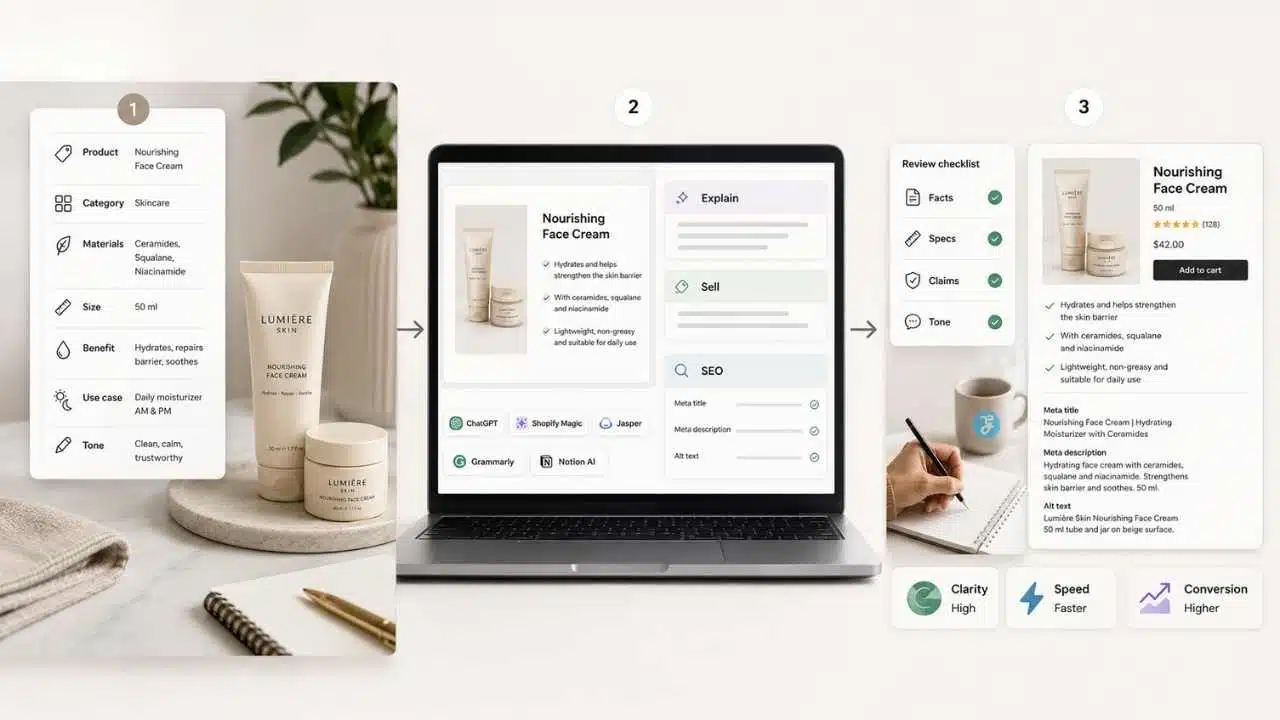
1. Product Description Automation Workflow
Business area: Product content
Useful AI tools: ChatGPT, Shopify Magic, Jasper, Grammarly, Notion AI
Business impact: Better product clarity, faster catalog updates, stronger conversion support
Product descriptions are often treated as small copy blocks. They are not. For many online stores, they are the salesperson, fit guide, objection handler, SEO asset, and brand voice test in one place.
AI can help write product descriptions faster, especially when a store has dozens or hundreds of SKUs. The mistake is asking AI to “write a product description” with only the product name. That usually creates vague copy that sounds like every other store.
A better workflow starts with structured product inputs.
Create a product brief for each SKU with:
- Product name
- Category
- Material or ingredients
- Size, fit, color, or technical details
- Main benefit
- Use case
- Target customer
- Common buyer questions
- Brand tone
- Claims to avoid
- Warranty, care, or shipping notes if relevant
Then use AI to create three content layers.
First, generate a plain-language product explanation. This helps make sure the basics are clear. If AI cannot explain the product simply from your brief, the brief is probably missing important details.
Second, create a sales-focused version for the product page. This should include a short opening, benefit-led bullets, practical details, and a clear fit for the right buyer.
Third, create supporting SEO elements: meta title, meta description, image alt text, FAQ-style snippets, and category-page copy if needed.
A simple prompt can look like this:
“Write a product description for this online store product using the brief below. Keep the tone clear and useful. Open with the main buyer benefit, include practical details, avoid exaggerated claims, and add 5 scannable bullets. Then create a meta title, meta description, and 3 image alt text options.”
Shopify Magic can help merchants generate product descriptions directly inside Shopify. ChatGPT and Jasper can help create variations, rewrite at different levels of detail, and adapt copy for ads or email. Grammarly can clean grammar and clarity before publishing.
The workflow should end with human review. Someone needs to check the facts, product specs, compliance language, claims, and tone. AI should not invent durability, sustainability, medical, beauty, nutrition, or performance claims.
Output/result: A ready-to-review product page copy package with description, bullets, SEO metadata, alt text, and short promo copy.
2. AI Ad Creative System
Business area: Paid marketing and creative testing
Useful AI tools: ChatGPT, Jasper, Midjourney, ImagineLab.art, Canva, Meta Ads tools, Google Ads tools
Business impact: More ad variations, faster testing, possible CTR and conversion improvement when paired with strong targeting and offer quality
Ad creative burns out quickly in e-commerce. A headline works for a while, then performance drops. A product image gets attention, then buyers stop responding. Small brands feel this more because they often do not have a full creative team producing new assets every week.
AI can help build a repeatable ad creative system.
Start by creating an ad brief, not an ad. The brief should include:
- Product
- Customer segment
- Offer
- Main objection
- Desired action
- Platform
- Creative format
- Brand tone
- Visual rules
- Claims to avoid
- Existing winning messages if available
Then use AI to create different angles. For example:
- Problem-solution angle
- Before-after angle, without misleading visual claims
- Gift angle
- Comparison angle
- Founder or brand story angle
- Seasonal angle
- Social proof angle, only when real proof exists
- Use-case angle
For each angle, ask AI to draft several versions of:
- Primary text
- Headline
- Short hook
- Video script
- Image concept
- CTA options
- Landing page message match
Image tools such as Midjourney or ImagineLab.art can help create concept visuals, lifestyle mockups, mood boards, and campaign directions. For real product ads, brands should be careful. If the product image must show exact color, packaging, material, size, or texture, use real product photography or approved edited assets. AI-generated product visuals can mislead buyers if they show a version of the product that does not exist.
A practical workflow:
- Pull the product’s top buyer objections from reviews, support tickets, and product page analytics.
- Use ChatGPT or Jasper to create 10 ad angles.
- Select 3 angles that match the offer and customer stage.
- Generate ad copy variations for each angle.
- Use ImagineLab.art, Midjourney, or Canva for creative concepts, background ideas, or visual directions.
- Build a small test set for Meta, TikTok, Google, or another ad platform.
- Track CTR, conversion rate, cost per acquisition, and post-click behavior.
- Feed performance notes back into the next creative batch.
This workflow is useful because it separates creative thinking from production. AI helps generate angles, copy, and visual concepts. The marketing team still chooses what fits the brand and what is legally safe to publish.
Output/result: A weekly or monthly ad testing board with creative angles, copy variations, visual concepts, and performance notes.
3. Customer Support Chatbot Workflow
Business area: Customer support
Useful AI tools: Shopify Inbox, Gorgias, Tidio, Intercom, ChatGPT for support knowledge-base drafting
Business impact: Faster replies, fewer repetitive tickets, better customer experience, possible retention improvement
Customer support is one of the best places to use ecommerce AI because many questions repeat. Customers ask about order status, shipping time, returns, sizing, payment issues, discounts, product care, and store policies.
A chatbot or AI-assisted support workflow can handle the first layer of these questions. That does not mean every support interaction should be automated. Refund disputes, damaged orders, angry customers, VIP buyers, and sensitive complaints often need a human.
The workflow starts with a clean support knowledge base.
Gather:
- Shipping policy
- Return and refund policy
- Exchange process
- Order tracking steps
- Size guide
- Product care instructions
- Warranty details
- Common product questions
- Payment and checkout help
- Contact escalation rules
Then turn these into short, clear support answers. ChatGPT can help draft the knowledge base, but a staff member must verify every policy before it goes live.
Next, build the chatbot or AI reply system in a tool such as Shopify Inbox, Gorgias, Tidio, or another support platform. The system should answer common questions, suggest relevant products where appropriate, and hand off to a person when the issue becomes specific or sensitive.
A practical setup:
- List the top 30 customer questions from past tickets.
- Group them into order, shipping, returns, sizing, product, payment, and account questions.
- Draft approved answers.
- Add links to policy pages and product guides.
- Set escalation rules for refunds, damaged products, angry messages, high-value orders, and unclear cases.
- Test the chatbot with real customer-style questions.
- Review weekly conversations for failed answers.
- Update the knowledge base every time policies or product details change.
The biggest risk is letting the chatbot sound confident when it does not know the answer. A good support bot should admit limits and move the customer to a human when needed.
For e-commerce brands, the business impact is not only fewer tickets. Fast, accurate support can reduce purchase hesitation. A customer who gets a sizing answer in 20 seconds may complete the order instead of leaving the site.
Output/result: A support automation system that answers common questions, routes complex issues, and keeps customer service more consistent.
4. SEO Product Page Optimization Workflow
Business area: SEO and product discoverability
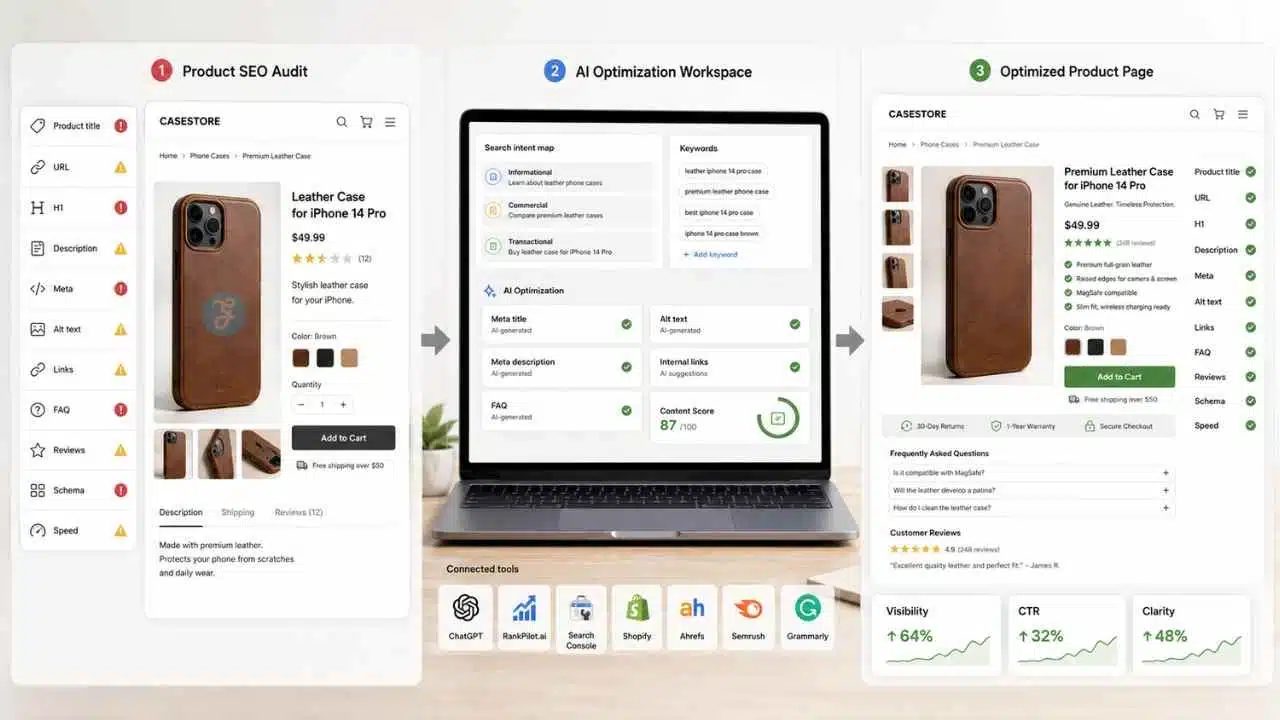
Useful AI tools: ChatGPT, RankPilot.ai, Shopify SEO fields, Google Search Console, Ahrefs or Semrush, Grammarly
Business impact: Better organic visibility, stronger product-page clarity, improved click-through potential from search results
Many e-commerce stores have product pages that look fine to humans but give search engines very little to work with. The title is thin. The description is copied from the supplier. The meta description is missing. Image alt text is generic. Category pages have almost no useful copy.
AI can help clean this up, but SEO product page optimization should not become keyword stuffing. The job is to make the page more useful and easier to understand.
Start with a product SEO audit.
For each important product page, check:
- Product title
- URL
- H1
- Product description
- Category placement
- Meta title
- Meta description
- Image alt text
- Internal links
- FAQ content
- Reviews
- Schema or structured data setup
- Page speed and mobile usability
Then use AI to create a search-intent map. Ask:
- What would a buyer search before buying this product?
- What questions would they need answered?
- What details are missing from the page?
- Which keywords fit naturally?
- What should not be forced into the page?
RankPilot.ai can support SEO content generation and optimization tasks. ChatGPT can help rewrite product descriptions, generate FAQ sections, suggest internal linking ideas, and create metadata options. Google Search Console is useful after publishing because it shows real queries, impressions, and clicks.
A clean workflow:
- Select your top revenue products or pages with impressions but weak clicks.
- Export current title, meta, description, and URL.
- Use AI to identify missing buyer information and possible keyword angles.
- Rewrite product copy with buyer intent first and keyword use second.
- Create a stronger meta title and meta description.
- Add useful FAQ content if the page needs it.
- Improve image alt text with accurate product details.
- Add internal links from related blog posts, category pages, and buying guides.
- Monitor search data after the page has time to settle.
For product pages, the writing should stay practical. A buyer does not need a 1,500-word essay for a simple phone case. They may need material, compatibility, grip, protection level, color accuracy, warranty, and shipping notes. A high-ticket item needs more explanation, comparison, and trust-building.
The AI workflow should match the buying decision.
Output/result: A more search-friendly product page with improved copy, metadata, FAQs, alt text, and internal linking ideas.
5. Email Marketing Automation Workflow
Business area: Retention, lifecycle marketing, and customer communication
Useful AI tools: Klaviyo, Mailchimp, Shopify Email, ChatGPT, Jasper, Notion AI
Business impact: Better retention, more repeat purchases, stronger customer segmentation, improved revenue from automated flows
Email is still one of the most valuable channels for e-commerce because it reaches people who already showed interest. The problem is that many stores only send discount blasts. That trains customers to wait for sales and ignores the full customer journey.
AI can help build smarter email workflows, especially for segmentation, copy variation, product recommendations, and lifecycle messaging.
Start with the basic e-commerce flows:
- Welcome sequence
- Abandoned cart
- Browse abandonment
- Post-purchase education
- Review request
- Replenishment reminder
- Win-back campaign
- VIP or repeat customer flow
Then create a customer map. A first-time visitor does not need the same message as a loyal customer. A buyer who abandoned a cart may need reassurance about shipping, sizing, returns, or product quality. A repeat buyer may respond better to early access, bundles, or personalized recommendations.
A practical AI-assisted process:
- Export or review customer segments from your email platform.
- Identify the customer stage: new subscriber, cart abandoner, first-time buyer, repeat buyer, inactive customer.
- Use AI to draft email goals for each stage.
- Generate subject lines, preview text, and email body variations.
- Personalize recommendations based on real purchase or browsing data where your platform supports it.
- Add brand-approved rules for tone, discount use, and claims.
- Test subject lines, content angle, send time, and offer.
- Review revenue, open rate, click rate, conversion rate, unsubscribe rate, and complaint rate.
Klaviyo, Shopify Email, Mailchimp, and similar platforms can support automation and segmentation. ChatGPT or Jasper can help draft copy, but the strategy should come from customer behavior.
One useful approach is to create an email angle bank. Instead of writing from scratch every time, save angles such as:
- “How to choose the right size”
- “Best products for first-time buyers”
- “How to care for your product”
- “What customers usually buy next”
- “How this product fits into a routine”
- “Why this bundle saves time”
- “Last chance before restock delay”
AI can then turn each angle into email drafts for different segments.
The warning here is simple: do not let AI over-personalize beyond what the customer actually shared. Creepy personalization damages trust. Useful personalization feels relevant; invasive personalization feels like surveillance.
Output/result: Automated email flows with tested subject lines, segment-based messaging, and repeatable campaign templates.
6. Inventory Demand Prediction Workflow
Business area: Inventory, operations, and merchandising
Useful AI tools: Shopify analytics, inventory planning apps, Google Sheets or Excel with AI features, ChatGPT for analysis summaries, ERP or forecasting tools depending on store size
Business impact: Fewer stockouts, less overstock, better cash flow, smoother promotions
Inventory is where e-commerce growth can get expensive. If a product sells out too early, the store loses revenue and ad momentum. If a product is over-ordered, cash sits on shelves. If seasonal demand is misread, discounts arrive too late.
AI can help analyze demand signals, but small stores should keep expectations realistic. Demand prediction is never perfect. It can be distorted by supplier delays, ad budget changes, influencer mentions, holidays, weather, platform algorithm shifts, and sudden trend changes.
The workflow starts with clean data.
Gather:
- Sales by SKU
- Sales by week or month
- Inventory on hand
- Lead time from supplier
- Return rate
- Stockout history
- Promotion dates
- Ad spend changes
- Seasonal patterns
- Product launch dates
- Major external events if relevant
Use AI to summarize trends and flag questions. For example:
“Review this SKU-level sales and inventory data. Identify products at risk of stockout in the next 30 days, products with slow-moving stock, seasonal demand changes, and items that need manual review. Do not make final purchasing decisions. Explain the assumptions.”
For a small store, this can begin in a spreadsheet. For a larger store, dedicated inventory forecasting tools or ERP systems may be necessary.
A practical workflow:
- Export sales and inventory data weekly.
- Sort products into fast-moving, steady, seasonal, slow-moving, and new products.
- Use AI to identify unusual spikes or drops.
- Compare demand against supplier lead time.
- Flag reorder risks.
- Review upcoming campaigns before making purchase decisions.
- Set manual approval for any AI-suggested reorder.
- Update the model or spreadsheet after each promotion or stockout.
This workflow is less creative than ad generation, but it may protect more money. A strong product description can increase sales. Better inventory planning can prevent the store from wasting the sales it already earned.
For stores with limited cash, AI should not be used to blindly reorder. It should help the owner see risk earlier.
Output/result: A weekly inventory risk report showing possible stockouts, overstock, reorder timing, and products that need manual review.
7. UGC Content Generation Workflow
Business area: Social proof, organic marketing, paid creative, and community content
Useful AI tools: ChatGPT, ImagineLab.art, Midjourney, Canva, CapCut, review platforms, social listening tools
Business impact: More creative ideas, stronger social proof structure, possible CTR and conversion lift when based on real customer insight
User-generated content is powerful because it often feels closer to how buyers actually talk. The problem is that brands sometimes fake it, over-script it, or use AI to create content that looks like social proof but has no real customer basis. That is risky and usually obvious.
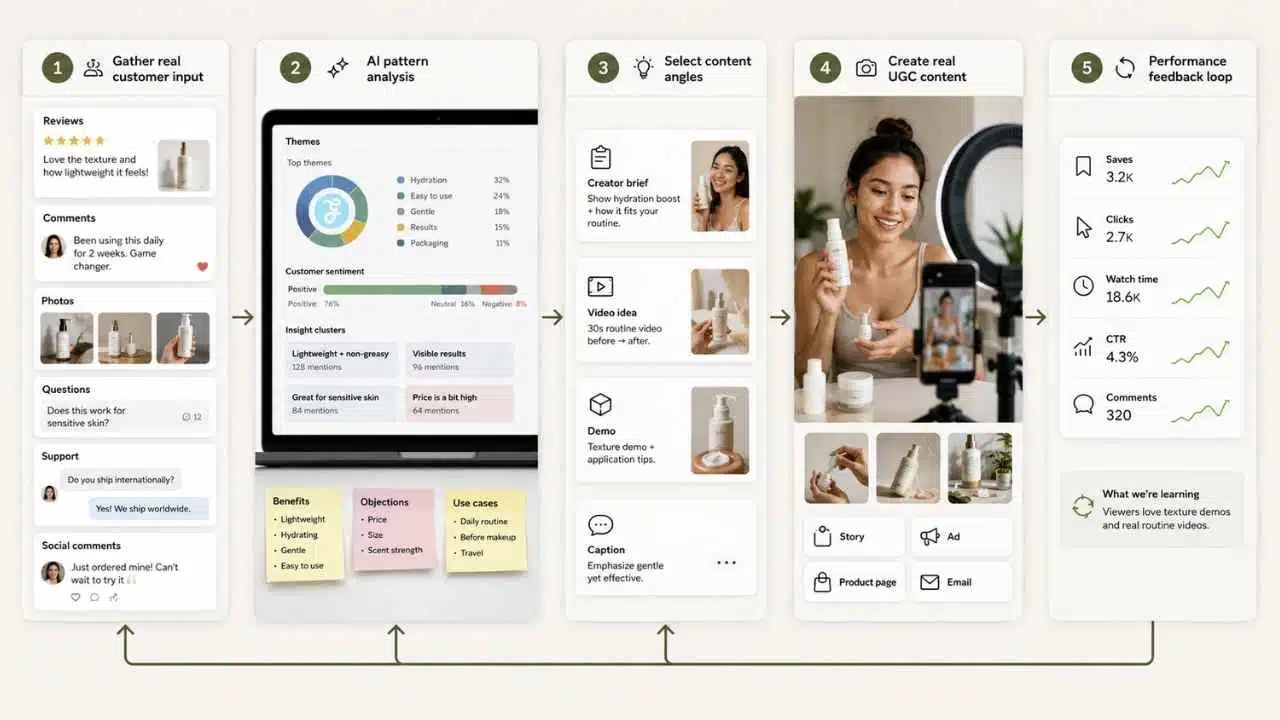
A better AI workflow uses real customer material as the source.
Collect:
- Real reviews
- Customer questions
- Support messages
- Product photos with permission
- Social comments
- Post-purchase survey answers
- Influencer or creator briefs
- Common objections
- Repeat compliments
- Return reasons
Then use AI to find patterns. Ask:
- What benefits do customers mention most?
- What objections appear before purchase?
- What phrases sound natural?
- What use cases are unexpected?
- What content angles could come from real feedback?
- Which claims need proof before using?
From there, AI can help create UGC-style briefs, not fake testimonials.
For example:
- “Create a 20-second creator script based on real review themes. Do not invent a customer quote.”
- “Turn these customer objections into five short video concepts.”
- “Create a product demo shot list for a creator showing how the item works.”
- “Write caption options based on real review language, but do not present them as direct quotes.”
ImagineLab.art, Midjourney, Canva, and CapCut can help with visual directions, background concepts, storyboards, and editing support. For real UGC, the strongest asset is still real customer or creator content. AI should help plan, edit, repurpose, and package it.
A good workflow:
- Gather real customer feedback.
- Use AI to group feedback into themes.
- Select 3–5 content angles.
- Create creator briefs or in-house video scripts.
- Produce content using real products and real demonstrations.
- Edit short versions for social, ads, product pages, and email.
- Track saves, clicks, watch time, CTR, conversion rate, and comments.
- Feed performance notes back into future briefs.
This workflow helps brands avoid generic “happy customer” content. It also keeps social proof grounded in real buyer language.
Output/result: A UGC content system with creator briefs, video scripts, review-based captions, ad variations, and repurposed customer insight.
How These AI Creative Workflows Connect to the Bigger Pillar Topic
AI Creative Workflows,” should show how AI is being used across different business types.
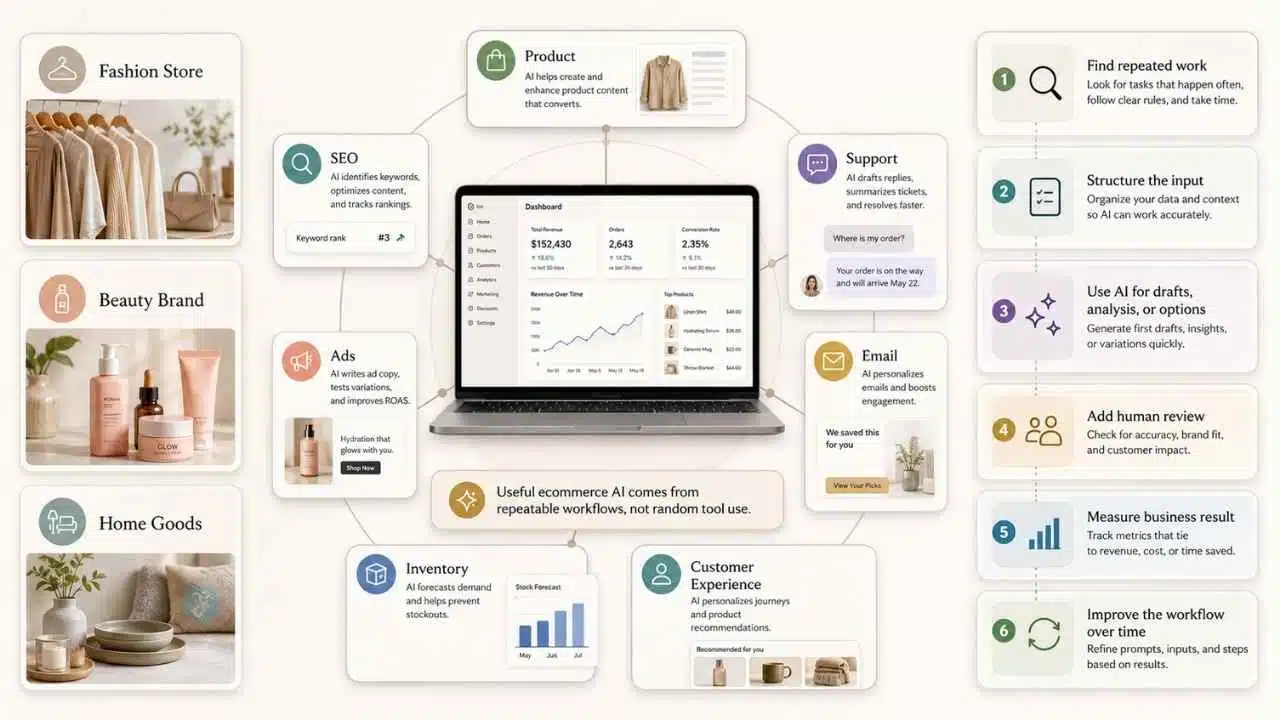
For online stores, AI creative workflows do not sit only in the marketing department. They connect product, SEO, support, ads, email, inventory, and customer experience. That makes e-commerce one of the clearest examples of AI industry use cases.
A small fashion store may use AI for product descriptions, ad ideas, support replies, and UGC briefs. A beauty brand may use it for SEO product pages, post-purchase education, and creator scripts. A home goods store may use it for inventory planning, seasonal email flows, and product comparison copy.
The workflows change by industry, but the pattern is similar:
- Find the repeated work.
- Structure the input.
- Use AI to create drafts, analysis, or options.
- Add human review.
- Measure the business result.
- Improve the workflow over time.
That is what separates useful ecommerce AI from random tool use.
How Small E-Commerce Stores Can Start Using AI Today
Small stores do not need a full AI stack on day one. They need one bottleneck fixed well.
A store with weak product pages should start with product description automation and SEO product page optimization. A store getting traffic but losing buyers should improve support, FAQs, and email flows. A store spending heavily on ads should build an AI ad creative system before increasing budget. A store with cash tied up in unsold products should look at inventory demand signals before creating more campaigns.
Start with this simple seven-day plan:
Day 1: Pick one product category or 10 important SKUs.
Day 2: Build clean product briefs with accurate details.
Day 3: Use AI to improve descriptions, metadata, and FAQs.
Day 4: Create three ad angles and two email ideas from the same product data.
Day 5: Review customer questions and turn the top answers into support content.
Day 6: Check sales and inventory data for obvious stockout or overstock risk.
Day 7: Publish the best updates and track what changes.
Keep the first setup small. AI workflows e-commerce brands use should create cleaner decisions, not more dashboards and drafts. The store owner or marketing team still needs to check facts, protect brand voice, follow platform rules, and measure outcomes.
The most practical starting point is one product, one customer problem, and one workflow. Improve that first. Then build the next one.
























